Monitor Your Sales Staff with Free GEO Tracking

In 2025, over 60% of sales activities still happen outside the office, yet many businesses continue to manage field teams using phone calls, spreadsheets, and assumptions.

As a result, sales leaders struggle with a simple but critical question: Where is my sales team right now, and are they working on the right priorities?

This lack of real-time visibility leads to missed opportunities, inaccurate reporting, inflated travel costs, and poor customer experiences. Moreover, as businesses scale, manual tracking becomes unreliable and unmanageable.

This is exactly why free GEO tracking for sales staff has become essential — not optional.

With rising competition, tighter margins, and distributed teams, organizations need precise location insights without adding operational complexity or cost.

In this blog, you will learn why free GEO tracking for sales staff matters in 2025, how it solves real business challenges across industries, and how INDPayroll enables seamless, compliant, and automated tracking — fully integrated with CRM, HRMS, Payroll, Projects, and Finance.

Most importantly, you will discover best practices to implement GEO tracking the right way while maintaining trust and transparency.
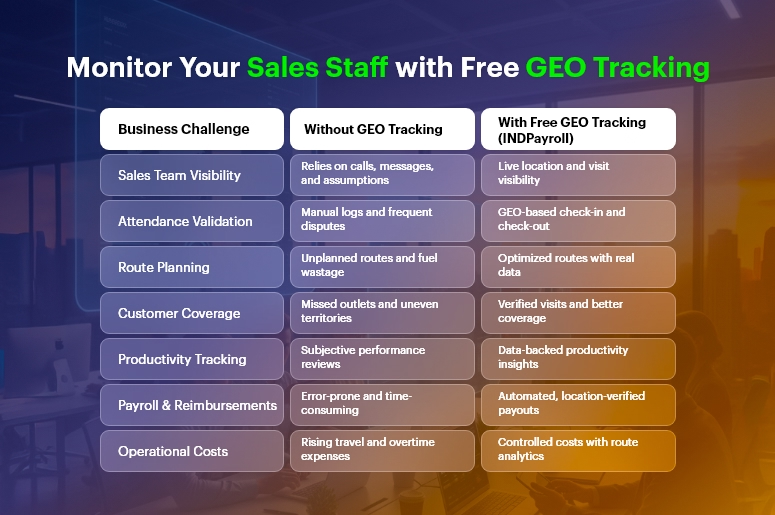
Monitor Your Sales Staff with Free GEO Tracking

Business Need & Importance

Modern businesses depend heavily on field sales, service agents, delivery teams, and on-site representatives. However, without digital tracking systems, organizations face several recurring challenges.

First, managers lack real-time visibility into field operations. They rely on delayed updates, manual attendance logs, or verbal confirmations, which often result in inaccurate data. Consequently, productivity measurement becomes subjective rather than data-driven.

Second, operational inefficiencies increase costs. Unoptimized routes, duplicate visits, and idle time go unnoticed. Over time, fuel expenses, overtime payments, and customer dissatisfaction quietly erode profitability.

Third, compliance and payroll accuracy suffer. Without verified location data, attendance disputes arise, reimbursements become error-prone, and payroll teams struggle to validate working hours — especially for sales staff working across territories.

For example:

  • In manufacturing and distribution, sales reps visiting dealers without route visibility cause uneven market coverage.
  • In retail and FMCG, merchandising teams miss outlets due to poor field coordination.
  • In services and logistics, delayed site visits directly impact SLA commitments.

As businesses grow, spreadsheets and disconnected tracking apps simply cannot scale. Therefore, companies need automation, integration, and real-time intelligence. This is where free GEO tracking for sales staff, when embedded into a unified platform like INDPayroll, becomes a strategic advantage rather than just a monitoring tool.

Best Practices, Frameworks & Actionable Tips

Implementing free GEO tracking for sales staff successfully requires more than enabling location access. Below are proven best practices, frameworks, and expert recommendations.

Best Practices for Effective GEO Tracking

  • Define clear objectives upfront: Before deployment, clarify whether GEO tracking is for attendance validation, route optimization, performance analysis, or customer coverage. This alignment ensures adoption and avoids misuse.
  • Communicate transparency and intent: Explain to employees how tracking improves planning, reduces manual reporting, and protects them from disputes. Transparency builds trust and encourages participation.
  • Enable tracking only during working hours: This protects employee privacy while ensuring compliance. INDPayroll supports controlled tracking aligned with HRMS and attendance rules.
  • Integrate GEO data with CRM workflows: Location insights become powerful when tied to leads, visits, follow-ups, and deal stages inside INDPayroll CRM.
India’s #1 Free Software

Free Payroll, PF, ESI & TDS Software

Do’s and Don’ts

Do’s

  • Do automate attendance using GEO check-ins, eliminating manual logs and buddy punching.
  • Do analyze route efficiency to reduce fuel costs and maximize customer coverage.
  • Do connect GEO data to payroll and reimbursements for accurate payouts.

Don’ts

  • Don’t use tracking as surveillance — focus on productivity and planning.
  • Don’t rely on standalone apps that create data silos.
  • Don’t ignore analytics — raw location data must translate into insights.

Step-by-Step Implementation Framework

  • Activate Free GEO Tracking for Sales Staff within INDPayroll mobile app.
  • Map employees to territories using HRMS and CRM modules.
  • Link GEO data to daily tasks, visits, and projects.
  • Automate attendance, travel claims, and payroll validation.
  • Monitor dashboards for productivity, coverage, and exceptions.

Quick Wins

  • Reduce attendance disputes by up to 90% using verified GEO logs.
  • Improve daily visit compliance within the first 30 days.
  • Gain instant visibility without additional software costs.

Common Mistakes to Avoid

  • Overtracking without purpose.
  • Failing to integrate GEO tracking with payroll and HR workflows.
  • Ignoring employee training during rollout.
India’s #1 Free Software

Free Payroll, PF,
ESI & TDS Software

Professional compliance management for Indian businesses. 100% Free Forever.

Why INDPayroll Is a Superior End-to-End Solution

Unlike point solutions, INDPayroll connects free GEO tracking for sales staff across:

  • CRM: Visit tracking, lead mapping, customer coverage
  • HRMS: Attendance, shifts, leave policies
  • Payroll: Accurate pay, reimbursements, compliance
  • Projects: On-site task validation
  • Manufacturing & Inventory: Dealer and distributor coverage
  • Finance: Cost control and expense tracking

This unified architecture eliminates fragmentation and maximizes ROI.

Customer Success

For example, Astra Distributors, a mid-sized FMCG distribution company, implemented free GEO tracking for sales staff using INDPayroll to solve visibility and attendance challenges across 120 field representatives.

Previously, the management team relied on manual reports and WhatsApp updates, resulting in inaccurate attendance, uneven market coverage, and frequent payroll disputes. Within 45 days of implementation, Astra Distributors achieved measurable improvements.

Attendance discrepancies dropped by 92%, while daily outlet coverage increased by 28%. Moreover, route optimization reduced travel expenses by 18%, and payroll processing time decreased by 40% due to automated validation.

By integrating GEO tracking with INDPayroll CRM, HRMS, and Payroll modules, managers gained real-time dashboards showing visit completion, idle time, and territory performance. As a result, decision-making became proactive rather than reactive — transforming both operational efficiency and team morale.

Key Takeaways & Closing

Field operations can no longer operate on assumptions and delayed updates. In 2025, real-time visibility, automation, and integration define successful sales organizations.

As discussed, free GEO tracking for sales staff helps businesses improve productivity, reduce costs, enhance accountability, and ensure payroll accuracy. However, the real value emerges when GEO tracking is connected to CRM, HR, Payroll, Finance, and Operations — exactly what INDPayroll delivers.

Therefore, businesses that adopt a unified approach today position themselves for scalable growth tomorrow. With rising competition and distributed teams becoming the norm, investing in intelligent tracking is no longer a choice — it is a necessity.

FAQs

What is free GEO tracking for sales staff?

Free GEO tracking for sales staff allows businesses to monitor real-time location, attendance, and field activity without additional software costs, improving visibility and accountability.

Is GEO tracking legal and compliant?

Yes. When implemented transparently and limited to working hours, free GEO tracking for sales staff complies with labor and privacy regulations.

Does GEO tracking affect employee trust?

When communicated clearly, it improves trust by eliminating disputes and ensuring fair payroll and reimbursements.

Can GEO tracking integrate with payroll?

Absolutely. INDPayroll links free GEO tracking for sales staff directly with attendance, payroll, and expense modules.

Does it work for remote and hybrid teams?

Yes. GEO tracking supports distributed field teams across cities, regions, and territories.

Is INDPayroll really free?

Yes. INDPayroll offers free GEO tracking along with integrated CRM, HRMS, and Payroll features—without hidden costs.

Free Payroll, PF, ESI & TDS Software

The most trusted automation tool for modern Indian businesses.

What are the Top 10 Challenges of Tax Consultants?

Taxation is one of the trickiest aspects of running a business. It’s not just about calculating numbers — it’s about interpreting laws, staying compliant, and making sure no one pays more tax than they should. For businesses, tax compliance is about avoiding penalties. For individuals, it’s about making the most of exemptions. And for consultants, it’s about balancing accuracy, compliance, and trust — all at once.

At CrmLeaf, we work closely with payroll managers, accountants, and tax consultants across industries. We’ve seen firsthand how small mistakes — like a missed PF contribution, late TDS payment, or miscalculated HRA — can create massive problems. That’s why we believe we are in the best position to explain the real challenges consultants face and how automation can solve them.

This isn’t just a generic list. This is a comprehensive guide, backed by real scenarios, examples, and solutions.

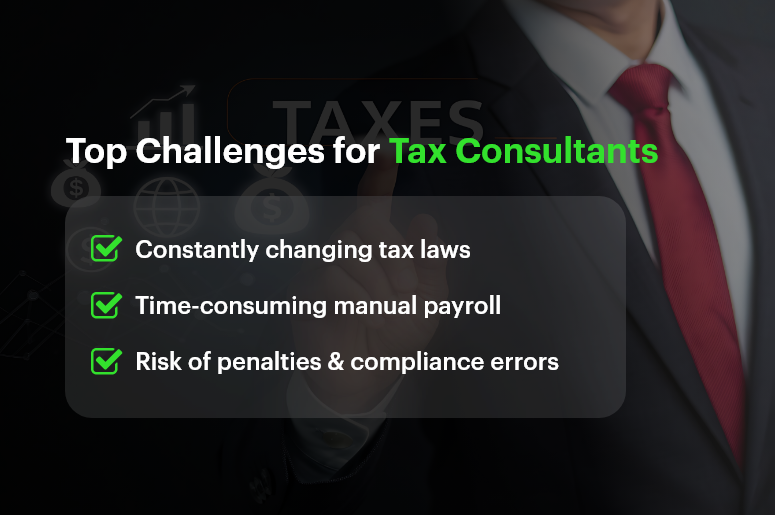
Top Challenges for Tax Consultants

The Top 10 Challenges of Tax Consultants

Here are the 10 biggest hurdles tax consultants face every day:

  • Ever-Changing Tax Laws and Regulations
  • Time-Consuming Manual Calculations
  • Complex Payroll Components (PF, ESI, TDS, Professional Tax)
  • Managing Multiple Clients at Once
  • Ensuring 100% Compliance
  • Handling Errors and Penalties
  • Data Security and Confidentiality
  • Client Miscommunication and Missing Documents
  • Peak Season Workload Pressure
  • Staying Updated with Technology and Automation

Detailed Breakdown of Each Challenge

1. Ever-Changing Tax Laws and Regulations

Tax laws are constantly evolving. Consultants must be aware of:

  • Budget announcements
  • CBDT (Central Board of Direct Taxes) circulars
  • EPFO and ESIC notifications
  • GST amendments
  • State-level changes like professional tax updates

For example, in 2023, the EPF wage ceiling increased, impacting how PF contributions were calculated for employees with higher salaries. Overnight, consultants had to adapt to this change, recalculate contributions, and update payroll systems.

The challenge? Missing even one update can mean incorrect filing, penalties, and angry clients. Consultants spend hours reading government notifications and updating spreadsheets — time that could be spent on client advisory.

2. Time-Consuming Manual Calculations

Manual tax calculation is like walking on a tightrope. Every number must match. One wrong formula in Excel could throw off an entire payroll file.

A tax consultant managing payroll for 100 employees manually has to calculate:

  • PF for each employee (employer + employee share)
  • ESI where applicable
  • TDS based on slabs, exemptions, and rebates
  • Professional Tax based on the state
  • Any arrears, bonuses, or deductions

This process can easily take 2-3 days every month — and that’s assuming no errors. If errors are found, it means re-checking everything.

Automation reduces this burden, but many consultants still rely on outdated methods because they’re afraid of moving away from Excel.

3. Complex Payroll Components

Each payroll component has its own formula, limits, and exceptions.

  • PF (Provident Fund): 12% of Basic + DA. But some employers cap their contribution at a ₹15,000 salary ceiling, while others don’t.
  • ESI: Only applicable if gross salary ≤ ₹21,000/month. Both employer and employee contributions differ.
  • TDS: Calculated on annualised salary after deductions like HRA, 80C, etc. Each employee may have a different TDS liability.
  • Professional Tax: Varies by state. In Karnataka, it’s ₹200/month for a salary > ₹15,000. In Maharashtra, slabs are different.

For consultants managing employees across different states and industries, this complexity becomes a huge challenge.

4. Managing Multiple Clients at Once

Tax consultants rarely work with one client. They may be handling:

  • A manufacturing company with 200 workers
  • A startup with 15 employees
  • Freelancers needing annual filings
  • A mid-sized IT firm with PF, ESI, and GST requirements

Each client has different needs, deadlines, and rules. One client might demand a PF challan today, while another needs revised TDS returns tomorrow. Managing all this requires time-blocking, task prioritisation, and reliable systems.

Without automation, consultants spend more time firefighting than planning.

5. Ensuring 100% Compliance

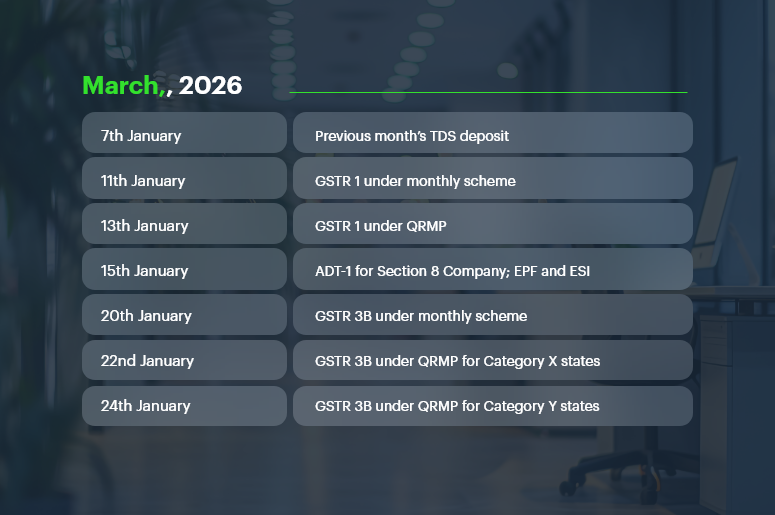
Tax is all about deadlines:

  • PF/ESI payments: 15th of every month
  • TDS payments: 7th of every month
  • GST filing: 10th, 20th, or 24th (depending on scheme)
  • Annual filings and returns: strict dates

If a consultant misses a deadline, even by a day, the client pays penalties and interest. That damages both trust and reputation.

The compliance burden becomes heavier during the financial year closing when multiple filings overlap. Consultants live under constant pressure to meet these dates without errors.

6. Handling Errors and Penalties

Even with the best intentions, errors happen:

  • Wrong HRA exemption claimed
  • Incorrect PAN/TAN details in TDS filing
  • Salary components misclassified

When this happens, consultants spend hours preparing revised returns, rectifications, and reconciliation. Not only is this frustrating, but clients often blame consultants — even if the mistake was due to missing data from the client.

7. Data Security and Confidentiality

Tax consultants handle highly sensitive data:

  • Employee salary details
  • PAN, Aadhaar, bank accounts
  • Tax returns and IT acknowledgements

In an era of cyber threats, storing this data in Excel files, emails, or unsecured systems is dangerous. A single breach could mean loss of trust, legal action, and permanent damage to reputation.

Clients expect consultants to follow data privacy best practices, which is tough without professional-grade tools.

8. Client Miscommunication and Missing Documents

Consultants often rely on clients to submit:

  • Investment proofs
  • Salary breakup details
  • Rent receipts for HRA
  • Loan repayment documents

The reality? Clients often delay, forget, or send incomplete files. This leads to last-minute rushes, incorrect calculations, and missed deadlines.

For example, if a client shares investment proofs after TDS filing, the consultant must re-do calculations and file corrections. This eats into valuable time.

9. Peak Season Workload Pressure

Tax consultants have two types of seasons: normal workload and chaotic workload.

During filing season (July for IT returns, March for FY closing), consultants may work 12–14 hours daily just to meet deadlines. Stress levels rise, mistakes increase, and burnout becomes real.

Without proper systems, tax consultants feel like they’re constantly “catching up” rather than being in control.

10. Staying Updated with Technology and Automation

Technology is moving fast. Payroll and compliance software now automate PF, ESI, TDS, GST, and reporting. Consultants who adopt these tools become more efficient.

But many still hesitate due to:

  • Lack of training
  • Fear of making mistakes in a new system
  • Cost concerns

The truth? Clients prefer consultants who are tech-enabled. They expect real-time reports, digital pay-slips, and error-free compliance. Falling behind in tech means losing clients to modern competitors.

How PF is Calculated (with Example)

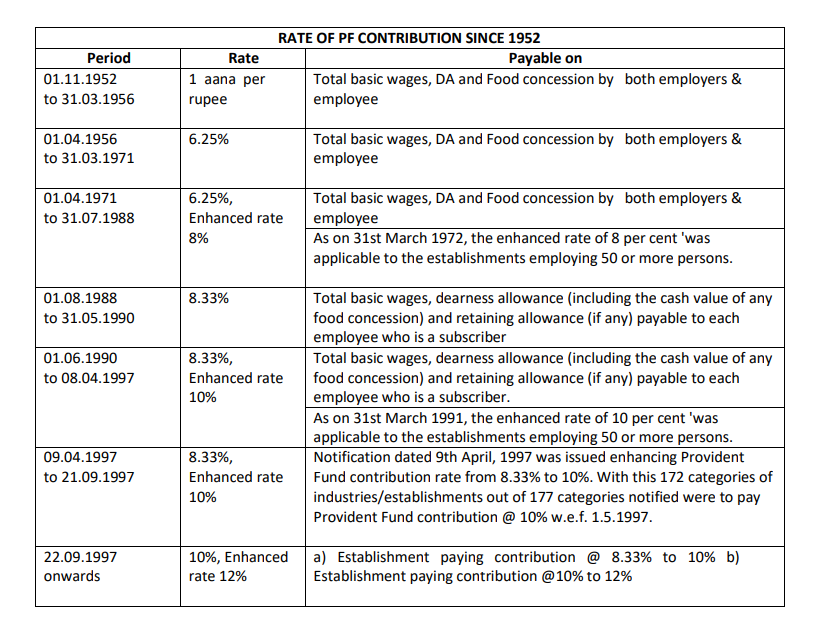
rate of pf contribution since 1952Provident Fund (PF)

Both employer and employee contribute 12% of Basic + DA.

Example:

  • Employee Basic Salary = ₹20,000
  • Employee PF = 12% of 20,000 = ₹2,400
  • Employer PF = 12% of 20,000 = ₹2,400
  • Total PF = ₹4,800 per month

If the company caps PF wages at ₹15,000:

  • Employee PF = 12% of 15,000 = ₹1,800
  • Employer PF = ₹1,800

Various Types of PF Deduction Calculation

Provident Fund (PF) may look straightforward on paper — 12% of basic salary + DA by both employee and employer — but in reality, PF deduction varies depending on company policy, government limits, and employee category. Here are the different scenarios:

1. Standard PF Deduction (12% of Basic + DA)

  • Employee contribution = 12% of Basic + DA
  • Employer contribution = 12% of Basic + DA
  • Widely followed in most organisations.

Example:
Basic Salary = ₹20,000

  • Employee PF = ₹2,400
  • Employer PF = ₹2,400
  • Total = ₹4,800

2. Capped PF Deduction (on ₹15,000 wage ceiling)

As per EPF Act, PF can be calculated only up to ₹15,000 of wages, unless the employer chooses to contribute above this. Many companies follow this cap to reduce costs.

Example:
Basic Salary = ₹25,000

  • Employee PF = 12% of ₹15,000 = ₹1,800
  • Employer PF = ₹1,800
  • Total = ₹3,600

3. Voluntary Provident Fund (VPF)

Employees can choose to contribute more than 12% of their basic salary to PF. Employer contribution remains capped at 12%.

Example:
Basic Salary = ₹30,000

  • Employee decides to contribute 20% = ₹6,000
  • Employer still contributes 12% = ₹3,600
  • Total PF = ₹9,600

4. Employer Contribution Split (EPF + EPS)

Employer’s 12% contribution doesn’t go entirely to EPF. A part is allocated to the EPS (Employee Pension Scheme).

  • 8.33% of Basic (max ₹1,250/month) → EPS
  • Remaining → EPF

Example:
Basic = ₹15,000

  • Employer 12% = ₹1,800
  • EPS (8.33% of 15,000) = ₹1,250
  • Balance (₹550) goes into EPF

5. Exempted Establishments (PF Trusts)

Some organisations run their own PF Trusts, where contributions are managed internally instead of EPFO. While the calculation percentages are the same, returns and management may differ. Consultants must handle compliance differently here.

6. International Worker PF Rules

For employees working in India but from countries with Social Security Agreements (SSA), PF rules may differ. Contributions can be higher, and withdrawal rules are stricter.

Why Does This Matter for Consultants?

Each PF scenario requires different calculations, challans, and reporting. Mistakes here can lead to:

  • Over/under deduction of PF
  • Employee dissatisfaction
  • Non-compliance penalties from EPFO

That’s why tax consultants must be crystal clear on which PF deduction type applies to which employee.

Other Payroll Calculations (with Example)

ESI

  • Employee contribution = 0.75% of gross
  • Employer contribution = 3.25% of gross

If gross = ₹18,000:

  • Employee: ₹135
  • Employer: ₹585
  • Total = ₹720

TDS

Based on tax slabs.

Example: Annual salary ₹6,00,000

  • Less: Standard Deduction = ₹50,000
  • Taxable = ₹5,50,000

Tax:

  • 0 – 2.5L = Nil
  • 2.5 – 5L = 5% = ₹12,500
  • 5 – 5.5L = 5% of ₹50,000 = ₹2,500
  • Total Tax = ₹15,000/year (₹1,250/month)

Professional Tax

Varies by state.

  • Maharashtra: ₹200/month for salaries above ₹10,000
  • Karnataka: ₹200/month for salaries above ₹15,000

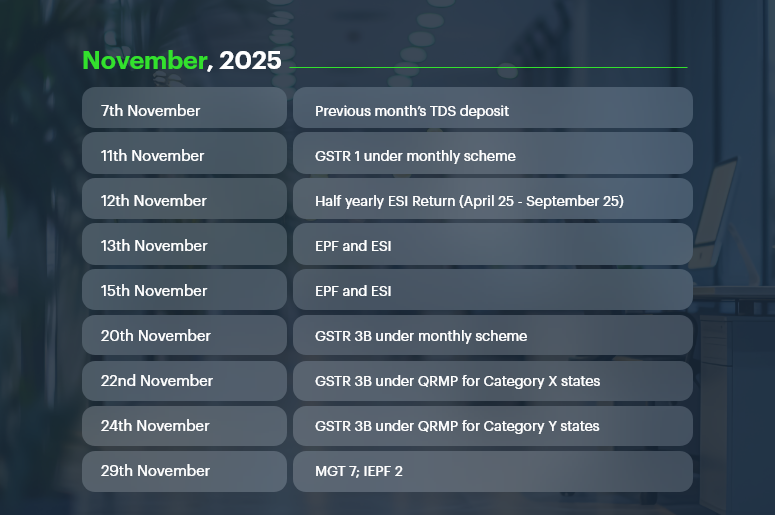
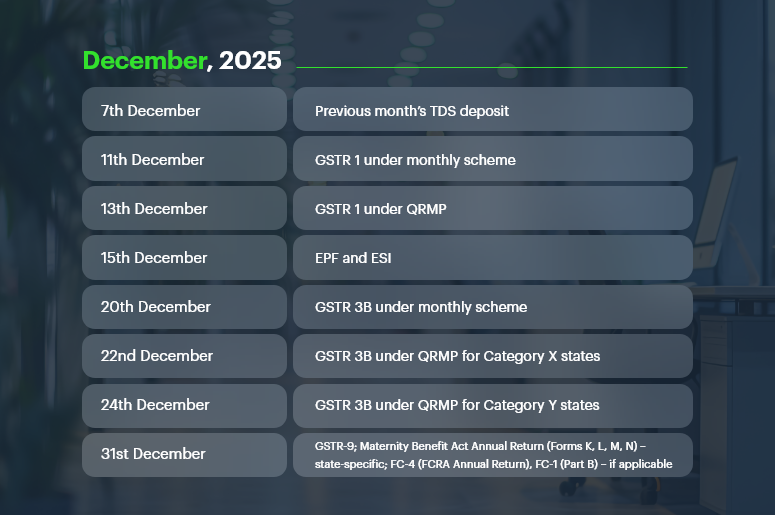
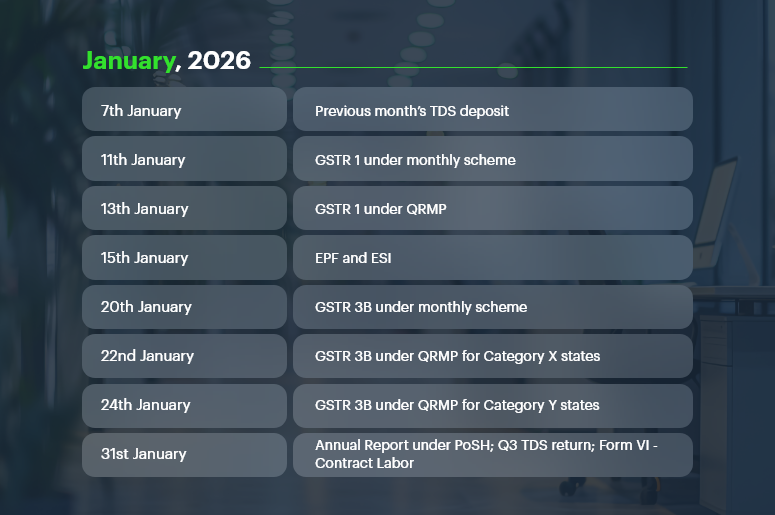
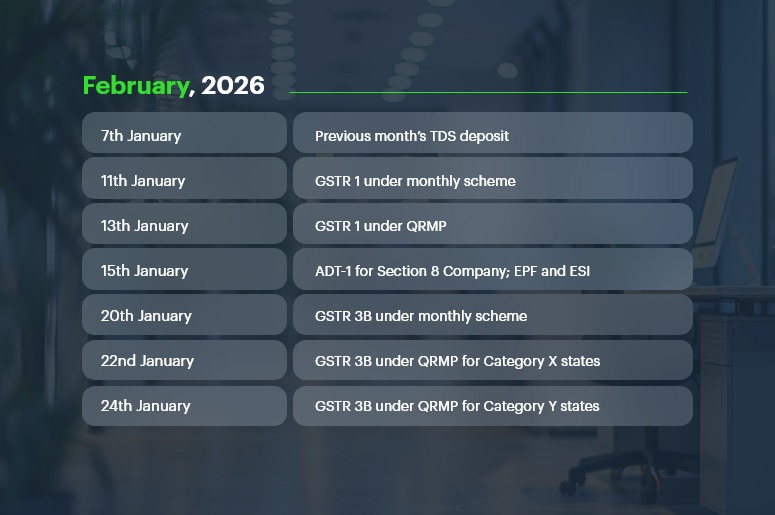
Compliance Calendar FY 2025-26

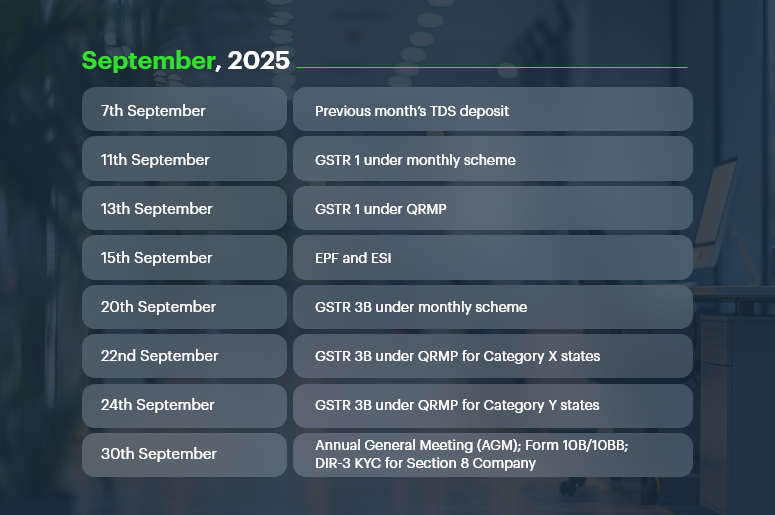
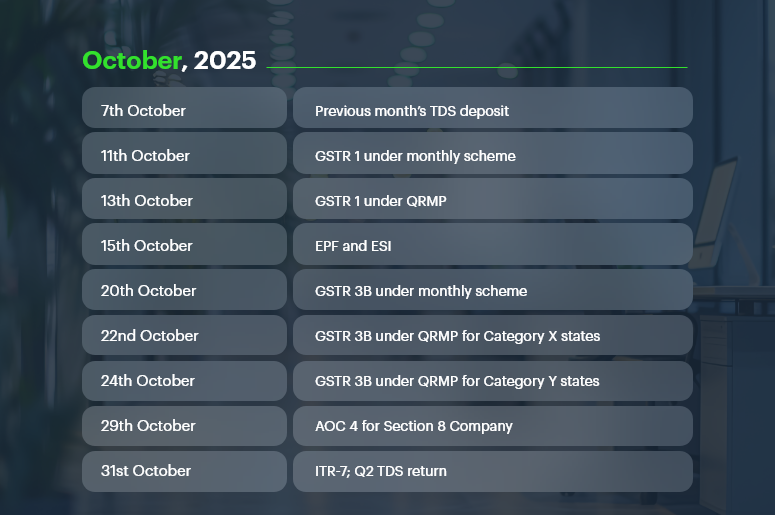
Staying compliant is easier when you have a clear roadmap. Our Compliance Calendar for FY 2025-26 highlights key GST, TDS, Tax, and Regulatory deadlines to help businesses and compliance professionals file on time, avoid penalties, and streamline processes.

What is a Compliance Calendar?

A compliance calendar is a one-stop guide for CFOs, Compliance Officers, and Company Secretaries to track important filing deadlines across GST, Income Tax, Company Law, and Labour Laws. It saves time, reduces risk, and ensures no critical date is missed. Our calendar is updated regularly — so bookmark it and check back often.

September, 2025

Sept-2025-Important-Dates

October, 2025

October-2025-Important-Dates

November, 2025

November-2025-Important-dates

December, 2025

December-2025-Important-Dates

January, 2026

January-2026-Important-Dates

February, 2026

February-2026-Important-Dates

March, 2026

March-2026-Important-Dates

Regulatory Compliance Calendar

Beyond taxes, businesses must comply with Labor Laws and Company Law requirements.

Important Deadlines:

  • ESI Contribution Payment: 15th of every month
  • Professional Tax Payment: 15th of every month (varies by state)
  • Service Tax Returns (ST-3): 25th of the month following the quarter
  • Filing of Annual Return (Form MGT-7): Within 60 days of AGM
  • Filing of Financial Statements (Form AOC-4): Within 30 days of AGM
  • Stamp Duty Payment: As per state laws/transactions

How to Stay Compliant & Avoid Penalties

  • Track all deadlines in one place – Use the compliance calendar as your single source of truth.
  • Automate and reconcile – Auto-file returns and match data with GSTR-2B, 26AS, and books.
  • Stay updated – Watch for changes in GST, TDS, MCA, and Income Tax rules.
  • Validate before filing – Cross-check PAN, GSTIN, challans, and invoices.
  • Centralize & train teams – Store compliance data securely and upskill staff.

EPFO Default Surge and Its Implications for Businesses

Managing PF contributions isn’t just about numbers — it’s about staying compliant with the Employees’ Provident Fund Organization (EPFO).

When companies fail to deposit contributions on time, they risk not only penalties but also becoming part of India’s growing default statistics.

The Historic Surge in EPFO Defaults

According to official EPFO data (2023–24):

  • Total defaults reached ₹25,820.88 crore, a 69.3% jump from ₹15,254.06 crore in 2022–23.
  • Private sector unexempted establishments accounted for the largest chunk with defaults worth ₹13,734.85 crore.
  • Public sector establishments defaulted on ₹2,252.27 crore, while cooperatives owed ₹362.58 crore.
  • Exempted establishments saw arrears rise to ₹5,318.42 crore, a massive 243.7% increase compared to the previous year.

State-Wise Concentration of Arrears

Defaults are not evenly spread. A few states account for the lion’s share of arrears from exempted establishments:

  • Telangana: ₹3,505.84 crore
  • Delhi: ₹213.52 crore
  • West Bengal & Sikkim: ₹145.26 crore
  • Jharkhand: ₹135.66 crore
  • Rajasthan: ₹115.85 crore

Together, these states alone contribute to over 92% of the total arrears.

Why These Defaults Happen

Many of these defaults fall into the “Not Immediately Realisable (NIR)” category, meaning the amounts are stuck in:

  • Court or tribunal disputes
  • Liquidation cases
  • Rehabilitation schemes
  • Instalment-based recovery plans

In fact, 57.9% of total defaults (₹9,474 crore) were marked as NIR.

The Strict Response from EPFO

To counter rising defaults, EPFO has directed regional offices to:

  • Publicly display the top 10 defaulters on notice boards and websites.
  • Attach movable and immovable properties of defaulting establishments.
  • Work with state police for enforcement.
  • Designate civil prisons to expedite recovery from chronic defaulters.

What This Means for Businesses and Consultants

For businesses, defaulting on PF payments is not just a financial setback — it’s a reputational risk. With names being published, properties attached, and stricter enforcement, compliance is non-negotiable.

For tax consultants, this surge highlights the critical role of timely and accurate PF calculation, deduction, and deposit. One missed deadline or error can expose clients to legal battles and massive arrears.

This is why many consultants now prefer automated systems like CrmLeaf Payroll, which:

  • Auto-calculates PF contributions with caps and splits (EPF + EPS).
  • Tracks payment deadlines.
  • Generates challans and compliance-ready reports.
  • Minimizes the chance of default by removing human error.

How CrmLeaf Auto-Calculates PF & Other Payroll Components

With CrmLeaf, tax consultants can say goodbye to manual errors.

  • PF, ESI, and PT are auto-calculated using built-in formulas.
  • TDS updates happen automatically with the latest government slabs.
  • Pay-slips are generated instantly with accurate deductions.
  • Compliance-ready reports are just one click away.
  • Clients get self-service access to pay-slips and tax docs — saving consultants hours of follow-ups.

This turns consultants into trusted advisors instead of number crunchers.

Conclusion

Being a tax consultant today is tough. Between changing laws, complex calculations, multiple clients, and peak season stress, the job can feel overwhelming. But it doesn’t have to be that way.

With automation tools like CrmLeaf Payroll, consultants can eliminate manual errors, stay compliant, and free up their time to focus on what really matters — advisory, strategy, and client relationships.

FAQs

1. What’s the hardest part of being a tax consultant?
Keeping up with constant law changes and ensuring 100% compliance while juggling multiple clients.

2. How is PF calculated?
12% of basic salary + DA, contributed by both employee and employer.

3. What makes payroll so complex?
Because it includes PF, ESI, TDS, and state-level professional taxes, all with different rules and limits.

4. How does CrmLeaf help consultants?
By automating calculations, reducing compliance risks, and generating instant reports.

5. Who can use CrmLeaf?
Individual consultants, small firms, and large companies — it’s scalable for everyone.

Real-Time Payroll Dashboards: Turning Data into Strategic Insights

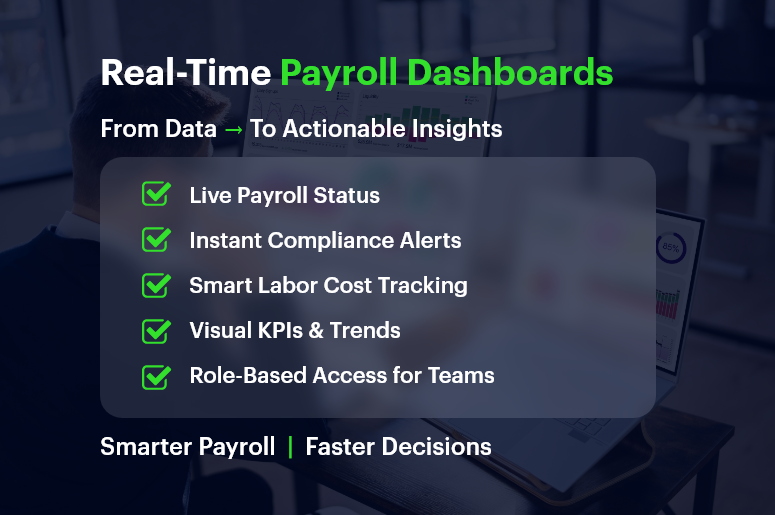
Payroll used to be a back-office chore. Today, real-time payroll dashboards are transforming it into a strategic powerhouse.

Think about this: 70% of CFOs say real-time access to payroll data improves financial decision-making.

Yet many businesses still wrestle with outdated spreadsheets, manual reconciliations, and surprise compliance issues.

If you’re in HR, operations, finance, or running a growing business, here’s the good news — real-time payroll dashboards don’t just track payments. They offer insights you can act on immediately.

In this guide, you’ll learn how modern CRM + ERP platforms like CRMLeaf leverage payroll dashboards to optimize processes, save time, and reduce errors—turning routine data into strategic wins.

Real-Time Payroll Dashboards

Why Real-Time Payroll Dashboards Matter for Growing Businesses

Growing companies need visibility, speed, and compliance — without extra complexity. That’s exactly where real-time payroll dashboards help. Let’s break down why they’re a game-changer.

The Payroll Chaos Most SMBs Face

  • Manual data entry causes errors: When finance and HR teams manually process payroll, inconsistencies creep in — often unnoticed until payday.
  • Disjointed tools lead to delays: Separate tools for time tracking, tax filing, and benefits calculation can slow everything down.
  • Lack of transparency frustrates teams: Employees want to know when they’ll be paid and how deductions work, while managers want to spot overtime trends.

Industries That Benefit the Most

  • Retail chains with variable hourly schedules gain real-time clarity on overtime, absences, and shift differentials.
  • Construction firms need mobile-friendly dashboards to manage crews across multiple sites with diverse pay rates.
  • Tech startups scaling quickly use dashboards to maintain accuracy across employee benefits, bonuses, and stock options.

No matter your industry, access to real-time payroll data can reduce risk, control costs, and improve decision-making.

From Data to Action: Payroll Dashboard Best Practices

Let’s walk through how to get the most from real-time payroll dashboards — and why using a unified CRM + ERP platform like CRMLeaf makes it seamless.

1. Centralize Payroll Inputs for Real-Time Accuracy

Connect your time tracking, leave management, and pay-grade systems.

  • A real-time dashboard can only be as good as the inputs feeding it.
  • By syncing everything — from shift hours to performance bonuses — you eliminate blind spots and double entries.

2. Use Visuals to Spot Trends and Outliers Instantly

Numbers are great — but visuals tell the story.

  • CRMLeaf’s dashboards turn raw numbers into bar graphs, heatmaps, and pie charts so that HR and finance teams can spot anomalies like sudden spikes in overtime or underpayments.
  • It empowers quicker interventions without waiting until end-of-month reports.

3. Automate Compliance Tracking and Tax Calculations

Let automation handle ever-changing laws.

  • Real-time payroll dashboards can flag outdated tax rules or threshold breaches.
  • CRMLeaf’s built-in compliance engine keeps your pay cycles aligned with labor laws, minimum wage regulations, and benefits mandates.

4. Monitor Labor Costs Against Project Budgets

Track labor costs in real-time, right down to individual projects.

  • If you’re using job costing or project accounting, dashboards let you see whether labor spend is exceeding planned budgets — before the project wraps.
  • For industries like construction or consulting, this reduces cost overruns and improves bid accuracy.

5. Empower Managers with Role-Based Access

Let managers access only what they need — securely.

  • Managers can view their team’s payroll insights without seeing sensitive financial data across departments.
  • This ensures data integrity, privacy, and faster decision-making at every level.

Case Study: A Fast-Growing Retail Brand Streamlines Payroll

For example, ShopNova, a rapidly expanding retail brand with 50+ outlets, used CRMLeaf’s real-time payroll dashboards to slash its payroll processing time by 35%.

They integrated biometric time clocks, regional tax rules, and incentive structures across all stores.

The results?

  • Errors dropped by 70%
  • Payroll was processed 3x faster
  • Managers gained insight into peak-hour labor costs, improving scheduling efficiency

With CRMLeaf, ShopNova turned payroll into a strategic lever — not a bottleneck.

Key Takeaways: Why Payroll Dashboards Deserve Your Attention

Let’s recap what makes real-time payroll dashboards so valuable for businesses:

  • You get immediate visibility into payroll operations across departments, helping you make informed decisions faster.
  • You reduce compliance risks by automating tax calculations, deductions, and wage laws.
  • You simplify labor cost management by seeing live reports on where time and money are being spent.
  • You foster employee trust by improving pay accuracy and transparency.

In short, real-time payroll dashboards are no longer a nice-to-have — they’re a must-have for any business that values operational control, compliance, and growth.

They’re also far more powerful when integrated into a CRM + ERP platform like CRMLeaf — bringing payroll, project costing, workforce planning, and reporting under one roof.

How Payroll Integration with HR and Finance Boosts Accuracy?

Every month, HR teams pull hours, benefits, and leave data while finance teams reconcile costs. Yet without payroll integration with HR and finance, data mismatches emerge, and errors slip through the cracks. Manual misalignments result in inaccurate paychecks, compliance headaches, and lost confidence.

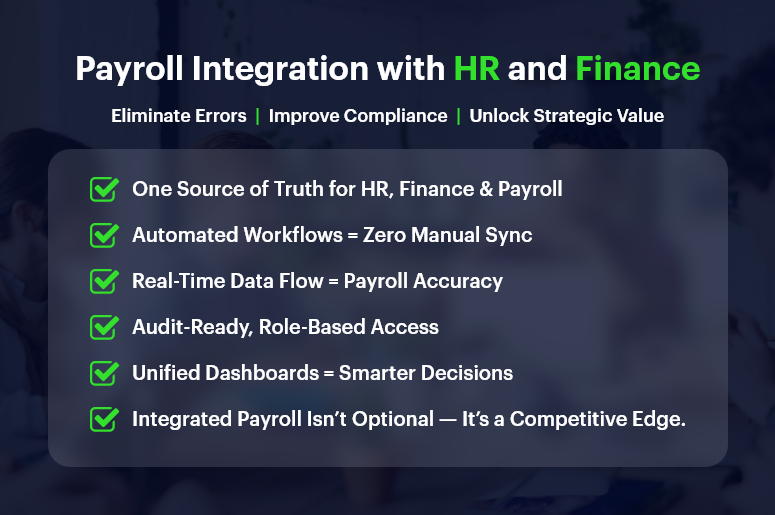
By linking payroll directly to HR and finance systems, organizations eliminate duplication, reduce mistakes, and safeguard trust — making payroll not just accurate but strategic. In this post, you’ll learn why payroll integration with HR and finance matters, how it transforms operations, and how CRMLeaf’s integrated CRM + ERP platform delivers results you can measure.

Business Need & Importance: Why Integration Matters Across Teams

Accurate payroll isn’t just about paying employees — it’s about consistency, compliance, and confidence across departments. When payroll doesn’t integrate with HR or finance, gaps emerge:

1. Misaligned Data Creates Errors

Even minor discrepancies in hours, deductions, or tax codes can lead to incorrect salaries or financial reports. Especially in industries like retail, hospitality, or consulting, where overtime and different pay structures abound, data alignment is critical.

2. Finance and HR Operate in Silos

Without integration, HR may see payroll data separate from finance budgets. That fragmentation delays reporting and undermines workforce planning.

3. Compliance Becomes a Risk

Tax rules, deductions, and benefit eligibility — these change often. Without automatic updates, manual systems amplify compliance risk and audit exposure.

For example, in manufacturing or logistics firms, workforce cost planning relies on aligned payroll, HR scheduling, and finance budgeting. In professional services firms, linking time tracking to payroll and invoicing ensures accurate client billing. And in tech startups, connecting HR records, payroll, and financial reporting supports fast growth with real-time visibility.

Best Practices & Actionable Tips: Boost Accuracy with Payroll Integration

Integrated systems aren’t magic — they follow best practices and smart workflows. Here’s how to implement robust payroll integration with HR and finance, especially when using CRMLeaf.

1. Use a Unified Platform for HR, Finance & Payroll

Rather than syncing separate tools, use a single CRM + ERP platform so HR, payroll, and finance draw from the same data sources.
This shared database ensures that changes in hours, benefits, or role assignments immediately flow into payroll calculations without mediation.

2. Automate Data Flow Between Modules

Ensure that timesheets, leave entries, and benefit changes automatically update payroll and finance ledgers.
For instance, when an HR manager marks an employee as full-time or adds a bonus, the system reflects that in the payroll run without human intervention.

3. Leverage Audit Trails and Role‑based Access

Accurate reporting requires transparent records of changes. Use logs that track when payroll data was updated — by whom and why.
Meanwhile, role-based permissions let HR see benefits and hours while finance sees cost breakdowns — without overexposure.

4. Design Smart Approval Workflows

Establish multi-tier approval (e.g., team lead approves timesheet before payroll processing).
When workflows trigger payroll only after verification, you reduce risk and avoid last-minute corrections.

5. Sync Compliance Rules and Tax Logic

Payroll integration with compliance modules ensures that tax tables, labor laws, and deductions are up to date.
Platforms like CRMLeaf can automatically enforce regional rules, avoiding manual recalibration each pay cycle.

6. Generate Unified Reporting Dashboards

Create dashboards that combine HR metrics (headcount, leave trends), payroll costs, and finance data (GL entries, cost centers).
This holistic view enables better forecasting, budgeting, and resource planning.

7. Provide Self‑Service Access for Teams

Employees and managers should access payslips, summary reports, leave balances, and benefit info via a shared portal.
This reduces HR queries and ensures consistent data visibility across departments.

Customer Success/Case Study

For example, GreenLeaf Consulting, a professional services firm, used payroll integration with HR and finance on CRMLeaf’s CRM + ERP platform to unify employee records, project billing, and payroll calculations seamlessly.

They automated:

  • Timesheet approvals,
  • Salary adjustments,
  • Tax rule updates, and
  • Benefits deductions

The results:

  • Payroll errors dropped by 75% and manual adjustments nearly vanished
  • Payroll processing time fell by 50%
  • Finance forecasting accuracy improved by 20%, enabling smarter budgeting and expense allocation

By aligning HR, payroll, and finance in real time, GreenLeaf turned payroll into a data-driven advantage—not a compliance risk.

Key Takeaways & Closing

Integrated payroll integration with HR and finance is no longer optional — it’s a core requirement for accuracy, compliance, and efficiency.

  • Manual or disconnected systems introduce errors, siloed data, and delays.
  • With integration, you unify key data, automate workflows, and reduce risk.
  • Accurate payroll becomes a driver of strategic insight instead of a monthly chore.

By using CRMLeaf’s unified CRM + ERP platform, businesses gain real-time visibility across payroll, HR, and finance — leading to better decisions, happier teams, and reduced costs.

Building a Scalable Payroll System: What to Consider as You Grow?

Payroll might not be the first thing you think about when scaling your business — but it’s one of the first systems to break if not built for growth. Whether you’re hiring across multiple states, expanding internationally, or simply doubling your headcount, your payroll system must scale without bottlenecks. Inaccurate payroll, compliance issues, and poor visibility can cost your business big — not just in money, but in trust and team morale. In this post, we’ll break down what makes a scalable payroll system scalable, why it matters now more than ever, and how you can get ahead with the right tools — including the power of a CRM + ERP payroll solution.

Why Scalability Matters: The Business Case for a Future-Proof Payroll

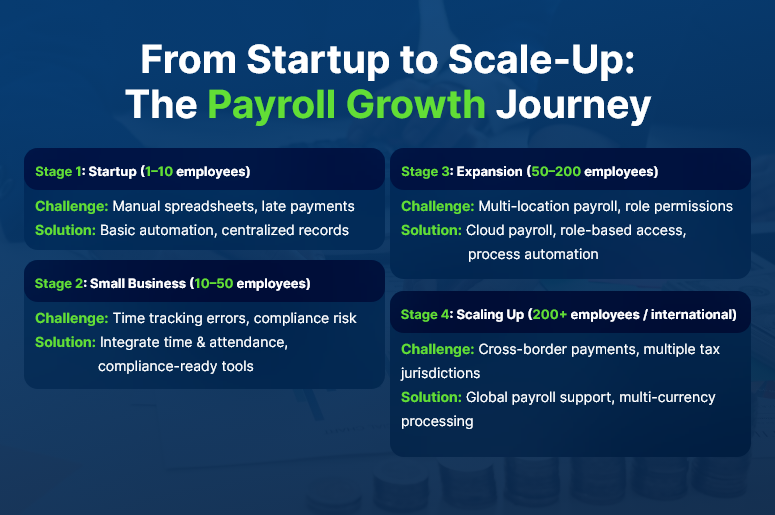
As businesses grow, so do payroll demands. New hires. More locations. Varied tax codes. Shift schedules. Contractor payments. International employees. What worked with 10 employees might become chaotic at 50 or 500.

Here’s why a scalable payroll system becomes a mission-critical investment:

  • Avoid Compliance Nightmares
    With growth comes complex labor laws, tax regulations, and cross-border rules. A scalable system automatically stays updated and reduces compliance risks.
  • Reduce Manual Errors and Admin Overload
    Spreadsheets and disconnected tools lead to duplicate entries, late submissions, and missed payments. Automation eliminates manual grunt work.
  • Support Fast-Paced Hiring and Onboarding
    Whether you’re opening a new office or onboarding seasonal workers, your payroll system should scale up quickly and painlessly.
  • Improve Employee Trust and Retention
    Timely, transparent, and accurate pay builds credibility. Late or incorrect payments? That’s a fast track to disengagement.

Industries like retail, logistics, manufacturing, and tech startups feel this pressure even more — high-volume hiring, remote teams, and compliance complexity all demand a reliable, scalable backbone.

From Startup to Scale-Up The Payroll Growth Journey

How to Build a Scalable Payroll System: 8 Actionable Strategies

1. Centralize Payroll and HR Data in One System

Avoid silos by unifying payroll, HR, and finance in a single platform. A CRM + ERP system helps ensure everyone’s working from the same data source — reducing discrepancies and delays.

2. Invest in Cloud-Based Payroll Software

Cloud solutions offer real-time access, better uptime, and built-in updates. They’re essential for growing teams and multi-location setups.

3. Automate Core Payroll Processes

From calculating wages to tax deductions and pay slip generation — automation saves time, reduces human error, and boosts efficiency.

4. Use Role-Based Access and Permissions

Ensure only authorized personnel can view/edit sensitive payroll data. This becomes more crucial as your org structure grows.

5. Plan for Multi-Currency and Global Payroll

Expanding internationally? Look for solutions that support global currencies, local tax laws, and multilingual interfaces.

6. Integrate Time Tracking and Attendance

Scalable systems sync real-time hours, shifts, and leaves automatically — reducing reconciliation headaches and disputes.

7. Enable Flexible Pay Structures

Support full-time, part-time, contract-based, and gig workers in one system. The modern workforce demands flexibility.

8. Track and Forecast Payroll Costs

Get visibility into costs by department, team, or project. Scalable payroll systems help finance teams forecast budgets accurately.

Customer Success Example

For example, SummitTech, a fast-scaling SaaS company, used CRMLeaf’s integrated payroll module to streamline multi-state compliance and reduce payroll processing time by 60%. With a rapidly growing remote team, they needed automation and visibility across HR and finance, which CRMLeaf delivered.

Key Takeaways: Future-Proofing Your Payroll Operations

  • Scaling businesses can’t rely on spreadsheets or legacy payroll tools. You need a system that grows with you.
  • A CRM + ERP platform combines HR, payroll, and finance in one place — removing silos and driving collaboration.
  • Automation, compliance, and visibility are the pillars of scalability.

In short, building a scalable payroll system isn’t just about tech — it’s about enabling your people and processes to grow confidently.

As your team expands, your payroll system should never hold you back.

Category: EPFO & ESI

No posts in this category.

Subcategory: EPFO

Subcategory: ESI

Category: Payroll Help

No posts in this category.

Subcategory: Employee Self-Service & Engagement

Subcategory: Introduction to Payroll

Subcategory: Payroll Analytics & Reporting

Subcategory: Payroll Automation & Technology

Subcategory: Payroll for Business Growth

Subcategory: Payroll Processing & Management

Subcategory: Taxation & Compliance

Category: User Manual

No posts in this category.

Subcategory: Company Setup

Subcategory: Employee Management

Subcategory: Getting Started

Subcategory: Glossary

Subcategory: Import & Export

Subcategory: Introduction

Subcategory: Payroll Configuration

Subcategory: Payslips & Disbursement

Subcategory: Reports & Analytics

Subcategory: Running Payroll

Subcategory: Statutory Compliance & Reports

Subcategory: Troubleshooting

Subcategory: User Management & Security