The Future of Payroll: Automation, Compliance, and Employee Experience

The future of payroll is no longer a distant vision — it’s unfolding right now. From increased government scrutiny to rising employee expectations, payroll has become a strategic function rather than just a back-office process. According to Deloitte, nearly 60% of businesses are actively modernizing payroll to improve accuracy, compliance, and employee satisfaction.

If you’re still using spreadsheets or disconnected systems, you’re likely wasting time, exposing your business to compliance risks, and frustrating your team. But there’s good news — with the right tools and automation in place, payroll can become one of your most reliable, efficient, and employee-friendly workflows.

In this blog, we’ll explore:

  • Why the future of payroll is central to business growth
  • The biggest changes shaping payroll across industries
  • Practical steps to improve your payroll process today
  • How automation and a CRM + ERP platform like CRMLeaf can help

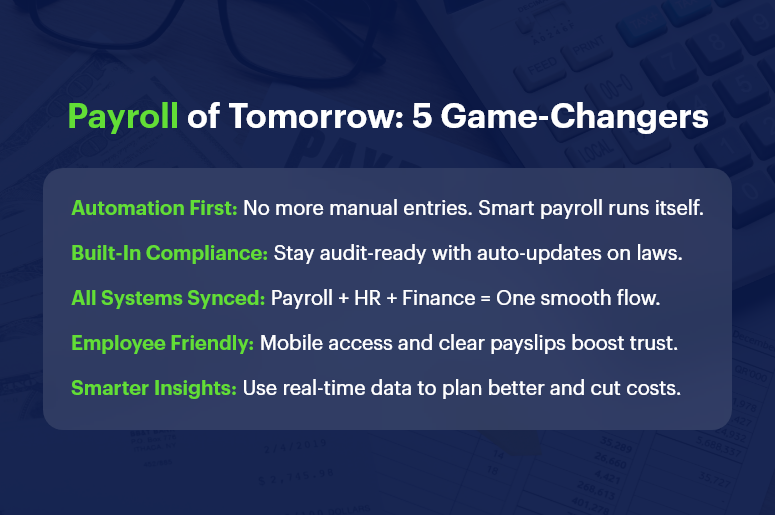
Payroll of Tomorrow 5 Game Changers

Why Payroll Modernization Matters for Your Business

Payroll isn’t just about cutting checks. It’s a direct reflection of how your business values accuracy, compliance, and employee well-being. Here’s why modernizing payroll is non-negotiable in today’s business environment:

  • High Stakes Compliance: Labor laws, tax codes, and statutory deductions change frequently. Missing a deadline or misclassifying an employee can lead to audits, penalties, or lawsuits. Automated payroll systems help you stay compliant, error-free, and audit-ready.
  • Employee Trust and Satisfaction: When employees are paid late or inaccurately, trust erodes. A well-run, transparent payroll process reinforces a culture of reliability and professionalism. This is critical for retention, especially in high-turnover industries like retail, construction, and logistics.
  • Operational Efficiency: Manual payroll is time-consuming and error-prone. Integrating payroll with your HR and finance systems eliminates duplicate work and frees up your team to focus on strategy.
  • Scalability for Growth: As your business grows, payroll becomes more complex. New tax jurisdictions, contract types, and benefit structures emerge. The future of payroll lies in scalable solutions that grow with you.

What’s Driving the Future of Payroll?

Several factors are transforming how businesses handle payroll:

1. Payroll Automation is Now Essential

  • Eliminates repetitive tasks: Automation reduces the need for manual data entry, making pay cycles faster and more reliable.
  • Improves real-time accuracy: Errors are flagged instantly, ensuring accurate deductions, reimbursements, and benefits.
  • Reduces cost and labor: Businesses save money on admin hours and reduce payroll staff burden.

2. Compliance is Getting More Complex — and Critical

  • New labor laws and tax codes are being introduced across regions.
  • Freelancers, gig workers, and remote teams add complexity.
  • Automated systems ensure that every update — from tax slabs to EPF/ESI — is handled in real time.

3. Employee Experience is Tied to Payroll

  • Transparent, on-time payments build trust.
  • Features like self-service payslip access, real-time leave tracking, and reimbursement visibility empower employees.
  • A positive payroll experience enhances engagement, especially for remote and hybrid teams.

4. Integrated Platforms Are Replacing Disconnected Tools

  • Businesses using separate apps for HR, accounting, and payroll are prone to sync errors.
  • CRM + ERP platforms like CRMLeaf centralize data, reduce friction, and enable smarter decision-making.

Practical Tips: How to Prepare for the Future of Payroll

Ready to upgrade your payroll game? Here’s how to stay ahead:

Digitize and Centralize Your Payroll Data

  • Replace spreadsheets and paper forms with a centralized digital platform.
  • Choose a solution that integrates with HR, finance, and compliance tools.

Automate Key Processes

  • Automate payslip generation, tax calculations, benefit deductions, and statutory compliance.
  • Set recurring payroll schedules and alerts to eliminate delays.

Prioritize Compliance from Day One

  • Select software that updates automatically with the latest regulations.
  • Run periodic audits to detect errors before authorities do.

Empower Employees Through Self-Service Portals

  • Give employees access to their payslips, tax declarations, and leave balances.
  • Add mobile accessibility for hybrid or field-based teams.

Track Metrics and Use Payroll Analytics

  • Monitor payroll KPIs like cycle time, error rate, and cost per payslip.
  • Use insights to forecast costs and support budget planning.

Train Your HR & Finance Teams

  • Regularly update your team on system changes and compliance requirements.
  • Invest in user training during onboarding and after major updates.

Customer Success Snapshot

For example, GreenRoots Logistics, a fast-growing transportation company, used CRMLeaf’s payroll automation tools to reduce salary processing time by 75%. They integrated timesheets, leave approvals, and compliance tracking into a single workflow — all managed from one platform. This helped them ensure 100% on-time payments and a 30% drop in payroll-related queries.

Key Takeaways: Shaping the Future of Payroll

The future of payroll demands automation, real-time compliance, and a better employee experience. Businesses that continue using outdated methods will fall behind — not just in efficiency but in trust and growth.

In summary:

  • Automation isn’t optional anymore — it’s the baseline for payroll success.
  • Compliance risks are growing — using automated systems ensures peace of mind.
  • Employee satisfaction is directly tied to their payroll experience.
  • CRM + ERP platforms like CRMLeaf offer an all-in-one solution for modern payroll challenges.

Investing in the right payroll system today will future-proof your business tomorrow.

Payroll Compliance 101: Key Laws Every Business Must Follow

Navigating payroll compliance is no longer just a back-office task — it’s a critical business responsibility that impacts employee trust, legal standing, and your bottom line. Whether you’re a startup or scaling enterprise, payroll compliance mistakes can cost you more than money — they can damage reputation, team morale, and operational efficiency.

In this guide, you’ll learn the must-know payroll laws, real-world scenarios, and how to stay compliant without draining time or resources. With help from platforms like CRMLeaf’s CRM + ERP, compliance becomes part of your workflow, not a fire drill.

Why Payroll Compliance Matters for Modern Businesses

Payroll compliance isn’t just about paying employees on time — it’s about doing it legally, accurately, and consistently. As your business grows, payroll gets more complex, and so do the risks.

Here’s why it matters:

  • Avoid Costly Penalties: Missing tax deadlines or misclassifying employees can lead to thousands in fines and interest. Staying compliant protects your finances and keeps audits away.
  • Maintain Employee Trust: Mistakes in paychecks — from incorrect deductions to late deposits — can erode employee satisfaction and increase churn.
  • Meet Industry-Specific Requirements: From construction to tech to retail, every industry has different labor laws. Staying up-to-date keeps you compliant and competitive.
  • Enable Better Growth Decisions: When your payroll data is accurate and compliant, you can plan for raises, new hires, and expansions with confidence.

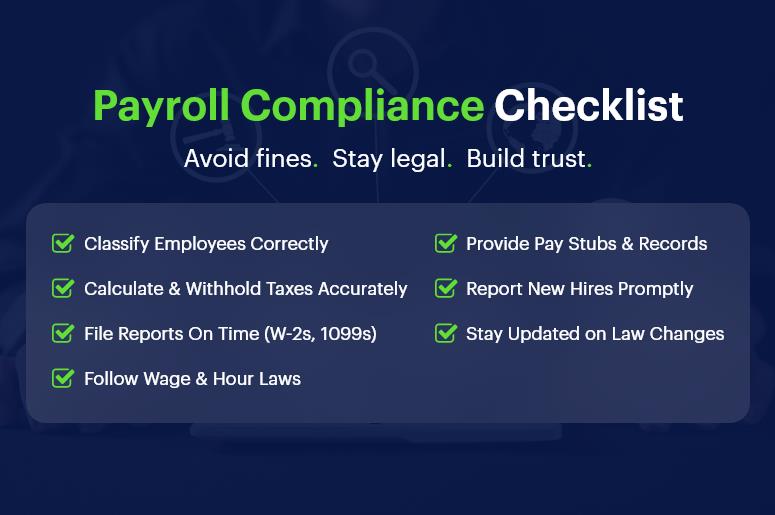
Payroll Compliance Checklist

Common Payroll Compliance Challenges & How to Solve Them

1. Misclassifying Employees and Contractors

Improper classification affects taxes, benefits, and legal exposure. Classifying a contractor as a full-time employee (or vice versa) may trigger audits and legal consequences. Always verify roles with federal and state guidelines.

2. Inaccurate Tax Withholding and Reporting

Incorrect tax calculations can result in underpayment or overpayment. Businesses must stay current on IRS guidelines and local tax requirements. Automation through payroll compliance software reduces these risks.

3. Late or Missed Filings

Missing deadlines for payroll taxes, W-2s, or 1099s leads to penalties. Build a tax calendar, set automated reminders, or better yet — let your CRM + ERP do it for you.

4. Ignoring Wage and Hour Laws

From overtime rules to minimum wage updates, compliance means aligning your payment structure with ever-changing labor laws. Integrating legal updates into your payroll engine helps you stay alert.

5. Poor Recordkeeping

Federal law requires you to retain payroll records for several years. A centralized system ensures you don’t misplace vital documents during audits.

6. Failing to Provide Proper Pay Stubs

Employees have the right to transparent, itemized pay stubs. A payroll compliance checklist should include pay stub generation that complies with your jurisdiction.

7. Noncompliance with New Hire Reporting

Each state mandates reporting new hires within a specific time window. Ignoring this can result in steep fines. Automated systems ensure timely compliance.

8. Overlooking Multi-State Regulations

Operating in multiple states? You’ll face different wage laws, tax codes, and filing rules. A unified platform helps you customize compliance settings by location.

9. Failing to Keep Up with Tax Law Changes

Tax codes evolve constantly. Manual tracking invites errors. Instead, use a CRM + ERP system that integrates real-time tax law updates and reflects them in payroll.

10. Ignoring Employee Classification Updates

Employees move between roles or contract statuses. Keeping classifications updated ensures ongoing compliance. Make this part of your HR workflow.

Best Practices to Master Payroll Compliance

Automate Where Possible

Automated systems ensure accurate tax withholdings, filing deadlines, and paycheck calculations — freeing up HR for strategic work.

Create a Payroll Compliance Checklist

Outline your responsibilities, including reporting, documentation, audits, and tax deadlines. Review and update this list quarterly.

Audit Your Payroll Process Regularly

Set up periodic internal audits to identify errors early. Validate timesheets, benefits, classifications, and tax rates.

Stay Educated on Compliance Requirements

Subscribe to HR and legal newsletters. Join webinars. Platforms like the IRS and Department of Labor provide free, updated guidance.

Work with Integrated Platforms

A disconnected spreadsheet can’t notify you of rule changes. Use CRMLeaf’s CRM + ERP to ensure HR, payroll, and compliance are all on the same page.

Keep Digital Records

Store pay stubs, tax filings, and employee contracts in a secure digital hub. Back them up and restrict access using role-based permissions.

Align HR and Payroll Teams

Regular syncs between HR and payroll ensure employee data — from bank accounts to benefits — remains accurate and compliant.

Customer Success Story

For example, SwiftHire Solutions, a mid-sized recruitment firm, used CRMLeaf’s automated payroll compliance features to eliminate filing errors and avoid $10,000+ in penalties over two years.

By centralizing HR, payroll, and employee data into one platform, they slashed admin time by 40% and stayed audit-ready during an IRS check. Their HR team can now focus on talent and engagement instead of tax forms.

Key Takeaways & Closing

Payroll compliance is critical to your legal, financial, and operational success. Mistakes are costly — both in money and morale.

Integrated tools like CRMLeaf’s CRM + ERP help automate, monitor, and update compliance processes, reducing errors and saving time.

Compliance isn’t a one-time job. You need a system that evolves with laws and your business.

What to do next:

  • Audit your current payroll workflow. Identify risks, gaps, or outdated processes.
  • Create a compliance checklist. Use it monthly.
  • Book a demo of CRMLeaf to see automation in action.

Category: EPFO & ESI

No posts in this category.

Subcategory: EPFO

Subcategory: ESI

Category: Payroll Help

No posts in this category.

Subcategory: Employee Self-Service & Engagement

Subcategory: Introduction to Payroll

Subcategory: Payroll Analytics & Reporting

Subcategory: Payroll Automation & Technology

Subcategory: Payroll for Business Growth

Subcategory: Payroll Processing & Management

Subcategory: Taxation & Compliance

Category: User Manual

No posts in this category.

Subcategory: Company Setup

Subcategory: Employee Management

Subcategory: Getting Started

Subcategory: Glossary

Subcategory: Import & Export

Subcategory: Introduction

Subcategory: Payroll Configuration

Subcategory: Payslips & Disbursement

Subcategory: Reports & Analytics

Subcategory: Running Payroll

Subcategory: Statutory Compliance & Reports

Subcategory: Troubleshooting

Subcategory: User Management & Security