Top 10 Features Every Indian Payroll Software Must Have

Managing payroll in India is complex. From ever-changing tax rules to labor regulations across multiple states, HR and finance teams spend countless hours ensuring payroll accuracy and compliance. That’s why choosing the right payroll software is crucial for Indian organizations—whether it’s a startup scaling fast or a large enterprise with distributed teams.

To help you make a confident decision, here are the Top 10 Features Every Indian Payroll Software Must Have to simplify payroll processing, ensure legal compliance, and improve employee experience.

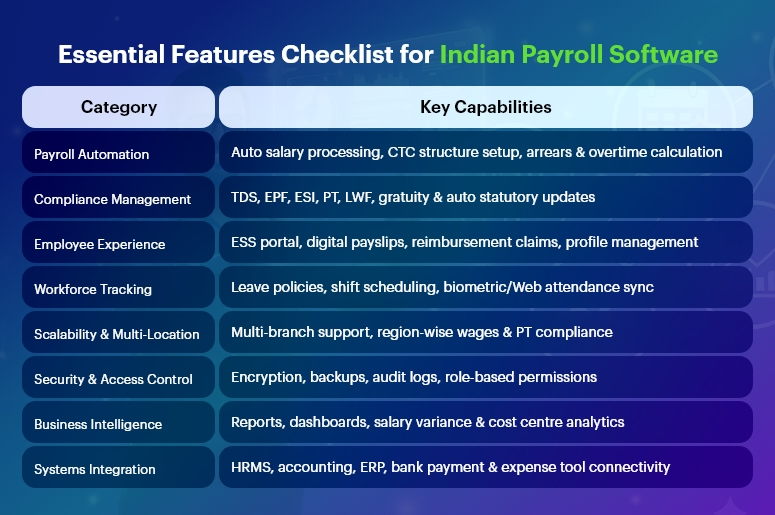
Essential Features Checklist for Indian Payroll Software

Automated Payroll Processing & Salary Calculations

Manual payroll calculations often lead to errors, late salary payments, and employee dissatisfaction. A modern payroll solution must offer:

  • Auto-calculation based on attendance data
  • Support for multiple pay cycles (monthly/weekly)
  • Automatic arrears, incentives, bonuses & overtime
  • Configurable salary structures (CTC breakup)

With automation, companies reduce repetitive work and ensure 100% accuracy every month.

Compliance With Indian Statutory Laws

Payroll compliance in India is dynamic and varies across states. A reliable payroll software must ensure seamless compliance with:

  • Income Tax / TDS
  • EPF, ESI & Labour Welfare Fund (LWF)
  • Professional Tax (PT)
  • Gratuity & Bonus Act
  • Minimum Wages Act
  • Maternity Benefit Act
  • Shops & Establishment Act regulations

It must auto-calculate contributions, generate challans, and update rules automatically to avoid penalties.

TDS, Income Tax & Investment Declarations Management

Employees should easily declare their investments for tax-saving purposes. Good payroll software should provide:

  • Automatic tax projections on salary slips
  • Section 80C & 80D declaration support
  • Proof submission tracking
  • Form 16 auto-generation

This simplifies the financial year-end chaos.

India’s #1 Free Software

Free Payroll, PF,
ESI & TDS Software

Professional compliance management for Indian businesses. 100% Free Forever.
Employee Self-Service (ESS) Portal

A self-service portal transforms employee experience by providing access to:

  • Digital payslips
  • Tax documents (Form 16, salary certificates)
  • Leave & attendance records
  • Personal information updates
  • Reimbursement claims

HR teams save significant time while employees stay empowered.

Leave & Attendance System Integration

Payroll and attendance must go hand-in-hand. A fully integrated system helps:

  • Sync biometric or web attendance in real-time
  • Auto-deduct leave without pay (LWP)
  • Manage multiple leave types and policies
  • Track shift schedules & overtime

This ensures accurate payouts every time.

Digital Reimbursements & Claims

Indian companies often offer tax-saving reimbursements like:

  • Travel allowances
  • Food coupons
  • Phone/internet bill reimbursements
  • Medical allowances

Payroll software should enable online claim submissions, approval workflows, and automatic payouts during payroll processing.

Multi-Location & Multi-State Support

Businesses expanding across states need payroll that supports:

  • Region-specific PT, local rules & wages
  • Multi-branch organization structure
  • Centralized admin dashboard
  • Multiple business units or legal entities

This ensures smooth processing for distributed workforces.

Secure Data Handling & Role-Based Access

Payroll data is highly sensitive. Security must be a top priority, including:

  • End-to-end encryption
  • Audit logs and detailed access permissions
  • Cloud-based data backups
  • ISO-compliant infrastructure

Role-based access ensures only authorized personnel can view salaries.

Comprehensive Payroll Reports & Analytics

Leadership needs insights for better decisions. The right software provides:

  • Payroll registers & compliance reports
  • Salary variance analysis
  • Cost centre-wise breakdowns
  • Reconciliation statements

Exportable reports (XLS, PDF) support audits and financial planning.

Integration With HR, Accounting & ERP Tools

Seamless integration eliminates duplicate data entry. Look for payroll that connects with:

  • HRMS, timesheet & attendance software
  • Bank payment systems for salary disbursement
  • Corporate expense management tools

This builds a connected digital workforce ecosystem.

India’s #1 Free Software

Free Payroll, PF, ESI & TDS Software

Final Thoughts

Indian payroll processing is unlike anywhere else in the world—and the right payroll software must solve challenges around regulatory compliance, multi-state management, and employee expectations.

Organizations should choose a solution that:

  • Is future-ready and scalable
  • Enables automation and compliance
  • Improves employee experience
  • Reduces manual workload for HR & finance

With the right digital payroll tool in place, companies can focus more on people and growth—and less on paperwork.

Frequently Asked Questions (FAQs)

1. What is the most important feature in Indian payroll software?

Automated statutory compliance and accurate salary calculations are the most crucial features to avoid legal issues.

2. Can payroll software handle multi-state compliance in India?

Yes, advanced solutions automatically apply state-specific rules like PT, minimum wages, and LWF.

3. Why do companies prefer cloud-based payroll?

Cloud payroll ensures security, accessibility, scalability, and real-time updates—especially for hybrid and remote teams.

4. Is payroll software useful for startups?

Absolutely! It minimizes HR workload, prevents calculation errors, and ensures compliance right from day one.

5. Can employees access payslips digitally?

Yes, through an ESS portal or mobile app, employees can download payslips anytime.

6. Does payroll software generate Form 16?

Yes, many solutions auto-generate and distribute Form 16 during tax season.

7. Is Tally integration available in Indian payroll software?

Most payroll systems offer accounting integration with Tally and ERP tools.

8. How does payroll software help in audits?

It provides standardized, exportable reports, reducing audit preparation time.

9. Can payroll software automate bank salary disbursements?

Yes, integration with bank systems enables hassle-free salary transfers.

10. What about data security in payroll software?

Modern platforms include encryption, access controls, and regular backups to secure sensitive payroll details.

Free Payroll, PF, ESI & TDS Software

The most trusted automation tool for modern Indian businesses.

Top 15 Payroll Automation Benefits for SMEs in India

Payroll in India is a complex function because employers must handle salaries, variable pay, attendance, leave rules, deductions, and constantly changing statutory norms every single month. For SMEs running on smaller HR teams and tighter budgets, managing payroll manually is not just difficult — it is risky.

Indian SMEs often face:

  • Spreadsheets overloaded with data
  • Common miscalculations creating salary disputes
  • Outdated compliance knowledge causing penalties
  • Manual attendance reconciliation taking days
  • Slow and error-prone report generation for audits
  • Increased HR effort with zero strategic output

One mismanaged payroll cycle can damage employee trust and brand reputation.

This is why many SMEs in India are turning to Payroll Automation — a smarter, more secure, and highly efficient way to manage payroll. Automation uses technology to calculate salaries, apply statutory rules, process attendance, generate reports, and ensure compliance — with minimal human intervention.

Below is an in-depth, professional, and extensively detailed breakdown of how Payroll Automation transforms Indian businesses.

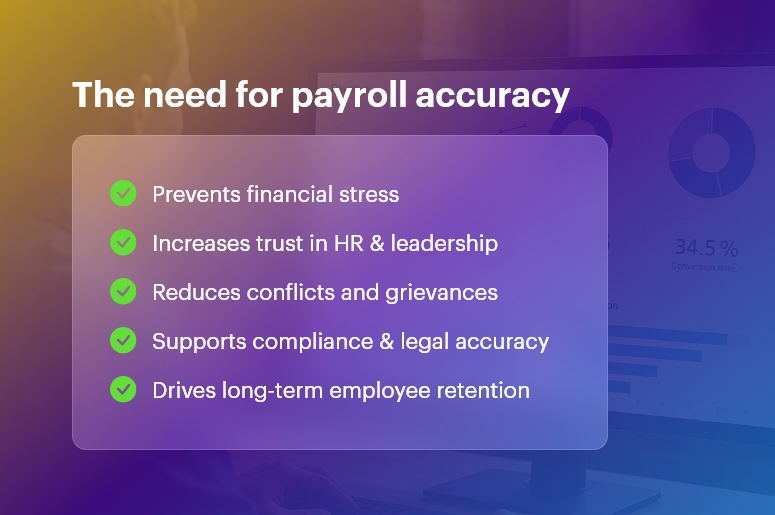
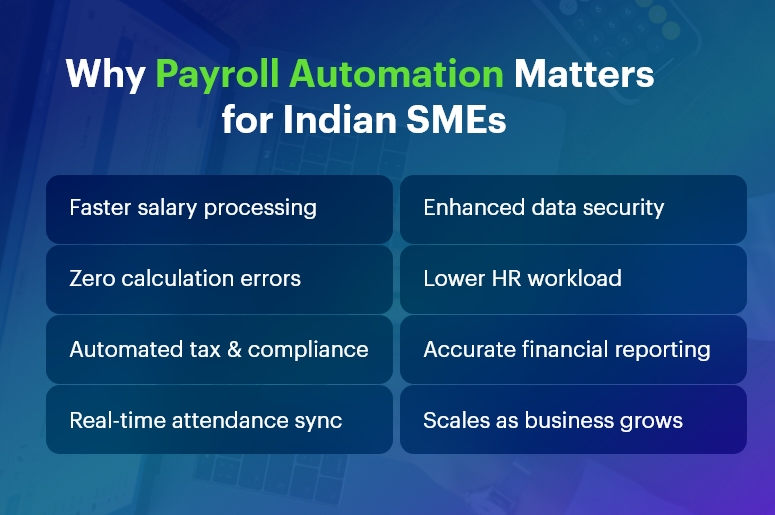
Why Payroll Automation Matters for Indian SMEs

Top 15 Payroll Automation Benefits for SMEs in India

Faster Salary Processing Means Happier Employees

Indian SMEs often spend 3–7 days every month preparing payroll manually. Automation cuts this time by more than 70%, because:

  • Salary structures are pre-configured
  • Attendance updates automatically
  • Deductions are applied instantly
  • No need to repeat data entry every month

Employees receive salaries on time — which directly improves morale, retention, and trust. In today’s competitive job market, timely salary payments can be a big differentiator.

Highly Accurate Calculations Reduce Payroll Disputes

Manual payroll often results in:

  • Incorrect salaries
  • Wrong overtime payouts
  • Missing allowances
  • Wrong TDS deductions

These mistakes are frustrating for employees and expensive for SMEs. Automation ensures accurate salary breakdowns using predefined formulas, so math errors are eliminated and employee satisfaction increases.

Seamless Statutory Compliance for Indian Labor Laws

Compliance is one of the biggest challenges for Indian SMEs. Payroll Automation always follows:

  • Latest PF, ESI calculation rules
  • Updated TDS slabs & exemptions
  • State-wise Professional Tax differences
  • Bonus, Gratuity & Minimum Wages rules
  • Labor Welfare Fund contributions

The system updates automatically with every policy change. This protects SMEs from:

  • Penalties
  • Legal issues
  • Audit failures

Businesses stay peacefully compliant.

Real-Time Attendance & Shift Management That Syncs Automatically

When Human Resources manually reconciles attendance from punch cards, emails, or Excel sheets, errors are guaranteed.

Automated payroll integrates with:

  • Biometric devices
  • Mobile GPS punch-in
  • Web attendance portals
  • Shift calendars

Every login, logout, leave, overtime hour is recorded in real time. Salary becomes 100% aligned with true productivity — no arguments later.

Full Transparency Through an Employee Self-Service Portal

An ESS portal empowers employees to:

  • Download payslips instantly
  • View salary summaries and tax calculations
  • Track attendance and leave balances
  • Claim and track reimbursements
  • Update profile details

Employees feel informed and valued. HR saves countless hours answering repetitive salary queries.

Free Payroll, PF, ESI & TDS Software

The most trusted automation tool for modern Indian businesses.

Significant Cost Savings — Immediate and Long Term

Payroll Automation reduces:

  • Administrative workload
  • Outsourced payroll expenses
  • Compliance fines
  • Paper, filing, and printing costs

SMEs operate more efficiently with the same HR team. Automation becomes a high-ROI investment — not an expense.

Ultra-Secure Protection for Payroll & Employee Data

Payroll touches the most confidential details of a business: Salaries, financials, bank information, PAN numbers, etc.

Automation offers:

  • Data encryption
  • Cloud backups
  • Role-based access control
  • Access logs & audit trails

This prevents leaks, misuse, or accidental data loss — something Excel can’t guarantee.

Instant Generation of Statutory and Payroll Reports

Preparing statutory forms manually (PF, ESI, TDS) is time-consuming and error-prone. With automation, files like:

  • ECR files for PF portal
  • TDS returns (Form 24Q/26Q)
  • Salary registers
  • Form 16 + MIS reports

are generated in seconds — accurate and ready for upload.

This reduces compliance stress and ensures filing happens before deadlines.

Productivity Boost for HR Teams

HR’s role is to develop people — not fight spreadsheets. Automation shifts HR’s energy to:

  • Employee development
  • Performance initiatives
  • Recruitment & onboarding
  • Workforce strategy

Organizations get better HR output without hiring more people.

Eliminates Fraud and Payroll Manipulation

Common fraud cases in SMEs include:

  • Ghost employees
  • Fake overtime claims
  • Modified attendance entries
  • Cash-based payout manipulation

Automation ensures every action is recorded. There is a complete audit trail — no room for hidden salary leaks.

Multi-State Payroll Handled with Ease

As SMEs open branches across India, payroll complexity increases due to state-specific:

  • PT slabs
  • Minimum wages
  • Public holidays
  • Employee categories

Automated payroll adapts for each location yet runs payroll centrally, saving tremendous regulatory effort.

Automated Digital Payslips — Professional and Paperless

Employees get legally compliant payslips:

  • On their phones
  • In the ESS portal
  • Automatically via email

No printing, no waiting, no errors. Digital payslips also give companies a modern professional impression.

Automated Leave, Loan & Reimbursement Accounting

Every leave approval or salary advance automatically flows into payroll.

The system:

  • Calculates LOP accurately
  • Tracks EMI-based repayments
  • Approves and verifies expense claims

This ensures zero disputes and complete visibility into financial adjustments.

Advanced Analytics for Better Financial Control

Owners and decision-makers get dashboards showing:

  • Salary cost trends
  • Overtime vs. productivity
  • Department-wise payroll impact
  • Budget deviation alerts

These insights help optimize hiring, scheduling, and compensation — fueling better profitability.

Easily Scalable As Your Business Grows

As SMEs expand:

  • New employees
  • New salary structures
  • New branches

…can be added effortlessly.

Payroll stays equally efficient whether managing 10 or 10,000 employees. Automation ensures payroll never becomes a growth roadblock.

India’s #1 Free Software

Free Payroll, PF, ESI & TDS Software

Final Thoughts

Payroll Automation is more than digitizing payroll —

  • It transforms how SMEs operate.
  • It builds employee trust and strengthens compliance.
  • It enables leaders to focus on growth rather than paperwork.

In India’s fast-moving economy, companies that automate will advance. Companies that remain manual will fall behind.

Payroll Automation is the foundation of a future-ready SME.

Frequently Asked Questions

  • Do small businesses really need payroll automation?

Yes. Even with 5–10 employees, automation improves transparency, efficiency, and compliance accuracy.

  • Will payroll automation reduce HR workloads?

Absolutely. Mundane tasks disappear, allowing HR to focus on employee success and culture development.

  • How does automated payroll ensure compliance?

It auto-updates tax laws and generates government-friendly files for PF, ESI, and TDS filings.

  • Is automated payroll safe for sensitive employee data?

Yes. Encryption, backups, and permissions make it far more secure than spreadsheets.

  • How long does implementation take for an SME?

Most businesses can go live in 1–7 days, depending on employee size and data format.

India’s #1 Free Software

Free Payroll, PF,
ESI & TDS Software

Professional compliance management for Indian businesses. 100% Free Forever.
How Payroll Software Changes the Life of a Tax Consultant?

In today’s fast-evolving financial landscape, tax consultants play a critical role in ensuring businesses remain compliant while optimizing their tax liabilities. They deal with salary structures, statutory deductions, income tax filings, reimbursements, benefits, and ever-changing government regulations.

But as businesses scale, so does the complexity of payroll and tax management. Manual spreadsheets, repetitive calculations, and constant regulation updates make it nearly impossible for tax consultants to stay efficient and error-free.

This is where modern payroll software — like CrmLeaf Payroll — becomes a transformative tool. It automates the entire payroll lifecycle, enhances compliance accuracy, and provides real-time insights, helping tax consultants move from being reactive to strategic advisors.

In this comprehensive guide, we’ll explore how payroll software changes the life of a tax consultant — improving productivity, accuracy, compliance, and client satisfaction.

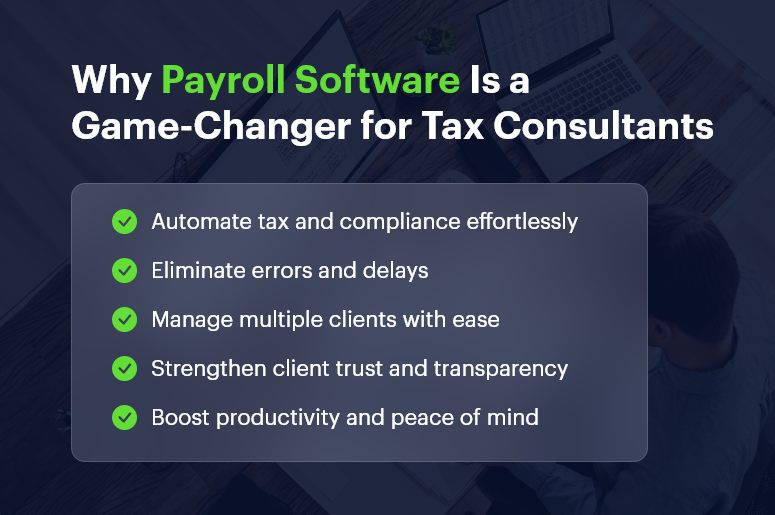
Why Payroll Software Is a Game-Changer for Tax Consultants

Eliminates Manual Payroll Hassles

For decades, payroll processing meant navigating endless spreadsheets, verifying attendance, calculating deductions, and applying tax rules manually. It was time-consuming, error-prone, and mentally exhausting.

With Payroll Software for Tax Consultants:

  • Automated Payroll Runs: Set schedules and let the system process salaries, deductions, and bonuses automatically.
  • Pre-Configured Rules: Define salary structures, tax slabs, and deductions once — the software does the rest every month.
  • Error-Free Processing: CrmLeaf’s automation eliminates manual calculation mistakes, ensuring 100% accuracy.

Result: Tax consultants spend less time crunching numbers and more time on strategic planning, client advisories, and business growth.

Automates Compliance and Tax Regulations

Tax laws are dynamic — with frequent updates in TDS rates, EPF, ESI, gratuity, or professional tax. Staying current manually is nearly impossible for consultants managing multiple clients.

CrmLeaf Payroll Keeps You Compliant Automatically:

  • Real-Time Updates: The system is auto-updated with the latest government rules and tax amendments.
  • Region-Specific Customization: Easily configure compliance settings for different states or countries.
  • Pre-Filled Forms and Returns: Generate TDS statements, Form 16, and statutory filings in seconds.

No more compliance stress. CrmLeaf ensures every payroll aligns with current tax norms — reducing legal risks and saving consultants from penalties or rework.

Streamlines Multi-Client Management

A tax consultant’s workload is rarely limited to a single organization. Managing payroll for multiple clients means handling diverse pay structures, compliance needs, and reporting formats.

How Payroll Software Simplifies Multi-Client Operations:

  • Centralized Dashboard: View all clients’ payroll data from one secure dashboard.
  • Client-Specific Rules: Configure unique salary templates and compliance settings per client.
  • Switch Effortlessly: Toggle between different client payrolls in a few clicks without confusion.

CrmLeaf Payroll allows consultants to manage multiple clients simultaneously, improving efficiency and reducing the risk of errors from juggling different data sources.

Enhances Accuracy in Tax Filings

For a tax consultant, accuracy isn’t optional — it’s the foundation of trust. Payroll software ensures consistency across all calculations and eliminates manual discrepancies.

Accuracy Benefits with CrmLeaf Payroll:

  • Automated Tax Computation: Automatically calculates tax withholdings, exemptions, and deductions.
  • Validation Checks: Flags anomalies before payroll is finalized.
  • Integrated Tax Reports: Syncs payroll data directly with accounting and tax systems.

By ensuring every figure aligns perfectly, consultants can file accurate returns, avoid audits, and maintain flawless client records.

India’s #1 Free Software

Free Payroll, PF,
ESI & TDS Software

Professional compliance management for Indian businesses. 100% Free Forever.

Provides Real-Time Reports and Analytics

Traditional payroll tools only process payments; modern payroll platforms like CrmLeaf deliver actionable insights.

Key Reporting Features:

  • Customizable Reports: Generate payroll summaries, tax liabilities, and year-end financial statements in real time.
  • Trend Analysis: Track employee costs, tax liabilities, and benefits distributions over time.
  • Forecasting Tools: Anticipate future tax implications and help clients plan proactively.

For consultants, this means transforming from a compliance manager into a data-driven financial advisor — offering smarter recommendations backed by real-time analytics.

Strengthens Data Security and Confidentiality

Payroll and tax data are highly sensitive — containing bank details, PANs, salary information, and identification documents. A single leak can destroy client trust.

CrmLeaf Payroll’s Security Protocols Include:

  • Bank-Grade Encryption: Protects data in transit and at rest.
  • Role-Based Access Controls: Restrict access by user role (consultant, accountant, admin, etc.).
  • Audit Trails: Keep a full log of every activity for transparency and accountability.
  • Cloud Backup & Recovery: Prevents data loss and ensures business continuity.

By using secure payroll software, tax consultants safeguard not just data — but their reputation and client trust.

Boosts Productivity and Saves Time

Manual payroll operations can consume 60–70% of a tax consultant’s monthly workload. Payroll software drastically reduces that time.

Productivity Gains:

  • Automated Payroll Runs: Execute multiple client payrolls simultaneously.
  • One-Click Payslips: Generate, download, or email payslips automatically.
  • Task Reminders: Get alerts for compliance deadlines and tax filings.

Time Saved = Higher Earnings + Less Stress.

Consultants can reinvest this time in acquiring new clients, upselling advisory services, or simply maintaining a healthier work-life balance.

Improves Client Communication and Transparency

Clients expect transparency — they want to see how salaries, deductions, and taxes are being managed. Payroll software helps consultants deliver this easily.

With CrmLeaf Payroll:

  • Client Dashboards: Share real-time payroll summaries and reports.
  • Custom Reports: Offer branded, professionally formatted statements for each client.
  • Automated Notifications: Keep clients informed about filings, due dates, and approvals.

Transparent reporting builds long-term client trust and differentiates a consultant from competitors relying on outdated manual systems.

Supports Remote and Hybrid Work Models

Post-pandemic, many tax consultants operate remotely or manage distributed clients. Cloud-based payroll systems ensure accessibility anytime, anywhere.

Cloud Payroll Benefits:

  • Work from Anywhere: Access client data securely from any device.
  • Team Collaboration: Multiple team members can collaborate in real time.
  • 24/7 Availability: No dependency on physical office infrastructure.

CrmLeaf Payroll enables consultants to maintain flexibility without compromising data integrity or efficiency.

Enables Scalability and Growth

As a tax consultant’s client base grows, manual payroll processes can’t scale. Payroll software, however, grows with your business.

CrmLeaf Scalability Features:

  • Unlimited Client Accounts: Manage multiple organizations simultaneously.
  • Custom Configurations: Adapt salary rules, benefits, and tax structures as clients evolve.
  • Integration Ready: Connect with CRMs, accounting platforms, and HR tools seamlessly.

With CrmLeaf, consultants can scale operations effortlessly without hiring extra staff or increasing overhead costs.

India’s #1 Free Software

Free Payroll, PF, ESI & TDS Software

Reduces Legal and Financial Risks

Non-compliance with statutory regulations can result in hefty fines and reputational damage. Payroll automation minimizes these risks.

CrmLeaf Risk Management Tools:

  • Built-in Compliance Tracker: Automatically checks for missing filings or underpayments.
  • Digital Record-Keeping: Maintains proof of all transactions for audits.
  • Alert Mechanism: Warns about upcoming deadlines or discrepancies.

With proactive compliance monitoring, consultants protect both their clients and their practice from legal trouble.

Creates a Better Work-Life Balance

One of the most overlooked benefits of payroll automation is the personal relief it offers. Consultants often work late nights during tax season — but automation changes that.

Lifestyle Benefits:

  • No repetitive manual tasks.
  • Reduced stress from compliance tracking.
  • More predictable workflows.

By cutting tedious administrative work, payroll software gives tax consultants their time and peace of mind back.

Why CrmLeaf Payroll Is the Best Choice for Tax Consultants

CrmLeaf Payroll isn’t just another payroll tool — it’s a complete payroll and compliance management ecosystem tailored for consultants, accountants, and financial experts.

Key Differentiators:

  • Integrated CRM + Payroll: Manage clients, payrolls, and communications in one unified system.
  • AI-Powered Insights: Get recommendations for compliance accuracy and tax optimization.
  • Custom Branding: White-label options to present payroll reports under your consulting firm’s name.
  • Seamless Integrations: Connect with QuickBooks, Xero, Tally, and ERP systems.
  • Global Compliance Support: Handle multi-country payrolls with localized rules.

With CrmLeaf Payroll, tax consultants can simplify, scale, and shine.

Free Payroll, PF, ESI & TDS Software

The most trusted automation tool for modern Indian businesses.

Conclusion

The life of a tax consultant has evolved from manual number-crunching to data-driven strategy — and payroll software is at the heart of that transformation.

By embracing automation through platforms like CrmLeaf Payroll, consultants can:

  • Automate compliance and tax filing
  • Improve accuracy and reduce risks
  • Boost productivity and scalability
  • Strengthen client trust
  • Enjoy better work-life balance

In short, payroll software doesn’t just simplify operations — it redefines how tax consultants deliver value.

Frequently Asked Questions

1. What is payroll software, and why do tax consultants need it?

Payroll software automates salary processing, tax deductions, and compliance management. For tax consultants, it simplifies complex calculations, ensures error-free tax filings, and saves significant time.

With payroll software like CrmLeaf Payroll, consultants can manage multiple clients effortlessly while maintaining 100% compliance accuracy.

2. How does payroll software help tax consultants with compliance?

Payroll systems automatically update themselves with the latest government tax laws, TDS rules, EPF, and ESI regulations. This means tax consultants don’t have to manually track compliance changes — the software ensures every payroll adheres to current legal requirements.

3. Can payroll software handle multiple clients for tax consultants?

Yes. CrmLeaf Payroll allows consultants to manage multiple clients simultaneously from a single dashboard. Each client can have customized salary structures, deductions, and reporting settings, making multi-client management seamless and organized.

4. Does payroll software reduce human errors in tax filings?

Absolutely. Payroll software automates calculations for income tax, deductions, reimbursements, and allowances. This eliminates manual data entry mistakes and ensures that every filing is precise, compliant, and audit-ready.

5. How does payroll automation improve client relationships for tax consultants?

By providing transparent reports, real-time dashboards, and accurate payslips, consultants can build stronger trust with their clients. CrmLeaf Payroll also enables consultants to share compliance reports and tax summaries in branded, professional formats — enhancing credibility and client satisfaction.

6. Is payroll software secure enough to handle sensitive financial data?

Yes. Modern payroll systems, especially CrmLeaf Payroll, use bank-grade encryption, role-based access control, and secure cloud backup systems. This ensures complete confidentiality and protection of client payroll and tax data from unauthorized access or breaches.

7. Can payroll software integrate with accounting and CRM systems?

Definitely. CrmLeaf Payroll integrates seamlessly with popular accounting software like Tally, QuickBooks, and Xero, as well as CRM tools. This integration enables automatic data synchronization, improving efficiency and reducing duplicate data entry.

8. Does payroll software save time for tax consultants?

Yes, it saves considerable time. Automated payroll processing, report generation, and compliance tracking drastically reduce manual effort. Consultants can process payrolls faster and focus more on strategic advisory services instead of repetitive administrative tasks.

9. How does payroll software help during audits or tax assessments?

Payroll software keeps detailed digital records of every transaction, deduction, and tax filing. During audits or assessments, consultants can easily access historical data and generate reports, making the process smooth and transparent.

10. Is payroll software suitable for both small and large tax consulting firms?

Yes. CrmLeaf Payroll is scalable — it suits individual consultants, small tax firms, and large accounting organizations. The platform grows with your business, allowing you to handle unlimited clients, employees, and compliance types as your firm expands.

India’s #1 Free Software

Free Payroll, PF,
ESI & TDS Software

Professional compliance management for Indian businesses. 100% Free Forever.
What are the Top 10 Challenges of Tax Consultants?

Taxation is one of the trickiest aspects of running a business. It’s not just about calculating numbers — it’s about interpreting laws, staying compliant, and making sure no one pays more tax than they should. For businesses, tax compliance is about avoiding penalties. For individuals, it’s about making the most of exemptions. And for consultants, it’s about balancing accuracy, compliance, and trust — all at once.

At CrmLeaf, we work closely with payroll managers, accountants, and tax consultants across industries. We’ve seen firsthand how small mistakes — like a missed PF contribution, late TDS payment, or miscalculated HRA — can create massive problems. That’s why we believe we are in the best position to explain the real challenges consultants face and how automation can solve them.

This isn’t just a generic list. This is a comprehensive guide, backed by real scenarios, examples, and solutions.

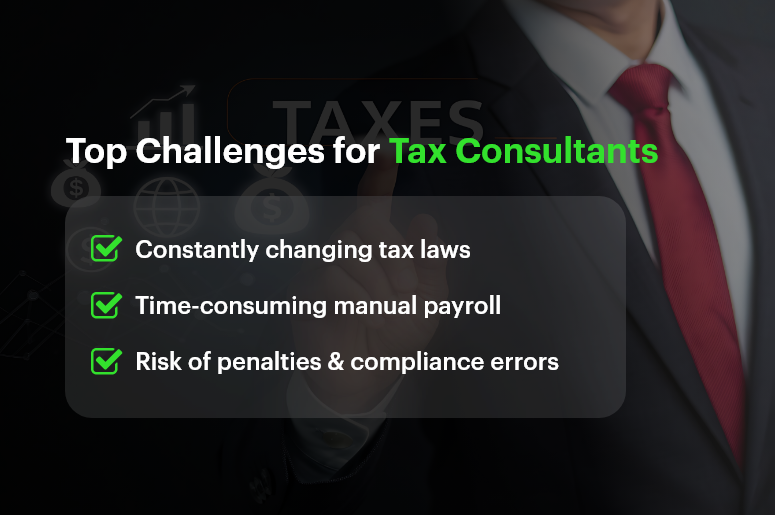
Top Challenges for Tax Consultants

The Top 10 Challenges of Tax Consultants

Here are the 10 biggest hurdles tax consultants face every day:

  • Ever-Changing Tax Laws and Regulations
  • Time-Consuming Manual Calculations
  • Complex Payroll Components (PF, ESI, TDS, Professional Tax)
  • Managing Multiple Clients at Once
  • Ensuring 100% Compliance
  • Handling Errors and Penalties
  • Data Security and Confidentiality
  • Client Miscommunication and Missing Documents
  • Peak Season Workload Pressure
  • Staying Updated with Technology and Automation

Detailed Breakdown of Each Challenge

1. Ever-Changing Tax Laws and Regulations

Tax laws are constantly evolving. Consultants must be aware of:

  • Budget announcements
  • CBDT (Central Board of Direct Taxes) circulars
  • EPFO and ESIC notifications
  • GST amendments
  • State-level changes like professional tax updates

For example, in 2023, the EPF wage ceiling increased, impacting how PF contributions were calculated for employees with higher salaries. Overnight, consultants had to adapt to this change, recalculate contributions, and update payroll systems.

The challenge? Missing even one update can mean incorrect filing, penalties, and angry clients. Consultants spend hours reading government notifications and updating spreadsheets — time that could be spent on client advisory.

2. Time-Consuming Manual Calculations

Manual tax calculation is like walking on a tightrope. Every number must match. One wrong formula in Excel could throw off an entire payroll file.

A tax consultant managing payroll for 100 employees manually has to calculate:

  • PF for each employee (employer + employee share)
  • ESI where applicable
  • TDS based on slabs, exemptions, and rebates
  • Professional Tax based on the state
  • Any arrears, bonuses, or deductions

This process can easily take 2-3 days every month — and that’s assuming no errors. If errors are found, it means re-checking everything.

Automation reduces this burden, but many consultants still rely on outdated methods because they’re afraid of moving away from Excel.

3. Complex Payroll Components

Each payroll component has its own formula, limits, and exceptions.

  • PF (Provident Fund): 12% of Basic + DA. But some employers cap their contribution at a ₹15,000 salary ceiling, while others don’t.
  • ESI: Only applicable if gross salary ≤ ₹21,000/month. Both employer and employee contributions differ.
  • TDS: Calculated on annualised salary after deductions like HRA, 80C, etc. Each employee may have a different TDS liability.
  • Professional Tax: Varies by state. In Karnataka, it’s ₹200/month for a salary > ₹15,000. In Maharashtra, slabs are different.

For consultants managing employees across different states and industries, this complexity becomes a huge challenge.

4. Managing Multiple Clients at Once

Tax consultants rarely work with one client. They may be handling:

  • A manufacturing company with 200 workers
  • A startup with 15 employees
  • Freelancers needing annual filings
  • A mid-sized IT firm with PF, ESI, and GST requirements

Each client has different needs, deadlines, and rules. One client might demand a PF challan today, while another needs revised TDS returns tomorrow. Managing all this requires time-blocking, task prioritisation, and reliable systems.

Without automation, consultants spend more time firefighting than planning.

5. Ensuring 100% Compliance

Tax is all about deadlines:

  • PF/ESI payments: 15th of every month
  • TDS payments: 7th of every month
  • GST filing: 10th, 20th, or 24th (depending on scheme)
  • Annual filings and returns: strict dates

If a consultant misses a deadline, even by a day, the client pays penalties and interest. That damages both trust and reputation.

The compliance burden becomes heavier during the financial year closing when multiple filings overlap. Consultants live under constant pressure to meet these dates without errors.

6. Handling Errors and Penalties

Even with the best intentions, errors happen:

  • Wrong HRA exemption claimed
  • Incorrect PAN/TAN details in TDS filing
  • Salary components misclassified

When this happens, consultants spend hours preparing revised returns, rectifications, and reconciliation. Not only is this frustrating, but clients often blame consultants — even if the mistake was due to missing data from the client.

7. Data Security and Confidentiality

Tax consultants handle highly sensitive data:

  • Employee salary details
  • PAN, Aadhaar, bank accounts
  • Tax returns and IT acknowledgements

In an era of cyber threats, storing this data in Excel files, emails, or unsecured systems is dangerous. A single breach could mean loss of trust, legal action, and permanent damage to reputation.

Clients expect consultants to follow data privacy best practices, which is tough without professional-grade tools.

8. Client Miscommunication and Missing Documents

Consultants often rely on clients to submit:

  • Investment proofs
  • Salary breakup details
  • Rent receipts for HRA
  • Loan repayment documents

The reality? Clients often delay, forget, or send incomplete files. This leads to last-minute rushes, incorrect calculations, and missed deadlines.

For example, if a client shares investment proofs after TDS filing, the consultant must re-do calculations and file corrections. This eats into valuable time.

9. Peak Season Workload Pressure

Tax consultants have two types of seasons: normal workload and chaotic workload.

During filing season (July for IT returns, March for FY closing), consultants may work 12–14 hours daily just to meet deadlines. Stress levels rise, mistakes increase, and burnout becomes real.

Without proper systems, tax consultants feel like they’re constantly “catching up” rather than being in control.

10. Staying Updated with Technology and Automation

Technology is moving fast. Payroll and compliance software now automate PF, ESI, TDS, GST, and reporting. Consultants who adopt these tools become more efficient.

But many still hesitate due to:

  • Lack of training
  • Fear of making mistakes in a new system
  • Cost concerns

The truth? Clients prefer consultants who are tech-enabled. They expect real-time reports, digital pay-slips, and error-free compliance. Falling behind in tech means losing clients to modern competitors.

How PF is Calculated (with Example)

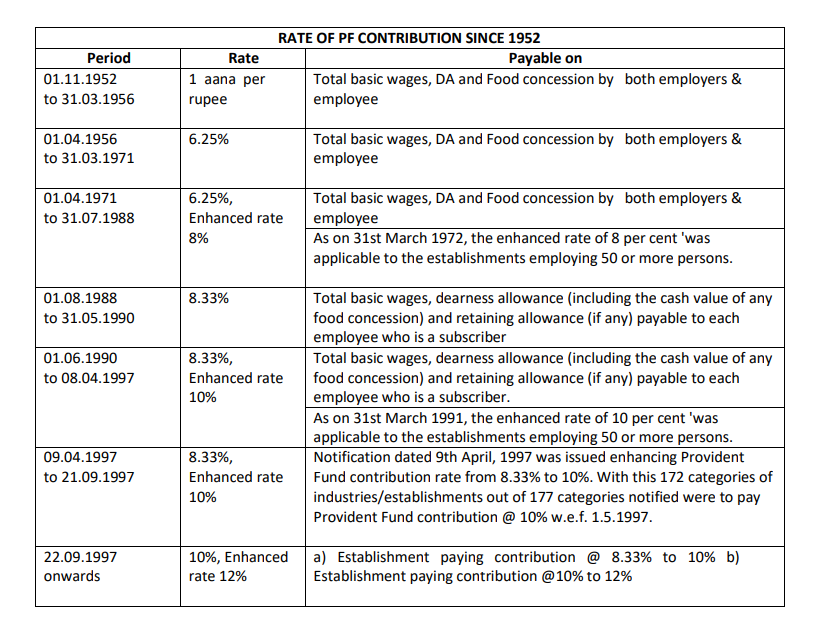
rate of pf contribution since 1952Provident Fund (PF)

Both employer and employee contribute 12% of Basic + DA.

Example:

  • Employee Basic Salary = ₹20,000
  • Employee PF = 12% of 20,000 = ₹2,400
  • Employer PF = 12% of 20,000 = ₹2,400
  • Total PF = ₹4,800 per month

If the company caps PF wages at ₹15,000:

  • Employee PF = 12% of 15,000 = ₹1,800
  • Employer PF = ₹1,800

Various Types of PF Deduction Calculation

Provident Fund (PF) may look straightforward on paper — 12% of basic salary + DA by both employee and employer — but in reality, PF deduction varies depending on company policy, government limits, and employee category. Here are the different scenarios:

1. Standard PF Deduction (12% of Basic + DA)

  • Employee contribution = 12% of Basic + DA
  • Employer contribution = 12% of Basic + DA
  • Widely followed in most organisations.

Example:
Basic Salary = ₹20,000

  • Employee PF = ₹2,400
  • Employer PF = ₹2,400
  • Total = ₹4,800

2. Capped PF Deduction (on ₹15,000 wage ceiling)

As per EPF Act, PF can be calculated only up to ₹15,000 of wages, unless the employer chooses to contribute above this. Many companies follow this cap to reduce costs.

Example:
Basic Salary = ₹25,000

  • Employee PF = 12% of ₹15,000 = ₹1,800
  • Employer PF = ₹1,800
  • Total = ₹3,600

3. Voluntary Provident Fund (VPF)

Employees can choose to contribute more than 12% of their basic salary to PF. Employer contribution remains capped at 12%.

Example:
Basic Salary = ₹30,000

  • Employee decides to contribute 20% = ₹6,000
  • Employer still contributes 12% = ₹3,600
  • Total PF = ₹9,600

4. Employer Contribution Split (EPF + EPS)

Employer’s 12% contribution doesn’t go entirely to EPF. A part is allocated to the EPS (Employee Pension Scheme).

  • 8.33% of Basic (max ₹1,250/month) → EPS
  • Remaining → EPF

Example:
Basic = ₹15,000

  • Employer 12% = ₹1,800
  • EPS (8.33% of 15,000) = ₹1,250
  • Balance (₹550) goes into EPF

5. Exempted Establishments (PF Trusts)

Some organisations run their own PF Trusts, where contributions are managed internally instead of EPFO. While the calculation percentages are the same, returns and management may differ. Consultants must handle compliance differently here.

6. International Worker PF Rules

For employees working in India but from countries with Social Security Agreements (SSA), PF rules may differ. Contributions can be higher, and withdrawal rules are stricter.

Why Does This Matter for Consultants?

Each PF scenario requires different calculations, challans, and reporting. Mistakes here can lead to:

  • Over/under deduction of PF
  • Employee dissatisfaction
  • Non-compliance penalties from EPFO

That’s why tax consultants must be crystal clear on which PF deduction type applies to which employee.

Other Payroll Calculations (with Example)

ESI

  • Employee contribution = 0.75% of gross
  • Employer contribution = 3.25% of gross

If gross = ₹18,000:

  • Employee: ₹135
  • Employer: ₹585
  • Total = ₹720

TDS

Based on tax slabs.

Example: Annual salary ₹6,00,000

  • Less: Standard Deduction = ₹50,000
  • Taxable = ₹5,50,000

Tax:

  • 0 – 2.5L = Nil
  • 2.5 – 5L = 5% = ₹12,500
  • 5 – 5.5L = 5% of ₹50,000 = ₹2,500
  • Total Tax = ₹15,000/year (₹1,250/month)

Professional Tax

Varies by state.

  • Maharashtra: ₹200/month for salaries above ₹10,000
  • Karnataka: ₹200/month for salaries above ₹15,000

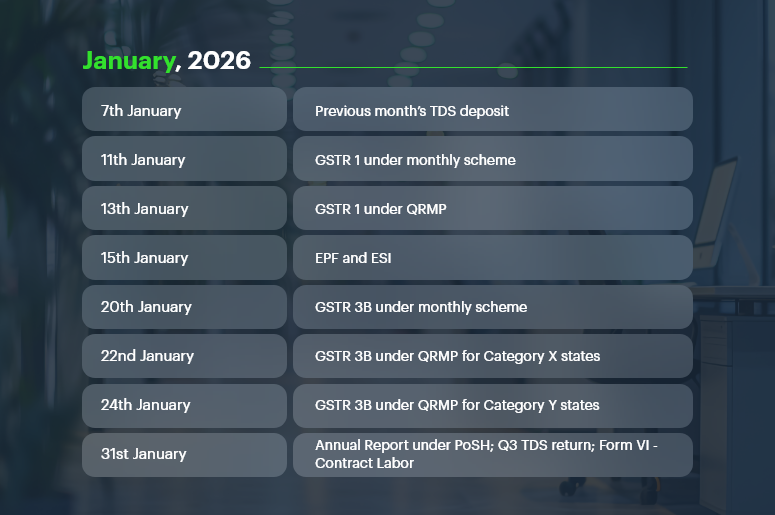
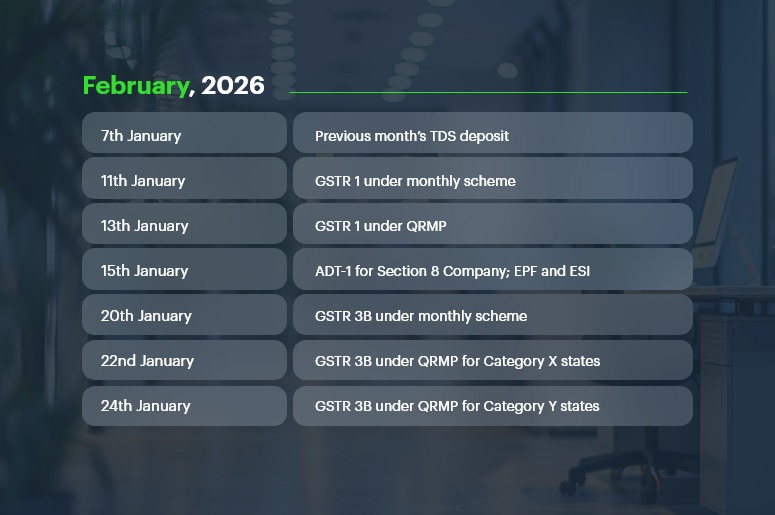
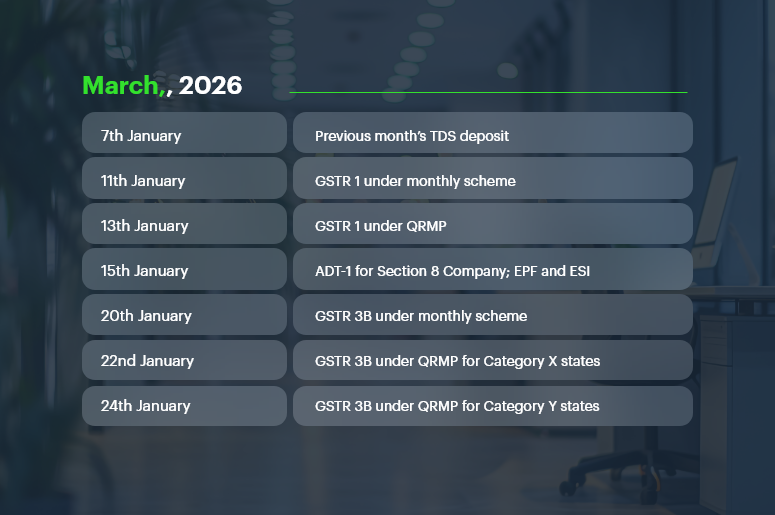
Compliance Calendar FY 2025-26

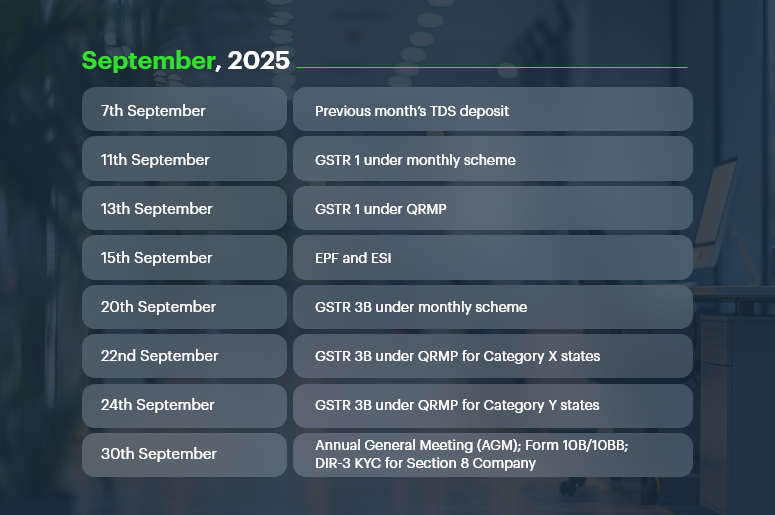
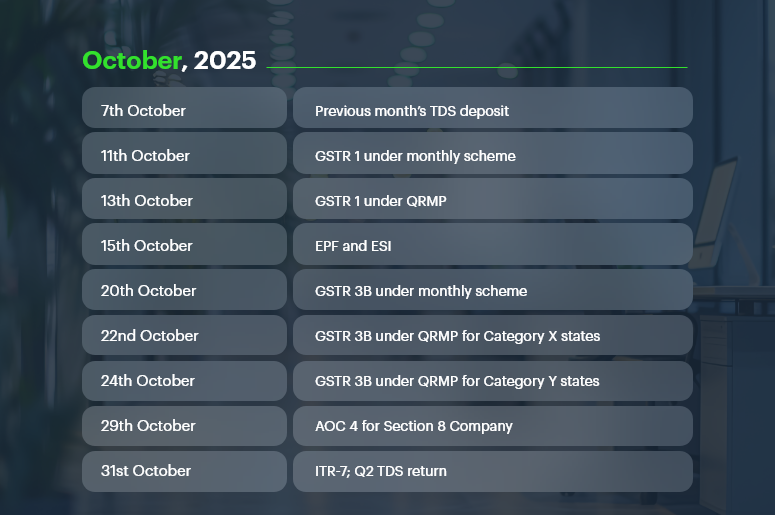
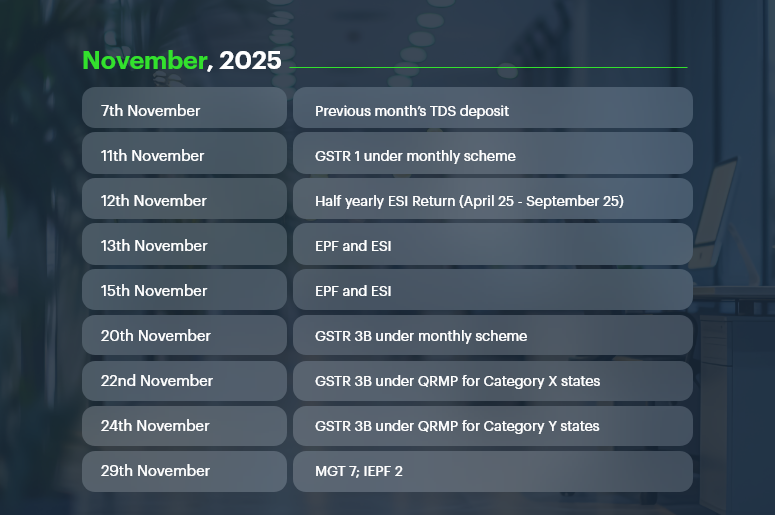
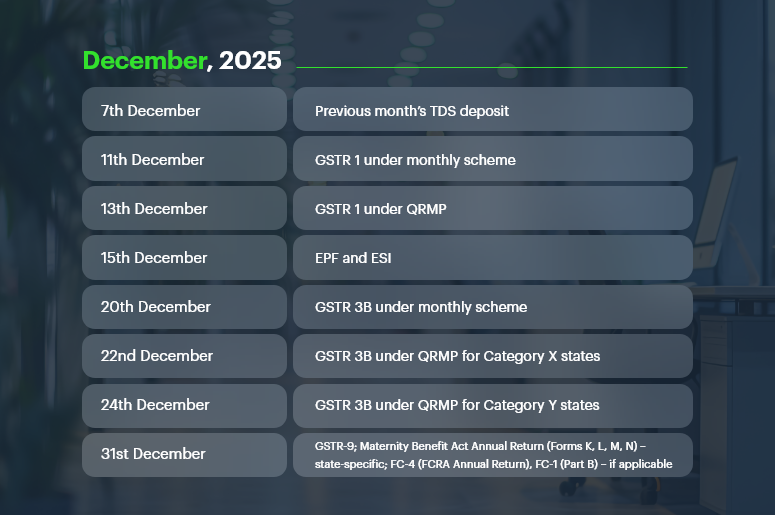
Staying compliant is easier when you have a clear roadmap. Our Compliance Calendar for FY 2025-26 highlights key GST, TDS, Tax, and Regulatory deadlines to help businesses and compliance professionals file on time, avoid penalties, and streamline processes.

What is a Compliance Calendar?

A compliance calendar is a one-stop guide for CFOs, Compliance Officers, and Company Secretaries to track important filing deadlines across GST, Income Tax, Company Law, and Labour Laws. It saves time, reduces risk, and ensures no critical date is missed. Our calendar is updated regularly — so bookmark it and check back often.

September, 2025

Sept-2025-Important-Dates

October, 2025

October-2025-Important-Dates

November, 2025

November-2025-Important-dates

December, 2025

December-2025-Important-Dates

January, 2026

January-2026-Important-Dates

February, 2026

February-2026-Important-Dates

March, 2026

March-2026-Important-Dates

Regulatory Compliance Calendar

Beyond taxes, businesses must comply with Labor Laws and Company Law requirements.

Important Deadlines:

  • ESI Contribution Payment: 15th of every month
  • Professional Tax Payment: 15th of every month (varies by state)
  • Service Tax Returns (ST-3): 25th of the month following the quarter
  • Filing of Annual Return (Form MGT-7): Within 60 days of AGM
  • Filing of Financial Statements (Form AOC-4): Within 30 days of AGM
  • Stamp Duty Payment: As per state laws/transactions

How to Stay Compliant & Avoid Penalties

  • Track all deadlines in one place – Use the compliance calendar as your single source of truth.
  • Automate and reconcile – Auto-file returns and match data with GSTR-2B, 26AS, and books.
  • Stay updated – Watch for changes in GST, TDS, MCA, and Income Tax rules.
  • Validate before filing – Cross-check PAN, GSTIN, challans, and invoices.
  • Centralize & train teams – Store compliance data securely and upskill staff.

EPFO Default Surge and Its Implications for Businesses

Managing PF contributions isn’t just about numbers — it’s about staying compliant with the Employees’ Provident Fund Organization (EPFO).

When companies fail to deposit contributions on time, they risk not only penalties but also becoming part of India’s growing default statistics.

The Historic Surge in EPFO Defaults

According to official EPFO data (2023–24):

  • Total defaults reached ₹25,820.88 crore, a 69.3% jump from ₹15,254.06 crore in 2022–23.
  • Private sector unexempted establishments accounted for the largest chunk with defaults worth ₹13,734.85 crore.
  • Public sector establishments defaulted on ₹2,252.27 crore, while cooperatives owed ₹362.58 crore.
  • Exempted establishments saw arrears rise to ₹5,318.42 crore, a massive 243.7% increase compared to the previous year.

State-Wise Concentration of Arrears

Defaults are not evenly spread. A few states account for the lion’s share of arrears from exempted establishments:

  • Telangana: ₹3,505.84 crore
  • Delhi: ₹213.52 crore
  • West Bengal & Sikkim: ₹145.26 crore
  • Jharkhand: ₹135.66 crore
  • Rajasthan: ₹115.85 crore

Together, these states alone contribute to over 92% of the total arrears.

Why These Defaults Happen

Many of these defaults fall into the “Not Immediately Realisable (NIR)” category, meaning the amounts are stuck in:

  • Court or tribunal disputes
  • Liquidation cases
  • Rehabilitation schemes
  • Instalment-based recovery plans

In fact, 57.9% of total defaults (₹9,474 crore) were marked as NIR.

The Strict Response from EPFO

To counter rising defaults, EPFO has directed regional offices to:

  • Publicly display the top 10 defaulters on notice boards and websites.
  • Attach movable and immovable properties of defaulting establishments.
  • Work with state police for enforcement.
  • Designate civil prisons to expedite recovery from chronic defaulters.

What This Means for Businesses and Consultants

For businesses, defaulting on PF payments is not just a financial setback — it’s a reputational risk. With names being published, properties attached, and stricter enforcement, compliance is non-negotiable.

For tax consultants, this surge highlights the critical role of timely and accurate PF calculation, deduction, and deposit. One missed deadline or error can expose clients to legal battles and massive arrears.

This is why many consultants now prefer automated systems like CrmLeaf Payroll, which:

  • Auto-calculates PF contributions with caps and splits (EPF + EPS).
  • Tracks payment deadlines.
  • Generates challans and compliance-ready reports.
  • Minimizes the chance of default by removing human error.

How CrmLeaf Auto-Calculates PF & Other Payroll Components

With CrmLeaf, tax consultants can say goodbye to manual errors.

  • PF, ESI, and PT are auto-calculated using built-in formulas.
  • TDS updates happen automatically with the latest government slabs.
  • Pay-slips are generated instantly with accurate deductions.
  • Compliance-ready reports are just one click away.
  • Clients get self-service access to pay-slips and tax docs — saving consultants hours of follow-ups.

This turns consultants into trusted advisors instead of number crunchers.

Conclusion

Being a tax consultant today is tough. Between changing laws, complex calculations, multiple clients, and peak season stress, the job can feel overwhelming. But it doesn’t have to be that way.

With automation tools like CrmLeaf Payroll, consultants can eliminate manual errors, stay compliant, and free up their time to focus on what really matters — advisory, strategy, and client relationships.

FAQs

1. What’s the hardest part of being a tax consultant?
Keeping up with constant law changes and ensuring 100% compliance while juggling multiple clients.

2. How is PF calculated?
12% of basic salary + DA, contributed by both employee and employer.

3. What makes payroll so complex?
Because it includes PF, ESI, TDS, and state-level professional taxes, all with different rules and limits.

4. How does CrmLeaf help consultants?
By automating calculations, reducing compliance risks, and generating instant reports.

5. Who can use CrmLeaf?
Individual consultants, small firms, and large companies — it’s scalable for everyone.

Monthly Payroll vs. Weekly Payroll: Which One Is Right for Your Business?

When it comes to payroll, frequency matters more than you might think. The decision between monthly payroll vs. weekly payroll isn’t just a preference — it’s a strategic lever that affects cash flow, compliance, morale, and operational efficiency.

For many HR professionals, finance teams, and small business owners, the question is this: How often should you pay your employees? And more importantly — how does that decision impact your team and bottom line?

In this blog, we’ll break down the differences between monthly and weekly payroll, explore how it affects various business models, and help you choose the option that aligns with your goals — backed by practical insights and powered by the flexibility of CRMLeaf’s CRM + ERP platform.

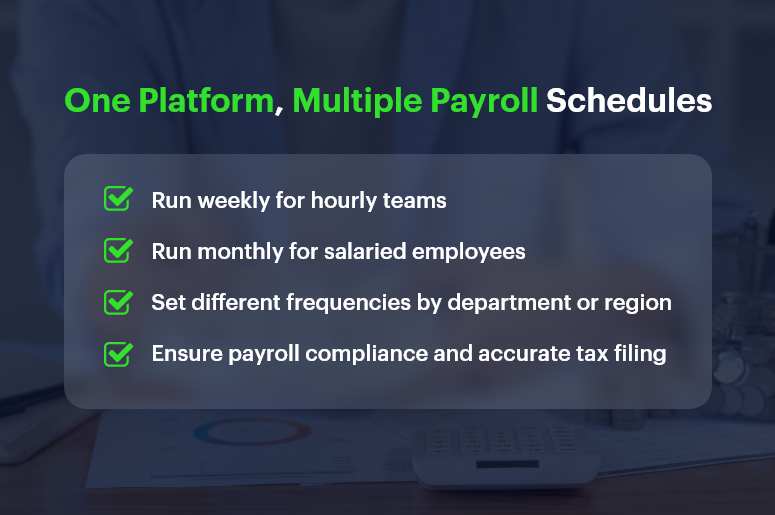
One Platform, Multiple Payroll Schedules

Why Payroll Frequency Is a Strategic Decision for Growing Businesses

Payroll isn’t just about cutting checks — it’s about financial planning, employee satisfaction, and regulatory compliance. As your business scales, choosing the right payroll schedule becomes even more critical.

1. Operational Simplicity vs. Workforce Expectations

  • Businesses often lean toward monthly payroll for its administrative simplicity and predictable cash flow cycles.
  • However, some industries require weekly payroll to meet labor expectations, especially for hourly or part-time staff.

2. Industry-Specific Norms

  • Construction, manufacturing, and retail industries often pay weekly or biweekly due to fluctuating shifts, hourly pay structures, and union rules.
  • SaaS companies, consultancies, and professional services prefer monthly payroll to reduce admin load and align payments with invoice cycles.

3. Employee Engagement and Retention

  • For many employees, pay frequency impacts satisfaction. Weekly payroll can improve morale and reduce financial stress — especially in hourly workforces.
  • On the other hand, salaried professionals often prefer predictable, consolidated monthly pay.

So, how do you decide between monthly payroll vs. weekly payroll? Let’s explore the pros and cons.

Payroll Schedule Comparison: Monthly vs. Weekly Breakdown

Here’s a clear breakdown of the advantages and trade-offs for both schedules, so you can make a confident decision.

Monthly Payroll: Advantages

  • Reduced Administrative Overhead: You only process payroll 12 times a year, saving time, effort, and resource costs.
  • Simplified Tax Filing: Fewer filings mean fewer opportunities for compliance errors and smoother reconciliation processes.
  • Cash Flow Predictability: Monthly payouts help businesses better forecast cash flow, especially when managing vendor payments and invoices.
  • Better Integration with Financial Systems: Monthly payroll aligns well with CRM + ERP platforms that also operate on monthly billing and reporting cycles.

Monthly Payroll: Potential Drawbacks

  • Delayed Earnings for Employees: Waiting 30 days for pay may cause dissatisfaction among employees, especially in lower-income or hourly roles.
  • Harder to Adjust for Mid-Cycle Changes: Bonuses, terminations, and last-minute adjustments may be harder to handle without disrupting the cycle.
  • Less Flexibility: If labor hours vary significantly, reconciling hours and calculating pay can be more challenging over longer cycles.

Weekly Payroll: Advantages

  • Boosts Employee Satisfaction: Employees receive faster access to their earnings, which can reduce financial stress and improve engagement.
  • Ideal for Hourly Workforces: Weekly payroll is perfect for businesses with fluctuating schedules and overtime payments.
  • Faster Error Correction: Mistakes can be caught and corrected more quickly, limiting the window for unresolved issues.

Weekly Payroll: Potential Drawbacks

  • Higher Administrative Load: Processing payroll 52 times a year can burden HR and finance teams — unless you automate with tools like CRMLeaf.
  • Increased Processing Costs: More frequent payroll runs can increase costs related to compliance, direct deposits, and accounting.
  • Shorter Cash Flow Windows: Weekly disbursements require tighter cash management and forecasting to avoid liquidity issues.

Best Practices: How to Choose the Right Payroll Schedule

Choosing between monthly payroll and weekly payroll depends on several factors — employee type, industry, company size, and available payroll infrastructure.

1. Align Payroll with Workforce Structure

  • If your team is largely hourly, seasonal, or shift-based, weekly payroll often works best.
  • For predominantly salaried employees, monthly payroll minimizes complexity and matches performance review or bonus cycles.

2. Evaluate Internal Resources

  • If your HR and finance teams are small or overstretched, monthly payroll might reduce workload and risk.
  • However, automation with CRMLeaf levels the playing field. You can run payroll weekly without overwhelming your team thanks to built-in workflows and tax calculators.

3. Consider Cash Flow Patterns

  • Ask: Can we maintain healthy cash reserves for weekly disbursements?
  • If not, monthly payroll may give your finance team more breathing room for planning, investing, or handling emergencies.

4. Stay Compliant with Local Laws

  • Some jurisdictions mandate weekly or biweekly payments, especially for certain industries.
  • CRMLeaf helps you stay compliant by automating regional payroll compliance and alerting you to changes in tax rules or labor laws.

Real-World Case Study: Choosing the Right Schedule with CRMLeaf

For example, ShopMax, a mid-sized retail business with 300 hourly employees, switched from monthly to weekly payroll using CRMLeaf’s CRM + ERP platform.

After automating time tracking, tax deduction, and overtime calculations:

  • Payroll errors dropped by 45%
  • Employee satisfaction scores increased by 22%
  • Time spent on payroll processing decreased by 40%

By leveraging CRMLeaf’s payroll automation and analytics, ShopMax turned payroll from a pain point into a retention advantage.

Key Takeaways: Finding Your Payroll Sweet Spot

Choosing between monthly payroll vs. weekly payroll isn’t one-size-fits-all. It’s a decision shaped by your team, your operations, and your goals.

  • Weekly payroll may suit hourly teams and high-turnover roles that require speed, transparency, and employee satisfaction.
  • Monthly payroll may suit salaried workforces, project-based companies, and cash-conscious operations.
  • The best strategy is to combine thoughtful planning with powerful automation.

With CRMLeaf’s CRM + ERP platform, you’re not stuck choosing one over the other — you get the flexibility to run different payroll schedules based on department, location, or role.

So whether you want efficiency, accuracy, or happier employees, CRMLeaf empowers your payroll process to align with business strategy.

Real-Time Payroll Dashboards: Turning Data into Strategic Insights

Payroll used to be a back-office chore. Today, real-time payroll dashboards are transforming it into a strategic powerhouse.

Think about this: 70% of CFOs say real-time access to payroll data improves financial decision-making.

Yet many businesses still wrestle with outdated spreadsheets, manual reconciliations, and surprise compliance issues.

If you’re in HR, operations, finance, or running a growing business, here’s the good news — real-time payroll dashboards don’t just track payments. They offer insights you can act on immediately.

In this guide, you’ll learn how modern CRM + ERP platforms like CRMLeaf leverage payroll dashboards to optimize processes, save time, and reduce errors—turning routine data into strategic wins.

Real-Time Payroll Dashboards

Why Real-Time Payroll Dashboards Matter for Growing Businesses

Growing companies need visibility, speed, and compliance — without extra complexity. That’s exactly where real-time payroll dashboards help. Let’s break down why they’re a game-changer.

The Payroll Chaos Most SMBs Face

  • Manual data entry causes errors: When finance and HR teams manually process payroll, inconsistencies creep in — often unnoticed until payday.
  • Disjointed tools lead to delays: Separate tools for time tracking, tax filing, and benefits calculation can slow everything down.
  • Lack of transparency frustrates teams: Employees want to know when they’ll be paid and how deductions work, while managers want to spot overtime trends.

Industries That Benefit the Most

  • Retail chains with variable hourly schedules gain real-time clarity on overtime, absences, and shift differentials.
  • Construction firms need mobile-friendly dashboards to manage crews across multiple sites with diverse pay rates.
  • Tech startups scaling quickly use dashboards to maintain accuracy across employee benefits, bonuses, and stock options.

No matter your industry, access to real-time payroll data can reduce risk, control costs, and improve decision-making.

From Data to Action: Payroll Dashboard Best Practices

Let’s walk through how to get the most from real-time payroll dashboards — and why using a unified CRM + ERP platform like CRMLeaf makes it seamless.

1. Centralize Payroll Inputs for Real-Time Accuracy

Connect your time tracking, leave management, and pay-grade systems.

  • A real-time dashboard can only be as good as the inputs feeding it.
  • By syncing everything — from shift hours to performance bonuses — you eliminate blind spots and double entries.

2. Use Visuals to Spot Trends and Outliers Instantly

Numbers are great — but visuals tell the story.

  • CRMLeaf’s dashboards turn raw numbers into bar graphs, heatmaps, and pie charts so that HR and finance teams can spot anomalies like sudden spikes in overtime or underpayments.
  • It empowers quicker interventions without waiting until end-of-month reports.

3. Automate Compliance Tracking and Tax Calculations

Let automation handle ever-changing laws.

  • Real-time payroll dashboards can flag outdated tax rules or threshold breaches.
  • CRMLeaf’s built-in compliance engine keeps your pay cycles aligned with labor laws, minimum wage regulations, and benefits mandates.

4. Monitor Labor Costs Against Project Budgets

Track labor costs in real-time, right down to individual projects.

  • If you’re using job costing or project accounting, dashboards let you see whether labor spend is exceeding planned budgets — before the project wraps.
  • For industries like construction or consulting, this reduces cost overruns and improves bid accuracy.

5. Empower Managers with Role-Based Access

Let managers access only what they need — securely.

  • Managers can view their team’s payroll insights without seeing sensitive financial data across departments.
  • This ensures data integrity, privacy, and faster decision-making at every level.

Case Study: A Fast-Growing Retail Brand Streamlines Payroll

For example, ShopNova, a rapidly expanding retail brand with 50+ outlets, used CRMLeaf’s real-time payroll dashboards to slash its payroll processing time by 35%.

They integrated biometric time clocks, regional tax rules, and incentive structures across all stores.

The results?

  • Errors dropped by 70%
  • Payroll was processed 3x faster
  • Managers gained insight into peak-hour labor costs, improving scheduling efficiency

With CRMLeaf, ShopNova turned payroll into a strategic lever — not a bottleneck.

Key Takeaways: Why Payroll Dashboards Deserve Your Attention

Let’s recap what makes real-time payroll dashboards so valuable for businesses:

  • You get immediate visibility into payroll operations across departments, helping you make informed decisions faster.
  • You reduce compliance risks by automating tax calculations, deductions, and wage laws.
  • You simplify labor cost management by seeing live reports on where time and money are being spent.
  • You foster employee trust by improving pay accuracy and transparency.

In short, real-time payroll dashboards are no longer a nice-to-have — they’re a must-have for any business that values operational control, compliance, and growth.

They’re also far more powerful when integrated into a CRM + ERP platform like CRMLeaf — bringing payroll, project costing, workforce planning, and reporting under one roof.

Category: EPFO & ESI

No posts in this category.

Subcategory: EPFO

Subcategory: ESI

Category: Payroll Help

No posts in this category.

Subcategory: Employee Self-Service & Engagement

Subcategory: Introduction to Payroll

Subcategory: Payroll Analytics & Reporting

Subcategory: Payroll Automation & Technology

Subcategory: Payroll for Business Growth

Subcategory: Payroll Processing & Management

Subcategory: Taxation & Compliance

Category: User Manual

No posts in this category.

Subcategory: Company Setup

Subcategory: Employee Management

Subcategory: Getting Started

Subcategory: Glossary

Subcategory: Import & Export

Subcategory: Introduction

Subcategory: Payroll Configuration

Subcategory: Payslips & Disbursement

Subcategory: Reports & Analytics

Subcategory: Running Payroll

Subcategory: Statutory Compliance & Reports

Subcategory: Troubleshooting

Subcategory: User Management & Security