PF Challan Generator: How to Generate Error Free EPF Challans & ECR files in 2026

TL;DR: PF Challan Generator in 2026

  • PF Challan Generators automate EPF compliance by calculating PF contributions, generating ECR files, and creating EPFO-ready challans.
  • Employee PF contribution is 12%, while employer contributions are split between EPF, EPS, and EDLI as per EPFO regulations.
  • ECR filing and PF payment are due by the 15th of the following month, making timely payroll processing essential.
  • Common compliance errors include invalid UANs, EPS wage ceiling mistakes, duplicate employee records, and contribution mismatches.
  • Automated payroll software reduces errors, saves administrative time, and improves compliance accuracy through built-in validations and reporting.
  • INDPayroll simplifies PF filing by generating ECR files, supporting TRRN tracking, maintaining audit records, and streamlining monthly EPF compliance workflows.

Managing Provident Fund compliance is critical for HR and payroll teams in India. Every month, employers must calculate contributions, prepare ECR files, upload them to the EPFO portal, and complete payments within statutory deadlines. Manual processes result in errors, missed deadlines, and compliance complications. A PF Challan Generator is a software solution that automates this entire process—automatically calculating contributions, validating employee UANs, generating ECR files, creating EPF challans, and tracking TRRN numbers—while maintaining complete audit compliance.

This comprehensive guide covers everything HR and payroll professionals need to know about PF challan generation, ECR filing procedures, TRRN generation, and payroll automation.

What is a PF Challan Generator?

A PF Challan Generator is software that automates the process of calculating PF contributions, generating ECR (Electronic Challan cum Return) files, and creating PF challans for EPFO compliance.

Instead of manual spreadsheet work, the software calculates contributions automatically based on payroll data, validates employee UANs against the EPFO database, generates ECR-compliant files in XML/CSV format, creates challans with accurate contribution amounts, tracks TRRN numbers for payment verification, maintains compliance records centrally, and generates audit-ready reports with complete documentation trails.

The primary objective is to eliminate manual errors while ensuring timely compliance and maintaining audit trails for regulatory reviews.

India’s #1 Free Software

Free Payroll, PF, ESI & TDS Software

Why Businesses Need a PF Challan Generator

Organisations face significant challenges: manual contribution calculations are prone to errors, UAN mismatches cause ECR rejection and filing delays, duplicate employee records lead to overpayment and compliance issues, ECR formatting errors trigger portal rejection, missed deadlines can result in interest and damages, reconciliation gaps cause audit complications, and manual processes become unmanageable at 50+ employees.

As explained in our guide on 15 Payroll Mistakes HR Managers Should Avoid, even small data entry errors in PF calculations can snowball into costly compliance issues.

A modern PF Challan Generator helps address these challenges through built-in validation, error detection, and automated workflows.

Understanding PF Contributions (2026 Rates)

Employee contribution is 12% of basic salary plus dearness allowance (DA), deducted during payroll and credited to the employee’s EPF account. To understand how salary components like Basic Pay and DA are structured, refer to our detailed guide.

Employer contribution is 12% of PF wages, allocated as: Employer EPF (3.67%), Employer EPS (8.33%), and EDLI (0.5%), per EPFO Scheme 1995. You can use our free PF Calculator to instantly compute these contribution amounts.

IMPORTANT – EPS Wage Ceiling: The EPS wage ceiling is Rs. 15,000 per month (not Rs. 21,000 as commonly misunderstood). Employer EPS contribution (8.33%) is generally capped at Rs. 1,250 per month. This is a critical compliance requirement. For the full breakdown of EPF regulations and statutory rates, visit our compliance page.

For example, an employee with basic salary Rs. 25,000 and DA Rs. 5,000 generates: Employee PF = Rs. 30,000 × 12% = Rs. 3,600; Employer EPF = Rs. 30,000 × 3.67% = Rs. 1,101; Employer EPS = Rs. 15,000 × 8.33% = Rs. 1,250 (wage ceiling applied); EDLI = Rs. 30,000 × 0.5% = Rs. 150. Accurate application of these rules is critical for compliance. Our PF Calculator India 2026 guide walks through these calculations in detail.

What is an ECR File?

Electronic Challan cum Return (ECR) is the mandatory monthly return filed with EPFO containing employee-wise contribution details. The ECR system streamlined compliance reporting into a single unified submission.

An ECR file includes UAN, employee name, wages (gross, EPF, EPS, EDLI), contributions, NCP (Non-Contributory) days, and refund amounts. EPFO accepts XML or CSV formats per official specifications. Before accepting an ECR and issuing TRRN, the portal validates: UAN records against the EPFO member database, contribution amounts follow statutory percentages, wage ceiling application to EPS, NCP days don’t exceed calendar days, and file format matches the official structure.

How to Generate PF Challan Online: 10 Steps

  • Process Payroll: Finalise salary processing with accurate wage calculations per EPFO guidelines.
  • Verify Data: Check all UAN numbers against the EPFO database, employment status, and joining/exit dates.
  • Calculate Contributions: Use automated payroll software to calculate employee and employer contributions as per statutory rates.
  • Generate ECR: Export ECR in XML or CSV format from the integrated payroll system.
  • Upload to EPFO: Log into the EPFO Employer Portal and upload the ECR file.
  • Portal Validates: EPFO system checks UAN validity, contribution amounts, wage ceiling application, and file format compliance.
  • TRRN Generation: After successful validation, EPFO issues a TRRN (Temporary Return Reference Number).
  • Generate Challan: EPFO automatically creates a PF challan with TRRN, employer details, contribution amount, and payment instructions.
  • Make Payment: Pay through EPFO-authorised banks by the statutory due date to comply with filing requirements.
  • Document & Reconcile: Download receipts from the EPFO portal, maintain records, and reconcile payroll, ECR, challan, and bank amounts.

Filing Deadlines and Compliance

The statutory due date for ECR filing and PF payment is the 15th of the following month. Extensions may occasionally be announced by EPFO for specific months, but there is no standard permanent grace period. Delayed filing may result in interest under Section 7Q (typically 12% per annum) and damages under Section 14B.

To stay on top of all statutory deadlines, use our free Compliance Calendar. For a broader understanding of laws governing payroll in India, read our post on Payroll Compliance 101: Key Laws Every Business Must Follow. For the latest deadline information, refer to the EPFO Official Portal.

Common ECR Errors to Avoid

  • Invalid or inactive UANs are a major cause of ECR rejection—verify all UANs before ECR generation.
  • Wage mismatch occurs when payroll wages differ from ECR amounts—reconcile reports before upload.
  • EPS contribution errors happen when the Rs. 15,000 wage ceiling is not applied correctly—always cap EPS calculations at this limit.
  • Duplicate employee records cause overpayment—clean master data before ECR generation.
  • Incorrect NCP days result from unsynced attendance data—match leave records with payroll.
  • Contribution mismatches occur from calculation errors—perform reconciliation before upload.

Real-World Example: Why Accuracy Matters

A mid-sized manufacturing company with 150 employees filed ECR manually for 3 years, averaging 8-12 errors per month. Common issues: invalid UANs (3-4 cases), wage mismatches (2-3 cases), and NCP day errors (1-2 cases).

This resulted in Rs. 45,000 in annual penalties, 15 hours of monthly admin time, and audit complications. After implementing a PF Challan Generator, errors dropped to zero, processing time reduced drastically, and compliance became 100% certified. This demonstrates the value of automation for mid-market organisations. Similar benefits are described in our guide on 15 Proven Payroll Best Practices for Indian SMEs.

How to Generate PF Challan Using INDPayroll

Step 1 → Log in to INDPayroll
Step 2 → Update Employee PF Details (UAN, PF Number, EPS Number)
Step 3 → Configure Salary Components and group for PF eligibility
Step 4 → Add employee salary
Step 5 → Run Monthly Payroll (Payroll → Run Payroll → Generate)
Step 6 → Go to Reports → Statutory Filings → PF Return (ECR)
Step 7 → Select Date Range, Department, Designation filters
Step 8 → Click Show Report → Verify ECR data table
Step 9 → Click Export ECR → Download .txt file
Step 10 → Upload .txt file to EPFO Portal → Get TRRN
Step 11 → Generate PF Challan on EPFO Portal
Step 12 → Make Payment (Net Banking / NEFT)
Step 13 → Record submission in INDPayroll (Add PF Return ECR Submission)

PF Challan Generator

INDPayroll also supports similar automated filing for ESI contributions. If you manage both PF and ESI for employees, refer to our guide on How to Generate ESI Challan Online for a parallel walkthrough.

Benefits of Automation

Automated systems reduce processing time compared to manual methods, improve accuracy through built-in validation, reduce manual data entry errors, prevent UAN validation failures through database verification, apply contribution rules correctly, detect errors before EPFO submission, generate audit-ready reports, and help maintain compliance records. Centralised records simplify audits, and the system scales easily for organisations of different sizes.

For HR teams looking to streamline all aspects of payroll—not just PF—our article on TDS on Salary: How to Calculate It Correctly in 2026 provides complementary guidance on managing income tax deductions alongside PF compliance.

Free Payroll, PF, ESI & TDS Software

The most trusted automation tool for modern Indian businesses.

Conclusion

PF compliance requires accuracy and timely execution at every step. Manual filing processes can lead to errors and delays. Modern payroll software helps automate calculations, validate employee data, and streamline monthly filings in accordance with EPFO standards. For organisations with multiple employees, automation can help reduce manual errors and simplify compliance processes.

Ready to eliminate PF compliance errors? Explore INDPayroll’s PF & ES Compliance module and run your first error-free ECR filing today.

ESIC New Rules 2026: Salary Limit, Eligibility, Contribution Rates & Payroll Compliance Guide

TL;DR: ESIC New Rules 2026

  • ESIC wage ceiling remains unchanged at ₹21,000 per month for general employees and ₹25,000 for employees with disabilities.
  • Contribution rates remain the same: Employer contributes 3.25%, and employee contributes 0.75% of eligible wages.
  • Eligible employees working in covered establishments and earning within the wage limit must be enrolled under the ESI Scheme.
  • ESI wages include Basic Pay, DA, HRA, CCA, attendance allowance, and other regular allowances, while overtime, bonus, gratuity, and reimbursements are generally excluded.
  • Employers must ensure compliance through timely registration, accurate contribution calculations, record maintenance, and on-time monthly payments.
  • No major ESIC rule changes were officially notified for 2026; the focus remains on stronger payroll compliance, digital audits, and accurate employee coverage.

Introduction

The Employees’ State Insurance Corporation (ESIC) is one of India’s largest social security organizations, providing medical and financial benefits to millions of employees and their families. For employers, compliance with this scheme is a critical payroll responsibility that directly impacts statutory compliance and employee welfare.

In 2026, employers must continue to comply with these statutory regulations relating to employee eligibility, wage limits, contribution calculations, registration requirements, and monthly filings.

This guide explains the latest ESIC rules applicable in 2026, including salary limits, contribution rates, eligibility criteria, benefits, compliance requirements, and payroll best practices.

India’s #1 Free Software

Free Payroll, PF,
ESI & TDS Software

Professional compliance management for Indian businesses. 100% Free Forever.

What Is ESIC?

The Employees’ State Insurance (ESI) Scheme is governed by the ESI Act, 1948, and administered by the Employees’ State Insurance Corporation (ESIC).

The scheme provides social security protection to eligible employees against:

  • Sickness
  • Maternity
  • Employment injury
  • Disability
  • Death due to employment injury

Employees and employers contribute to the scheme, enabling insured persons and their dependents to receive medical and financial benefits.

ESIC Salary Limit 2026

The ESIC wage ceiling in 2026 remains:

Category Wage Limit
General Employees ₹21,000 per month
Employees with Disabilities ₹25,000 per month

Employees earning wages within the prescribed limit are generally covered under the ESI Scheme if employed in an eligible establishment.

Who Is Eligible for ESIC Coverage?

An employee is generally covered under ESIC if (refer to the ESI registration guide for details):

  • The establishment is covered under the ESI Act.
  • The employee’s monthly wages do not exceed ₹21,000.
  • The establishment employs the prescribed minimum number of employees (generally 10 or more).
  • The employee works in a covered category of employment.

Coverage may also extend to:

  • Contract workers
  • Casual workers
  • Temporary employees
  • Outsourced workers deployed at covered establishments

Wage Components Included in ESIC Calculation

The following salary components are generally included for ESI contribution purposes:

  • Basic Salary
  • Dearness Allowance (DA)
  • House Rent Allowance (HRA)
  • City Compensatory Allowance (CCA)
  • Attendance Allowance
  • Night Shift Allowance
  • Fixed Monthly Incentives
  • Other Regular Allowances

Wage Components Generally Excluded

  • Overtime Wages
  • Annual Bonus
  • Ex-Gratia Payments
  • Leave Encashment
  • Gratuity
  • Retrenchment Compensation
  • Employer PF Contribution
  • Travel Reimbursements
  • Business Expense Reimbursements

Correct wage classification is essential for accurate contribution calculations. Use our free ESI Calculator to verify deductions instantly.

ESIC Contribution Rates 2026

The contribution rates remain unchanged in 2026.

Contribution Rate
Employer Contribution 3.25%
Employee Contribution 0.75%
Total Contribution 4.00%

Employers are responsible for deducting employee contributions and depositing both shares with the corporation. Explore our PF & ESI Compliance Software for automated calculations.

ESIC Contribution Calculation Examples

Example 1: Monthly Wage ₹15,000

Particulars Amount
Monthly Wage ₹15,000
Employee Contribution (0.75%) ₹112.50
Employer Contribution (3.25%) ₹487.50
Total Contribution ₹600.00

Example 2: Monthly Wage ₹21,000

Particulars Amount
Monthly Wage ₹21,000
Employee Contribution (0.75%) ₹157.50
Employer Contribution (3.25%) ₹682.50
Total Contribution ₹840.00

ESIC Contribution Period and Benefit Period

The scheme follows two contribution periods and corresponding benefit periods.

Contribution Period Benefit Period
April – September January – June
October – March July – December

Benefits are generally available during the applicable benefit period based on contributions made during the contribution period.

Free Payroll, PF, ESI & TDS Software

The most trusted automation tool for modern Indian businesses.

What Happens If Salary Exceeds ₹21,000?

A common payroll question arises when an employee’s wages exceed the ESIC wage ceiling during a contribution period. Use our CTC Calculator to model revised salary structures.

If an employee is already covered at the beginning of a contribution period and subsequently receives a salary increase above ₹21,000, ESIC contributions generally continue until the end of that contribution period.

Example

Month Wage
April ₹20,500
July ₹22,500

The employee remains covered until the current contribution period ends.

ESIC Registration Process for Employers

Step 1: Employer Registration

Register the establishment on the official portal and obtain the Employer Code Number.

Step 2: Employee Enrollment

Register eligible employees and collect required personal and family information.

Step 3: Insurance Number Generation

Each insured employee receives a unique Insurance Number.

Step 4: Monthly Contribution Calculation

Calculate employee and employer contributions based on applicable wages.

Step 5: Contribution Payment

Deposit all contributions through the online portal. Learn how to generate ESI challan online for timely payment.

Step 6: Maintain Records

Maintain wage records, contribution records, employee details, and statutory documentation for inspections and audits.

ESIC Due Date for Contribution Payment

Employers must deposit ESIC contributions within 21 days of the end of the calendar month” — i.e., by the 21st of the following month, per Regulation 31 of the ESI (General) Regulations, 1950.

Late payment may result in:

  • Interest on delayed contributions
  • Damages and penalties
  • Compliance notices
  • Legal action in severe cases

ESIC Benefits Available to Employees

Medical Benefit

Comprehensive medical care for insured employees and their dependents.

Sickness Benefit

Cash compensation during certified sickness periods.

Extended Sickness Benefit

Additional support for specified long-term illnesses.

Maternity Benefit

Paid maternity benefits for eligible insured women employees.

Temporary Disablement Benefit

Compensation for temporary loss of earning capacity due to employment injury.

Permanent Disablement Benefit

Long-term financial assistance for permanent disability.

Dependants Benefit

Financial support for dependants in case of death due to employment injury.

Funeral Expenses

Financial assistance towards the funeral expenses of an insured person.

Payroll Compliance Checklist for Employers

To maintain ESIC compliance in 2026 and meet all statutory compliance requirements:

  • Verify employee eligibility regularly.
  • Register all eligible employees promptly.
  • Calculate applicable wages accurately.
  • Deduct employee contributions correctly.
  • Deposit contributions within prescribed timelines.
  • Maintain contribution and wage records.
  • Reconcile payroll and statutory filings monthly. Use the Compliance Calendar to track all due dates.
  • Monitor salary changes impacting ESIC eligibility.
  • Respond promptly to ESIC notices and inspections.

What Actually Changed in 2026?

While ESIC contribution rates and wage ceilings remain unchanged in 2026, the compliance environment is new. ESIC has intensified digital audits, enforced stricter employer registration checks, continued the SPREE scheme for new enrolments, and increased scrutiny of contract worker coverage. For employers, 2026 demands stronger payroll accuracy and audit readiness.

Organizations are expected to:

  • Maintain accurate payroll records.
  • Ensure proper employee registration.
  • Avoid incorrect wage classifications.
  • Strengthen payroll audit readiness.
  • Use payroll systems capable of handling statutory compliance automatically.

For most employers, the focus in 2026 is not on new contribution rates but on stronger compliance and accurate payroll administration. Avoid costly errors by reviewing common payroll challenges HR teams face.

How INDPayroll Simplifies ESIC Compliance

INDPayroll’s payroll software helps businesses manage ESIC compliance through:

By automating payroll processes, organisations can reduce manual effort, minimise errors, and maintain statutory compliance.

India’s #1 Free Software

Free Payroll, PF, ESI & TDS Software

Conclusion

The scheme remains a critical component of India’s social security framework. Employers must ensure accurate employee registration, wage classification, contribution calculation, and timely compliance to avoid penalties and ensure uninterrupted benefits for employees. Follow proven payroll best practices and use purpose-built tools to stay ahead.

By understanding ESIC eligibility rules, salary limits, contribution requirements, and compliance obligations, organizations can build a stronger payroll compliance framework and provide better protection to their workforce.

How to Generate ESI Challan Online: Complete Guide for Indian Employers 2026

TL;DR: ESI Challan Generator Guide 2026

  • ESI compliance is mandatory for eligible employees and requires employers to calculate, deposit, and report contributions accurately every month.
  • Current ESI contribution rates are 0.75% (employee) and 3.25% (employer), totaling 4% of gross wages.
  • ESI challans must be generated and paid by the 15th of the following month to avoid penalties, interest, and compliance issues.
  • Accurate eligibility checks, contribution calculations, and employee records are essential for maintaining ESIC compliance.
  • Common mistakes include calculation errors, missed deadlines, zero-contribution filing omissions, and delayed employee registration.
  • INDPayroll automates ESI calculations, challan generation, compliance tracking, and reporting, helping businesses complete ESI filing in minutes.

Introduction

Managing payroll compliance is one of the most important responsibilities for employers in India. Among various statutory requirements, Employee State Insurance (ESI) compliance plays a crucial role in protecting employees while ensuring businesses meet their legal obligations.

However, managing ESI contributions manually can be challenging. HR and payroll teams often spend significant time calculating contributions, verifying employee eligibility, generating challans, and making timely payments. Even a minor mistake can lead to compliance issues, penalties, or additional administrative work.

As organisations grow, manual payroll processes become increasingly difficult to manage. This is why businesses are adopting automated payroll solutions and ESI Challan Generators to simplify compliance, improve accuracy, and save valuable time.

In this guide, you will learn everything about ESI challan generation, contribution calculations, payment procedures, compliance requirements, and how payroll software can streamline the entire process.

India’s #1 Free Software

Free Payroll, PF, ESI & TDS Software

What Is Employee State Insurance (ESI)?

Employee State Insurance (ESI) is a social security and health insurance scheme administered by the Employees’ State Insurance Corporation (ESIC), an autonomous body under India’s Ministry of Labour and Employment, established under the Employees’ State Insurance Act, 1948.

The scheme provides financial protection and medical benefits to eligible employees and their families during:

  • Sickness
  • Maternity
  • Employment injury
  • Disability
  • Medical emergencies
  • Dependents’ support requirements

The objective of ESI is to ensure that employees have access to healthcare services and income support during difficult situations.

What Benefits Does ESI Provide to Employees?

Quick Answer: ESI provides covered employees with free medical care, sickness cash benefit at approximately 70% of wages, maternity benefit, disability compensation, dependent support, and funeral expense assistance. Benefits extend to the employee’s family. Coverage applies during employment in any ESIC-registered establishment where the employee earns up to ₹21,000 per month.

The ESI scheme offers several benefits to covered employees.

  • Medical Benefits: Employees and their dependents can access medical treatment through ESIC hospitals and dispensaries.
  • Sickness Benefits: Employees receive approximately 70% of their average daily wages during certified illness periods — for up to 91 days in two consecutive benefit periods per year.
  • Maternity Benefits: Female employees are entitled to maternity-related benefits under applicable conditions as per the ESI Act.
  • Disability Benefits: Employees who suffer work-related disabilities receive monthly compensation in accordance with ESIC guidelines.
  • Dependents’ Benefits: Family members receive monthly financial support if an employee dies from an on-the-job injury.
  • Funeral Expenses: A fixed lump sum is available for funeral-related expenses as notified by ESIC. Verify the current amount at ESIC. in.

Why Does ESI Compliance Matter for Indian Employers?

Quick Answer: ESI compliance is a statutory obligation under the Employees’ State Insurance Act, 1948. Non-compliant employers face interest at 12% per annum, damages up to 25% of arrears, ESIC inspection notices, and prosecution under Section 85 of the ESI Act. Compliance protects employees’ social security rights and shields businesses from financial penalties and legal action.

Employers covered under ESI regulations must:

  • Register eligible employees with ESIC
  • Calculate contributions accurately every month
  • Deposit contributions on time
  • Maintain payroll and contribution records
  • Generate ESI challans
  • File the half-yearly Return of Contributions (RC)
  • Preserve all compliance documentation

Failure to comply may result in:

  • Interest at 12% per annum on delayed payments
  • Damages of 5% to 25% of arrear amounts, depending on the delay period
  • Compliance notices from ESIC
  • Legal action under Section 85 of the ESI Act
  • Increased audit risks

For growing businesses, automated compliance management is the most effective way to avoid these risks.

ESI Eligibility Criteria

Employees are covered under the ESI scheme if their gross monthly wages do not exceed ₹21,000 per month.
For employees with disabilities, the wage ceiling is ₹25,000 per month.

Employers should regularly review employee payroll records to determine eligibility and maintain compliance.

Which Establishments Must Register?

Establishment Type Minimum Employees Required
Factory (power-using) 10 or more
Non-seasonal factory 10 or more
Shops, restaurants, hotels, and cinemas 10 or more
Road motor transport undertakings 10 or more

Once an establishment is registered, coverage continues even if the employee count later falls below the threshold. For a complete walkthrough of the process, see our ESI Registration Process guide for employers.

ESI Contribution Periods

The ESI scheme operates in two contribution periods every year:

Contribution Period Months Covered
1st Period 1 April – 30 September
2nd Period 1 October – 31 March

Important rule: If an employee’s salary crosses ₹21,000 mid-period, they remain covered under ESI until the end of that contribution period — not immediately. Their exclusion takes effect from the start of the next period. This is one of the most commonly misunderstood ESI rules.

ESI Contribution Rates for 2026

Both employers and employees contribute to the ESI scheme every month.

Contribution Type Rate
Employee Contribution 0.75% of gross wages
Employer Contribution 3.25% of gross wages
Total Contribution 4.00% of gross wages

These rates were revised in 2019 and remain applicable in 2026.

How to Calculate ESI Contributions

Accurate calculation is essential for generating the correct ESI challan.

Quick Answer: ESI contribution is calculated by multiplying the employee’s gross monthly wages by 0.75% for the employee share and 3.25% for the employer share. Both figures are rounded to the nearest rupee. ESIC does not accept paise values.

Example Calculations

Monthly Salary Employee Contribution (0.75%) Employer Contribution (3.25%) Total
₹18,000 ₹135 ₹585 ₹720
₹20,000 ₹150 ₹650 ₹800
₹21,000 ₹158 ₹683 ₹841

Rounding rule: ESIC rounds all contributions to the nearest rupee. For example, ₹21,000 × 0.75% = ₹157.50, which rounds to ₹158. Always round — ESIC does not accept paise values in challans.

When managing large workforces, manual calculations across dozens of employees become time-consuming and error-prone. Automated payroll software handles rounding and calculation automatically.

Free Payroll, PF, ESI & TDS Software

The most trusted automation tool for modern Indian businesses.

What Is an ESI Challan?

An ESI challan is the official monthly payment document that employers generate and submit to deposit ESI contributions with ESIC.

Quick Answer: An ESI Challan is a monthly payment document submitted by registered employers to ESIC. It records the employer contribution (3.25% of gross wages) and employee contribution (0.75% of gross wages) for all covered employees. It consolidates wage and contribution data into a single payable amount used to remit statutory ESI dues and maintain ESIC compliance records.

The challan contains essential details such as:

  • Employer code
  • Establishment information
  • Contribution period (wage month)
  • Employee-wise IP numbers, wages, and contributions
  • Employer contribution amount
  • Employee contribution amount
  • Total payable contribution
  • Payment reference information

The challan acts as legal proof that ESI contributions have been calculated and deposited correctly.

How to Generate an ESI Challan Online

Quick Answer: To generate an ESI challan online, log in to the ESIC employer portal at esic. In using your employer code and password. Navigate to Monthly Contribution → Enter Contribution. Enter employee-wise data or upload a CSV file, verify the totals, generate the challan, and pay via net banking or NEFT by the 15th of the following month.

Step 1: Collect Employee Payroll Information

Gather data including:

  • Employee salaries and gross wages
  • Attendance records and leave information
  • Overtime details
  • Employee eligibility status (who is under ₹21,000)
  • IP numbers for all covered employees

Step 2: Calculate ESI Contributions

Determine employer and employee contributions based on current rates, rounded to the nearest rupee. You can also use our Salary Components in India guide to understand which allowances form the ESI calculation base.

Step 3: Verify Employee Data

Ensure that:

  • Salary records are accurate and finalised
  • All employee details match ESIC records
  • All eligible employees are included
  • New joiners have been registered on the ESIC portal

Step 4: Generate the Challan

Log in to esic. In and navigate to Employer Login → Monthly Contribution → Enter Contribution. Enter data manually or upload a CSV file, verify the summary, and click Generate Challan.

Step 5: Complete Payment

Submit payment through net banking (SBI, PNB, or other empanelled banks), NEFT/RTGS using the challan reference number, or at a designated bank branch.

Step 6: Store Compliance Records

Maintain copies of:

  • ESI challans and payment receipts
  • Employee-wise contribution statements
  • Payroll reports for the contribution period

Proper documentation is essential for compliance and future audits.

Generate ESI Challan in Minutes with INDPayroll

Generating an ESI challan with INDPayroll is quick and helps ensure accurate ESIC compliance. Follow these steps:

  • Step 1: Log in to INDPayroll
  • Step 2: Update Employee Attendance & Salary Data
  • Step 3: Run Monthly Payroll
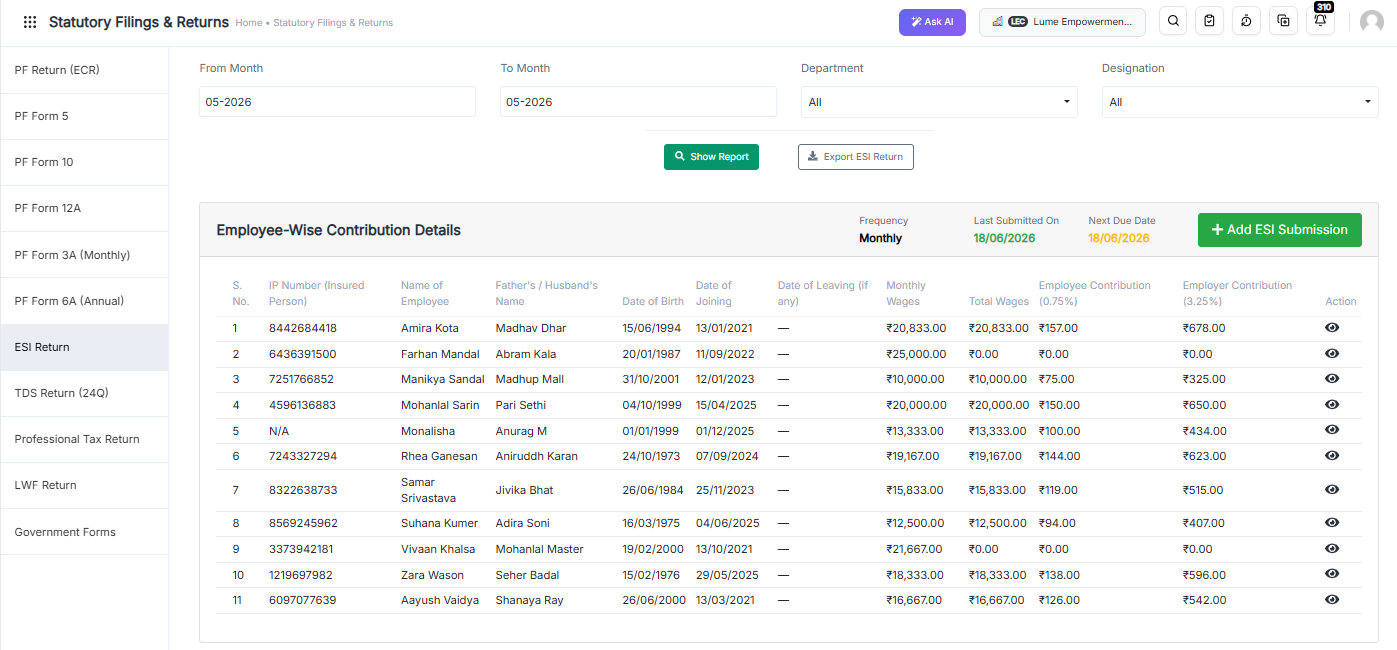
  • Step 4: Go to Statutory Filings
  • Step 5: Open the ESI Return
  • Step 6: Export the ESI Challan File
  • Step 7: Download in ESI Challan Format
  • Step 8: Upload the File to the ESIC Portal
  • Step 9: Generate the Challan Instantly

ESI Challan Generator

Key Benefits

  • No further or additional calculations are required.
  • ESI contribution data is prepared automatically.
  • Month-over-month data can be exported instantly whenever required. Use our payslip and reports generator for professional documentation.
  • Reduces manual effort and minimises compliance errors.
  • Ensures faster ESI challan generation and filing.

ESI Payment Due Date and Compliance Deadlines

Quick Answer: ESI challan is due by the 15th of the month following the wage month. For example, June 2026 contributions must be paid by 15 July 2026. If the 15th falls on a bank holiday, the next working day applies.

Monthly Challan Due Dates (2026–27)

Wage Month Challan Due Date
April 2026 15 May 2026
May 2026 15 June 2026
June 2026 15 July 2026
July 2026 15 August 2026
August 2026 15 September 2026
September 2026 15 October 2026
October 2026 15 November 2026
November 2026 15 December 2026
December 2026 15 January 2027
January 2027 15 February 2027
February 2027 15 March 2027
March 2027 15 April 2027

Half-Yearly Return of Contributions (RC)

In addition to monthly challans, employers must file a Return of Contributions (RC) twice a year. This is a separate statutory requirement that many employers overlook.

Contribution Period RC Filing Due Date
April – September 2026 11 November 2026
October 2026 – March 2027 11 May 2027

Missing the RC deadline is treated as non-compliance independently of your monthly challan payments.

Penalty for Late Payment

Delay Period Damages Levied
Less than 2 months 5% of the arrear amount
2 to 6 months 10% of the arrear amount
6 months to 1 year 15% of the arrear amount
More than 1 year 25% of the arrear amount

Plus simple interest at 12% per annum from the due date. Continued defaults can lead to prosecution under Section 85 of the ESI Act. For a broader view of payroll legal obligations, read our Payroll Compliance 101 guide.

Zero Contribution Filing: A Requirement Most Employers Miss

If your establishment had no eligible employees in a given month — because all employees exceeded the ₹21,000 wage ceiling, or due to temporary closure — you must still file a zero-contribution challan for that month.

Skipping it is treated as non-filing by ESIC and can trigger a compliance notice. This is one of the most frequently overlooked ESI obligations among Indian SMEs.

What Are the Common Challenges in ESI Challan Management?

Quick Answer: The most common ESI challan challenges are manual calculation errors (especially incorrect rounding), missed 15th-of-month deadlines, IP number mismatches on the ESIC portal, eligibility blind spots when salaries cross ₹21,000, overlooked zero-contribution months, and difficulty compiling the half-yearly Return of Contributions from scattered spreadsheet records.

Most compliance failures are not caused by ignorance of the law. They are caused by process gaps in manual workflows. Discover the top payroll automation benefits that can help your business eliminate these gaps.

Manual Calculation Errors: Incorrect contribution calculations — especially rounding errors — lead to mismatched challans and correction requests with ESIC.

Missed Deadlines Tracking the 15th-of-month deadline manually, alongside payroll close and other compliance tasks, increases the risk of delayed payments.

Employee Data Inconsistencies: IP number mismatches, name discrepancies between ESIC records and payroll systems, and salary data errors cause challan rejection on the ESIC portal.

Eligibility Blind Spots Salary revisions that push employees above ₹21,000 mid-period are easy to miss. The wage ceiling continuation rule — where the employee stays covered until the period ends — adds complexity.

Administrative Burden Manual processing consumes valuable HR and payroll resources that could be directed toward higher-value work. Learn more about why manual payroll fails growing businesses in India.

Half-Yearly Return Compilation When monthly records are stored in separate spreadsheets across six months, compiling the RC is time-consuming and prone to errors.

Common ESI Compliance Mistakes Employers Should Avoid

  • Incorrect employee eligibility determination
  • Wrong contribution calculations (especially not rounding to the nearest rupee)
  • Delayed challan generation
  • Late ESI payments
  • Skipping zero-contribution challan months
  • Not filing the half-yearly Return of Contributions (RC)
  • Missing IP number registration for new joiners
  • Ignoring contractor employee ESI liability

Automating payroll and compliance processes significantly reduces all of these risks. For a broader list of errors to watch for, see 15 payroll mistakes HR managers should avoid.

Manual ESI Management vs Automated ESI Challan Generator

Feature Manual Process Automated ESI Challan Generator
Contribution Calculation Manual, error-prone Automatic, rounded correctly
Challan Generation Time-consuming One-click generation
Error Risk High Minimal
Rounding Compliance Often missed Built-in
Eligibility Tracking Manual review Auto-flags employees above ₹21,000
Deadline Reminders Manual calendar Automated alerts
RC Filing Data Manual compilation Auto-generated from monthly data
Zero-Return Filing Easy to forget System prompts when applicable
Audit Readiness Difficult Organised digital records
Scalability Limited Highly scalable

Why Businesses Choose INDPayroll’s ESI Challan Generator

INDPayroll’s ESI Challan Generator is built specifically for Indian statutory compliance. Every feature addresses a real pain point that Indian payroll teams face every month.

Quick Answer: INDPayroll’s ESI Challan Generator automatically calculates ESI contributions, tracks employee eligibility against the ₹21,000 wage ceiling, and generates ESIC portal-compatible challan files every month. It integrates with payroll and attendance data, sends deadline alerts, and auto-compiles the half-yearly Return of Contributions — eliminating manual effort and penalty risk for Indian employers.

Key benefits include:

  • Automatic ESI contribution calculations with correct rounding
  • One-click ESI challan generation
  • Employee eligibility tracking with automatic wage ceiling alerts
  • Integrated payroll and attendance management
  • Automated deadline reminders (monthly challan and half-yearly RC)
  • Zero-contribution challan prompts when applicable
  • Centralised employee records with IP number management
  • Compliance tracking and audit-ready reporting
  • Secure cloud-based access

Businesses that switch from manual ESI filing to INDPayroll consistently report that monthly compliance preparation time drops from several hours to under 15 minutes. Read our guide on how to run payroll in minutes with INDPayroll — and that missed-deadline incidents fall to near zero once automated reminders and one-click challan generation are in place.

Whether you are a startup, SME, or growing enterprise, INDPayroll helps reduce compliance risks while improving efficiency. Explore the top 10 features every Indian payroll software must have to evaluate your compliance toolkit.

INDPayroll also integrates with Payroll Compliance Software, Attendance Management Software, PF & ESI Compliance Solutions, and Salary Management Software for end-to-end statutory compliance.

What Are the Best Practices for ESI Compliance in 2026?

  • Maintain accurate, up-to-date employee records at all times
  • Register new employees with ESIC promptly after joining
  • Automate contribution calculations to avoid rounding errors
  • Monitor the 15th-of-month deadline and the RC deadlines
  • Track salary revisions against the ₹21,000 wage ceiling
  • File zero-contribution challans when no employees are covered
  • Keep digital copies of all challans and payment receipts for at least 5 years
  • Verify contractor employee ESI liability monthly
  • Use integrated payroll software to generate ESIC portal-compatible files
  • Conduct periodic compliance reviews before ESIC contribution periods close

Simplify ESI Compliance with INDPayroll

Managing ESI compliance manually is complicated, time-consuming, and risky. INDPayroll’s ESI Challan Generator helps businesses automate calculations, generate accurate challans, meet every deadline, and reduce the risk of ESIC penalties.

Also, explore the full INDPayroll compliance suite:

India’s #1 Free Software

Free Payroll, PF,
ESI & TDS Software

Professional compliance management for Indian businesses. 100% Free Forever.

Conclusion

ESI compliance is a critical responsibility for every employer in India. Accurate contribution calculations, correct rounding, timely monthly challan payments, half-yearly RC filing, and proper record maintenance are all essential for avoiding compliance risks and ensuring employee welfare.

An automated ESI Challan Generator simplifies these processes by eliminating manual errors, applying correct rounding, tracking eligibility changes, and generating all required documents automatically. By adopting payroll automation solutions like INDPayroll, organisations can streamline ESI management, save valuable time, and focus on business growth rather than administrative complexity.

15 Proven Payroll Best Practices for Indian SMEs 2026

TL;DR: Payroll Best Practices for Indian SMEs in 2026

  • Classify employees and contractors correctly to avoid compliance penalties.
  • Build compliant salary structures aligned with wage regulations.
  • Automate PF, ESI, TDS, and Professional Tax calculations.
  • Never miss statutory filing and payment deadlines.
  • Maintain accurate payroll records, payslips, and reconciliation reports.
  • Conduct regular payroll audits and prepare for Labour Code implementation.

Nearly half of India’s small businesses have faced a payroll penalty they could have avoided. One wrong formula in a spreadsheet, one missed PF deadline, one misclassified employee — and a routine pay run turns into interest, fines, and a difficult conversation with your team. Payroll is the single largest cash outflow for most SMEs, yet it is often run on tools never designed for India’s compliance maze.

If you manage payroll for a small or mid-sized business, you already feel the pressure: shifting tax rules, the long-awaited Labour Codes, and employees who expect their salary to be correct and on time — every single month. The cost of getting it wrong is rising, and “we’ll fix it next month” is no longer a safe plan.

In this guide, you will discover the 15 payroll best practices that keep Indian SMEs compliant, accurate, and audit-ready in 2026 — without expensive consultants or fragile spreadsheets. The INDPayroll Compliance Team works with thousands of Indian businesses and CA firms to automate PF, ESI, TDS, and Professional Tax, and these payroll best practices are the habits we see in every well-run payroll.

Free Payroll, PF, ESI & TDS Software

The most trusted automation tool for modern Indian businesses.

Why payroll best practices matter for Indian SMEs in 2026

Following payroll best practices is no longer optional housekeeping — it is risk management. Indian payroll sits at the intersection of the EPFO, the ESIC, and the Income Tax Department, and each carries its own deadlines and penalties. Strong payroll best practices protect your cash flow, your compliance record, and your reputation as an employer.

What are the payroll best practices for Indian SMEs? Payroll best practices are the standardised steps a business follows to pay staff accurately and stay legally compliant. They cover correct salary structuring, automated PF, ESI, TDS and Professional Tax deductions, on-time filings, accurate payslips, and secure record-keeping. Together, they prevent penalties and build employee trust.

1. Classify every worker correctly before you pay them

Misclassification is the most expensive payroll mistake an SME can make. Whether a person is a full-time employee, a contractor, or a gig worker decides which deductions, benefits, and filings apply. Treating an employee as a “consultant” to avoid PF and ESI can trigger back-payments, interest, and penalties during an inspection.

Worker classification is the process of deciding a worker’s legal status — employee, contractor, or gig worker. It works by testing control, supervision, and the nature of the engagement. It matters because each category carries different obligations for PF, ESI, TDS, and gratuity under Indian law.

India’s four Labour Codes formally recognise gig and platform workers and tighten definitions across the board. Map every person on your payroll to the right category in writing, and review the classification whenever a role changes.

2. Build a salary structure that is compliant by design

How you split a salary is not just a tax decision — it is a compliance one. Under the Code on Wages, 2019, the statutory definition of “wages” limits how much of total pay can sit in excluded allowances. In practice, this pushes the basic-plus-DA component toward at least 50% of total remuneration, which directly affects PF, gratuity, and overtime calculations.

A compliant salary structure is a pay breakup where basic wages meet statutory thresholds and allowances stay within legal limits. It works by keeping basic plus dearness allowance at roughly half of total pay. Most SMEs use it to control PF and gratuity liability while maximising employee take-home.

Design your CTC template once, correctly, and apply it consistently. A lopsided structure that under-reports basic wages is a red flag in any audit.

3. Automate statutory deductions instead of calculating them by hand

PF, ESI, Professional Tax, and TDS each follow different rates, ceilings, and rounding rules. Calculating them manually for even 30 employees invites error — and a single decimal mistake in TDS can cascade into a wrong Form 16. Automation removes the guesswork and applies current rates consistently every month.

Statutory deductions are the legally mandated amounts withheld from salary — EPF, ESI, Professional Tax, and TDS. They work by applying fixed rates to defined wage components each pay cycle. Indian employers must deduct and deposit them on time to stay compliant and avoid interest or penalties.

This is exactly the work payroll software is built to handle. Automated compliance tools recalculate deductions whenever rates change, so you are never relying on a year-old spreadsheet formula.

4. Get EPF (Provident Fund) right, every month

The EPFO administers the Employees’ Provident Fund and is mandatory for most establishments with 20 or more employees. Both employer and employee contribute 12% of basic wages plus dearness allowance, and contributions are typically due by the 15th of the following month.

EPF is a retirement savings scheme run by the Employees’ Provident Fund Organisation. It works by collecting 12% of basic wages plus DA from both the employer and the employee each month. The employer’s share is split between the pension fund (EPS) and the provident fund, calculated on a statutory wage ceiling of Rs. 15,000.

Generate your ECR (Electronic Challan-cum-Return) and deposit on time. Late PF payments not only attract damages and interest, but they can also disqualify the expense for income-tax purposes.

5. Stay within ESI rules for eligible employees

The Employees’ State Insurance scheme, run by the ESIC, provides medical and cash benefits to lower-wage workers. It generally applies to establishments with 10 or more employees and covers staff earning up to Rs. 21,000 per month (Rs. 25,000 for employees with disabilities).

ESI is a social security scheme for employees earning up to Rs. 21,000 a month. It works through a combined contribution of 4% of wages — 0.75% from the employee and 3.25% from the employer. It funds medical care, sickness, maternity, and disability benefits for covered workers.

Track wage thresholds carefully: an employee can move in or out of ESI coverage mid-year as pay changes, and your system must handle that transition cleanly within the contribution period.

6. Run an accurate TDS on salary under Section 192

Tax Deducted at Source on salary is governed by Section 192 of the Income Tax Act. Employers must estimate each employee’s annual tax liability and deduct it proportionately every month, choosing correctly between the old and new tax regimes based on the employee’s declaration.

TDS on salary is income tax that the employer deducts before paying wages, under Section 192. It works by spreading an employee’s estimated yearly tax across 12 months. Employers deposit it with the government and report it quarterly on Form 24Q, then issue Form 16 to each employee.

The new tax regime is now the default, and recent Budgets have reshaped the slabs and rebates. Collect investment declarations early in the financial year, verify proofs before year-end, and reconcile so no employee faces a shock deduction in March. Always confirm the current year’s slabs against the Income Tax Department before finalising.

7. Treat statutory deadlines as a non-negotiable payroll best practice

Most payroll penalties come not from wrong amounts but from being late. Each statutory due date is fixed, and missing it triggers automatic interest or fees regardless of intent. Among all payroll best practices, hitting deadlines is the cheapest and highest-return habit you can build.

Obligation Typical due date
EPF contribution & ECR 15th of the following month
ESI contribution 15th of the following month
TDS deposit (salary) 7th of the following month
TDS return (Form 24Q) Quarterly
Professional Tax Varies by state
What happens if you miss a TDS deadline? Late filing of a TDS return attracts a fee of Rs. 200 per day under Section 234E until the return is filed, capped at the TDS amount. A separate interest applies for late deduction or deposit. Meeting every due date is the cheapest compliance you will ever buy.

8. Keep a single source of truth for payroll data

When salary data lives in one spreadsheet, attendance in another, and bank details in an email, errors are inevitable. Centralising employee master data — pay structure, PAN, UAN, ESI number, bank details, and tax declarations — in one system removes duplication and version-control chaos.

A single source of truth is one authoritative system holding all payroll and employee data. It works by feeding every calculation, payslip, and filing from the same records. SMEs use it to eliminate conflicting spreadsheets, reduce manual re-entry, and ensure every report reconciles.

This is where SMEs reclaim the most time. Centralised payroll processing means one update flows everywhere instead of being copied across files.

9. Issue clear, itemised payslips on time

A payslip is both a legal record and a trust signal. The Code on Wages requires employers to give employees wage slips, and a good payslip itemises earnings, each statutory deduction, and the net pay so employees can see exactly how their salary was calculated.

A payslip is a document detailing an employee’s earnings and deductions for a pay period. It works by listing gross pay, PF, ESI, TDS, and other deductions, then showing net pay. Indian employers must provide it to meet wage-transparency obligations and reduce salary disputes.

Automated, password-protected digital payslips — generated and emailed in one click — save hours and look far more professional than a manual PDF.

10. Reconcile payroll before, not after, you file

Reconciliation catches errors while they are still cheap to fix. Each month, match gross pay, deductions, and net disbursement against your bank file. Each quarter, reconcile TDS deducted against Form 24Q and the deposits reflected in Form 26AS.

Payroll reconciliation is the process of matching payroll records against bank payments and statutory filings. It works by comparing what was calculated, paid, and reported, line by line. It matters because mismatches in Form 24Q or Form 26AS create notices and corrections that are costly to unwind.

A clean monthly reconciliation makes year-end Form 16 generation almost effortless.

11. Maintain statutory registers and records

Indian labour law requires employers to keep registers and records of wages, attendance, leave, and deductions — and to retain them for several years. Inspectors can ask for these at any time, and missing documentation is itself a violation, even if your calculations were correct.

Statutory registers are the records employers must keep under labour and tax laws, covering wages, attendance, and deductions. They work as the audit trail behind every pay run. The Labour Codes aim to simplify them into fewer digital registers, but retention obligations remain firmly in place.

Digital records with a complete change history make audits straightforward and protect you if a past calculation is ever questioned.

12. Manage attendance, leave, and overtime accurately

Payroll is only as accurate as the attendance feeding it. Loss-of-pay, overtime, and leave encashment must flow correctly into each month’s calculation. Manual transcription of attendance is a common — and avoidable — source of salary errors.

Attendance-to-payroll integration is the automatic flow of worked hours, leave, and overtime into salary calculation. It works by linking your attendance system directly to payroll so nothing is keyed in twice. SMEs use it to pay precisely for time worked and to comply with overtime rules.

Define your leave policy clearly, apply it consistently, and let the system, not a person, do the arithmetic.

13. Plan gratuity and full-and-final settlements ahead of time

Gratuity is a statutory benefit under the Payment of Gratuity Act, 1972, payable to employees who complete five years of continuous service, at 15 days’ wages for each completed year, subject to the prevailing cap. Provisioning for it monthly avoids a cash shock when senior staff exit.

Gratuity is a lump-sum reward for long service under the Payment of Gratuity Act. It works out to roughly 15 days of wages for each completed year, payable after five years of continuous service. Employers should provision for it gradually rather than funding it only at exit.

Build a clear, full, and final settlement process too — recovering advances, settling leave balances, and releasing dues within the legally expected timeframe.

14. Protect payroll and employee data

Payroll holds your most sensitive data: salaries, PAN, bank accounts, and Aadhaar-linked identifiers. With the Digital Personal Data Protection Act, 2023, safeguarding this information is now a legal duty, not just good hygiene. A leaked salary sheet damages trust and can carry regulatory consequences.

Payroll data protection is the practice of securing sensitive employee and salary information. It works through access controls, encryption, and limited sharing of pay data. Under India’s DPDP Act, 2023, businesses must handle personal data responsibly, making secure payroll systems a compliance requirement, not an option.

Restrict who can view salary data, use encrypted systems with audit logs, and avoid circulating raw payroll files over email or shared drives.

15. Audit regularly: the payroll best practice that ties it all together

India’s four Labour Codes — on Wages, Social Security, Industrial Relations, and Occupational Safety — consolidate 29 central labour laws and will reshape definitions of wages, working hours, and benefits as they roll out. SMEs that treat a yearly review as a core payroll best practice avoid scrambling later.

The Labour Codes are four laws that consolidate India’s central labour legislation. They work by standardising definitions of wages, social security, and working conditions across the country. Their phased implementation changes how SMEs structure pay and benefits, so businesses should track notifications and adjust payroll settings accordingly.

Run an internal payroll audit at least once a year: review classifications, salary structures, deduction rates, deadlines, and records. Confirm the current implementation status of the Labour Codes and your state’s specific notifications, since timing and rules continue to evolve.

Trust and authority: what we see in practice

“The businesses that never face a payroll penalty are rarely the ones with the biggest finance teams — they are the ones who automated their statutory calculations and treated deadlines as fixed,” notes the INDPayroll Compliance Team, drawing on payroll runs across thousands of Indian SMEs and CA firms.

Our own data points to a clear pattern: the most common penalty is not a wrong amount but a late filing, and almost every late filing traces back to a manual, calendar-driven process that someone simply forgot. The single highest-leverage change an SME can make is to move statutory deductions and deadlines off spreadsheets and onto a system that updates rates and reminders automatically.

Payroll best practices are the standardised steps a business follows to pay staff accurately and stay legally compliant — correct salary structuring, automated PF, ESI, TDS and Professional Tax deductions, on-time filings, accurate payslips, and secure record-keeping. Together, they prevent penalties and build employee trust.

India’s #1 Free Software

Free Payroll, PF, ESI & TDS Software

Conclusion

Strong payroll in 2026 comes down to three things: structure salaries correctly, automate every statutory deduction, and never miss a deadline. Master those, keep secure records, and stay ready for the Labour Codes, and payroll stops being a monthly risk and becomes a quiet competitive advantage. These payroll best practices are not theory — they are the habits that keep Indian SMEs penalty-free and their teams paid on time.

The fastest way to put all 15 payroll best practices into action is to stop running payroll on spreadsheets. Try INDPayroll free and run your next pay cycle in minutes, fully compliant.

This article is for general information only and does not constitute legal, tax, or financial advice. Statutory rates, wage ceilings, thresholds, due dates, and the implementation status of the Labour Codes change over time and can vary by state. Always verify the current rules with official sources such as the EPFO, ESIC, and the Income Tax Department, or consult a qualified professional, before acting.

Best Payroll Software in India for 2026: Top 10 Solutions Compared

Choosing payroll software in India is no longer a back-office decision. It now sits at the intersection of finance, HR, statutory compliance, and employee experience. As a result, it has become one of the most important business tools for Indian companies. Get it right, and salary day becomes a 15-minute task. Get it wrong, and a single decimal error in a TDS calculation can trigger penalties, interest, and an unhappy workforce.

Consequently, this guide compares the 10 best payroll software solutions in India for 2026. It is built for HR managers, payroll managers, business owners, startup founders, finance teams, chartered accountants, and tax consultants who need a clear, honest, and practical comparison — not marketing noise.

Specifically, by the end, you will know what payroll software does, how to evaluate it, which tool fits your business size, and how the leading platforms stack up on automation, compliance, pricing, and support.

What Is Payroll Software?

Payroll software is an application that automates the calculation, processing, and disbursement of employee salaries while ensuring statutory compliance with tax and labour laws. In the Indian context, it therefore automatically computes PF, ESI, TDS, and Professional Tax, generates payslips, files statutory returns, and maintains audit-ready records. Moreover, it ensures that your business stays compliant with India’s complex statutory requirements.

Specifically, payroll software is a digital system that calculates gross-to-net salary (earnings minus statutory and voluntary deductions). Furthermore, it produces compliant payslips and reports, files government returns, and pays employees accurately and on time. Modern payroll software is usually cloud-based and integrates attendance, leave, and tax compliance into a single platform.

What Payroll Software Does

In essence, modern payroll software handles the following core functions automatically:

  • Calculates gross salary, deductions, and net pay for every employee.
  • Computes statutory contributions: PF, ESI, TDS, PT, and gratuity.
  • Generates digital payslips and Form 16.
  • Produces ready-to-file returns such as ECR (PF), ESI challans, and Form 24Q (TDS).
  • Maintains employee records, salary history, and audit trails.
  • Provides self-service portals for payslips, tax declarations, and reimbursements.

The Typical Payroll Workflow

Typically, a monthly payroll cycle follows these sequential steps:

  • Set up employee records and salary structures (Basic, HRA, allowances, deductions).
  • Capture inputs — attendance, leave, overtime, arrears, and one-time payments.
  • Calculate gross-to-net pay, including all statutory deductions.
  • Review and approve the payroll run.
  • Disburse salaries via bank transfer or integration.
  • File and report — generate ECR, ESI, PT, and TDS returns, and issue payslips.

Quick Answer: Payroll software is a tool that automates salary calculation, tax and statutory deductions (PF, ESI, TDS, PT), payslip generation, and compliance filing, helping Indian businesses pay employees accurately and stay legally compliant.

India’s #1 Free Software

Free Payroll, PF,
ESI & TDS Software

Professional compliance management for Indian businesses. 100% Free Forever.

Why Businesses Need Payroll Software in 2026

Businesses need payroll software in 2026 because manual payroll is too slow, too error-prone, and too risky to keep up with India’s compliance requirements at scale. Furthermore, as regulations become more stringent, the cost of errors continues to rise. Automation reduces errors, saves time, lowers penalty risk, and improves the employee experience.

Specifically, here are the key factors that drive payroll software adoption in India today:

  • Compliance complexity. Specifically, PF, ESI, TDS, and PT rules change frequently and differ by state. Software updated for the latest slabs removes guesswork and the risk of penalties under provisions such as Section 234E for late filing.
  • Workforce growth. As headcount rises, manual processing time grows linearly while error risk compounds. Software keeps processing time flat.
  • Remote and distributed work. Cloud payroll lets HR and finance run payroll from anywhere and supports multi-location, multi-state teams.
  • Automation requirements. For example, bulk payslip generation, auto-calculated arrears, and one-click statutory reports replace days of spreadsheet work.
  • Cost savings. Avoided penalties, reclaimed staff hours, and reduced reliance on external consultants add up quickly — often paying for the software many times over.

Quick stat: Notably, companies that switch from spreadsheets to dedicated payroll software commonly report cutting monthly payroll processing from several days to under an hour, while sharply reducing statutory errors.

How We Evaluated the Best Payroll Software in India

To keep this comparison fair and useful, we assessed each platform against the criteria that matter most to Indian businesses. Therefore, we weighted India-specific compliance heavily because that is where most payroll risk lives.

Criteria What we looked for
Payroll automation One-click salary runs, auto-calculated deductions, arrears and bonus handling
PF management Auto EPF computation, ECR file generation, and PF challan generation
ESI management Accurate ESI eligibility, contribution calculation, ESI challan generation, and reporting
TDS management Old vs new regime support, Form 24Q, Form 16 generation
Employee self-service Payslip access, tax declarations, reimbursement claims
Attendance integration Native or integrated attendance, geo-tagging, shifts
Leave management Configurable policies, approvals, and leave encashment
Reporting & analytics Statutory reports, custom report builders, and salary analytics
Scalability Performance from a handful of employees to thousands
Pricing Transparency and value (flat vs per-employee models)
Customer support Availability, India-tax expertise, and onboarding help

A note on trust: all competitor prices in this guide were verified directly from each vendor’s pricing page in June 2026 and exclude GST unless stated. Payroll pricing changes frequently — always confirm current rates with the vendor before purchasing.

Quick Comparison Table of the Top Payroll Software Solutions

Rank

Software Best for Pricing  India compliance

Free plan

1 INDPayroll SMEs, startups & CA firms Flat rate; Essentials ₹499/mo, Ultimate ₹3,999/mo Full, India-native Yes — free up to 25 employees
2 Zoho Payroll SMBs in the Zoho ecosystem Per-org + per-employee; Standard ₹1,250/mo (monthly) Full Yes — free up to 10 employees
3 greytHR Mid-market HR + payroll Base + per-employee; Essential ₹2,495/mo (50 emp) Full No — 7-day trial
4 Keka Mid-to-large, HR-led teams Quote-based; setup fee applies Full No — free trial
5 RazorpayX Payroll Startups wanting auto-disbursal Tiered; Prime ₹2,499/mo (≤20 emp) +GST Full No (free tier discontinued)
6 Pocket HRMS SMEs wanting HRMS + payroll Base + per-employee; Standard ₹2,995/mo (50 emp) Full No — demo; min 50 emp
7 HROne Mid-to-large enterprises Per-user; base ₹4,950/mo (₹99/extra user) Full No — free trial
8 factoHR Growing & mid-market firms Base + per-employee; Core ₹4,999/mo Full Yes — free plan for small teams
9 HRMantra Large enterprises, deep customization Quote-based (ROI-led) Full No — demo
10 Spine Payroll Desktop/on-prem traditionalists License / quote-based Full No — demo

Summary: Best Payroll Software for Indian Businesses

Prices verified from each vendor’s pricing page in June 2026, excluding GST unless noted. Tiers and rates change; confirm before purchasing.

Direct answer: For most Indian SMEs, startups, and CA firms in 2026, INDPayroll offers the strongest combination of India-native compliance automation, flat-rate pricing with no per-employee penalty, and a genuinely free tier for up to 25 employees — notably more generous than Zoho Payroll’s free-up-to-10 plan and the trial-only or quote-based models used by most rivals.

Top 10 Payroll Software Solutions in India for 2026

1. INDPayroll

INDPayroll is a cloud-based payroll and compliance platform built specifically for Indian businesses. Developed by CRMLeaf Software, it focuses squarely on the realities of Indian statutory payroll — PF, ESI, TDS, and Professional Tax — and is designed for SMEs, startups, and the chartered accountants and tax consultants who manage payroll for many clients. According to the company, it is used by 5,000+ Indian businesses and 300+ CA firms. Consequently, it has established itself as a trusted solution across the country.

Furthermore, what sets it apart is its pricing philosophy. While most competitors charge per employee per month or by quote, INDPayroll offers flat-rate plans — including a genuinely free tier for up to 25 employees — so growing your team never inflates your software bill.

Key Features

  • Automated payroll processing — consequently, you can calculate salaries, deductions, arrears, and bonuses in one click.
  • India-native compliance — specifically, it automates PF, ESI, TDS (old and new regime), and Professional Tax calculations.
  • Statutory filings — furthermore, it generates Form 24Q, Form 16, Form 12BB, and ready-to-upload PF/ESI/TDS files.
  • Challan generation – PF Challan Generator, ESI Challan Generator, and ECR file generation for faster compliance processing. Payroll platforms commonly position PF challan, ESI challan, and ECR generation as core compliance features rather than standalone calculators.
  • Employee Self-Service (ESS) portal — employees view tax projections, download payslips, and submit investment proofs.
  • Multi-company / multi-client dashboard — manage many entities or clients from a single master login, ideal for CA firms.
  • Attendance with geo-tagging, shift scheduling, and leave management (on higher plans).
  • Professional, password-protected digital payslips with bulk email.
  • Smart analytics — reports on CTC leakage, tax liability, and salary trends.
  • Dual tax regime optimisation to help maximise employee take-home pay.
  • Audit-ready logs with full change tracking, plus 256-bit TLS encryption and data hosted in India.

Pros

  • Notably, it is genuinely free for up to 25 employees, forever — specifically, it is the most generous free tier in this comparison.
  • Furthermore, flat-rate paid plans mean no per-employee fees as you scale.
  • Moreover, it is purpose-built for Indian statutory compliance.
  • Additionally, a multi-client dashboard makes it strong for CA and consulting firms.
  • Furthermore, it includes a large suite of free payroll calculators and tools.

Cons

  • However, it is primarily focused on India, so it is not built for multi-country global payroll.
  • However, some advanced features (geo-tagging attendance, biometric sync, ERP bridges) sit on higher or enterprise tiers.
  • Additionally, the mobile app on the free plan is read-only.

Best For

Indian SMEs, startups, micro-businesses, and CA/tax consulting firms that want full statutory compliance without per-employee pricing. In other words, it is ideal for teams that are currently stuck on spreadsheets.

Pricing Information

In terms of pricing, INDPayroll offers four tiers to match different business needs:

  • Specifically, the Free plan costs ₹0 forever, covering up to 25 employees — automated monthly payroll, digital payslips, Form 12BB, basic PF compliance, basic leave tracking.
  • Furthermore, the Essentials plan costs ₹499/month (billed monthly), covering up to 200 employees — full TDS/income tax, ESI & PT, Form 16, ECR & PF challan, custom pay components.
  • Moreover, the Ultimate plan costs ₹3,999/month (billed annually) with unlimited employees at a flat rate — advanced attendance with geo-tagging, arrears & bonus, shift scheduling, API access, multi-organisation management, 24/7 support. (A limited-time offer lists Ultimate at ₹3,199 against a ₹15,000 reference price.)
  • Enterprise: custom pricing — biometric/face-recognition sync, SSO/SAML, ERP bridges (SAP, Oracle, MS Dynamics), on-premise option, dedicated success manager.

2. Zoho Payroll

In contrast to standalone tools, Zoho Payroll is the payroll module within the broader Zoho business suite. It is a strong fit for companies already using Zoho Books, Zoho People, or other Zoho apps, offering tight integration across finance and HR. In addition, the native integrations reduce data entry errors significantly.

Key Features

  • Automated salary, PF, ESI, TDS, and PT calculations.
  • Additionally, it generates an automatic TDS worksheet, Form 16 (with digital signature) and Form 24Q.
  • Employee self-service portal, mobile app, and 40+ built-in payroll reports.
  • Native integration with Zoho Books, Zoho People, and Zoho Expense.
  • Direct salary deposit through partner banks.

Pros

  • Clean, modern interface and a genuine free plan (up to 10 employees).
  • Excellent if you already use the Zoho ecosystem.
  • Solid compliance coverage for Indian statutory needs.

Cons

  • However, costs rise with per-additional-employee charges above plan limits.
  • Furthermore, it is most valuable when combined with other (paid) Zoho products.
  • Attendance and leave management only appear on the higher Premium plan.

Best For

Overall, small and mid-sized businesses already invested in Zoho will find this the best fit. Similarly, those wanting a polished, integrated finance-and-payroll stack will benefit greatly.

Pricing Information

Specifically, there is a free plan for up to 10 employees (free forever). Moreover, the Standard ₹1,000/organisation/month billed annually (₹1,250 monthly), including 25 employees, then ₹40/additional employee. Professional ₹3,000/month and Premium ₹4,000/month (annual), each including 50 employees. Prices exclude GST.

3. greytHR

For example, greytHR is one of India’s most established HR and payroll platforms, widely adopted across the mid-market, with 30,000+ companies on the platform. It combines payroll with a broad HR feature set. Therefore, it is a natural choice for companies looking for a proven solution.

Key Features

  • Specifically, it offers comprehensive payroll with statutory compliance (PF, ESI, TDS, PT).
  • Moreover, it provides leave management with unlimited leave types and employee self-onboarding.
  • Employee self-service and mobile app, plus an AI assistant (NAVOS).
  • Furthermore, it includes a wide library of compliance reports and letters.
  • Add-ons for attendance, performance, expenses, and recruitment.

Pros

  • Overall, it is mature, reliable, and widely used.
  • Additionally, it has strong compliance and reporting depth.
  • ISO 27001 / SOC 2 certified with a large support ecosystem.

Cons

  • However, pricing combines a base fee with per-employee charges, plus paid add-ons.
  • Furthermore, there is no permanent free tier — only a 7-day trial.
  • The interface can feel dense for first-time users.

Best For

Specifically, mid-market companies that want a proven, full-featured HR-plus-payroll platform will find greytHR ideal.

Pricing Information 

For pricing, the Essential plan costs ₹2,495/month (base, includes 50 employees; ₹45/additional employee/month). Furthermore, the Growth ₹4,495/month (includes 50 employees; ₹85/additional). Premium is custom-priced. Many modules (PMS, expenses, GPS tracking, and recruitment) are paid add-ons. Free access is a 7-day trial only.

4. Keka

Similarly, Keka is a popular HR-led platform that pairs modern, user-friendly HR and performance tools with payroll. Trusted by 10,000+ organisations, it is favoured by companies that want strong employee experience alongside compliance.

Key Features
In terms of functionality, Keka offers:

  • Specifically, Keka offers payroll automation with full Indian statutory compliance (PF, ESI, LWF, TDS).
  • Additionally, it provides employee tax management with declarations, Form 16, and Form 24Q.
  • Furthermore, it includes strong attendance, leave, gamified tracking, geo-fencing, and shift management.
  • Performance management, OKRs, and HR analytics.
  • Polished employee self-service and mobile experience.

Pros

  • Notably, Keka offers an excellent user experience and design.
  • Furthermore, it has strong HR and performance modules beyond payroll.
  • Good analytics and reporting.

Cons

  • However, pricing is no longer published publicly — therefore, you must request a quote.
  • A nominal setup/implementation fee applies.
  • However, it may be more than some small businesses need if payroll is the only goal.

Best For

Overall, mid-to-large, HR-led organisations that want payroll bundled with strong people management will find Keka a strong match.

Pricing Information

Keka no longer lists numeric pricing on its site; plans (Foundation, Strength, Growth) are quote-based, and a nominal setup/implementation fee applies. A free trial is available. Request a quote from .

5. RazorpayX Payroll

Notably, RazorpayX Payroll focuses on automated salary disbursal and compliance, leveraging Razorpay’s payments backbone. As a result, it delivers some of the fastest payment processing in the market. Its standout feature is hands-off salary and statutory payments.

Key Features
Notably, RazorpayX Payroll offers these automation capabilities:

  • Automated salary disbursal directly to bank accounts.
  • Furthermore, it provides automated compliance calculation, payment, and filing (TDS, PF, ESI, PT).
  • Payslip generation, one-time payments, and salary adjustments.
  • Moreover, it includes employee self-onboarding and self-service features.
  • Time, attendance, and integrations on higher tiers.

Pros

  • Notably, it offers excellent automation of payments and compliance deposits.
  • Moreover, it offers a fast setup for startups.
  • Furthermore, it offers transparent, tiered pricing.

Cons

  • However, the previously free plan has been discontinued — consequently, the entry price is now ₹2,499/month.
  • However, it is best suited to startups and smaller teams.
  • Additionally, it has fewer deep HR features than a full HRMS.

Best For

In short, startups and small businesses that want payroll and statutory payments to be fully automated will find RazorpayX Payroll a compelling option.

Pricing Information

Regarding pricing, the Prime plan costs ₹2,499/month (up to 20 employees); similarly, the Elite plan is ₹5,499/month (50 employees, ₹150/additional employee/month); Enterprise custom. All plans plus 18% GST. The free plan has been discontinued.

Free Payroll, PF, ESI & TDS Software

The most trusted automation tool for modern Indian businesses.

6. Pocket HRMS

Meanwhile, Pocket HRMS is a cloud HRMS and payroll platform aimed at SMEs. Specifically, it offers an AI assistant (smHRty) and a broad HR feature set alongside payroll, which makes it ideal for growing businesses.

Key Features

  • Specifically, it offers smHRt payroll with statutory compliance (PF, ESI, PT, TDS) and old/new regime support.
  • Furthermore, it includes attendance with AI face recognition, geo-tagging, and leave management.
  • Furthermore, it provides employee self-service via web and mobile, with tax projection.
  • Additionally, it includes an AI chatbot, document management, and MIS reports.
  • Additionally, there are add-ons for expenses, recruitment, learning, and WhatsApp payslips.

Pros

  • Overall, it is a good all-round HRMS for SMEs.
  • AI-assisted features at a competitive price point.
  • Useful self-service and mobile features.

Cons

  • However, it requires a minimum of 50 employees.
  • Per-additional-employee charges above plan limits, plus a one-time implementation fee.
  • Furthermore, there is no permanent free tier — therefore, you can only request a demo.

Best For

In summary, SMEs with 50+ employees that want a combined HRMS and payroll tool with self-service should consider Pocket HRMS.

Pricing Information 

Standard ₹2,995/month (up to 50 employees, ₹60/additional); Professional ₹4,495/month (₹90/additional); Premium custom (minimum 100+ employees). A minimum of 50 employees is required, and a one-time implementation fee applies. Free demo, not a free tier.

7. HROne

On the other hand, HROne is a comprehensive HCM (Human Capital Management) suite with strong payroll capabilities. Consequently, it is particularly well-suited to mid-to-large enterprises that want a unified HR system.

Key Features

  • Specifically, it provides end-to-end payroll with statutory compliance.
  • Full HCM: recruitment, onboarding, attendance, performance, expenses.
  • Moreover, it delivers a mobile-first employee experience.
  • Furthermore, it offers workflow automation and analytics.
  • Feature- and user-based plans with add-ons.

Pros

  • Specifically, it offers a broad, enterprise-grade HR feature set.
  • Strong mobile app and automation.
  • No setup fee on standard plans (implementation cost may apply for enterprise).

Cons

  • However, per-user pricing scales with headcount.
  • Can be more than smaller businesses need.
  • Implementation effort for the full suite.

Best For

To summarise, mid-to-large enterprises that want a single unified platform for HR and payroll will find HROne a strong choice.

Pricing Information

Two standard base plans: ₹4,950/month (additional user ₹99/month) and ₹6,500/month (additional user ₹130/month); Enterprise is custom/quote-based. HROne describes the model as feature- and user-based (roughly ₹85–115/user/month). Free trial available.

8. factoHR

Furthermore, factoHR is a mobile-first HR and payroll platform serving 4,000+ businesses across India. Notably, it has built a strong reputation for attendance and workforce management features.

Key Features

  • Payroll with full statutory compliance.
  • Robust attendance, including mobile and biometric options.
  • Additionally, it includes leave, expense, and performance management.
  • Furthermore, employees benefit from a self-service portal and mobile app.
  • Additionally, it includes configurable workflows and integrations.

Pros

  • Notably, it offers a genuine free plan for small teams.
  • Strong attendance and workforce management.
  • Scales from growing to mid-market firms.

Cons

  • However, paid tiers use a base + per-employee model billed quarterly.
  • Feature breadth can require configuration.
  • Some advanced modules sit on higher tiers.

Best For

Ultimately, growing and mid-market companies that need strong attendance plus payroll will find factoHR well-suited. Furthermore, small teams wanting a free starting point will appreciate the free plan.

Pricing Information 

Free plan (₹0 forever) for small teams. Core ₹4,999/month (₹69/additional employee, billed quarterly); Premium ₹5,999/month (₹89/additional); Ultimate ₹6,999/month (₹119/additional).

9. HRMantra

In contrast, HRMantra is a long-established, highly configurable HR and payroll suite operating since 1999. Therefore, it is specifically aimed at larger enterprises that need deep customisation and extensive workflow control.

Key Features

  • Specifically, it includes payroll with comprehensive statutory compliance.
  • Extensive, configurable HR workflows.
  • Furthermore, it offers attendance, leave, travel, and expense modules.
  • Detailed reporting and analytics.
  • Cloud and on-premise options.

Pros

  • Specifically, it offers deep configurability for complex requirements.
  • Furthermore, it has a broad enterprise feature set with a long track record.
  • ROI-focused enterprise positioning.

Cons

  • However, there is no public pricing — it is a quote only.
  • Additionally, the interface feels dated compared with newer tools.
  • Steeper learning curve; better suited to larger firms.

Best For

In essence, large enterprises that need highly customizable HR and payroll workflows should consider HRMantra.

Pricing Information 

HRMantra does not publish pricing; it uses an ROI-led, quote-based model. Contact the vendor for a quote.

10. Spine Payroll

Finally, Spine Payroll is a traditional payroll solution. In particular, it is popular with businesses and consultants who prefer a desktop or on-premise model alongside optional cloud access.

Key Features

  • Specifically, it handles payroll processing with statutory compliance (PF, ESI, TDS, PT).
  • Moreover, it supports loan, advance, and arrears handling.
  • Statutory reports and Form 16.
  • Leave and attendance modules.
  • Desktop and on-premise deployment options.

Pros

  • Specifically, it is reliable for traditional, on-premise needs.
  • Moreover, it has good statutory report coverage.
  • Familiar to many accountants and consultants.

Cons

  • However, it is less modern than cloud-first platforms.
  • Additionally, it offers limited self-service and mobile experience.
  • No public pricing; quote/license-based.

Best For

In particular, businesses and consultants who prefer an established, desktop or on-premise payroll tool will find Spine Payroll a reliable option.

Pricing Information

Spine Payroll does not publish pricing; it is license- or quote-based depending on deployment. Confirm directly with the vendor.

Why INDPayroll Stands Out

As a result, INDPayroll stands out because it pairs India-native compliance automation with flat-rate pricing and a genuinely free tier — a combination that none of the other nine tools matches. Furthermore, its flat-rate model means your costs stay predictable as you grow. For SMEs, startups, and CA firms, that means full statutory coverage without the base-plus-per-employee cost that punishes growth.

Key Strengths of INDPayroll

Here, in particular, is where it leads:

  • Payroll automation. Specifically, one-click salary runs handle arrears, bonuses, and deductions automatically — consequently, what took days on spreadsheets now takes minutes.
  • PF Challan Generator. Specifically, it generates EPF challans and ECR files automatically for faster EPFO compliance.
  • ESI Challan Generator. Furthermore, it automatically creates ESIC challans with accurate contribution calculations and reporting.
  • PF automation. Auto-computed EPF contributions and ready-to-upload ECR files for the EPFO portal.
  • ESI automation. Accurate eligibility and contribution calculations with automated challan reporting.
  • TDS management. Moreover, income tax is computed under both old and new regimes, with Form 24Q and Form 16 generation, including Section 80C and 80D handling.
  • Employee self-service portal. Additionally, staff can view tax projections, download payslips, and submit investment proofs without HR back-and-forth.
  • Attendance integration. Additionally, geo-tagged attendance, shift scheduling, and roster management are available on higher plans.
  • Leave management. Furthermore, it offers configurable leave tracking, with encashment handled correctly.
  • Payroll reports & analytics. Specifically, it provides insights on CTC leakage, tax liability, and salary trends.
  • Multi-company management. Moreover, a single master dashboard lets you run many entities or clients — consequently, it is purpose-built for CA firms.
  • Compliance tracking. Additionally, it includes a monthly-updated compliance engine plus audit-ready logs and India-hosted, encrypted data.

The honest caveat: if you need true multi-country global payroll, INDPayroll’s India focus is a limitation. For Indian operations, that same focus is its biggest strength.

Free Payroll Tools Offered by INDPayroll

One key reason INDPayroll ranks highly is its suite of free calculators. Specifically, these tools let you handle common payroll tasks before committing to full automation. As a result, they are useful for small teams, consultants, and anyone double-checking a figure.

  • Payslip Generator — create professional PDF payslips in minutes. Use case: a small business issuing compliant payslips without a full system.
  • PF Calculator — compute EPF contributions instantly. Use case: verifying employer/employee PF splits.
  • ESI Calculator — check ESI eligibility and contributions. Use case: confirming deductions for employees near the wage threshold.
  • TDS Calculator — estimate income tax deductions under both regimes. Use case: projecting an employee’s monthly TDS.
  • Moreover, the Salary Calculator helps you break down gross-to-net pay. Use case: answering “what will my take-home be?”
  • CTC Calculator — convert gross CTC to in-hand salary. Use case: structuring offers and explaining packages to candidates.
  • Compliance Calendar — track statutory due dates. Use case: never missing a PF, ESI, or TDS deadline.
  • Full & Final Settlement Calculator — compute exit settlements accurately. Use case: processing a resigning employee’s final dues, including leave encashment.

Consequently, these tools double as lead generators and trust builders. In particular, they demonstrate the platform’s compliance expertise before a business ever signs up.

How to Choose the Right Payroll Software

To choose the right payroll software, you should first match the tool to your team size, compliance needs, budget model, and growth plans. Then, validate your choice with a trial. Specifically, follow these steps to make the right decision:

  • Define your headcount and growth. Specifically, if you expect to scale, prefer flat-rate pricing over base-plus-per-employee models that grow your bill with your team.
  • List your statutory needs. In particular, confirm the tool fully automates PF, ESI, TDS, and the Professional Tax slabs for your states.
  • Check filing support. In particular, look for ECR generation, ESI challans, Form 24Q, and Form 16 — not just calculations.
  • Assess employee self-service. As a result, a good ESS portal cuts HR workload and improves staff satisfaction.
  • Evaluate attendance and leave. Additionally, decide whether you need native attendance, geo-tagging, or integration with existing tools.
  • Review reporting. Additionally, ensure you can export the statutory and management reports you actually need.
  • Test support quality. For instance, India-tax expertise and responsive onboarding matter more than generic ticketing.
  • Run a trial or free tier. Moreover, process a real (or sample) payroll cycle before committing.
  • Confirm pricing transparency. Furthermore, watch for implementation fees, per-employee charges, GST, and module add-ons.
  • Plan for scale. Ultimately, choose a platform that fits today and the next two to three years.

Rule of thumb: Micro-businesses and CA firms should prioritise free tiers and flat-rate pricing; mid-market firms should weigh HR depth and integrations; enterprises should focus on customisation, SSO, and ERP bridges.

Payroll Trends in India for 2026

Payroll is evolving quickly. Specifically, these are the key trends shaping platform choices this year:

  • AI-powered payroll. For instance, AI now flags anomalies, suggests the optimal tax regime per employee, and assists employees through chat-based queries (greytHR’s NAVOS and Pocket HRMS’s smHRty are examples).
  • Automated compliance. As a result, engines update automatically for changing PF/ESI ceilings, tax slabs, and the rollout of the four Labour Codes, reducing manual rework.
  • In addition, employee self-service is now standard. Self-service for payslips, declarations, and reimbursements is now an expectation, not a premium feature.
  • Cloud-first and mobile-first. As a result, distributed teams have made cloud payroll the default, with mobile apps for approvals and access on the go.
  • Real-time payroll analytics. Furthermore, dashboards on CTC leakage, tax liability, and salary trends help finance teams make decisions, not just process pay.
  • On-demand and faster pay cycles. Notably, interest in earned-wage access and more flexible disbursal continues to grow.

Therefore, businesses choosing software in 2026 should favour platforms that are cloud-based, automatically updated for compliance, and built around self-service.

India’s #1 Free Software

Free Payroll, PF, ESI & TDS Software

Conclusion

In summary, the best payroll software in India for 2026 is the one that fully automates your statutory compliance, fits your team’s size and budget, and scales without penalising growth. Across this comparison, every platform handles core Indian compliance. However, they diverge sharply on pricing model, HR depth, and target customer.

Key findings:

  • Specifically, INDPayroll leads for SMEs, startups, and CA firms thanks to India-native compliance, flat-rate pricing, and the most generous free tier (up to 25 employees).
  • Additionally, Zoho Payroll and factoHR also offer genuine free plans (up to 10 employees, and small teams, respectively).
  • greytHR, Keka, Pocket HRMS, and HROne are strong when you want broader HR features, and most use base-plus-per-employee or quote-based pricing.
  • Furthermore, RazorpayX Payroll excels at automated disbursal for startups (now paid from ₹2,499/month + GST).
  • Finally, HRMantra and Spine Payroll suit enterprises and traditionalists needing deep customisation or on-premise deployment, with quote-based pricing.

Therefore, if you are choosing today, start by matching the pricing model to your growth plans. Additionally, confirm full PF/ESI/TDS/PT automation, and trial the tool with a real payroll cycle.

For Indian businesses that want zero-error compliance without per-employee costs, INDPayroll is well worth evaluating — its free plan lets you run compliant payroll for up to 25 employees at no cost. Start free at indpayroll.com or explore its free payroll calculators before you commit.
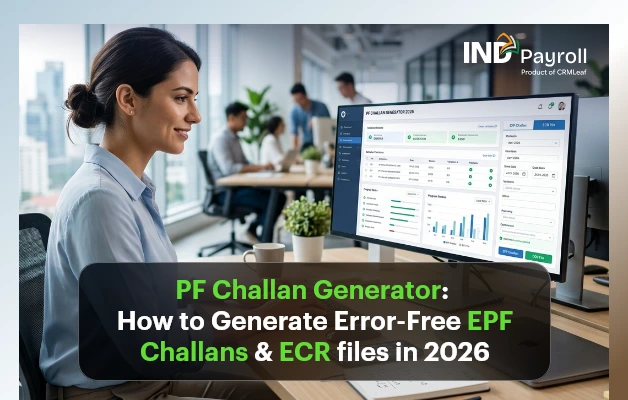
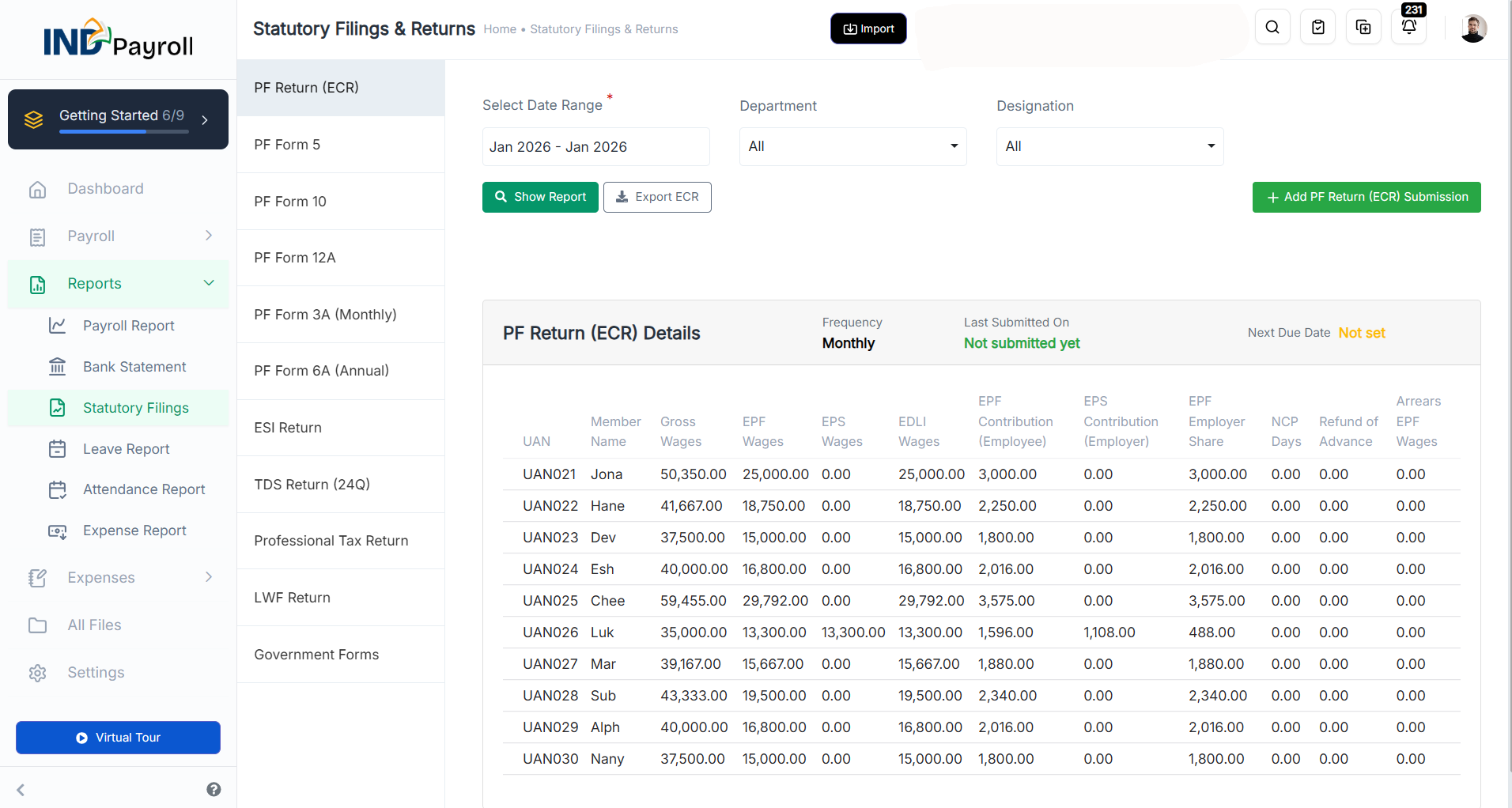
Best Free Payroll Software Alternatives In India For 2026

TL;DR: Best Free Payroll Software Alternatives in India (2026)

  • INDPayroll is the best overall payroll software for Indian startups and SMEs, offering payroll automation, PF, ESI, TDS compliance, attendance management, and employee self-service.
  • Kredily provides a genuine free-forever payroll plan for businesses that want a no-cost solution.
  • Zoho Payroll is a great option for small businesses, with a free plan for up to 10 employees and strong compliance features.
  • greytHR, Keka, Pocket HRMS, factoHR, and HRMantra are suitable for growing businesses that need advanced HR and payroll capabilities.
  • When choosing payroll software, prioritize PF, ESI, TDS compliance, payroll automation, payslip generation, attendance integration, employee self-service, and reporting tools.
  • The right payroll software can reduce manual errors, save time, improve compliance, and scale with your business growth.

Payroll in India is no longer a simple monthly task. Between PF, ESI, TDS, Professional Tax, and constantly changing labour codes, even a small mistake can lead to penalties. That is exactly why so many companies are searching for free payroll software India options in 2026—they want compliance and automation without a heavy price tag. India’s Ministry of Labour mandates PF, ESI, and Professional Tax compliance for businesses of all sizes.

For years, businesses managed salaries on spreadsheets. But manual payroll is slow, error-prone, and risky. As teams grow, formulas break, statutory rates change, and a single wrong cell can cost thousands. Consequently, business owners, HR managers, and finance teams are moving to dedicated tools.

In this guide, we compare the best payroll software alternatives in India for 2026. Whether you’re a startup or a growing SME looking for payroll software India options, this guide covers everything you need. Pricing and free-plan details below were verified against each vendor’s official pricing page in June 2026—so you can choose with confidence.

Free Payroll, PF, ESI & TDS Software

The most trusted automation tool for modern Indian businesses.

Why Businesses Need Payroll Software In 2026

Modern payroll involves far more than paying salaries. A good system handles the full statutory cycle, including:

  • Salary processing with accurate earnings and deductions
  • PF (Provident Fund) contributions and ECR filing
  • ESI calculations for eligible employees
  • TDS deduction under the correct income tax slabs
  • Professional Tax is based on each state’s rules
  • Payslips are generated automatically every cycle
  • Attendance integration linking worked days to pay
  • Compliance reporting for audits and returns

Manual payroll struggles with all of this. Rates change mid-year, multiple states have different rules, and one missed deadline triggers interest or penalties. Moreover, spreadsheets offer no audit trail, no employee access, and no real security. Payroll software removes these risks by automating calculations and keeping you compliant by default.

What To Look for in the Best Free Payroll Software

Not every free tool is built for Indian compliance. Before you commit, check for these essentials:

  • Payroll automation – automatic salary, tax, and deduction calculations
  • Compliance management – built-in PF, ESI, TDS, and PT support
  • PF & ESI support – correct contribution rates and return-ready reports
  • Payslip generation – branded, downloadable payslips
  • Employee self-service – a portal for payslips, tax declarations, and leave
  • Reporting & analytics – payroll registers and statutory summaries
  • Attendance integration – sync with biometric or attendance apps
  • Scalability – room to grow from 10 to 1,000 employees

A quick note on the word “free”: some tools offer a genuine free-forever plan, while others provide only a time-limited trial or a demo. We flag the difference for each option below. Learn how to run payroll in India without any cost.

Best Payroll Software Alternatives In India For 2026

1. INDPayroll

INDPayroll is a payroll software built specifically for Indian businesses, and it leads our list for 2026. It combines payroll automation, statutory compliance, and employee management in one affordable platform—with a free plan to get started.

Key strengths include:

Pros: Built for India, compliance-first, easy to use, affordable, quick to implement.

Cons: Primarily focused on Indian statutory needs, so global multi-country payroll is not the goal.

Best For: Startups, SMEs, and growing businesses that want compliant, automated payroll without high costs.

2. Kredily

Kredily is a popular HR and payroll platform with a genuine “Free Forever” plan, used by 25,000+ Indian companies.

Pros: Truly free plan (no time limit) covering unlimited employees, with PF, ESI, PT, and TDS statutory calculations, attendance, leave, and an employee self-service portal.

Cons: PF/ESI challan generation, Form 16, NEFT salary payouts, and analytics sit on paid plans; free storage is capped at 250 MB.

Best For: Startups and small teams wanting a real no-cost HR and payroll starting point.

3. Zoho Payroll

Zoho Payroll offers a free-forever plan and handles Indian statutory payroll well.

Pros: Free plan for up to 10 employees with automatic payroll, payslips, Income Tax, EPF, ESI, PT, a TDS worksheet, an ESS portal, and 40+ reports; integrates with Zoho Books and People.

Cons: The free plan is capped at 10 employees; leave and attendance management require the paid Premium plan (from ₹1,000/organisation/month, billed annually).

Best For: Small teams and businesses already using the Zoho ecosystem.

India’s #1 Free Software

Free Payroll, PF,
ESI & TDS Software

Professional compliance management for Indian businesses. 100% Free Forever.

4. greytHR

greytHR is an established HR and payroll provider trusted by 30,000+ companies.

Pros: Robust compliance, a mature payroll engine, and a strong employee portal.

Cons: No free plan—only a 7-day free trial; paid plans start at ₹2,495/month (Essential, up to 50 employees).

Best For: Mid-sized companies needing proven compliance depth.

5. Keka

Keka offers modern HR, payroll, and performance management.

Pros: Polished interface, strong analytics, solid payroll and attendance, and statutory PF/ESI/LWF/TDS reports.

Cons: No free plan (free trial only); a nominal setup/implementation fee applies and pricing scales with headcount.

Best For: Growing companies wanting an all-in-one HRMS.

6. factoHR

factoHR provides payroll and HR with a focus on automation and mobile access, trusted by 4,000+ businesses.

Pros: Has a ₹0/forever plan (up to 20 employees) and good automation on its paid tiers.

Cons: The free plan is HRIS-only—employee data, letter generation, and basic payslips—with no payroll processing, statutory compliance, or attendance; full payroll starts on the Core plan (from ₹4,999/month).

Best For: Very small teams that want to start with employee data, then scale into full payroll.

7. Pocket HRMS

Pocket HRMS is a cloud HR and payroll solution aimed at Indian businesses.

Pros: Cloud-based, AI features, and payroll plus HR with statutory compliance (PF, ESIC, PT, TDS).

Cons: No free plan (free demo only); a 50-employee minimum applies and pricing starts at ₹2,995/month plus a one-time implementation fee.

Best For: Established SMEs (50+ employees) wanting cloud HR with payroll.

8. HRMantra

HRMantra is a feature-rich, highly configurable HR and payroll suite with 26+ years in the market.

Pros: Extensive modules, deep customisation, and strong workflows.

Cons: No free plan; it is demo- and quote-based, enterprise-focused (built for organisations of roughly 200+ employees), and complex for small teams.

Best For: Larger enterprises with complex HR needs.

Comparison Table of the Best Payroll Software Alternatives

Not sure which tool fits your needs? Use this comparison alongside our guide on how to choose payroll software in India.

Software Free Plan Payroll Processing PF ESI TDS Attendance Leave Mgmt Employee Portal Reporting Best For
INDPayroll Yes Yes Yes Yes Yes Yes Yes Yes Yes Startups & SMEs
Kredily Yes (unlimited emp) Yes Yes Yes Yes (calc) Yes Yes Yes Paid Startups & small teams
Zoho Payroll Yes (≤10 emp) Yes Yes Yes Yes Paid Paid Yes Yes Zoho users
greytHR No (7-day trial) Yes Yes Yes Yes Yes Yes Yes Yes Mid-sized firms
Keka No (trial only) Yes Yes Yes Yes Yes Yes Yes Yes Growing companies
factoHR Free tier (HRIS only) Paid Paid Paid Paid Paid Paid Paid Paid Very small teams
Pocket HRMS No (demo only) Yes Yes Yes Yes Yes Yes Yes Yes SMEs (50+)
HRMantra No (demo/quote) Yes Yes Yes Yes Yes Yes Yes Yes Enterprises

Why INDPayroll Stands Out

Among all the free payroll software India options, INDPayroll is purpose-built for the local market. It stands out because it is:

  • Built for India – PF, ESI, TDS, and PT handled natively
  • Compliance-first – statutory rules baked into every calculation
  • Automated – payroll runs in minutes, not days
  • User-friendly – an interface that non-experts can navigate
  • Cost-effective – a free plan plus affordable upgrades
  • Tool-rich – a growing ecosystem of free payroll tools
  • Growth-ready – scales as your headcount rises
  • Fast to deploy – quick implementation with minimal setup

Common Mistakes When Choosing Payroll Software

  • Many businesses regret their first choice. Avoid these frequent errors:
  • Choosing on price alone – the cheapest tool can cost more in penalties
  • Ignoring compliance – a system that misses PF, ESI, or TDS is a liability
  • Lacking automation – manual steps reintroduce errors
  • Poor support – payroll issues need fast, reliable help
  • No scalability – you outgrow the tool within a year
  • Hidden costs – a “free” plan that excludes payroll or charges setup fees adds up quickly
India’s #1 Free Software

Free Payroll, PF, ESI & TDS Software

Conclusion

Every tool on this list has merits. greytHR and Keka suit larger, well-resourced teams (though both are trial-only, not free); Zoho Payroll offers a solid free plan for up to 10 employees; Kredily provides a genuine free-forever plan for unlimited staff; and factoHR’s free tier covers employee data but not payroll. For businesses that need a free, compliance-focused payroll solution with full PF, ESI, and TDS processing from day one, INDPayroll is the strongest overall choice. It combines payroll processing, statutory compliance, employee management, and automation in a single, easy-to-use platform—without the high cost. For Indian startups and SMEs in 2026, that balance is hard to beat.

Choosing payroll software in 2026 comes down to compliance, automation, and value. While many tools cover the basics, few balance all three as well as INDPayroll. If you want compliant, automated payroll without the high cost, start with INDPayroll’s free plan today—run your first payroll in minutes and explore the free payroll tools built for Indian businesses

Category: EPFO & ESI

No posts in this category.

Subcategory: EPFO

Subcategory: ESI

Category: Payroll Help

No posts in this category.

Subcategory: Employee Self-Service & Engagement

Subcategory: Introduction to Payroll

Subcategory: Payroll Analytics & Reporting

Subcategory: Payroll Automation & Technology

Subcategory: Payroll for Business Growth

Subcategory: Payroll Processing & Management

Subcategory: Taxation & Compliance

Category: User Manual

No posts in this category.

Subcategory: Company Setup

Subcategory: Employee Management

Subcategory: Getting Started

Subcategory: Glossary

Subcategory: Import & Export

Subcategory: Introduction

Subcategory: Payroll Configuration

Subcategory: Payslips & Disbursement

Subcategory: Reports & Analytics

Subcategory: Running Payroll

Subcategory: Statutory Compliance & Reports

Subcategory: Troubleshooting

Subcategory: User Management & Security