Payroll ROI: Unlock How Automation Increases Your Profits!

What if your payroll process is silently draining thousands of rupees every month — and you don’t even know it? Most business owners and HR managers focus on payroll as a compliance task, not a profit lever. But here’s the truth: the ROI of payroll automation is one of the most overlooked financial wins in modern businesses.

Manual payroll is slow, error-prone, and expensive. Between recalculations, compliance penalties, and hours of staff time — the hidden costs pile up fast. This guide will show you exactly how payroll software turns those costs into measurable profit gains — with real data, real use cases, and a clear roadmap to smarter payroll.

Ready to see what automated payroll can really do for your bottom line? Let’s break it down. Try it free and experience the ROI shift yourself.

Free Payroll, PF, ESI & TDS Software

The most trusted automation tool for modern Indian businesses.

What Is Payroll ROI and Why Does It Matter?

Payroll ROI (Return on Investment) measures the financial gains your business earns by optimizing your payroll process — compared to the time, money, and resources you spend running it. In simpler terms: how much are you saving (or losing) by the way you currently handle payroll?

For most SMEs in India, payroll is processed manually or with outdated tools. That means:

  • HR teams spending 10–15 hours per month on manual data entry
  • Frequent errors in salary slip generation and tax deductions
  • Compliance risks with EPF, ESI, and TDS miscalculations
  • High employee dissatisfaction from delayed or incorrect pay

When you introduce automated payroll software, each of these pain points is eliminated — and that elimination translates directly into rupees saved and profits recovered.

ROI Formula for Payroll:

Payroll ROI = (Total Cost Saved – Cost of Payroll Software) ÷ Cost of Payroll Software × 100

If your team was spending ₹50,000/month in combined staff hours and compliance penalties, and INDPayroll costs ₹3,000/month — your ROI is over 1,500%. That’s not a typo.

The Real Costs of Manual Payroll Processing

Before you can appreciate the ROI of automation, you need to understand what manual payroll actually costs. Most businesses see only the surface — the software license fee or accountant’s salary. The real iceberg runs much deeper.

1. Lost Staff Hours

According to industry benchmarks, HR teams in SMEs spend an average of 12–18 hours per month on payroll-related tasks — data collection, entry, verification, and corrections. At an average HR salary of ₹35,000/month, that’s roughly ₹10,000+ in pure labor cost just for payroll processing — every single month.

With automated salary processing, this drops to under 2 hours. That’s 80%+ time saved.

2. Compliance Penalties and Errors

India’s payroll compliance landscape is complex. EPF, ESI, TDS, PT — each has its own filing schedule, rate changes, and penalties. A single miscalculation can result in penalties from ₹5,000 to ₹25,000 or more. With manual systems, errors are inevitable.

INDPayroll’s PF & ESI compliance module auto-calculates contributions based on the latest EPF regulations, eliminating this risk entirely.

3. Payslip Generation Delays

Delayed payslips frustrate employees and create HR bottlenecks. With manual methods, generating 50+ payslips takes hours of formatting, checking, and emailing. Our free payslip generator automates this in minutes — with professional formatting and complete salary breakdowns.

4. Audit and Reconciliation Costs

Manual payroll creates inconsistent records that are hard to audit. Year-end reconciliations consume significant time and often require external accountants. Automated payroll keeps a clean, timestamped audit trail — saving ₹15,000–₹50,000 in annual audit prep costs for mid-sized teams.

How Payroll Automation Directly Increases Your Profits

Let’s get specific. Here are the five core ways payroll automation generates measurable ROI for Indian businesses:

1. Massive Reduction in Processing Time

With INDPayroll’s payroll software, what took a full day now takes under 30 minutes. HR teams get their time back — time they can reinvest in recruitment, employee engagement, and strategic HR work that actually drives business growth.

Real-World Example: A 100-person IT firm in Bengaluru was spending 3 full working days every month on payroll. After switching to INDPayroll, they cut that to 4 hours — freeing up nearly ₹60,000/month in combined HR productivity.

2. Zero Compliance Penalties

INDPayroll automatically stays updated with the latest Indian labor law updates, EPF ceiling changes, and ESI rate revisions. Use our PF calculator and ESI calculator to instantly verify contributions. This means no surprise penalties, no late filing fees, and no compliance anxiety.

3. Accurate Salary Breakup Every Time

Errors in salary computation cause downstream problems — incorrect TDS, wrong Form 16, disputed payslips. INDPayroll’s CTC calculator and salary breakup engine ensures every component — Basic, HRA, LTA, PF, ESI, PT — is calculated precisely, automatically, and consistently.

Explore our free payroll tools to see how accurate your current setup is.

4. Reduced Payroll Fraud Risk

Manual payroll creates opportunities for ghost employees, inflated claims, and unauthorized changes. Automated payroll software has built-in access controls, approval workflows, and audit logs — significantly reducing fraud risk. For a 200-person company, even a 0.1% payroll fraud rate could mean ₹1–2 lakhs lost annually.

5. Happier Employees = Higher Retention

This is the ROI that most spreadsheets miss. When employees receive accurate, on-time salary slips and transparent salary breakdowns — trust improves. Employee satisfaction surveys consistently show that payroll accuracy is among the top 3 factors in workplace satisfaction. High retention saves ₹50,000–₹2,00,000 per employee in recruitment and onboarding costs.

Start your free trial and see the difference accurate, on-time payroll makes for your team.

Payroll ROI Calculator: Estimate Your Savings

Not sure what your payroll ROI looks like? Here’s a simplified model based on common SME metrics:

Cost Area Manual Payroll (Monthly) With INDPayroll (Monthly) Monthly Savings
HR Staff Time ₹12,000 ₹2,000 ₹10,000
Compliance Penalties ₹8,000 (avg) ₹0 ₹8,000
Payslip Generation ₹3,000 ₹500 ₹2,500
Error Corrections ₹4,000 ₹200 ₹3,800
Audit/Reconciliation ₹5,000 ₹500 ₹4,500
Total ₹32,000 ₹3,200 ₹28,800/month

That’s over ₹3,45,600 in annual savings for a 50–100 person company — just by switching to automated payroll.

INDPayroll vs Manual Payroll: Feature-by-Feature Comparison

Speed and Accuracy

Manual payroll requires human data entry, verification, and re-entry — all prone to error. INDPayroll’s salary processing engine runs calculations in seconds with 100% accuracy. No rounding errors, no missed deductions, no formatting mistakes on payslips.

Compliance Automation

Manual payroll depends on the HR team staying current with every regulation change. INDPayroll integrates directly with the latest EPF compliance guidelines and ESI compliance guide, so your filings are always current — automatically.

Reporting and Analytics

Manual payroll generates reports only when someone builds them. INDPayroll’s payslip and reports generator provides instant, customizable reports for management, finance, and compliance — on demand, any time.

Scalability

Hiring 10 more employees with manual payroll means 10x more work. With INDPayroll, adding employees takes minutes — with no added complexity or cost per task.

India’s #1 Free Software

Free Payroll, PF,
ESI & TDS Software

Professional compliance management for Indian businesses. 100% Free Forever.

Who Benefits Most from Payroll Automation ROI?

Startups and SMEs (10–200 employees)

This segment gains the most from payroll automation ROI. Lean teams can’t afford HR headcount dedicated purely to payroll. INDPayroll replaces a part-time payroll executive with software that costs a fraction of the salary — and works 24/7 without errors.

IT Companies and Remote Teams

Distributed teams with employees across states face multi-state PT compliance, varying allowances, and remote attendance tracking. INDPayroll handles all of it centrally, making it ideal for tech firms managing hybrid or remote workforces.

Manufacturing and Retail Businesses

High headcounts, shift-based attendance, and complex wage structures make manual payroll a nightmare. Automation streamlines everything from wage calculation to PF/ESI filing — including registration and filing tutorials.

Agencies and Professional Services

Client-billing agencies and professional firms often have variable pay structures — bonuses, commissions, and project-based compensation. INDPayroll handles this flexibility while maintaining compliance and clean records.

Comparing INDPayroll with Other Payroll Solutions

Wondering how INDPayroll compares to competitors? We’ve done the homework:

INDPayroll consistently delivers stronger ROI through superior compliance automation, lower pricing tiers, and India-specific payroll intelligence that generic HR tools simply can’t match.

Step-by-Step: How to Start Maximizing Payroll ROI with INDPayroll

Step 1: Audit Your Current Payroll Costs

Use the ROI table above as a baseline. Log how many hours your HR team spends on payroll, how many compliance penalties you’ve paid in the last 12 months, and how frequently salary errors occur.

Step 2: Sign Up for INDPayroll

Visit INDPayroll and create your account. Setup takes under 15 minutes — including importing your employee data and configuring your salary structure.

Step 3: Configure Your Salary Structure

Use the CTC calculator to set up each employee’s salary breakup. INDPayroll supports custom pay components, variable pay, and India-specific statutory deductions.

Step 4: Run Your First Payroll

Process your first payroll in minutes using INDPayroll’s salary processing module. Review automatically generated payslips, compliance reports, and payment summaries — all in one dashboard.

Step 5: Monitor ROI Monthly

Use INDPayroll’s reporting suite to track time saved, errors reduced, and compliance maintained. Most businesses hit full ROI within the first 2–3 months of using INDPayroll.

Try INDPayroll free today — no credit card required.

Real Results: What INDPayroll Customers Are Saying

“We were spending almost 3 working days a month on payroll. INDPayroll cut that down to a few hours. The compliance automation alone saved us from two potential PF penalties last quarter.” — HR Manager, 120-person software firm, Pune

“The salary slip generation is flawless. Our employees love receiving professional payslips on time. It’s improved trust in our payroll process significantly.” — Operations Head, logistics startup, Hyderabad

“We switched from a generic tool and the difference in India-specific compliance handling is night and day. INDPayroll actually knows EPF, ESI, and PT — not just basic salary math.” — Founder, digital agency, Delhi NCR

Key Metrics to Measure Payroll Automation ROI

Once you’ve automated payroll, track these KPIs monthly to quantify your ROI:

  • Payroll Processing Time: Hours spent per payroll cycle (target: under 2 hours)
  • Error Rate: Number of payroll corrections per month (target: 0)
  • Compliance Penalty Rate: EPF/ESI/TDS penalties in the last 12 months (target: ₹0)
  • Employee Payslip Satisfaction: From your employee feedback surveys
  • HR Productivity Index: Hours freed for strategic HR work
  • Payroll Cost as % of Revenue: Benchmark this quarterly to track improvement

Read our INDPayroll blog for monthly benchmarks and payroll best practices tailored to Indian businesses.

India’s #1 Free Software

Free Payroll, PF, ESI & TDS Software

Conclusion: Your Payroll Is a Profit Center Waiting to Happen

Payroll automation isn’t a luxury — it’s a financial strategy. The ROI is clear, the implementation is fast, and the benefits compound over time. Every month you delay automating payroll is another month of avoidable costs, compliance risks, and wasted HR hours.

With INDPayroll, you get India’s most compliance-forward payroll software — built specifically for businesses that want to grow without being held back by manual HR processes. From PF & ESI compliance to instant payslip generation — everything you need is in one platform.

Stop treating payroll as a cost center. Start treating it as a ROI engine.

Frequently Asked Questions

1. What is payroll ROI and how is it calculated?

Payroll ROI measures the financial return you get from investing in payroll automation. It’s calculated as: (Total Cost Saved – Cost of Payroll Software) ÷ Cost of Payroll Software × 100. Most businesses using INDPayroll see ROI within 60–90 days.

2. How much can a business save by automating payroll in India?

Depending on company size, businesses typically save ₹20,000–₹60,000 per month by switching from manual to automated payroll — factoring in time, compliance penalties, and error correction costs.

3. Does payroll automation help with EPF and ESI compliance?

Yes. INDPayroll’s PF & ESI compliance module auto-calculates contributions, stays updated with regulation changes, and generates filing-ready reports — eliminating compliance risk.

4. Is INDPayroll suitable for small businesses?

Absolutely. INDPayroll is built for Indian SMEs with 10–500 employees. It’s affordable, easy to set up, and handles all India-specific payroll requirements out of the box.

5. How quickly can I set up INDPayroll?

Most businesses are fully set up within 1 business day. You can import employee data, configure salary structures, and run your first payroll in under 15 minutes using INDPayroll’s guided setup.

6. Can INDPayroll generate salary slips automatically?

Yes. INDPayroll’s payslip generator creates professional, compliant salary slips in seconds — for all employees, all at once, with full salary breakup details.

7. How does payroll automation improve employee retention?

Accurate, on-time salary payments and transparent payslips significantly improve employee trust and satisfaction. This directly reduces attrition — saving ₹50,000–₹2,00,000 per replaced employee in recruitment and training costs.

8. What’s the difference between INDPayroll and manual Excel payroll?

Excel payroll is error-prone, time-intensive, and not compliance-aware. INDPayroll automates calculations, stays updated with Indian labor laws, generates reports, and processes payslips automatically — saving hours every month.

9. Does INDPayroll handle multi-state payroll compliance?

Yes. INDPayroll supports Professional Tax (PT) rates across Indian states, making it ideal for businesses with employees in multiple states or remote/hybrid teams spread across India.

10. Where can I try INDPayroll for free?

You can start your free trial — no credit card required. Explore all features, process a test payroll, and see the ROI difference firsthand.

Salary Slip Format in India 2026 — Components, Sample & Free Download

A salary slip (also called a payslip or pay stub) is a document issued by an employer to an employee every month. It contains a detailed breakdown of the employee’s earnings, deductions, and net pay. Under the Payment of Wages Act, 1936, employers are legally required to provide salary slips to employees.

Salary slips serve as proof of income and are essential for loan applications, visa processing, tax filing, and employment verification.

Key Components of a Salary Slip

A standard salary slip in India contains three main sections: earnings, deductions, and summary.

India’s #1 Free Software

Free Payroll, PF, ESI & TDS Software

Earnings (Gross Pay Components)

Component Description Typical % of CTC
Basic Salary Core salary component, used to calculate PF, gratuity, and HRA 40-50%
House Rent Allowance (HRA) Allowance for rental accommodation, partially tax-exempt 20-25%
Dearness Allowance (DA) Compensates for inflation, common in government & PSU jobs Variable
Conveyance Allowance For daily commute expenses Fixed amount
Medical Allowance For healthcare expenses Fixed amount
Special Allowance Balancing component, fully taxable 15-30%
Leave Travel Allowance (LTA) For domestic travel, tax-exempt with conditions Variable
Performance Bonus Variable pay based on performance 5-20%

Deductions

Deduction Description Rate
Provident Fund (PF) Employee contribution to EPF 12% of Basic + DA
ESI (Employee State Insurance) Health insurance for employees earning ≤ Rs. 21,000/month 0.75% of gross
Professional Tax State-level tax on employment (varies by state) Rs. 150-200/month
TDS (Tax Deducted at Source) Income tax is deducted based on declared investments As per the slab
Loan Recovery EMI deductions for company-provided loans As applicable
Loss of Pay (LOP) Deduction for unauthorised absence Per day basis

Summary Section

  • Gross Earnings: Total of all earnings components
  • Total Deductions: Sum of PF + ESI + PT + TDS + other deductions
  • Net Pay (Take-Home): Gross Earnings − Total Deductions
  • Days Paid / Days in Month / LOP Days

Sample Salary Slip Format

Here is a sample salary slip for an employee with a CTC of Rs. 6,00,000 per annum:

Earnings Amount (₹) Deductions Amount (₹)
Basic Salary 25,000 Provident Fund 3,000
HRA 10,000 ESI 375
Conveyance 1,600 Professional Tax 200
Medical Allowance 1,250 TDS 2,500
Special Allowance 12,150
Gross Earnings 50,000 Total Deductions 6,075

Net Pay (Take-Home): ₹43,925

Salary Slip Format for Different Sectors

Private Sector Salary Slip

Private companies typically include Basic, HRA, Special Allowance, and variable pay. The format varies by organisation, but must include all statutory deductions (PF, ESI, PT, TDS).

Government Salary Slip

Government salary slips follow the 7th Pay Commission structure and include: Basic Pay (as per pay matrix), DA (revised twice yearly), HRA (based on city classification X/Y/Z), Transport Allowance, and NPS (National Pension Scheme) deduction instead of EPF.

Legal Requirements for Salary Slips in India

  • Payment of Wages Act, 1936: Employers must provide a wage slip showing all deductions
  • Code on Wages, 2019: Mandates salary slips to be issued in electronic or written form
  • Frequency: Must be provided every month on or before the pay date
  • Retention: Employers must maintain salary records for 3 years
  • Format: No prescribed format, but must include all earnings and deductions

How to Read Your Salary Slip

Understanding your salary slip helps you verify your pay and plan your taxes effectively:

  • Check Basic Salary: This determines your PF contribution, gratuity, and HRA exemption. Higher basic = higher PF, but also higher tax
  • Verify PF Deduction: Should be exactly 12% of Basic + DA. Match with your UAN passbook
  • Review TDS: Compare with your investment declarations. If you’ve submitted proof, TDS should reduce
  • Check LOP: Ensure leave deductions match your actual absence records
  • Match Net Pay: Verify the amount credited to your bank matches the net pay on the slip

Generate Salary Slips Automatically with INDPayroll

Creating salary slips manually in Excel every month is tedious and error-prone. INDPayroll automates the entire process:

  • Auto-calculate all components: Basic, HRA, PF, ESI, PT, TDS — all computed automatically
  • Professional PDF payslips: Branded salary slips with your company logo, generated in one click
  • Employee self-service: Employees download their own payslips from the portal anytime
  • Bulk generation: Generate payslips for all employees simultaneously
  • Compliance built-in: All statutory deductions calculated per the latest rates
  • Email distribution: Auto-email payslips to employees on pay day

Try INDPayroll Free: Generate professional salary slips for up to 5 employees at no cost.

Free Payroll, PF, ESI & TDS Software

The most trusted automation tool for modern Indian businesses.

Final Thoughts — Getting Your Salary Slip Right in 2026

A well-structured salary slip is not just a document — it is a reflection of your organisation’s payroll accuracy, legal compliance, and transparency with employees. In 2026, with the New Tax Regime as the default, updated ESI limits, and stricter labour law enforcement, getting the salary slip format right is more important than ever.

Here is a quick recap of everything covered in this guide:

  • A standard Indian salary slip has three sections: Earnings, Deductions, and Net Pay Summary
  • Basic Salary is the most important component — it determines PF, gratuity, HRA exemption, and tax liability
  • PF is 12% of Basic + DA (not gross salary)
  • ESI applies only to employees earning ₹21,000 or less per month
  • Professional Tax varies by state — up to ₹200/month
  • TDS depends on the tax regime chosen — New or Old
  • Salary slips must be issued every month as per the Code on Wages 2019
  • Employers must retain salary records for a minimum of 3 years

The biggest mistake most small businesses make is generating salary slips manually in Excel, which is error-prone, time-consuming, and hard to scale as the team grows. Missing a single calculation (wrong PF base, incorrect ESI applicability, or outdated PT slab) can lead to employee disputes and statutory compliance failures.

The smartest solution is to automate the entire process. INDPayroll automatically calculates Basic, HRA, PF, ESI, PT, and TDS
based on the latest statutory rates. It generates professional, branded PDF salary slips in one click and emails them directly to employees on pay day — for every employee, every month, without any manual effort. Start free today — generate salary slips for up to 5 employees at absolutely no cost, with no credit card required.

Frequently Asked Questions

Is a salary slip mandatory in India?

Yes. Under the Payment of Wages Act and the Code on Wages 2019, employers must provide salary slips to all employees. Failure to do so can result in penalties.

Can I use salary slips for loan applications?

Yes. Banks and NBFCs require the last 3-6 months’ salary slips as proof of income for home loans, personal loans, and credit cards. The salary slip must be on company letterhead or from an authenticated payroll system.

What is the difference between CTC and take-home salary?

CTC (Cost to Company) includes everything the company spends on you — salary, PF employer contribution, gratuity, insurance, etc. Take-home salary is what you actually receive after all deductions. Typically, take-home is 60-70% of CTC.

How many months of salary slips do I need for a visa?

Most embassies require 3-6 months of salary slips along with bank statements and Form 16 for visa applications. Some countries, like the US and UK, may ask for up to 12 months.

Can I get a salary slip from a previous employer?

Yes. You can request salary slips from your previous employer’s HR department. They are legally required to maintain salary records for at least 3 years.

Related Payroll Resources

A proper salary slip requires accurate calculation of all components. Learn about PF contribution calculation, ESI contribution rates, TDS on salary, and professional tax slabs by state. See our detailed payslip format guide for all mandatory components. Try our free payroll tools.

How Automated Payroll Reduces HR Stress

Every HR professional knows payroll is one of the most stressful, detail-heavy functions in the entire organization. At the same time, HR teams must balance compliance, accuracy, timeliness, and employee satisfaction with limited time and resources. Fortunately, automated payroll reduces HR stress by eliminating repetitive tasks, reducing errors, speeding up processes, and freeing HR professionals to focus on strategic work.

In this comprehensive, practical guide, you will learn how automation reduces HR stress, why it matters, how to implement it, and how to maximize its impact across your company.

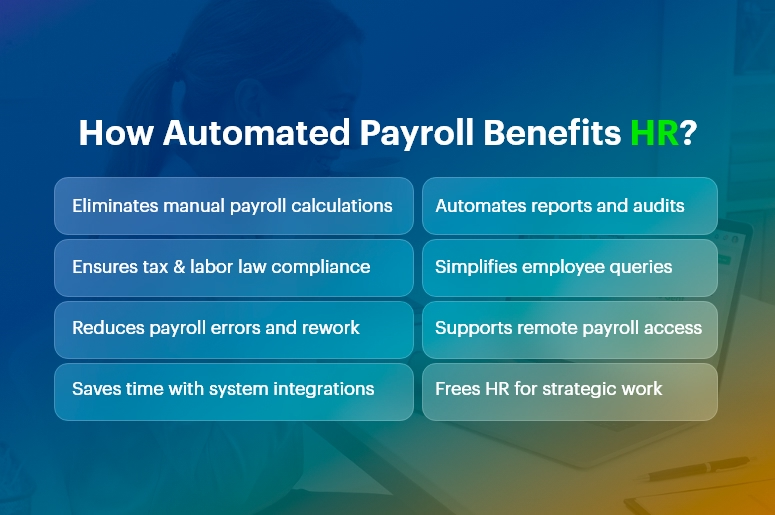
How Automated Payroll Benefits HR Stress

What Is Automated Payroll?

It is a technology-driven process that calculates wages, taxes, deductions, and benefits automatically using software.

Instead of manually calculating hours, deductions, and tax rates, an automated payroll system pulls data from time tracking tools, HR databases, and compliance libraries to produce accurate payruns with minimal human intervention.

By design, automation reduces HR stress, increases accuracy, and accelerates payroll cycles.

Why Payroll Causes Stress in HR

Payroll creates stress because it demands precision under tight deadlines. HR teams must:

  • Calculate pay accurately: This requires tracking hours, overtime, bonuses, leave, and commissions.
  • Manage taxes and compliance: Tax rates change frequently, and noncompliance carries penalties.
  • Handle benefits and deductions: Health insurance, retirement contributions, garnishments, and other deductions vary by employee.
  • Report and document: Payroll reports feed into accounting, audits, and internal planning.
  • Respond to employee questions: Employees expect clarity, speed, and transparency.

No wonder traditional payroll processes overwhelm HR teams. This is where automated payroll reduces HR stress dramatically.

India’s #1 Free Software

Free Payroll, PF,
ESI & TDS Software

Professional compliance management for Indian businesses. 100% Free Forever.

Top Ways Automated Payroll Reduces HR Stress

1. Eliminates Manual Calculations

Manual payroll calculations take hours and invite errors. In contrast, automated systems compute wages automatically based on configured rules.

By removing manual math from the equation, automation reduces HR stress and increases accuracy.

2. Ensures Compliance With Laws and Regulations

Labor laws and tax regulations change frequently. Automated payroll software updates tax tables and compliance rules automatically, ensuring your payroll is always up to date.

This means HR spends less time tracking changes and worrying about compliance penalties.

3. Reduces Errors and Risk

Human error is inevitable under pressure. Missing a decimal, misapplying a tax rate, or omitting a benefit can create costly mistakes.

Because automation reduces HR stress by catching errors upfront and enforcing consistency, HR teams can trust the numbers and avoid costly corrections.

4. Saves Time With Integrated Systems

Integration matters. When your payroll software connects with time tracking, benefits administration, and HR databases, data flows automatically. This eliminates duplicate data entry and ensures consistency.

Consequently, automation reduces HR stress by cutting administrative overhead.

5. Improves Reporting and Insights

Automated payroll systems generate reports instantly. Whether you need departmental cost breakdowns, tax filings, or historical pay data, automated reporting gives HR the insights it needs without manual assembly.

Because it reduces HR stress around data preparation, HR can focus more on analysis and decision-making.

6. Enhances Employee Experience

Employees dislike errors and delays in pay. When payroll runs smoothly and accurately, employee satisfaction rises.

It reduces HR stress by minimizing customer service issues and enabling HR to handle questions quickly and confidently.

How Automated Payroll Reduces HR Stress in Daily Operations

To understand real-world impact, let’s examine day-to-day HR operations:

  • Streamlined Payroll Runs

With automation, data flows from time-tracking systems into payroll seamlessly. HR simply reviews and approves pay runs rather than generating them from scratch.

Thus, automation reduces HR stress by shortening payroll preparation time and cutting repetitive work.

  • Faster Adjustments

Need to update an employee’s tax status or benefit enrollment? Automated systems propagate changes across all payroll modules.

This eliminates manual intervention and ensures accuracy. Because automated payroll reduces HR stress during adjustments, HR can respond swiftly to employee life events.

  • Simplified Audits

Auditors demand documentation, trails, and accuracy. Automation systems maintain logs, reports, and documentation automatically.

This transparency helps HR complete audits with less effort. In short, automation reduces HR stress when compliance checks arrive.

  • Remote and On-Demand Access

Modern payroll tools allow HR and employees to access payroll information from anywhere. This reduces dependency on paper records and ensures that HR can answer questions in real time.

Consequently, automation reduces HR stress by supporting remote and distributed teams.

India’s #1 Free Software

Free Payroll, PF, ESI & TDS Software

Key Features That Make Automated Payroll Effective

Understanding which features deliver stress relief helps you make informed choices.

  • Real-Time Calculations

Instant updates to payroll figures reduce last-minute surprises.

  • Tax Filing Automation

Automatic filing and payments save time and prevent penalties.

  • Integration With HR Systems

Connected systems ensure data accuracy and eliminate siloed information.

  • Self-Service Employee Portals

Employees can view payslips, tax forms, and benefits independently, reducing HR inquiries.

  • Alerts and Notifications

Reminders for deadlines and exceptions help HR stay proactive.

Each of these features contributes to how automation reduces HR stress, making payroll faster, smarter, and more reliable.

Choosing the Right Automated Payroll Solution

Selecting the right system matters. To ensure your payroll solution truly reduces HR stress, evaluate the following:

  • Scalability

Choose software that grows with your business and handles multiple pay schedules, classifications, and international requirements.

  • Integration Capabilities

Verify that the payroll tool integrates with your HRIS, time tracking, benefits platform, and accounting systems.

  • Compliance Support

Ensure the solution updates tax tables, legal changes, and reporting requirements automatically.

  • Support and Training

Reliable vendor support and user training help your HR team adopt the tool smoothly.

By focusing on these criteria, you increase the likelihood that automated payroll reduces HR stress—not just in theory but in practice.

Common Misconceptions About Payroll Automation

Many HR teams hesitate to adopt payroll automation due to misconceptions:

“Automation Means No Human Control”

False. Automated payroll reduces HR stress by handling calculations, but HR still reviews, approves, and oversees payroll.

“It’s Only for Large Organizations”

Not true. Small and medium businesses benefit even more because automation eliminates manual work that small teams cannot afford.

“It’s Too Expensive”

While upfront costs exist, automated payroll reduces HR stress and delivers ROI through time saved, error reduction, and improved compliance.

Clarifying these misconceptions helps HR teams embrace automation with confidence.

Real-World Impact: Case Scenarios

Consider these examples:

Case 1: Mid-Size Tech Firm

Before automation, HR spent three days per pay run reconciling time cards. After implementing payroll automation, the firm cut that to under one day and eliminated overtime miscalculations. In this case, automated payroll reduces HR stress by removing manual reconciliation.

Case 2: Retail Chain With Variable Hours

With hourly workers and seasonal fluctuations, payroll errors were common. Automated rules captured overtime, shift differentials, and compliance automatically. Here, automated payroll reduces HR stress by standardizing complex wage calculations.

These scenarios show how automated payroll reduces HR stress across different business models.

Best Practices for a Smooth Payroll Automation Transition

To get the most value:

  • Map Your Current Process – Document existing workflows to understand where automation helps most.
  • Train Your Team – Ensure all users understand how to operate and troubleshoot the system.
  • Test Before DeploymentRun parallel payroll tests to validate accuracy.
  • Set Clear Policies – Define roles, review cycles, and approval workflows.
  • Monitor and Improve Continuously – Review reports and process performance regularly.

Following these steps ensures automated payroll reduces HR stress not just initially, but over the long term.

Free Payroll, PF, ESI & TDS Software

The most trusted automation tool for modern Indian businesses.

Conclusion

Automated payroll reduces HR stress by removing manual work, increasing accuracy, ensuring compliance, and delivering faster, more reliable payroll processes.

When implemented thoughtfully — and paired with training, integration, and continuous improvement — automation transforms payroll from a stressful chore into a strategic advantage.

Whether you lead a small business or a large enterprise, understanding how automated payroll reduces HR stress equips your organization to operate more efficiently, improve employee satisfaction, and focus HR efforts where they matter most.

Frequently Asked Questions (FAQs)

Q: How soon will automated payroll reduce HR stress after implementation?

A: Many organizations see measurable reductions in administrative workload within the first payroll cycle because repetitive manual tasks disappear.

Q: Does automated payroll remove HR jobs?

A: No. It shifts HR teams from transactional work to strategic, value-added activities like employee engagement and policy development.

Q: Can automated payroll handle compliance across different regions?

A: Yes, modern solutions update tax tables and compliance rules for multiple regions, ensuring accurate and compliant payroll processing.


Category: EPFO & ESI

No posts in this category.

Subcategory: EPFO

Subcategory: ESI

Category: Payroll Help

No posts in this category.

Subcategory: Employee Self-Service & Engagement

Subcategory: Introduction to Payroll

Subcategory: Payroll Analytics & Reporting

Subcategory: Payroll Automation & Technology

Subcategory: Payroll for Business Growth

Subcategory: Payroll Processing & Management

Subcategory: Taxation & Compliance

Category: User Manual

No posts in this category.

Subcategory: Company Setup

Subcategory: Employee Management

Subcategory: Getting Started

Subcategory: Glossary

Subcategory: Import & Export

Subcategory: Introduction

Subcategory: Payroll Configuration

Subcategory: Payslips & Disbursement

Subcategory: Reports & Analytics

Subcategory: Running Payroll

Subcategory: Statutory Compliance & Reports

Subcategory: Troubleshooting

Subcategory: User Management & Security