How Automated Payroll Reduces HR Stress

Every HR professional knows payroll is one of the most stressful, detail-heavy functions in the entire organization. At the same time, HR teams must balance compliance, accuracy, timeliness, and employee satisfaction with limited time and resources. Fortunately, automated payroll reduces HR stress by eliminating repetitive tasks, reducing errors, speeding up processes, and freeing HR professionals to focus on strategic work.

In this comprehensive, practical guide, you will learn how automation reduces HR stress, why it matters, how to implement it, and how to maximize its impact across your company.
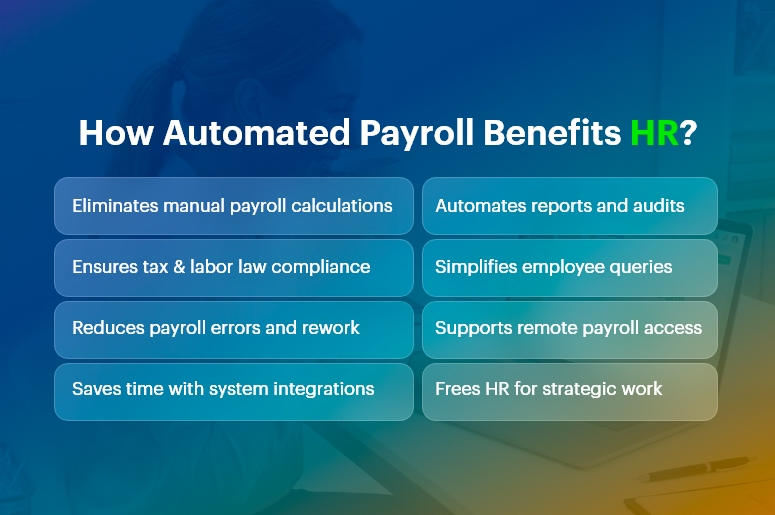
How Automated Payroll Benefits HR Stress

What Is Automated Payroll?

It is a technology-driven process that calculates wages, taxes, deductions, and benefits automatically using software.

Instead of manually calculating hours, deductions, and tax rates, an automated payroll system pulls data from time tracking tools, HR databases, and compliance libraries to produce accurate payruns with minimal human intervention.

By design, automation reduces HR stress, increases accuracy, and accelerates payroll cycles.

Why Payroll Causes Stress in HR

Payroll creates stress because it demands precision under tight deadlines. HR teams must:

  • Calculate pay accurately: This requires tracking hours, overtime, bonuses, leave, and commissions.
  • Manage taxes and compliance: Tax rates change frequently, and noncompliance carries penalties.
  • Handle benefits and deductions: Health insurance, retirement contributions, garnishments, and other deductions vary by employee.
  • Report and document: Payroll reports feed into accounting, audits, and internal planning.
  • Respond to employee questions: Employees expect clarity, speed, and transparency.

No wonder traditional payroll processes overwhelm HR teams. This is where automated payroll reduces HR stress dramatically.

India’s #1 Free Software

Free Payroll, PF,
ESI & TDS Software

Professional compliance management for Indian businesses. 100% Free Forever.

Top Ways Automated Payroll Reduces HR Stress

1. Eliminates Manual Calculations

Manual payroll calculations take hours and invite errors. In contrast, automated systems compute wages automatically based on configured rules.

By removing manual math from the equation, automation reduces HR stress and increases accuracy.

2. Ensures Compliance With Laws and Regulations

Labor laws and tax regulations change frequently. Automated payroll software updates tax tables and compliance rules automatically, ensuring your payroll is always up to date.

This means HR spends less time tracking changes and worrying about compliance penalties.

3. Reduces Errors and Risk

Human error is inevitable under pressure. Missing a decimal, misapplying a tax rate, or omitting a benefit can create costly mistakes.

Because automation reduces HR stress by catching errors upfront and enforcing consistency, HR teams can trust the numbers and avoid costly corrections.

4. Saves Time With Integrated Systems

Integration matters. When your payroll software connects with time tracking, benefits administration, and HR databases, data flows automatically. This eliminates duplicate data entry and ensures consistency.

Consequently, automation reduces HR stress by cutting administrative overhead.

5. Improves Reporting and Insights

Automated payroll systems generate reports instantly. Whether you need departmental cost breakdowns, tax filings, or historical pay data, automated reporting gives HR the insights it needs without manual assembly.

Because it reduces HR stress around data preparation, HR can focus more on analysis and decision-making.

6. Enhances Employee Experience

Employees dislike errors and delays in pay. When payroll runs smoothly and accurately, employee satisfaction rises.

It reduces HR stress by minimizing customer service issues and enabling HR to handle questions quickly and confidently.

How Automated Payroll Reduces HR Stress in Daily Operations

To understand real-world impact, let’s examine day-to-day HR operations:

  • Streamlined Payroll Runs

With automation, data flows from time-tracking systems into payroll seamlessly. HR simply reviews and approves pay runs rather than generating them from scratch.

Thus, automation reduces HR stress by shortening payroll preparation time and cutting repetitive work.

  • Faster Adjustments

Need to update an employee’s tax status or benefit enrollment? Automated systems propagate changes across all payroll modules.

This eliminates manual intervention and ensures accuracy. Because automated payroll reduces HR stress during adjustments, HR can respond swiftly to employee life events.

  • Simplified Audits

Auditors demand documentation, trails, and accuracy. Automation systems maintain logs, reports, and documentation automatically.

This transparency helps HR complete audits with less effort. In short, automation reduces HR stress when compliance checks arrive.

  • Remote and On-Demand Access

Modern payroll tools allow HR and employees to access payroll information from anywhere. This reduces dependency on paper records and ensures that HR can answer questions in real time.

Consequently, automation reduces HR stress by supporting remote and distributed teams.

India’s #1 Free Software

Free Payroll, PF, ESI & TDS Software

Key Features That Make Automated Payroll Effective

Understanding which features deliver stress relief helps you make informed choices.

  • Real-Time Calculations

Instant updates to payroll figures reduce last-minute surprises.

  • Tax Filing Automation

Automatic filing and payments save time and prevent penalties.

  • Integration With HR Systems

Connected systems ensure data accuracy and eliminate siloed information.

  • Self-Service Employee Portals

Employees can view payslips, tax forms, and benefits independently, reducing HR inquiries.

  • Alerts and Notifications

Reminders for deadlines and exceptions help HR stay proactive.

Each of these features contributes to how automation reduces HR stress, making payroll faster, smarter, and more reliable.

Choosing the Right Automated Payroll Solution

Selecting the right system matters. To ensure your payroll solution truly reduces HR stress, evaluate the following:

  • Scalability

Choose software that grows with your business and handles multiple pay schedules, classifications, and international requirements.

  • Integration Capabilities

Verify that the payroll tool integrates with your HRIS, time tracking, benefits platform, and accounting systems.

  • Compliance Support

Ensure the solution updates tax tables, legal changes, and reporting requirements automatically.

  • Support and Training

Reliable vendor support and user training help your HR team adopt the tool smoothly.

By focusing on these criteria, you increase the likelihood that automated payroll reduces HR stress—not just in theory but in practice.

Common Misconceptions About Payroll Automation

Many HR teams hesitate to adopt payroll automation due to misconceptions:

“Automation Means No Human Control”

False. Automated payroll reduces HR stress by handling calculations, but HR still reviews, approves, and oversees payroll.

“It’s Only for Large Organizations”

Not true. Small and medium businesses benefit even more because automation eliminates manual work that small teams cannot afford.

“It’s Too Expensive”

While upfront costs exist, automated payroll reduces HR stress and delivers ROI through time saved, error reduction, and improved compliance.

Clarifying these misconceptions helps HR teams embrace automation with confidence.

Real-World Impact: Case Scenarios

Consider these examples:

Case 1: Mid-Size Tech Firm

Before automation, HR spent three days per pay run reconciling time cards. After implementing payroll automation, the firm cut that to under one day and eliminated overtime miscalculations. In this case, automated payroll reduces HR stress by removing manual reconciliation.

Case 2: Retail Chain With Variable Hours

With hourly workers and seasonal fluctuations, payroll errors were common. Automated rules captured overtime, shift differentials, and compliance automatically. Here, automated payroll reduces HR stress by standardizing complex wage calculations.

These scenarios show how automated payroll reduces HR stress across different business models.

Best Practices for a Smooth Payroll Automation Transition

To get the most value:

  • Map Your Current Process – Document existing workflows to understand where automation helps most.
  • Train Your Team – Ensure all users understand how to operate and troubleshoot the system.
  • Test Before DeploymentRun parallel payroll tests to validate accuracy.
  • Set Clear Policies – Define roles, review cycles, and approval workflows.
  • Monitor and Improve Continuously – Review reports and process performance regularly.

Following these steps ensures automated payroll reduces HR stress not just initially, but over the long term.

Free Payroll, PF, ESI & TDS Software

The most trusted automation tool for modern Indian businesses.

Conclusion

Automated payroll reduces HR stress by removing manual work, increasing accuracy, ensuring compliance, and delivering faster, more reliable payroll processes.

When implemented thoughtfully — and paired with training, integration, and continuous improvement — automation transforms payroll from a stressful chore into a strategic advantage.

Whether you lead a small business or a large enterprise, understanding how automated payroll reduces HR stress equips your organization to operate more efficiently, improve employee satisfaction, and focus HR efforts where they matter most.

Frequently Asked Questions (FAQs)

Q: How soon will automated payroll reduce HR stress after implementation?

A: Many organizations see measurable reductions in administrative workload within the first payroll cycle because repetitive manual tasks disappear.

Q: Does automated payroll remove HR jobs?

A: No. It shifts HR teams from transactional work to strategic, value-added activities like employee engagement and policy development.

Q: Can automated payroll handle compliance across different regions?

A: Yes, modern solutions update tax tables and compliance rules for multiple regions, ensuring accurate and compliant payroll processing.

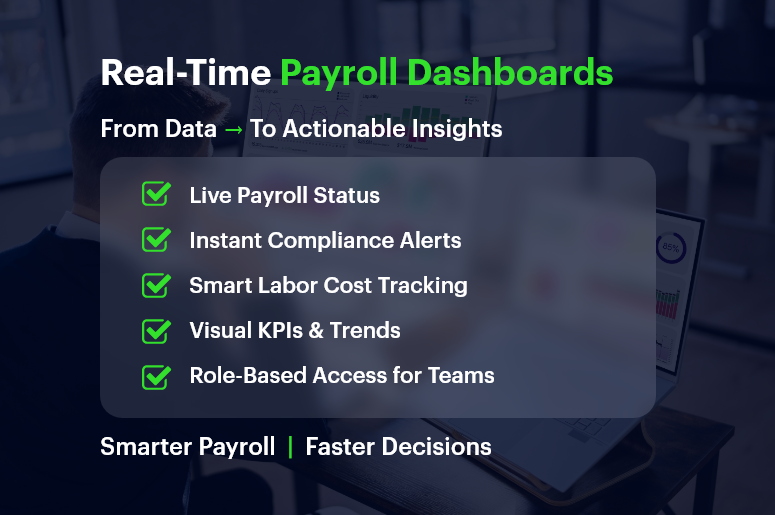
 

Real-Time Payroll Dashboards: Turning Data into Strategic Insights

Payroll used to be a back-office chore. Today, real-time payroll dashboards are transforming it into a strategic powerhouse.

Think about this: 70% of CFOs say real-time access to payroll data improves financial decision-making.

Yet many businesses still wrestle with outdated spreadsheets, manual reconciliations, and surprise compliance issues.

If you’re in HR, operations, finance, or running a growing business, here’s the good news — real-time payroll dashboards don’t just track payments. They offer insights you can act on immediately.

In this guide, you’ll learn how modern CRM + ERP platforms like CRMLeaf leverage payroll dashboards to optimize processes, save time, and reduce errors—turning routine data into strategic wins.

Real-Time Payroll Dashboards

Why Real-Time Payroll Dashboards Matter for Growing Businesses

Growing companies need visibility, speed, and compliance — without extra complexity. That’s exactly where real-time payroll dashboards help. Let’s break down why they’re a game-changer.

The Payroll Chaos Most SMBs Face

  • Manual data entry causes errors: When finance and HR teams manually process payroll, inconsistencies creep in — often unnoticed until payday.
  • Disjointed tools lead to delays: Separate tools for time tracking, tax filing, and benefits calculation can slow everything down.
  • Lack of transparency frustrates teams: Employees want to know when they’ll be paid and how deductions work, while managers want to spot overtime trends.

Industries That Benefit the Most

  • Retail chains with variable hourly schedules gain real-time clarity on overtime, absences, and shift differentials.
  • Construction firms need mobile-friendly dashboards to manage crews across multiple sites with diverse pay rates.
  • Tech startups scaling quickly use dashboards to maintain accuracy across employee benefits, bonuses, and stock options.

No matter your industry, access to real-time payroll data can reduce risk, control costs, and improve decision-making.

India’s #1 Free Software

Free Payroll, PF,
ESI & TDS Software

Professional compliance management for Indian businesses. 100% Free Forever.

From Data to Action: Payroll Dashboard Best Practices

Let’s walk through how to get the most from real-time payroll dashboards — and why using a unified CRM + ERP platform like CRMLeaf makes it seamless.

1. Centralize Payroll Inputs for Real-Time Accuracy

Connect your time tracking, leave management, and pay-grade systems.

  • A real-time dashboard can only be as good as the inputs feeding it.
  • By syncing everything — from shift hours to performance bonuses — you eliminate blind spots and double entries.

2. Use Visuals to Spot Trends and Outliers Instantly

Numbers are great — but visuals tell the story.

  • CRMLeaf’s dashboards turn raw numbers into bar graphs, heatmaps, and pie charts so that HR and finance teams can spot anomalies like sudden spikes in overtime or underpayments.
  • It empowers quicker interventions without waiting until the end-of-month reports.

3. Automate Compliance Tracking and Tax Calculations

Let automation handle ever-changing laws.

  • Real-time payroll dashboards can flag outdated tax rules or threshold breaches.
  • CRMLeaf’s built-in compliance engine keeps your pay cycles aligned with labor laws, minimum wage regulations, and benefits mandates.

4. Monitor Labor Costs Against Project Budgets

Track labor costs in real-time, right down to individual projects.

  • If you’re using job costing or project accounting, dashboards let you see whether labor spend is exceeding planned budgets — before the project wraps.
  • For industries like construction or consulting, this reduces cost overruns and improves bid accuracy.

5. Empower Managers with Role-Based Access

Let managers access only what they need — securely.

  • Managers can view their team’s payroll insights without seeing sensitive financial data across departments.
  • This ensures data integrity, privacy, and faster decision-making at every level.

Case Study: A Fast-Growing Retail Brand Streamlines Payroll

For example, ShopNova, a rapidly expanding retail brand with 50+ outlets, used CRMLeaf’s real-time payroll dashboards to slash its payroll processing time by 35%.

They integrated biometric time clocks, regional tax rules, and incentive structures across all stores.

The results?

  • Errors dropped by 70%
  • Payroll was processed 3x faster
  • Managers gained insight into peak-hour labor costs, improving scheduling efficiency

With CRMLeaf, ShopNova turned payroll into a strategic lever — not a bottleneck.

Free Payroll, PF, ESI & TDS Software

The most trusted automation tool for modern Indian businesses.

Key Takeaways: Why Payroll Dashboards Deserve Your Attention

Let’s recap what makes real-time payroll dashboards so valuable for businesses:

  • You get immediate visibility into payroll operations across departments, helping you make informed decisions faster.
  • You reduce compliance risks by automating tax calculations, deductions, and wage laws.
  • You simplify labor cost management by seeing live reports on where time and money are being spent.
  • You foster employee trust by improving pay accuracy and transparency.

In short, real-time payroll dashboards are no longer a nice-to-have — they’re a must-have for any business that values operational control, compliance, and growth.

They’re also far more powerful when integrated into a CRM + ERP platform like CRMLeaf — bringing payroll, project costing, workforce planning, and reporting under one roof.

Employee Self‑Service in Payroll: A Win for Transparency and Productivity

Every time someone emails HR for a pay stub or correction, you lose productivity, clarity, and trust. That’s why employee self‑service in payroll isn’t just a convenience — it’s a transformative approach to fostering transparency and efficiency.

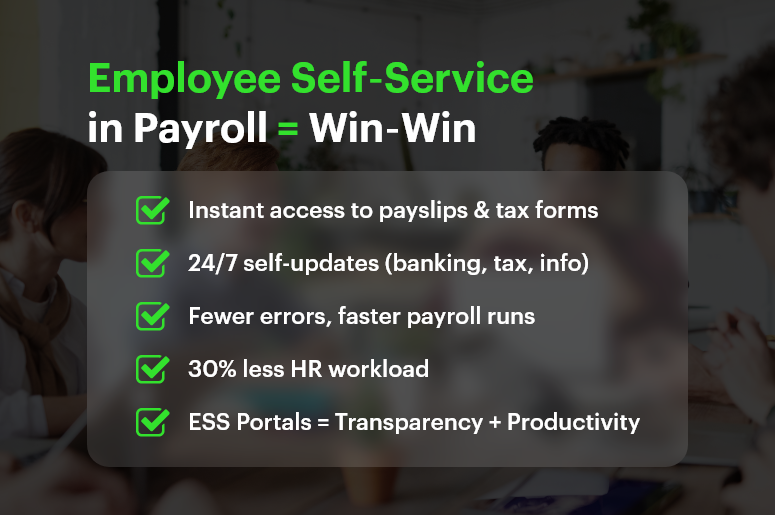
Research confirms that self‑service portals reduce HR workload by up to 30%, speed responses, and boost employee empowerment

In this post, we’ll explain why employee self‑service in payroll matters, the benefits it delivers, and how CRMLeaf’s unified CRM + ERP platform makes it effortless to implement.

Employee Self‑Service in Payroll Win‑Win

Why Employee Self‑Service in Payroll Matters

When employees rely on HR for every pay slip or deduction question, HR teams become overloaded, and delays frustrate people. Empowering employees with a payroll self-service portal solves that—and unlocks broader organizational benefits.

1. Enhances Payroll Transparency

  • An ESS portal gives employees instant access to payslips, deductions, tax forms, and earnings history.
  • With on-demand visibility, trust rises because payroll becomes open and understandable

2. Boosts Productivity & Reduces HR Workload

  • Empowering employees to self-serve reduces routine HR queries by nearly one-third.
  • This frees HR teams for strategic initiatives instead of repetitive admin

3. Improves Payroll Accuracy

  • When employees enter their details — banking info, tax election, personal data — errors drop significantly.
  • Built-in validation helps correct discrepancies before payroll is finalized

Free Payroll, PF, ESI & TDS Software

The most trusted automation tool for modern Indian businesses.

Who Benefits Most? Industries That Gain from ESS in Payroll

Employee self‑service in payroll delivers ROI across sectors:

  • Retail & Hospitality: High-volume, hourly staff with frequent deductions rely on immediate pay transparency.
  • Manufacturing & Logistics: Rotating shift workers need real-time payroll visibility to confirm hours across sites.
  • Professional Services & Startups: Tight payroll schedules, project-based compensation, and fast-changing headcounts benefit from self-service accessibility.

In all cases, ESS leads to fewer errors, happier teams, and more focused HR departments.

Best Practices & Actionable Tips for ESS in Payroll

Effective deployment of employee self‑service in payroll requires a best-in-class strategy. Here’s how to plan implementation — especially when integrated with CRMLeaf’s CRM + ERP system.

1. Implement a Unified ESS Portal

  • Use a single platform that integrates payroll, HR, and finance.
  • That way, changes in one module (like leave or benefits) reflect across the system immediately.

2. Offer Mobile & 24/7 Access

  • Employees should be able to view pay details, request updates, and download forms anytime.
  • Mobile-compatible portals meet modern expectations perfectly.

3. Enable Self-Updates with Automatic Validation

  • Let staff update direct deposit details, withholding info, or emergency contacts themselves.
  • Use validation rules to prevent incorrect entries and conflicts before payroll processing.

4. Cut HR Tickets by Providing Transparent Information

  • When employees can self-access payslips and tax forms, HR inquiries reduce drastically.
  • This minimizes repetitive texting and email chains for routine questions.

5. Integrate ESS with Leave & Benefits Modules

  • Link ESS to leave balance, PTO requests, and benefits elections to reduce cross-team misalignment.
  • Every update feeds into payroll automatically without manual adjustments.

6. Provide Pre-Payroll Error Alerts

  • Use alerts to flag missing data, incomplete profiles, or mismatched information before final payroll runs.
  • This proactive approach improves data quality and lowers downstream corrections.

7. Empower Employees & Improve Engagement

  • Giving staff control over their payroll data drives accountability and morale.
  • Studies show that empowered employees report higher satisfaction and retention.

8. Use Secure, Role‑Based Access

  • Provide multi-factor authentication and restrict visibility so employees only see their data.
  • Role-based permissions keep HR and finance functions secure and audit-ready.

Customer Success /Case Study

For example, BrightWorks Co., a mid-sized manufacturing company with 300 employees, implemented employee self‑service in payroll using CRMLeaf’s CRM + ERP platform. They rolled out a mobile ESS portal allowing staff to view payslips, update banking and tax info, request PTO, and submit unclaimed hours.

  • HR queries dropped by 35% within two months
  • Payroll error rate fell by 60% due to pre-payroll validation
  • Employee satisfaction increased by 20%, thanks to transparency and autonomy

By empowering employees and streamlining admin, BrightWorks transformed payroll from a headache into a productivity driver.

India’s #1 Free Software

Free Payroll, PF, ESI & TDS Software

Key Takeaways & Closing

Here’s why employee self‑service in payroll is a win-win for businesses:

  • Transparency: Staff can access their payroll data instantly, reducing confusion and enhancing trust.
  • Productivity: HR teams spend less time on routine tickets, freeing them for strategic work.
  • Accuracy: Self-entry and validation reduce errors before payroll is processed.

With CRMLeaf’s integrated CRM + ERP platform, ESS becomes more than a feature — it becomes a backbone of data integrity, employee engagement, and operational efficiency. This synergy helps businesses scale faster, operate more transparently, and support employees better — without increasing HR effort.

Building a Scalable Payroll System: What to Consider as You Grow?

Payroll might not be the first thing you think about when scaling your business — but it’s one of the first systems to break if not built for growth. Whether you’re hiring across multiple states, expanding internationally, or simply doubling your headcount, your payroll system must scale without bottlenecks. Inaccurate payroll, compliance issues, and poor visibility can cost your business big — not just in money, but in trust and team morale. In this post, we’ll break down what makes a scalable payroll system scalable, why it matters now more than ever, and how you can get ahead with the right tools — including the power of a CRM + ERP payroll solution.

Why Scalability Matters: The Business Case for a Future-Proof Payroll

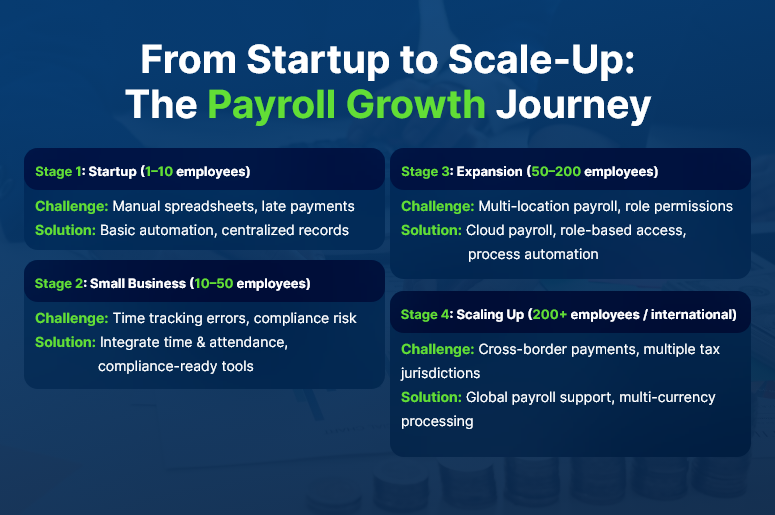
As businesses grow, so do payroll demands. New hires. More locations. Varied tax codes. Shift schedules. Contractor payments. International employees. What worked with 10 employees might become chaotic at 50 or 500.

Here’s why a scalable payroll system becomes a mission-critical investment:

  • Avoid Compliance Nightmares
    With growth comes complex labor laws, tax regulations, and cross-border rules. A scalable system automatically stays updated and reduces compliance risks.
  • Reduce Manual Errors and Admin Overload
    Spreadsheets and disconnected tools lead to duplicate entries, late submissions, and missed payments. Automation eliminates manual grunt work.
  • Support Fast-Paced Hiring and Onboarding
    Whether you’re opening a new office or onboarding seasonal workers, your payroll system should scale up quickly and painlessly.
  • Improve Employee Trust and Retention
    Timely, transparent, and accurate pay builds credibility. Late or incorrect payments? That’s a fast track to disengagement.

Industries like retail, logistics, manufacturing, and tech startups feel this pressure even more — high-volume hiring, remote teams, and compliance complexity all demand a reliable, scalable backbone.

From Startup to Scale-Up The Payroll Growth Journey

How to Build a Scalable Payroll System: 8 Actionable Strategies

1. Centralize Payroll and HR Data in One System

Avoid silos by unifying payroll, HR, and finance in a single platform. A CRM + ERP system helps ensure everyone’s working from the same data source — reducing discrepancies and delays.

2. Invest in Cloud-Based Payroll Software

Cloud solutions offer real-time access, better uptime, and built-in updates. They’re essential for growing teams and multi-location setups.

3. Automate Core Payroll Processes

From calculating wages to tax deductions and pay slip generation — automation saves time, reduces human error, and boosts efficiency.

4. Use Role-Based Access and Permissions

Ensure only authorized personnel can view/edit sensitive payroll data. This becomes more crucial as your org structure grows.

5. Plan for Multi-Currency and Global Payroll

Expanding internationally? Look for solutions that support global currencies, local tax laws, and multilingual interfaces.

6. Integrate Time Tracking and Attendance

Scalable systems sync real-time hours, shifts, and leaves automatically — reducing reconciliation headaches and disputes.

7. Enable Flexible Pay Structures

Support full-time, part-time, contract-based, and gig workers in one system. The modern workforce demands flexibility.

8. Track and Forecast Payroll Costs

Get visibility into costs by department, team, or project. Scalable payroll systems help finance teams forecast budgets accurately.

Customer Success Example

For example, SummitTech, a fast-scaling SaaS company, used CRMLeaf’s integrated payroll module to streamline multi-state compliance and reduce payroll processing time by 60%. With a rapidly growing remote team, they needed automation and visibility across HR and finance, which CRMLeaf delivered.

India’s #1 Free Software

Free Payroll, PF,
ESI & TDS Software

Professional compliance management for Indian businesses. 100% Free Forever.

Key Takeaways: Future-Proofing Your Payroll Operations

  • Scaling businesses can’t rely on spreadsheets or legacy payroll tools. You need a system that grows with you.
  • A CRM + ERP platform combines HR, payroll, and finance in one place — removing silos and driving collaboration.
  • Automation, compliance, and visibility are the pillars of scalability.

In short, building a scalable payroll system isn’t just about tech — it’s about enabling your people and processes to grow confidently.

As your team expands, your payroll system should never hold you back.

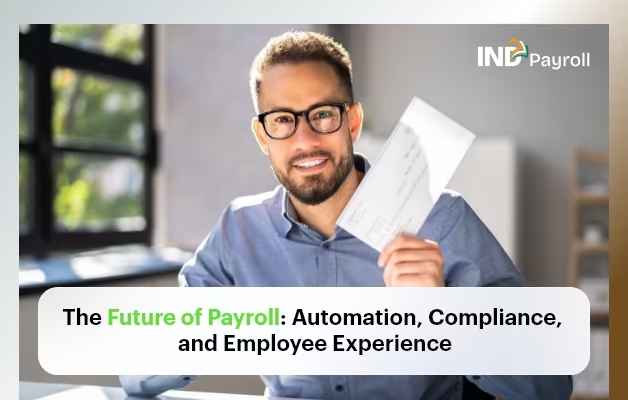
The Future of Payroll: Automation, Compliance, and Employee Experience

The future of payroll is no longer a distant vision — it’s unfolding right now. From increased government scrutiny to rising employee expectations, payroll has become a strategic function rather than just a back-office process. According to Deloitte, nearly 60% of businesses are actively modernising payroll to improve accuracy, compliance, and employee satisfaction.

If you’re still using spreadsheets or disconnected systems, you’re likely wasting time, exposing your business to compliance risks, and frustrating your team. But there’s good news — with the right tools and automation in place, payroll can become one of your most reliable, efficient, and employee-friendly workflows.

In this blog, we’ll explore:

  • Why the future of payroll is central to business growth
  • The biggest changes shaping payroll across industries
  • Practical steps to improve your payroll process today
  • How automation and a CRM + ERP platform like CRMLeaf can help

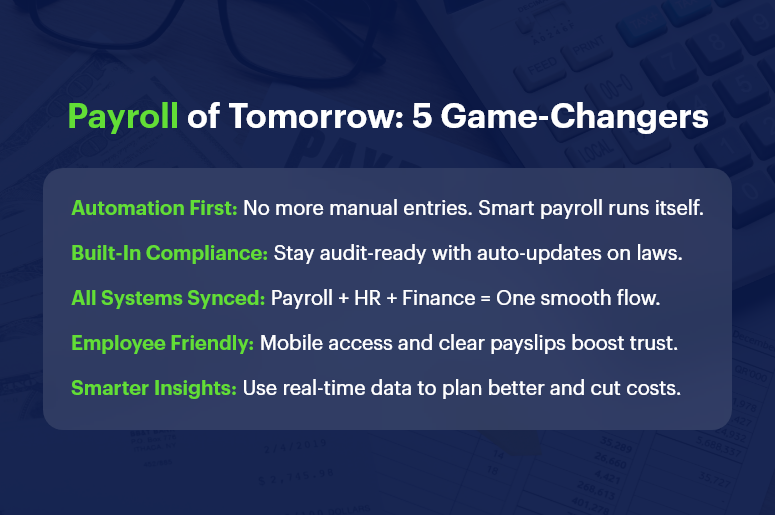
Payroll of Tomorrow 5 Game Changers

Why Payroll Modernisation Matters for Your Business

Payroll isn’t just about cutting checks. It’s a direct reflection of how your business values accuracy, compliance, and employee well-being. Here’s why modernising payroll is non-negotiable in today’s business environment:

  • High Stakes Compliance: Labour laws, tax codes, and statutory deductions change frequently. Missing a deadline or misclassifying an employee can lead to audits, penalties, or lawsuits. Automated payroll systems help you stay compliant, error-free, and audit-ready.
  • Employee Trust and Satisfaction: When employees are paid late or inaccurately, trust erodes. A well-run, transparent payroll process reinforces a culture of reliability and professionalism. This is critical for retention, especially in high-turnover industries like retail, construction, and logistics.
  • Operational Efficiency: Manual payroll is time-consuming and error-prone. Integrating payroll with your HR and finance systems eliminates duplicate work and frees up your team to focus on strategy.
  • Scalability for Growth: As your business grows, payroll becomes more complex. New tax jurisdictions, contract types, and benefit structures emerge. The future of payroll lies in scalable solutions that grow with you.
India’s #1 Free Software

Free Payroll, PF, ESI & TDS Software

What’s Driving the Future of Payroll?

Several factors are transforming how businesses handle payroll:

1. Payroll Automation is Now Essential

  • Eliminates repetitive tasks: Automation reduces the need for manual data entry, making pay cycles faster and more reliable.
  • Improves real-time accuracy: Errors are flagged instantly, ensuring accurate deductions, reimbursements, and benefits.
  • Reduces cost and labour: Businesses save money on admin hours and reduce payroll staff burden.

2. Compliance is Getting More Complex — and Critical

  • New labour laws and tax codes are being introduced across regions.
  • Freelancers, gig workers, and remote teams add complexity.
  • Automated systems ensure that every update — from tax slabs to EPF/ESI — is handled in real time.

3. Employee Experience is Tied to Payroll

  • Transparent, on-time payments build trust.
  • Features like self-service payslip access, real-time leave tracking, and reimbursement visibility empower employees.
  • A positive payroll experience enhances engagement, especially for remote and hybrid teams.

4. Integrated Platforms Are Replacing Disconnected Tools

  • Businesses using separate apps for HR, accounting, and payroll are prone to sync errors.
  • CRM + ERP platforms like CRMLeaf centralise data, reduce friction, and enable smarter decision-making.

Practical Tips: How to Prepare for the Future of Payroll

Ready to upgrade your payroll game? Here’s how to stay ahead:

Digitise and Centralise Your Payroll Data

  • Replace spreadsheets and paper forms with a centralised digital platform.
  • Choose a solution that integrates with HR, finance, and compliance tools.

Automate Key Processes

  • Automate payslip generation, tax calculations, benefit deductions, and statutory compliance.
  • Set recurring payroll schedules and alerts to eliminate delays.

Prioritise Compliance from Day One

  • Select software that updates automatically with the latest regulations.
  • Run periodic audits to detect errors before authorities do.

Empower Employees Through Self-Service Portals

  • Give employees access to their payslips, tax declarations, and leave balances.
  • Add mobile accessibility for hybrid or field-based teams.

Track Metrics and Use Payroll Analytics

  • Monitor payroll KPIs like cycle time, error rate, and cost per payslip.
  • Use insights to forecast costs and support budget planning.

Train Your HR & Finance Teams

  • Regularly update your team on system changes and compliance requirements.
  • Invest in user training during onboarding and after major updates.

Customer Success Snapshot

For example, GreenRoots Logistics, a fast-growing transportation company, used CRMLeaf’s payroll automation tools to reduce salary processing time by 75%. They integrated timesheets, leave approvals, and compliance tracking into a single workflow — all managed from one platform. This helped them ensure 100% on-time payments and a 30% drop in payroll-related queries.

Free Payroll, PF, ESI & TDS Software

The most trusted automation tool for modern Indian businesses.

Key Takeaways: Shaping the Future of Payroll

The future of payroll demands automation, real-time compliance, and a better employee experience. Businesses that continue using outdated methods will fall behind — not just in efficiency but in trust and growth.

In summary:

  • Automation isn’t optional anymore — it’s the baseline for payroll success.
  • Compliance risks are growing — using automated systems ensures peace of mind.
  • Employee satisfaction is directly tied to their payroll experience.
  • CRM + ERP platforms like CRMLeaf offer an all-in-one solution for modern payroll challenges.

Investing in the right payroll system today will future-proof your business tomorrow.

Category: EPFO & ESI

No posts in this category.

Subcategory: EPFO

Subcategory: ESI

Category: Payroll Help

No posts in this category.

Subcategory: Employee Self-Service & Engagement

Subcategory: Introduction to Payroll

Subcategory: Payroll Analytics & Reporting

Subcategory: Payroll Automation & Technology

Subcategory: Payroll for Business Growth

Subcategory: Payroll Processing & Management

Subcategory: Taxation & Compliance

Category: User Manual

No posts in this category.

Subcategory: Company Setup

Subcategory: Employee Management

Subcategory: Getting Started

Subcategory: Glossary

Subcategory: Import & Export

Subcategory: Introduction

Subcategory: Payroll Configuration

Subcategory: Payslips & Disbursement

Subcategory: Reports & Analytics

Subcategory: Running Payroll

Subcategory: Statutory Compliance & Reports

Subcategory: Troubleshooting

Subcategory: User Management & Security