15 Proven Payroll Best Practices for Indian SMEs 2026

TL;DR: Payroll Best Practices for Indian SMEs in 2026

  • Classify employees and contractors correctly to avoid compliance penalties.
  • Build compliant salary structures aligned with wage regulations.
  • Automate PF, ESI, TDS, and Professional Tax calculations.
  • Never miss statutory filing and payment deadlines.
  • Maintain accurate payroll records, payslips, and reconciliation reports.
  • Conduct regular payroll audits and prepare for Labour Code implementation.

Nearly half of India’s small businesses have faced a payroll penalty they could have avoided. One wrong formula in a spreadsheet, one missed PF deadline, one misclassified employee — and a routine pay run turns into interest, fines, and a difficult conversation with your team. Payroll is the single largest cash outflow for most SMEs, yet it is often run on tools never designed for India’s compliance maze.

If you manage payroll for a small or mid-sized business, you already feel the pressure: shifting tax rules, the long-awaited Labour Codes, and employees who expect their salary to be correct and on time — every single month. The cost of getting it wrong is rising, and “we’ll fix it next month” is no longer a safe plan.

In this guide, you will discover the 15 payroll best practices that keep Indian SMEs compliant, accurate, and audit-ready in 2026 — without expensive consultants or fragile spreadsheets. The INDPayroll Compliance Team works with thousands of Indian businesses and CA firms to automate PF, ESI, TDS, and Professional Tax, and these payroll best practices are the habits we see in every well-run payroll.

Free Payroll, PF, ESI & TDS Software

The most trusted automation tool for modern Indian businesses.

Why payroll best practices matter for Indian SMEs in 2026

Following payroll best practices is no longer optional housekeeping — it is risk management. Indian payroll sits at the intersection of the EPFO, the ESIC, and the Income Tax Department, and each carries its own deadlines and penalties. Strong payroll best practices protect your cash flow, your compliance record, and your reputation as an employer.

What are the payroll best practices for Indian SMEs? Payroll best practices are the standardised steps a business follows to pay staff accurately and stay legally compliant. They cover correct salary structuring, automated PF, ESI, TDS and Professional Tax deductions, on-time filings, accurate payslips, and secure record-keeping. Together, they prevent penalties and build employee trust.

1. Classify every worker correctly before you pay them

Misclassification is the most expensive payroll mistake an SME can make. Whether a person is a full-time employee, a contractor, or a gig worker decides which deductions, benefits, and filings apply. Treating an employee as a “consultant” to avoid PF and ESI can trigger back-payments, interest, and penalties during an inspection.

Worker classification is the process of deciding a worker’s legal status — employee, contractor, or gig worker. It works by testing control, supervision, and the nature of the engagement. It matters because each category carries different obligations for PF, ESI, TDS, and gratuity under Indian law.

India’s four Labour Codes formally recognise gig and platform workers and tighten definitions across the board. Map every person on your payroll to the right category in writing, and review the classification whenever a role changes.

2. Build a salary structure that is compliant by design

How you split a salary is not just a tax decision — it is a compliance one. Under the Code on Wages, 2019, the statutory definition of “wages” limits how much of total pay can sit in excluded allowances. In practice, this pushes the basic-plus-DA component toward at least 50% of total remuneration, which directly affects PF, gratuity, and overtime calculations.

A compliant salary structure is a pay breakup where basic wages meet statutory thresholds and allowances stay within legal limits. It works by keeping basic plus dearness allowance at roughly half of total pay. Most SMEs use it to control PF and gratuity liability while maximising employee take-home.

Design your CTC template once, correctly, and apply it consistently. A lopsided structure that under-reports basic wages is a red flag in any audit.

3. Automate statutory deductions instead of calculating them by hand

PF, ESI, Professional Tax, and TDS each follow different rates, ceilings, and rounding rules. Calculating them manually for even 30 employees invites error — and a single decimal mistake in TDS can cascade into a wrong Form 16. Automation removes the guesswork and applies current rates consistently every month.

Statutory deductions are the legally mandated amounts withheld from salary — EPF, ESI, Professional Tax, and TDS. They work by applying fixed rates to defined wage components each pay cycle. Indian employers must deduct and deposit them on time to stay compliant and avoid interest or penalties.

This is exactly the work payroll software is built to handle. Automated compliance tools recalculate deductions whenever rates change, so you are never relying on a year-old spreadsheet formula.

4. Get EPF (Provident Fund) right, every month

The EPFO administers the Employees’ Provident Fund and is mandatory for most establishments with 20 or more employees. Both employer and employee contribute 12% of basic wages plus dearness allowance, and contributions are typically due by the 15th of the following month.

EPF is a retirement savings scheme run by the Employees’ Provident Fund Organisation. It works by collecting 12% of basic wages plus DA from both the employer and the employee each month. The employer’s share is split between the pension fund (EPS) and the provident fund, calculated on a statutory wage ceiling of Rs. 15,000.

Generate your ECR (Electronic Challan-cum-Return) and deposit on time. Late PF payments not only attract damages and interest, but they can also disqualify the expense for income-tax purposes.

5. Stay within ESI rules for eligible employees

The Employees’ State Insurance scheme, run by the ESIC, provides medical and cash benefits to lower-wage workers. It generally applies to establishments with 10 or more employees and covers staff earning up to Rs. 21,000 per month (Rs. 25,000 for employees with disabilities).

ESI is a social security scheme for employees earning up to Rs. 21,000 a month. It works through a combined contribution of 4% of wages — 0.75% from the employee and 3.25% from the employer. It funds medical care, sickness, maternity, and disability benefits for covered workers.

Track wage thresholds carefully: an employee can move in or out of ESI coverage mid-year as pay changes, and your system must handle that transition cleanly within the contribution period.

6. Run an accurate TDS on salary under Section 192

Tax Deducted at Source on salary is governed by Section 192 of the Income Tax Act. Employers must estimate each employee’s annual tax liability and deduct it proportionately every month, choosing correctly between the old and new tax regimes based on the employee’s declaration.

TDS on salary is income tax that the employer deducts before paying wages, under Section 192. It works by spreading an employee’s estimated yearly tax across 12 months. Employers deposit it with the government and report it quarterly on Form 24Q, then issue Form 16 to each employee.

The new tax regime is now the default, and recent Budgets have reshaped the slabs and rebates. Collect investment declarations early in the financial year, verify proofs before year-end, and reconcile so no employee faces a shock deduction in March. Always confirm the current year’s slabs against the Income Tax Department before finalising.

7. Treat statutory deadlines as a non-negotiable payroll best practice

Most payroll penalties come not from wrong amounts but from being late. Each statutory due date is fixed, and missing it triggers automatic interest or fees regardless of intent. Among all payroll best practices, hitting deadlines is the cheapest and highest-return habit you can build.

Obligation Typical due date
EPF contribution & ECR 15th of the following month
ESI contribution 15th of the following month
TDS deposit (salary) 7th of the following month
TDS return (Form 24Q) Quarterly
Professional Tax Varies by state
What happens if you miss a TDS deadline? Late filing of a TDS return attracts a fee of Rs. 200 per day under Section 234E until the return is filed, capped at the TDS amount. A separate interest applies for late deduction or deposit. Meeting every due date is the cheapest compliance you will ever buy.

8. Keep a single source of truth for payroll data

When salary data lives in one spreadsheet, attendance in another, and bank details in an email, errors are inevitable. Centralising employee master data — pay structure, PAN, UAN, ESI number, bank details, and tax declarations — in one system removes duplication and version-control chaos.

A single source of truth is one authoritative system holding all payroll and employee data. It works by feeding every calculation, payslip, and filing from the same records. SMEs use it to eliminate conflicting spreadsheets, reduce manual re-entry, and ensure every report reconciles.

This is where SMEs reclaim the most time. Centralised payroll processing means one update flows everywhere instead of being copied across files.

9. Issue clear, itemised payslips on time

A payslip is both a legal record and a trust signal. The Code on Wages requires employers to give employees wage slips, and a good payslip itemises earnings, each statutory deduction, and the net pay so employees can see exactly how their salary was calculated.

A payslip is a document detailing an employee’s earnings and deductions for a pay period. It works by listing gross pay, PF, ESI, TDS, and other deductions, then showing net pay. Indian employers must provide it to meet wage-transparency obligations and reduce salary disputes.

Automated, password-protected digital payslips — generated and emailed in one click — save hours and look far more professional than a manual PDF.

10. Reconcile payroll before, not after, you file

Reconciliation catches errors while they are still cheap to fix. Each month, match gross pay, deductions, and net disbursement against your bank file. Each quarter, reconcile TDS deducted against Form 24Q and the deposits reflected in Form 26AS.

Payroll reconciliation is the process of matching payroll records against bank payments and statutory filings. It works by comparing what was calculated, paid, and reported, line by line. It matters because mismatches in Form 24Q or Form 26AS create notices and corrections that are costly to unwind.

A clean monthly reconciliation makes year-end Form 16 generation almost effortless.

11. Maintain statutory registers and records

Indian labour law requires employers to keep registers and records of wages, attendance, leave, and deductions — and to retain them for several years. Inspectors can ask for these at any time, and missing documentation is itself a violation, even if your calculations were correct.

Statutory registers are the records employers must keep under labour and tax laws, covering wages, attendance, and deductions. They work as the audit trail behind every pay run. The Labour Codes aim to simplify them into fewer digital registers, but retention obligations remain firmly in place.

Digital records with a complete change history make audits straightforward and protect you if a past calculation is ever questioned.

12. Manage attendance, leave, and overtime accurately

Payroll is only as accurate as the attendance feeding it. Loss-of-pay, overtime, and leave encashment must flow correctly into each month’s calculation. Manual transcription of attendance is a common — and avoidable — source of salary errors.

Attendance-to-payroll integration is the automatic flow of worked hours, leave, and overtime into salary calculation. It works by linking your attendance system directly to payroll so nothing is keyed in twice. SMEs use it to pay precisely for time worked and to comply with overtime rules.

Define your leave policy clearly, apply it consistently, and let the system, not a person, do the arithmetic.

13. Plan gratuity and full-and-final settlements ahead of time

Gratuity is a statutory benefit under the Payment of Gratuity Act, 1972, payable to employees who complete five years of continuous service, at 15 days’ wages for each completed year, subject to the prevailing cap. Provisioning for it monthly avoids a cash shock when senior staff exit.

Gratuity is a lump-sum reward for long service under the Payment of Gratuity Act. It works out to roughly 15 days of wages for each completed year, payable after five years of continuous service. Employers should provision for it gradually rather than funding it only at exit.

Build a clear, full, and final settlement process too — recovering advances, settling leave balances, and releasing dues within the legally expected timeframe.

14. Protect payroll and employee data

Payroll holds your most sensitive data: salaries, PAN, bank accounts, and Aadhaar-linked identifiers. With the Digital Personal Data Protection Act, 2023, safeguarding this information is now a legal duty, not just good hygiene. A leaked salary sheet damages trust and can carry regulatory consequences.

Payroll data protection is the practice of securing sensitive employee and salary information. It works through access controls, encryption, and limited sharing of pay data. Under India’s DPDP Act, 2023, businesses must handle personal data responsibly, making secure payroll systems a compliance requirement, not an option.

Restrict who can view salary data, use encrypted systems with audit logs, and avoid circulating raw payroll files over email or shared drives.

15. Audit regularly: the payroll best practice that ties it all together

India’s four Labour Codes — on Wages, Social Security, Industrial Relations, and Occupational Safety — consolidate 29 central labour laws and will reshape definitions of wages, working hours, and benefits as they roll out. SMEs that treat a yearly review as a core payroll best practice avoid scrambling later.

The Labour Codes are four laws that consolidate India’s central labour legislation. They work by standardising definitions of wages, social security, and working conditions across the country. Their phased implementation changes how SMEs structure pay and benefits, so businesses should track notifications and adjust payroll settings accordingly.

Run an internal payroll audit at least once a year: review classifications, salary structures, deduction rates, deadlines, and records. Confirm the current implementation status of the Labour Codes and your state’s specific notifications, since timing and rules continue to evolve.

Trust and authority: what we see in practice

“The businesses that never face a payroll penalty are rarely the ones with the biggest finance teams — they are the ones who automated their statutory calculations and treated deadlines as fixed,” notes the INDPayroll Compliance Team, drawing on payroll runs across thousands of Indian SMEs and CA firms.

Our own data points to a clear pattern: the most common penalty is not a wrong amount but a late filing, and almost every late filing traces back to a manual, calendar-driven process that someone simply forgot. The single highest-leverage change an SME can make is to move statutory deductions and deadlines off spreadsheets and onto a system that updates rates and reminders automatically.

Payroll best practices are the standardised steps a business follows to pay staff accurately and stay legally compliant — correct salary structuring, automated PF, ESI, TDS and Professional Tax deductions, on-time filings, accurate payslips, and secure record-keeping. Together, they prevent penalties and build employee trust.

India’s #1 Free Software

Free Payroll, PF, ESI & TDS Software

Conclusion

Strong payroll in 2026 comes down to three things: structure salaries correctly, automate every statutory deduction, and never miss a deadline. Master those, keep secure records, and stay ready for the Labour Codes, and payroll stops being a monthly risk and becomes a quiet competitive advantage. These payroll best practices are not theory — they are the habits that keep Indian SMEs penalty-free and their teams paid on time.

The fastest way to put all 15 payroll best practices into action is to stop running payroll on spreadsheets. Try INDPayroll free and run your next pay cycle in minutes, fully compliant.

This article is for general information only and does not constitute legal, tax, or financial advice. Statutory rates, wage ceilings, thresholds, due dates, and the implementation status of the Labour Codes change over time and can vary by state. Always verify the current rules with official sources such as the EPFO, ESIC, and the Income Tax Department, or consult a qualified professional, before acting.
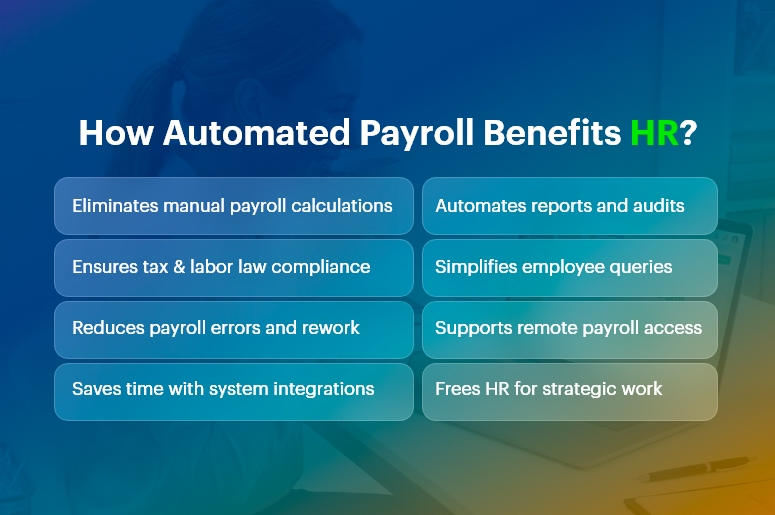
How Automated Payroll Reduces HR Stress

Every HR professional knows payroll is one of the most stressful, detail-heavy functions in the entire organization. At the same time, HR teams must balance compliance, accuracy, timeliness, and employee satisfaction with limited time and resources. Fortunately, automated payroll reduces HR stress by eliminating repetitive tasks, reducing errors, speeding up processes, and freeing HR professionals to focus on strategic work.

In this comprehensive, practical guide, you will learn how automation reduces HR stress, why it matters, how to implement it, and how to maximize its impact across your company.

How Automated Payroll Benefits HR Stress

What Is Automated Payroll?

It is a technology-driven process that calculates wages, taxes, deductions, and benefits automatically using software.

Instead of manually calculating hours, deductions, and tax rates, an automated payroll system pulls data from time tracking tools, HR databases, and compliance libraries to produce accurate payruns with minimal human intervention.

By design, automation reduces HR stress, increases accuracy, and accelerates payroll cycles.

Why Payroll Causes Stress in HR

Payroll creates stress because it demands precision under tight deadlines. HR teams must:

  • Calculate pay accurately: This requires tracking hours, overtime, bonuses, leave, and commissions.
  • Manage taxes and compliance: Tax rates change frequently, and noncompliance carries penalties.
  • Handle benefits and deductions: Health insurance, retirement contributions, garnishments, and other deductions vary by employee.
  • Report and document: Payroll reports feed into accounting, audits, and internal planning.
  • Respond to employee questions: Employees expect clarity, speed, and transparency.

No wonder traditional payroll processes overwhelm HR teams. This is where automated payroll reduces HR stress dramatically.

India’s #1 Free Software

Free Payroll, PF,
ESI & TDS Software

Professional compliance management for Indian businesses. 100% Free Forever.

Top Ways Automated Payroll Reduces HR Stress

1. Eliminates Manual Calculations

Manual payroll calculations take hours and invite errors. In contrast, automated systems compute wages automatically based on configured rules.

By removing manual math from the equation, automation reduces HR stress and increases accuracy.

2. Ensures Compliance With Laws and Regulations

Labor laws and tax regulations change frequently. Automated payroll software updates tax tables and compliance rules automatically, ensuring your payroll is always up to date.

This means HR spends less time tracking changes and worrying about compliance penalties.

3. Reduces Errors and Risk

Human error is inevitable under pressure. Missing a decimal, misapplying a tax rate, or omitting a benefit can create costly mistakes.

Because automation reduces HR stress by catching errors upfront and enforcing consistency, HR teams can trust the numbers and avoid costly corrections.

4. Saves Time With Integrated Systems

Integration matters. When your payroll software connects with time tracking, benefits administration, and HR databases, data flows automatically. This eliminates duplicate data entry and ensures consistency.

Consequently, automation reduces HR stress by cutting administrative overhead.

5. Improves Reporting and Insights

Automated payroll systems generate reports instantly. Whether you need departmental cost breakdowns, tax filings, or historical pay data, automated reporting gives HR the insights it needs without manual assembly.

Because it reduces HR stress around data preparation, HR can focus more on analysis and decision-making.

6. Enhances Employee Experience

Employees dislike errors and delays in pay. When payroll runs smoothly and accurately, employee satisfaction rises.

It reduces HR stress by minimizing customer service issues and enabling HR to handle questions quickly and confidently.

How Automated Payroll Reduces HR Stress in Daily Operations

To understand real-world impact, let’s examine day-to-day HR operations:

  • Streamlined Payroll Runs

With automation, data flows from time-tracking systems into payroll seamlessly. HR simply reviews and approves pay runs rather than generating them from scratch.

Thus, automation reduces HR stress by shortening payroll preparation time and cutting repetitive work.

  • Faster Adjustments

Need to update an employee’s tax status or benefit enrollment? Automated systems propagate changes across all payroll modules.

This eliminates manual intervention and ensures accuracy. Because automated payroll reduces HR stress during adjustments, HR can respond swiftly to employee life events.

  • Simplified Audits

Auditors demand documentation, trails, and accuracy. Automation systems maintain logs, reports, and documentation automatically.

This transparency helps HR complete audits with less effort. In short, automation reduces HR stress when compliance checks arrive.

  • Remote and On-Demand Access

Modern payroll tools allow HR and employees to access payroll information from anywhere. This reduces dependency on paper records and ensures that HR can answer questions in real time.

Consequently, automation reduces HR stress by supporting remote and distributed teams.

India’s #1 Free Software

Free Payroll, PF, ESI & TDS Software

Key Features That Make Automated Payroll Effective

Understanding which features deliver stress relief helps you make informed choices.

  • Real-Time Calculations

Instant updates to payroll figures reduce last-minute surprises.

  • Tax Filing Automation

Automatic filing and payments save time and prevent penalties.

  • Integration With HR Systems

Connected systems ensure data accuracy and eliminate siloed information.

  • Self-Service Employee Portals

Employees can view payslips, tax forms, and benefits independently, reducing HR inquiries.

  • Alerts and Notifications

Reminders for deadlines and exceptions help HR stay proactive.

Each of these features contributes to how automation reduces HR stress, making payroll faster, smarter, and more reliable.

Choosing the Right Automated Payroll Solution

Selecting the right system matters. To ensure your payroll solution truly reduces HR stress, evaluate the following:

  • Scalability

Choose software that grows with your business and handles multiple pay schedules, classifications, and international requirements.

  • Integration Capabilities

Verify that the payroll tool integrates with your HRIS, time tracking, benefits platform, and accounting systems.

  • Compliance Support

Ensure the solution updates tax tables, legal changes, and reporting requirements automatically.

  • Support and Training

Reliable vendor support and user training help your HR team adopt the tool smoothly.

By focusing on these criteria, you increase the likelihood that automated payroll reduces HR stress—not just in theory but in practice.

Common Misconceptions About Payroll Automation

Many HR teams hesitate to adopt payroll automation due to misconceptions:

“Automation Means No Human Control”

False. Automated payroll reduces HR stress by handling calculations, but HR still reviews, approves, and oversees payroll.

“It’s Only for Large Organizations”

Not true. Small and medium businesses benefit even more because automation eliminates manual work that small teams cannot afford.

“It’s Too Expensive”

While upfront costs exist, automated payroll reduces HR stress and delivers ROI through time saved, error reduction, and improved compliance.

Clarifying these misconceptions helps HR teams embrace automation with confidence.

Real-World Impact: Case Scenarios

Consider these examples:

Case 1: Mid-Size Tech Firm

Before automation, HR spent three days per pay run reconciling time cards. After implementing payroll automation, the firm cut that to under one day and eliminated overtime miscalculations. In this case, automated payroll reduces HR stress by removing manual reconciliation.

Case 2: Retail Chain With Variable Hours

With hourly workers and seasonal fluctuations, payroll errors were common. Automated rules captured overtime, shift differentials, and compliance automatically. Here, automated payroll reduces HR stress by standardizing complex wage calculations.

These scenarios show how automated payroll reduces HR stress across different business models.

Best Practices for a Smooth Payroll Automation Transition

To get the most value:

  • Map Your Current Process – Document existing workflows to understand where automation helps most.
  • Train Your Team – Ensure all users understand how to operate and troubleshoot the system.
  • Test Before DeploymentRun parallel payroll tests to validate accuracy.
  • Set Clear Policies – Define roles, review cycles, and approval workflows.
  • Monitor and Improve Continuously – Review reports and process performance regularly.

Following these steps ensures automated payroll reduces HR stress not just initially, but over the long term.

Free Payroll, PF, ESI & TDS Software

The most trusted automation tool for modern Indian businesses.

Conclusion

Automated payroll reduces HR stress by removing manual work, increasing accuracy, ensuring compliance, and delivering faster, more reliable payroll processes.

When implemented thoughtfully — and paired with training, integration, and continuous improvement — automation transforms payroll from a stressful chore into a strategic advantage.

Whether you lead a small business or a large enterprise, understanding how automated payroll reduces HR stress equips your organization to operate more efficiently, improve employee satisfaction, and focus HR efforts where they matter most.

Frequently Asked Questions (FAQs)

Q: How soon will automated payroll reduce HR stress after implementation?

A: Many organizations see measurable reductions in administrative workload within the first payroll cycle because repetitive manual tasks disappear.

Q: Does automated payroll remove HR jobs?

A: No. It shifts HR teams from transactional work to strategic, value-added activities like employee engagement and policy development.

Q: Can automated payroll handle compliance across different regions?

A: Yes, modern solutions update tax tables and compliance rules for multiple regions, ensuring accurate and compliant payroll processing.


End-to-End Payroll Processing Checklist for Growing Businesses

Payroll isn’t just about paying your people. It’s about staying compliant, earning trust, and keeping your team motivated. But as your business grows, managing payroll manually becomes risky, time-consuming, and error-prone. In fact, more than 33% of small businesses face penalties due to payroll errors. In this guide, we’ll walk you through a practical end-to-end payroll processing checklist — built for modern, growing businesses. You’ll learn where most companies slip up, what to fix, and how to make the entire process seamless with CRMLeaf’s CRM + ERP platform.

The Business Case: Why End-to-End Payroll Processing Matters

Managing payroll goes far beyond cutting checks. When payroll is inaccurate or non-compliant, it creates ripple effects across your business. Think employee dissatisfaction, audits, legal trouble, and financial losses.

Let’s look at why a robust payroll system is essential for growth:

  • Retail & Hospitality: High employee turnover and hourly wages make real-time payroll updates critical. Delays lead to unhappy staff and retention issues.
  • Manufacturing & Logistics: Managing overtime, shift differentials, and contract workers demands precision — or you’ll face major payroll compliance risks.
  • Professional Services: Billing hours, bonuses, and project-based compensation require automation to prevent calculation errors.

No matter the industry, streamlined payroll automation improves productivity, builds employee trust, and reduces your operational burden.

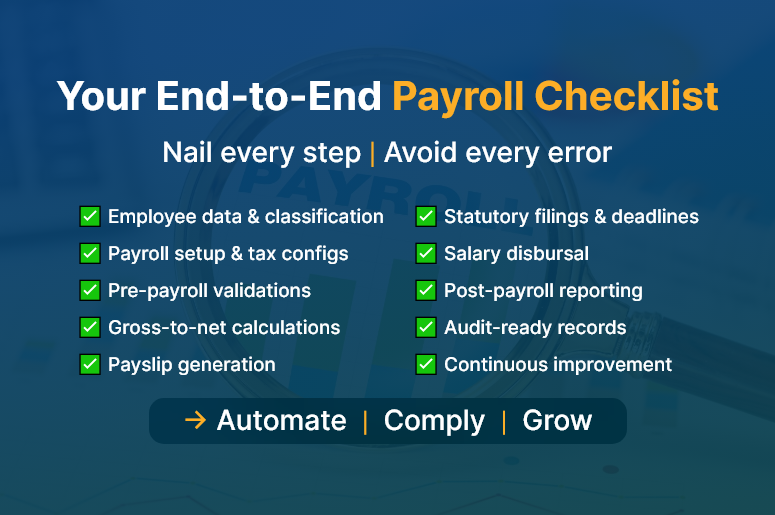
Your End-to-End Payroll Checklist

The Ultimate End-to-End Payroll Processing Checklist

Here’s your complete payroll checklist, broken down into actionable stages. Each one is critical for a smooth, accurate, and compliant payroll cycle.

1. Employee Data Collection & Classification

  • Capture full employee details: Collect tax ID, contact info, job role, bank details, and any benefits preferences at onboarding.
  • Classify employment type: Distinguish between full-time, part-time, contract, and freelance workers to ensure correct tax treatment.
  • Track working hours and shifts: Use digital timesheets or biometric systems to gather accurate work data.

2. Payroll Setup & Configuration

  • Set pay frequencies: Define weekly, bi-weekly, or monthly payroll cycles based on company structure.
  • Automate tax rates & deductions: Stay current with federal, state, and local tax laws to apply accurate deductions.
  • Integrate with attendance systems: Sync leave, holidays, and work hours from your HR tool into your payroll system.

3. Pre-Payroll Validation

  • Verify attendance data: Double-check logged work hours, approved leave, and overtime entries.
  • Audit changes in pay structure, including bonuses, commissions, and pay raises, and validate them before final processing.
  • Confirm deductions: Ensure that benefits, insurance, and loan deductions are accurate and approved.

4. Payroll Calculation & Review

  • Run gross-to-net calculations: Automatically compute gross salary, taxes, deductions, and net pay.
  • Cross-check with payroll software: Use automated payroll software to reduce human errors and eliminate spreadsheet fatigue.
  • Generate payslips: Produce detailed, downloadable payslips for employee transparency.
India’s #1 Free Software

Free Payroll, PF,
ESI & TDS Software

Professional compliance management for Indian businesses. 100% Free Forever.

5. Compliance & Statutory Filings

  • Generate tax forms: Automatically create W-2s, 1099s, PF/ESI documents, and other required tax filings.
  • Meet submission deadlines: Set reminders for tax payment and reporting deadlines to avoid penalties.
  • Stay audit-ready: Maintain digital records and audit trails to comply with labour laws.

6. Payment Processing

  • Schedule timely payments: Use integrated banking or payroll software to process salary payments without delay.
  • Disburse reimbursements: Include travel or expense claims in the current cycle to avoid payment lags.
  • Reconcile bank statements: Ensure every payment matches the payroll run and accounting books.

7. Post-Payroll Reporting & Feedback

  • Share detailed reports: Provide department-wise breakdowns and payroll summaries to finance and HR teams.
  • Analyze payroll KPIs: Track payroll accuracy, error rates, cycle time, and compliance status.
  • Collect feedback: Enable employee feedback to improve future payroll runs.

How CRM + ERP Transforms Payroll for Scaling Teams

Disconnected tools lead to fragmented processes. CRMLeaf’s CRM + ERP platform brings everything — from employee onboarding to payroll disbursal — into one unified workflow.

  • HR integration: Automatically sync new hire data from your HR module into payroll setup.
  • Real-time tracking: Use dashboards to monitor payroll progress, pending validations, and payment status.
  • Custom reports: Generate audit-ready reports, salary slips, and tax documents at the click of a button.
  • Scalability: Whether you have 20 or 200 employees, the system grows with you — minus the manual work.

Customer Success

For example, Finovate Solutions, a 50-person IT services company, used CRMLeaf’s payroll automation to reduce payroll errors by 95% and cut processing time from 3 days to 4 hours. Here’s how:

  • Integrated employee timesheets with payroll
  • Enabled automatic compliance checks and tax form generation
  • Streamlined payouts and payslip generation

This shift not only saved time but boosted employee satisfaction and reduced compliance risks.

Free Payroll, PF, ESI & TDS Software

The most trusted automation tool for modern Indian businesses.

Key Takeaways & Closing

A smooth end-to-end payroll processing workflow doesn’t just prevent errors — it strengthens trust, ensures compliance, and frees up your time for strategic growth.

  • Map your payroll process: Understand each phase and identify bottlenecks.
  • Automate wherever possible: Manual work invites mistakes. Use payroll automation tools.
  • Stay compliant: Regulations change frequently. Your system must adapt in real time.
  • Unify systems: Don’t rely on disconnected HR, time tracking, and payroll apps.

With the right tools and mindset, payroll can become a growth enabler — not a back-office burden.

Top Payroll Challenges Small Businesses Face — And How to Overcome Them

Managing payroll is not just about calculating salaries and hitting “send.” It’s a critical function that impacts compliance, employee trust, and business growth. Small businesses, especially, face intense pressure to get payroll right — without the luxury of large teams or expensive systems.

In this blog, we break down the top payroll challenges faced by small businesses and show you how to overcome them with modern tools, smart workflows, and streamlined systems like a CRM + ERP platform.

Why Payroll Management Deserves More Attention

If payroll feels like a back-office task, think again. For small and mid-sized businesses, payroll can make or break operations:

  • Cash flow hinges on payroll timing. If salaries are delayed or miscalculated, it can cause employee dissatisfaction and even attrition.
  • Payroll errors often trigger legal penalties. From late filings to incorrect tax calculations, non-compliance is costly.
  • Manual payroll is time-consuming and error-prone. Many small teams still rely on spreadsheets, which are simply not scalable.

Industries like retail, manufacturing, and IT services that operate with mixed or distributed workforces often find payroll particularly tricky due to varying shifts, bonuses, and legal compliance.

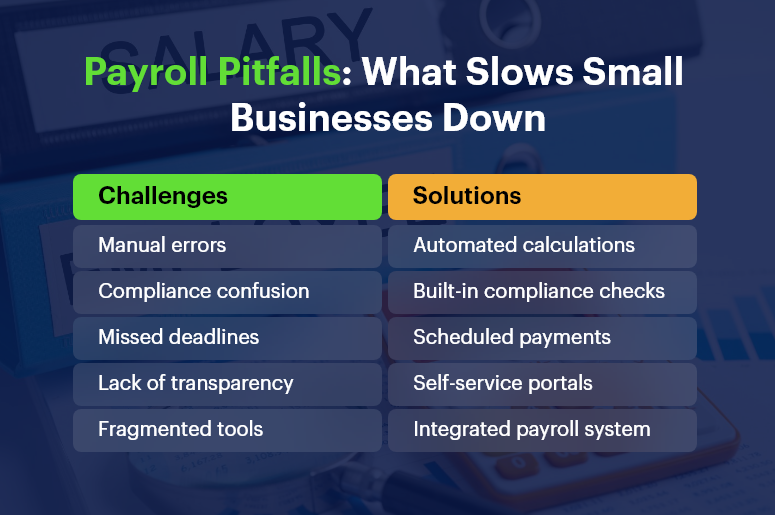
Payroll Pitfalls What Slows Small Businesses Down

The Top Payroll Challenges for Small Businesses

1. Payroll Compliance and Ever-Changing Tax Regulations

Staying compliant with local, state, and national laws is exhausting. Tax slabs change, new deductions are introduced, and local labor laws evolve regularly.

  • Failure to comply can lead to hefty fines. For example, misfiling PF or ESI returns can invite audits or penalties.
  • Keeping up with changes requires continuous monitoring. Small HR teams may not have bandwidth for this.

2. Employee Misclassification (Full-Time vs. Contractual)

Many small businesses operate with a mix of full-time, part-time, and freelance workers.

  • Incorrect classification leads to incorrect tax deductions and benefit allocations.
  • This misstep can attract government scrutiny and cause reputational damage.

Free Payroll, PF, ESI & TDS Software

The most trusted automation tool for modern Indian businesses.

3. Frequent Payroll Errors and Manual Calculations

Human errors during data entry, incorrect overtime calculations, or forgetting to update deductions can all snowball quickly.

  • Incorrect payslips break employee trust. It lowers morale and could lead to disputes.
  • Fixing payroll errors consumes time and resources, especially if discovered late.

4. Delayed Salary Disbursement

Salary delays often result from approvals stuck in email threads or cash flow uncertainty.

  • Late salaries hurt employee retention. Workers expect timely payments — especially in labor-heavy sectors.
  • It also disrupts payroll reporting and statutory submissions.

5. No Integration Between HR, Payroll, and Finance Systems

Disjointed systems mean multiple logins, repeated data entry, and no single view of employee or financial data.

  • Data silos lead to inefficiencies. You may calculate leave in one system, salary in another, and taxes manually.
  • Lack of integration affects reporting accuracy.

6. Handling Bonus, Incentive, and Variable Pay

Bonuses, commissions, and performance incentives add complexity to monthly processing.

  • Without a rule-based system, calculating variable pay is confusing and inconsistent.
  • Mistakes here affect employee motivation and tax liabilities.

7. Difficulties in Tax Filing and Year-End Reports

Many businesses struggle with last-minute data compilation during TDS filing or form generation.

  • Inaccurate tax filing risks penalties and employee dissatisfaction.
  • Manually generating Form 16 or 24Q is time-consuming.

How to Overcome These Payroll Challenges

Solving these issues starts with automation, integration, and insight. Here’s how:

Adopt a Unified Payroll Platform

Replace fragmented tools with a CRM + ERP system that integrates payroll, HR, and finance.

  • Eliminates redundant data entry across departments.
  • Ensures consistency in employee classification and tax deduction rules.

Set Payroll Rules and Templates

Use configurable salary structures and templates for roles, departments, and work types.

  • Standardization reduces calculation errors.
  • Templates ensure clarity across full-time, part-time, and freelance roles.

Automate Tax Compliance and Filing

Use payroll software that supports automatic deductions, PF/ESI calculation, and timely filings.

  • Get real-time compliance alerts.
  • Avoid end-of-quarter panic.

Enable Self-Service for Employees

Give employees access to payslips, tax details, and reimbursement updates.

  • Builds transparency and reduces admin burden.
  • Empowers employees to track earnings and deductions.

Set Clear Payroll Schedules and Workflows

Avoid delays with automated approval workflows and defined processing dates.

  • Improves coordination between HR, finance, and leadership.
  • Ensures salaries are hit on time.

Case Study

For example, a retail chain implemented an integrated payroll + HR solution to streamline monthly payouts. With automated PF/ESI calculations and integrated leave tracking, they:

  • Reduced payroll processing time by 60%
  • Avoided late filing penalties completely
  • Improved employee satisfaction and retention
India’s #1 Free Software

Free Payroll, PF, ESI & TDS Software

Key Takeaways

  • Payroll management is more than salary disbursement — it’s a business-critical operation.
  • Manual systems increase risks and drain time for small teams.
  • Compliance, classification, and tax filing are the top pain points in small business payroll.
  • Integrated systems reduce errors, delays, and missed compliance windows.

In summary, a smart, unified payroll system can transform how small businesses manage compliance, build employee trust, and save countless hours each month. As you grow, you need processes that scale without multiplying complexity.

Category: EPFO & ESI

No posts in this category.

Subcategory: EPFO

Subcategory: ESI

Category: Payroll Help

No posts in this category.

Subcategory: Employee Self-Service & Engagement

Subcategory: Introduction to Payroll

Subcategory: Payroll Analytics & Reporting

Subcategory: Payroll Automation & Technology

Subcategory: Payroll for Business Growth

Subcategory: Payroll Processing & Management

Subcategory: Taxation & Compliance

Category: User Manual

No posts in this category.

Subcategory: Company Setup

Subcategory: Employee Management

Subcategory: Getting Started

Subcategory: Glossary

Subcategory: Import & Export

Subcategory: Introduction

Subcategory: Payroll Configuration

Subcategory: Payslips & Disbursement

Subcategory: Reports & Analytics

Subcategory: Running Payroll

Subcategory: Statutory Compliance & Reports

Subcategory: Troubleshooting

Subcategory: User Management & Security