ESIC New Rules 2026: Salary Limit, Eligibility, Contribution Rates & Payroll Compliance Guide

TL;DR: ESIC New Rules 2026

  • ESIC wage ceiling remains unchanged at ₹21,000 per month for general employees and ₹25,000 for employees with disabilities.
  • Contribution rates remain the same: Employer contributes 3.25%, and employee contributes 0.75% of eligible wages.
  • Eligible employees working in covered establishments and earning within the wage limit must be enrolled under the ESI Scheme.
  • ESI wages include Basic Pay, DA, HRA, CCA, attendance allowance, and other regular allowances, while overtime, bonus, gratuity, and reimbursements are generally excluded.
  • Employers must ensure compliance through timely registration, accurate contribution calculations, record maintenance, and on-time monthly payments.
  • No major ESIC rule changes were officially notified for 2026; the focus remains on stronger payroll compliance, digital audits, and accurate employee coverage.

Introduction

The Employees’ State Insurance Corporation (ESIC) is one of India’s largest social security organizations, providing medical and financial benefits to millions of employees and their families. For employers, compliance with this scheme is a critical payroll responsibility that directly impacts statutory compliance and employee welfare.

In 2026, employers must continue to comply with these statutory regulations relating to employee eligibility, wage limits, contribution calculations, registration requirements, and monthly filings.

This guide explains the latest ESIC rules applicable in 2026, including salary limits, contribution rates, eligibility criteria, benefits, compliance requirements, and payroll best practices.

India’s #1 Free Software

Free Payroll, PF,
ESI & TDS Software

Professional compliance management for Indian businesses. 100% Free Forever.

What Is ESIC?

The Employees’ State Insurance (ESI) Scheme is governed by the ESI Act, 1948, and administered by the Employees’ State Insurance Corporation (ESIC).

The scheme provides social security protection to eligible employees against:

  • Sickness
  • Maternity
  • Employment injury
  • Disability
  • Death due to employment injury

Employees and employers contribute to the scheme, enabling insured persons and their dependents to receive medical and financial benefits.

ESIC Salary Limit 2026

The ESIC wage ceiling in 2026 remains:

Category Wage Limit
General Employees ₹21,000 per month
Employees with Disabilities ₹25,000 per month

Employees earning wages within the prescribed limit are generally covered under the ESI Scheme if employed in an eligible establishment.

Who Is Eligible for ESIC Coverage?

An employee is generally covered under ESIC if (refer to the ESI registration guide for details):

  • The establishment is covered under the ESI Act.
  • The employee’s monthly wages do not exceed ₹21,000.
  • The establishment employs the prescribed minimum number of employees (generally 10 or more).
  • The employee works in a covered category of employment.

Coverage may also extend to:

  • Contract workers
  • Casual workers
  • Temporary employees
  • Outsourced workers deployed at covered establishments

Wage Components Included in ESIC Calculation

The following salary components are generally included for ESI contribution purposes:

  • Basic Salary
  • Dearness Allowance (DA)
  • House Rent Allowance (HRA)
  • City Compensatory Allowance (CCA)
  • Attendance Allowance
  • Night Shift Allowance
  • Fixed Monthly Incentives
  • Other Regular Allowances

Wage Components Generally Excluded

  • Overtime Wages
  • Annual Bonus
  • Ex-Gratia Payments
  • Leave Encashment
  • Gratuity
  • Retrenchment Compensation
  • Employer PF Contribution
  • Travel Reimbursements
  • Business Expense Reimbursements

Correct wage classification is essential for accurate contribution calculations. Use our free ESI Calculator to verify deductions instantly.

ESIC Contribution Rates 2026

The contribution rates remain unchanged in 2026.

Contribution Rate
Employer Contribution 3.25%
Employee Contribution 0.75%
Total Contribution 4.00%

Employers are responsible for deducting employee contributions and depositing both shares with the corporation. Explore our PF & ESI Compliance Software for automated calculations.

ESIC Contribution Calculation Examples

Example 1: Monthly Wage ₹15,000

Particulars Amount
Monthly Wage ₹15,000
Employee Contribution (0.75%) ₹112.50
Employer Contribution (3.25%) ₹487.50
Total Contribution ₹600.00

Example 2: Monthly Wage ₹21,000

Particulars Amount
Monthly Wage ₹21,000
Employee Contribution (0.75%) ₹157.50
Employer Contribution (3.25%) ₹682.50
Total Contribution ₹840.00

ESIC Contribution Period and Benefit Period

The scheme follows two contribution periods and corresponding benefit periods.

Contribution Period Benefit Period
April – September January – June
October – March July – December

Benefits are generally available during the applicable benefit period based on contributions made during the contribution period.

Free Payroll, PF, ESI & TDS Software

The most trusted automation tool for modern Indian businesses.

What Happens If Salary Exceeds ₹21,000?

A common payroll question arises when an employee’s wages exceed the ESIC wage ceiling during a contribution period. Use our CTC Calculator to model revised salary structures.

If an employee is already covered at the beginning of a contribution period and subsequently receives a salary increase above ₹21,000, ESIC contributions generally continue until the end of that contribution period.

Example

Month Wage
April ₹20,500
July ₹22,500

The employee remains covered until the current contribution period ends.

ESIC Registration Process for Employers

Step 1: Employer Registration

Register the establishment on the official portal and obtain the Employer Code Number.

Step 2: Employee Enrollment

Register eligible employees and collect required personal and family information.

Step 3: Insurance Number Generation

Each insured employee receives a unique Insurance Number.

Step 4: Monthly Contribution Calculation

Calculate employee and employer contributions based on applicable wages.

Step 5: Contribution Payment

Deposit all contributions through the online portal. Learn how to generate ESI challan online for timely payment.

Step 6: Maintain Records

Maintain wage records, contribution records, employee details, and statutory documentation for inspections and audits.

ESIC Due Date for Contribution Payment

Employers must deposit ESIC contributions within 21 days of the end of the calendar month” — i.e., by the 21st of the following month, per Regulation 31 of the ESI (General) Regulations, 1950.

Late payment may result in:

  • Interest on delayed contributions
  • Damages and penalties
  • Compliance notices
  • Legal action in severe cases

ESIC Benefits Available to Employees

Medical Benefit

Comprehensive medical care for insured employees and their dependents.

Sickness Benefit

Cash compensation during certified sickness periods.

Extended Sickness Benefit

Additional support for specified long-term illnesses.

Maternity Benefit

Paid maternity benefits for eligible insured women employees.

Temporary Disablement Benefit

Compensation for temporary loss of earning capacity due to employment injury.

Permanent Disablement Benefit

Long-term financial assistance for permanent disability.

Dependants Benefit

Financial support for dependants in case of death due to employment injury.

Funeral Expenses

Financial assistance towards the funeral expenses of an insured person.

Payroll Compliance Checklist for Employers

To maintain ESIC compliance in 2026 and meet all statutory compliance requirements:

  • Verify employee eligibility regularly.
  • Register all eligible employees promptly.
  • Calculate applicable wages accurately.
  • Deduct employee contributions correctly.
  • Deposit contributions within prescribed timelines.
  • Maintain contribution and wage records.
  • Reconcile payroll and statutory filings monthly. Use the Compliance Calendar to track all due dates.
  • Monitor salary changes impacting ESIC eligibility.
  • Respond promptly to ESIC notices and inspections.

What Actually Changed in 2026?

While ESIC contribution rates and wage ceilings remain unchanged in 2026, the compliance environment is new. ESIC has intensified digital audits, enforced stricter employer registration checks, continued the SPREE scheme for new enrolments, and increased scrutiny of contract worker coverage. For employers, 2026 demands stronger payroll accuracy and audit readiness.

Organizations are expected to:

  • Maintain accurate payroll records.
  • Ensure proper employee registration.
  • Avoid incorrect wage classifications.
  • Strengthen payroll audit readiness.
  • Use payroll systems capable of handling statutory compliance automatically.

For most employers, the focus in 2026 is not on new contribution rates but on stronger compliance and accurate payroll administration. Avoid costly errors by reviewing common payroll challenges HR teams face.

How INDPayroll Simplifies ESIC Compliance

INDPayroll’s payroll software helps businesses manage ESIC compliance through:

By automating payroll processes, organisations can reduce manual effort, minimise errors, and maintain statutory compliance.

India’s #1 Free Software

Free Payroll, PF, ESI & TDS Software

Conclusion

The scheme remains a critical component of India’s social security framework. Employers must ensure accurate employee registration, wage classification, contribution calculation, and timely compliance to avoid penalties and ensure uninterrupted benefits for employees. Follow proven payroll best practices and use purpose-built tools to stay ahead.

By understanding ESIC eligibility rules, salary limits, contribution requirements, and compliance obligations, organizations can build a stronger payroll compliance framework and provide better protection to their workforce.

How to Generate ESI Challan Online: Complete Guide for Indian Employers 2026

TL;DR: ESI Challan Generator Guide 2026

  • ESI compliance is mandatory for eligible employees and requires employers to calculate, deposit, and report contributions accurately every month.
  • Current ESI contribution rates are 0.75% (employee) and 3.25% (employer), totaling 4% of gross wages.
  • ESI challans must be generated and paid by the 15th of the following month to avoid penalties, interest, and compliance issues.
  • Accurate eligibility checks, contribution calculations, and employee records are essential for maintaining ESIC compliance.
  • Common mistakes include calculation errors, missed deadlines, zero-contribution filing omissions, and delayed employee registration.
  • INDPayroll automates ESI calculations, challan generation, compliance tracking, and reporting, helping businesses complete ESI filing in minutes.

Introduction

Managing payroll compliance is one of the most important responsibilities for employers in India. Among various statutory requirements, Employee State Insurance (ESI) compliance plays a crucial role in protecting employees while ensuring businesses meet their legal obligations.

However, managing ESI contributions manually can be challenging. HR and payroll teams often spend significant time calculating contributions, verifying employee eligibility, generating challans, and making timely payments. Even a minor mistake can lead to compliance issues, penalties, or additional administrative work.

As organisations grow, manual payroll processes become increasingly difficult to manage. This is why businesses are adopting automated payroll solutions and ESI Challan Generators to simplify compliance, improve accuracy, and save valuable time.

In this guide, you will learn everything about ESI challan generation, contribution calculations, payment procedures, compliance requirements, and how payroll software can streamline the entire process.

India’s #1 Free Software

Free Payroll, PF, ESI & TDS Software

What Is Employee State Insurance (ESI)?

Employee State Insurance (ESI) is a social security and health insurance scheme administered by the Employees’ State Insurance Corporation (ESIC), an autonomous body under India’s Ministry of Labour and Employment, established under the Employees’ State Insurance Act, 1948.

The scheme provides financial protection and medical benefits to eligible employees and their families during:

  • Sickness
  • Maternity
  • Employment injury
  • Disability
  • Medical emergencies
  • Dependents’ support requirements

The objective of ESI is to ensure that employees have access to healthcare services and income support during difficult situations.

What Benefits Does ESI Provide to Employees?

Quick Answer: ESI provides covered employees with free medical care, sickness cash benefit at approximately 70% of wages, maternity benefit, disability compensation, dependent support, and funeral expense assistance. Benefits extend to the employee’s family. Coverage applies during employment in any ESIC-registered establishment where the employee earns up to ₹21,000 per month.

The ESI scheme offers several benefits to covered employees.

  • Medical Benefits: Employees and their dependents can access medical treatment through ESIC hospitals and dispensaries.
  • Sickness Benefits: Employees receive approximately 70% of their average daily wages during certified illness periods — for up to 91 days in two consecutive benefit periods per year.
  • Maternity Benefits: Female employees are entitled to maternity-related benefits under applicable conditions as per the ESI Act.
  • Disability Benefits: Employees who suffer work-related disabilities receive monthly compensation in accordance with ESIC guidelines.
  • Dependents’ Benefits: Family members receive monthly financial support if an employee dies from an on-the-job injury.
  • Funeral Expenses: A fixed lump sum is available for funeral-related expenses as notified by ESIC. Verify the current amount at ESIC. in.

Why Does ESI Compliance Matter for Indian Employers?

Quick Answer: ESI compliance is a statutory obligation under the Employees’ State Insurance Act, 1948. Non-compliant employers face interest at 12% per annum, damages up to 25% of arrears, ESIC inspection notices, and prosecution under Section 85 of the ESI Act. Compliance protects employees’ social security rights and shields businesses from financial penalties and legal action.

Employers covered under ESI regulations must:

  • Register eligible employees with ESIC
  • Calculate contributions accurately every month
  • Deposit contributions on time
  • Maintain payroll and contribution records
  • Generate ESI challans
  • File the half-yearly Return of Contributions (RC)
  • Preserve all compliance documentation

Failure to comply may result in:

  • Interest at 12% per annum on delayed payments
  • Damages of 5% to 25% of arrear amounts, depending on the delay period
  • Compliance notices from ESIC
  • Legal action under Section 85 of the ESI Act
  • Increased audit risks

For growing businesses, automated compliance management is the most effective way to avoid these risks.

ESI Eligibility Criteria

Employees are covered under the ESI scheme if their gross monthly wages do not exceed ₹21,000 per month.
For employees with disabilities, the wage ceiling is ₹25,000 per month.

Employers should regularly review employee payroll records to determine eligibility and maintain compliance.

Which Establishments Must Register?

Establishment Type Minimum Employees Required
Factory (power-using) 10 or more
Non-seasonal factory 10 or more
Shops, restaurants, hotels, and cinemas 10 or more
Road motor transport undertakings 10 or more

Once an establishment is registered, coverage continues even if the employee count later falls below the threshold. For a complete walkthrough of the process, see our ESI Registration Process guide for employers.

ESI Contribution Periods

The ESI scheme operates in two contribution periods every year:

Contribution Period Months Covered
1st Period 1 April – 30 September
2nd Period 1 October – 31 March

Important rule: If an employee’s salary crosses ₹21,000 mid-period, they remain covered under ESI until the end of that contribution period — not immediately. Their exclusion takes effect from the start of the next period. This is one of the most commonly misunderstood ESI rules.

ESI Contribution Rates for 2026

Both employers and employees contribute to the ESI scheme every month.

Contribution Type Rate
Employee Contribution 0.75% of gross wages
Employer Contribution 3.25% of gross wages
Total Contribution 4.00% of gross wages

These rates were revised in 2019 and remain applicable in 2026.

How to Calculate ESI Contributions

Accurate calculation is essential for generating the correct ESI challan.

Quick Answer: ESI contribution is calculated by multiplying the employee’s gross monthly wages by 0.75% for the employee share and 3.25% for the employer share. Both figures are rounded to the nearest rupee. ESIC does not accept paise values.

Example Calculations

Monthly Salary Employee Contribution (0.75%) Employer Contribution (3.25%) Total
₹18,000 ₹135 ₹585 ₹720
₹20,000 ₹150 ₹650 ₹800
₹21,000 ₹158 ₹683 ₹841

Rounding rule: ESIC rounds all contributions to the nearest rupee. For example, ₹21,000 × 0.75% = ₹157.50, which rounds to ₹158. Always round — ESIC does not accept paise values in challans.

When managing large workforces, manual calculations across dozens of employees become time-consuming and error-prone. Automated payroll software handles rounding and calculation automatically.

Free Payroll, PF, ESI & TDS Software

The most trusted automation tool for modern Indian businesses.

What Is an ESI Challan?

An ESI challan is the official monthly payment document that employers generate and submit to deposit ESI contributions with ESIC.

Quick Answer: An ESI Challan is a monthly payment document submitted by registered employers to ESIC. It records the employer contribution (3.25% of gross wages) and employee contribution (0.75% of gross wages) for all covered employees. It consolidates wage and contribution data into a single payable amount used to remit statutory ESI dues and maintain ESIC compliance records.

The challan contains essential details such as:

  • Employer code
  • Establishment information
  • Contribution period (wage month)
  • Employee-wise IP numbers, wages, and contributions
  • Employer contribution amount
  • Employee contribution amount
  • Total payable contribution
  • Payment reference information

The challan acts as legal proof that ESI contributions have been calculated and deposited correctly.

How to Generate an ESI Challan Online

Quick Answer: To generate an ESI challan online, log in to the ESIC employer portal at esic. In using your employer code and password. Navigate to Monthly Contribution → Enter Contribution. Enter employee-wise data or upload a CSV file, verify the totals, generate the challan, and pay via net banking or NEFT by the 15th of the following month.

Step 1: Collect Employee Payroll Information

Gather data including:

  • Employee salaries and gross wages
  • Attendance records and leave information
  • Overtime details
  • Employee eligibility status (who is under ₹21,000)
  • IP numbers for all covered employees

Step 2: Calculate ESI Contributions

Determine employer and employee contributions based on current rates, rounded to the nearest rupee. You can also use our Salary Components in India guide to understand which allowances form the ESI calculation base.

Step 3: Verify Employee Data

Ensure that:

  • Salary records are accurate and finalised
  • All employee details match ESIC records
  • All eligible employees are included
  • New joiners have been registered on the ESIC portal

Step 4: Generate the Challan

Log in to esic. In and navigate to Employer Login → Monthly Contribution → Enter Contribution. Enter data manually or upload a CSV file, verify the summary, and click Generate Challan.

Step 5: Complete Payment

Submit payment through net banking (SBI, PNB, or other empanelled banks), NEFT/RTGS using the challan reference number, or at a designated bank branch.

Step 6: Store Compliance Records

Maintain copies of:

  • ESI challans and payment receipts
  • Employee-wise contribution statements
  • Payroll reports for the contribution period

Proper documentation is essential for compliance and future audits.

Generate ESI Challan in Minutes with INDPayroll

Generating an ESI challan with INDPayroll is quick and helps ensure accurate ESIC compliance. Follow these steps:

  • Step 1: Log in to INDPayroll
  • Step 2: Update Employee Attendance & Salary Data
  • Step 3: Run Monthly Payroll
  • Step 4: Go to Statutory Filings
  • Step 5: Open the ESI Return
  • Step 6: Export the ESI Challan File
  • Step 7: Download in ESI Challan Format
  • Step 8: Upload the File to the ESIC Portal
  • Step 9: Generate the Challan Instantly
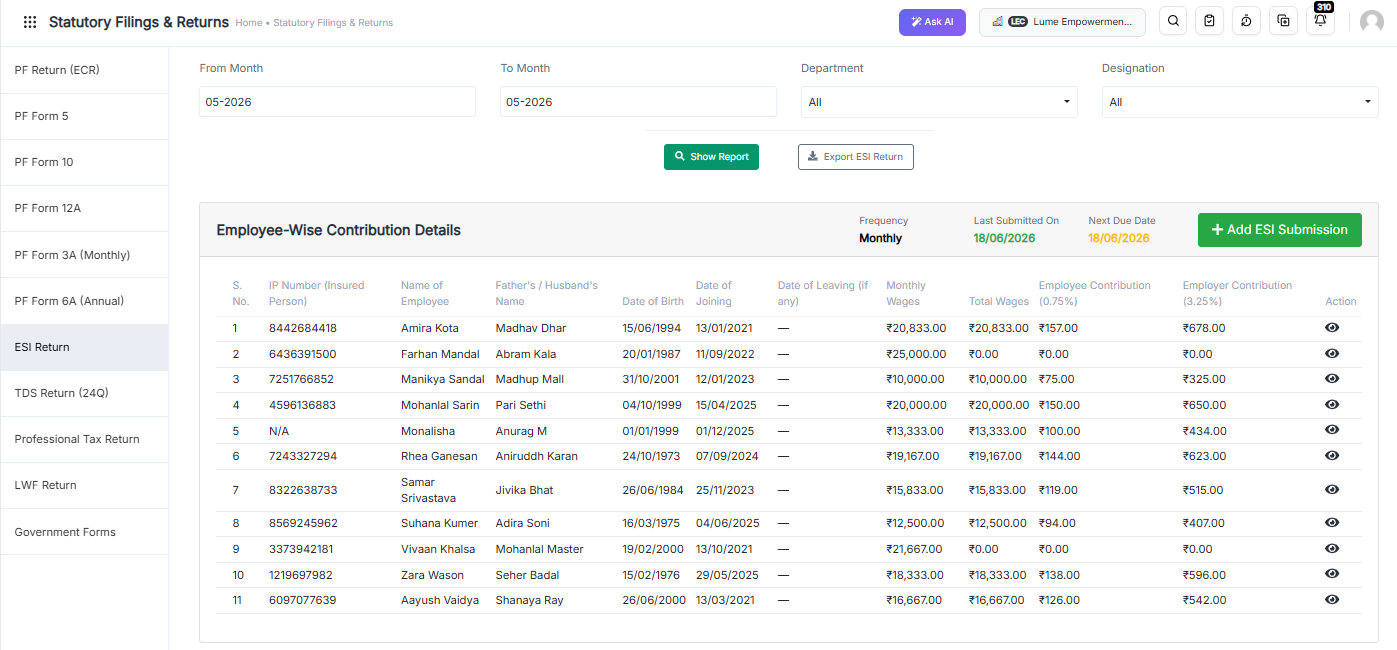
ESI Challan Generator

Key Benefits

  • No further or additional calculations are required.
  • ESI contribution data is prepared automatically.
  • Month-over-month data can be exported instantly whenever required. Use our payslip and reports generator for professional documentation.
  • Reduces manual effort and minimises compliance errors.
  • Ensures faster ESI challan generation and filing.

ESI Payment Due Date and Compliance Deadlines

Quick Answer: ESI challan is due by the 15th of the month following the wage month. For example, June 2026 contributions must be paid by 15 July 2026. If the 15th falls on a bank holiday, the next working day applies.

Monthly Challan Due Dates (2026–27)

Wage Month Challan Due Date
April 2026 15 May 2026
May 2026 15 June 2026
June 2026 15 July 2026
July 2026 15 August 2026
August 2026 15 September 2026
September 2026 15 October 2026
October 2026 15 November 2026
November 2026 15 December 2026
December 2026 15 January 2027
January 2027 15 February 2027
February 2027 15 March 2027
March 2027 15 April 2027

Half-Yearly Return of Contributions (RC)

In addition to monthly challans, employers must file a Return of Contributions (RC) twice a year. This is a separate statutory requirement that many employers overlook.

Contribution Period RC Filing Due Date
April – September 2026 11 November 2026
October 2026 – March 2027 11 May 2027

Missing the RC deadline is treated as non-compliance independently of your monthly challan payments.

Penalty for Late Payment

Delay Period Damages Levied
Less than 2 months 5% of the arrear amount
2 to 6 months 10% of the arrear amount
6 months to 1 year 15% of the arrear amount
More than 1 year 25% of the arrear amount

Plus simple interest at 12% per annum from the due date. Continued defaults can lead to prosecution under Section 85 of the ESI Act. For a broader view of payroll legal obligations, read our Payroll Compliance 101 guide.

Zero Contribution Filing: A Requirement Most Employers Miss

If your establishment had no eligible employees in a given month — because all employees exceeded the ₹21,000 wage ceiling, or due to temporary closure — you must still file a zero-contribution challan for that month.

Skipping it is treated as non-filing by ESIC and can trigger a compliance notice. This is one of the most frequently overlooked ESI obligations among Indian SMEs.

What Are the Common Challenges in ESI Challan Management?

Quick Answer: The most common ESI challan challenges are manual calculation errors (especially incorrect rounding), missed 15th-of-month deadlines, IP number mismatches on the ESIC portal, eligibility blind spots when salaries cross ₹21,000, overlooked zero-contribution months, and difficulty compiling the half-yearly Return of Contributions from scattered spreadsheet records.

Most compliance failures are not caused by ignorance of the law. They are caused by process gaps in manual workflows. Discover the top payroll automation benefits that can help your business eliminate these gaps.

Manual Calculation Errors: Incorrect contribution calculations — especially rounding errors — lead to mismatched challans and correction requests with ESIC.

Missed Deadlines Tracking the 15th-of-month deadline manually, alongside payroll close and other compliance tasks, increases the risk of delayed payments.

Employee Data Inconsistencies: IP number mismatches, name discrepancies between ESIC records and payroll systems, and salary data errors cause challan rejection on the ESIC portal.

Eligibility Blind Spots Salary revisions that push employees above ₹21,000 mid-period are easy to miss. The wage ceiling continuation rule — where the employee stays covered until the period ends — adds complexity.

Administrative Burden Manual processing consumes valuable HR and payroll resources that could be directed toward higher-value work. Learn more about why manual payroll fails growing businesses in India.

Half-Yearly Return Compilation When monthly records are stored in separate spreadsheets across six months, compiling the RC is time-consuming and prone to errors.

Common ESI Compliance Mistakes Employers Should Avoid

  • Incorrect employee eligibility determination
  • Wrong contribution calculations (especially not rounding to the nearest rupee)
  • Delayed challan generation
  • Late ESI payments
  • Skipping zero-contribution challan months
  • Not filing the half-yearly Return of Contributions (RC)
  • Missing IP number registration for new joiners
  • Ignoring contractor employee ESI liability

Automating payroll and compliance processes significantly reduces all of these risks. For a broader list of errors to watch for, see 15 payroll mistakes HR managers should avoid.

Manual ESI Management vs Automated ESI Challan Generator

Feature Manual Process Automated ESI Challan Generator
Contribution Calculation Manual, error-prone Automatic, rounded correctly
Challan Generation Time-consuming One-click generation
Error Risk High Minimal
Rounding Compliance Often missed Built-in
Eligibility Tracking Manual review Auto-flags employees above ₹21,000
Deadline Reminders Manual calendar Automated alerts
RC Filing Data Manual compilation Auto-generated from monthly data
Zero-Return Filing Easy to forget System prompts when applicable
Audit Readiness Difficult Organised digital records
Scalability Limited Highly scalable

Why Businesses Choose INDPayroll’s ESI Challan Generator

INDPayroll’s ESI Challan Generator is built specifically for Indian statutory compliance. Every feature addresses a real pain point that Indian payroll teams face every month.

Quick Answer: INDPayroll’s ESI Challan Generator automatically calculates ESI contributions, tracks employee eligibility against the ₹21,000 wage ceiling, and generates ESIC portal-compatible challan files every month. It integrates with payroll and attendance data, sends deadline alerts, and auto-compiles the half-yearly Return of Contributions — eliminating manual effort and penalty risk for Indian employers.

Key benefits include:

  • Automatic ESI contribution calculations with correct rounding
  • One-click ESI challan generation
  • Employee eligibility tracking with automatic wage ceiling alerts
  • Integrated payroll and attendance management
  • Automated deadline reminders (monthly challan and half-yearly RC)
  • Zero-contribution challan prompts when applicable
  • Centralised employee records with IP number management
  • Compliance tracking and audit-ready reporting
  • Secure cloud-based access

Businesses that switch from manual ESI filing to INDPayroll consistently report that monthly compliance preparation time drops from several hours to under 15 minutes. Read our guide on how to run payroll in minutes with INDPayroll — and that missed-deadline incidents fall to near zero once automated reminders and one-click challan generation are in place.

Whether you are a startup, SME, or growing enterprise, INDPayroll helps reduce compliance risks while improving efficiency. Explore the top 10 features every Indian payroll software must have to evaluate your compliance toolkit.

INDPayroll also integrates with Payroll Compliance Software, Attendance Management Software, PF & ESI Compliance Solutions, and Salary Management Software for end-to-end statutory compliance.

What Are the Best Practices for ESI Compliance in 2026?

  • Maintain accurate, up-to-date employee records at all times
  • Register new employees with ESIC promptly after joining
  • Automate contribution calculations to avoid rounding errors
  • Monitor the 15th-of-month deadline and the RC deadlines
  • Track salary revisions against the ₹21,000 wage ceiling
  • File zero-contribution challans when no employees are covered
  • Keep digital copies of all challans and payment receipts for at least 5 years
  • Verify contractor employee ESI liability monthly
  • Use integrated payroll software to generate ESIC portal-compatible files
  • Conduct periodic compliance reviews before ESIC contribution periods close

Simplify ESI Compliance with INDPayroll

Managing ESI compliance manually is complicated, time-consuming, and risky. INDPayroll’s ESI Challan Generator helps businesses automate calculations, generate accurate challans, meet every deadline, and reduce the risk of ESIC penalties.

Also, explore the full INDPayroll compliance suite:

India’s #1 Free Software

Free Payroll, PF,
ESI & TDS Software

Professional compliance management for Indian businesses. 100% Free Forever.

Conclusion

ESI compliance is a critical responsibility for every employer in India. Accurate contribution calculations, correct rounding, timely monthly challan payments, half-yearly RC filing, and proper record maintenance are all essential for avoiding compliance risks and ensuring employee welfare.

An automated ESI Challan Generator simplifies these processes by eliminating manual errors, applying correct rounding, tracking eligibility changes, and generating all required documents automatically. By adopting payroll automation solutions like INDPayroll, organisations can streamline ESI management, save valuable time, and focus on business growth rather than administrative complexity.

ESI Registration Process: Complete Employer Guide 2026

If your business employs 10 or more workers and your monthly wage bill exceeds ₹21,000 per employee, ESI (Employee State Insurance) registration is not optional — it is mandatory. Yet many Indian employers still struggle with the ESI registration process, unsure where to start, what documents to gather, or what to expect after registration.

This complete employer guide to ESI registration in 2026 walks you through every step of the process so you can register confidently, stay compliant, and protect your employees. If you are also managing EPF compliance obligations, it is worth reviewing both requirements together for seamless statutory compliance.

What is ESI (Employee State Insurance)?

The Employee State Insurance scheme is a self-financing social security and health insurance scheme for Indian workers. It is governed by the ESI Act, 1948 and administered by the Employees’ State Insurance Corporation (ESIC) — an autonomous body under the Ministry of Labour and Employment.

ESI provides covered employees with a range of benefits, including:

  • Medical benefits for employees and their dependents
  • Sickness benefits (cash compensation during illness)
  • Maternity benefits
  • Disablement benefits
  • Dependent benefits (for family in case of work-related death)
  • Funeral expenses

In addition, to understand how ESI fits within the full statutory compliance picture, check our guide on labour law updates for Indian businesses.

India’s #1 Free Software

Free Payroll, PF, ESI & TDS Software

Who Needs to Register for ESI?

ESI registration is mandatory for:

  • Factories employing 10 or more workers
  • Establishments (shops, hotels, restaurants, road motor transport, cinema theatres, etc.) employing 10 or more workers in most states (20 or more in some states)
  • Any establishment covered under a State Government notification

Employee eligibility: All employees earning up to ₹21,000 per month (₹25,000 for persons with disability) are covered under ESI. Furthermore, managing payroll for a growing workforce is easier with IndPayroll’s payroll software, which automates statutory compliance workflows end-to-end.

ESI Contribution Rates in 2026

Contributor Rate
Employer 3.25% of gross wages
Employee 0.75% of gross wages

Note: Employees earning ₹176 per day or less are exempt from the employee contribution — only the employer contributes for them. Moreover, for accurate contribution calculations, use our free ESI Calculator tool to verify deductions before finalising your payroll.

Documents Required for ESI Registration Process

Before starting the ESI registration process, gather the following documents:

  • Certificate of Incorporation / Registration Certificate of the firm
  • Memorandum and Articles of Association (for companies)
  • Partnership Deed (for partnership firms)
  • GST Registration Certificate
  • PAN card of the establishment
  • Address proof of the establishment (electricity bill, rent agreement, etc.)
  • List of all employees with their details (name, salary, date of joining)
  • Bank account details of the establishment
  • Cancelled cheque
  • Digital Signature Certificate (DSC) or Aadhaar-based OTP of the authorised signatory

Step-by-Step ESI Registration Process in 2026

Step 1: Visit the ESIC Portal

First, go to the official ESIC Self-Service Portal at esic.gov.in. All ESI registrations in 2026 are done online through this portal. Importantly, paper-based applications are no longer accepted for new registrations.

Step 2: Employer Registration – Sign Up

Next, click on “Employer Login” and then “Sign Up” to create a new employer account. You will need to provide:

  • Your establishment’s name and address
  • Type of business/industry
  • PAN of the establishment
  • Contact information (email and mobile number)

An OTP will be sent to your registered mobile number for verification.

Step 3: Fill in the Employer Registration Form (Form 01)

After signing in, navigate to “New Employer Registration” and fill out Form 01 — Employer’s Registration Form. This form includes:

  • Nature of business
  • Date of commencement of employment
  • Details of the factory/establishment (location, area, number of floors, etc.)
  • Details of the proprietor, partners, or directors
  • Number of employees and wage details

Step 4: Upload Required Documents

Subsequently, upload all the documents listed above in the required formats (PDF, JPG as specified by the portal). Ensure all documents are clear and readable to avoid rejection.

Step 5: Submit and Receive the ESI Code Number

Once the form is submitted successfully, the system will generate a 17-digit ESI Code Number immediately. This code is unique to your establishment and is used for all future ESI-related filings. You will receive the registration confirmation on your registered email ID.

Step 6: Register Your Employees (Insured Persons)

After receiving the ESI code, you must register all eligible employees. Therefore, log into the ESIC portal and navigate to “Employee Registration”. Provide each employee’s details:

  • Aadhaar number
  • Date of birth
  • Date of joining
  • Wage details
  • Family members’ details (for dependent benefits)

Each employee will be assigned an Insurance Number (IP Number) — their unique identifier under ESI. However, employers who process payroll manually often miss employee registrations. As a result, learn why manual payroll fails growing businesses in India and how automation prevents such oversights.

Step 7: Generate and Distribute ESI Cards

Finally, employees can access their ESI cards through the Umang App or by logging into the ESIC portal. These cards are needed when availing medical benefits at ESI hospitals and dispensaries.

ESI Compliance After Registration

Registration is just the beginning. In fact, here is what you need to do on an ongoing basis to stay compliant.

Monthly Contributions

ESI contributions must be deposited by the 15th of the following month. For example, contributions for April 2026 are due by May 15, 2026. Specifically, contributions are calculated on all wages, including basic salary, dearness allowance, house rent allowance, overtime, and other allowances.

Moreover, understanding how salary components affect ESI deductions is essential. Therefore, refer to our detailed salary slip format guide for India 2026 to see which components form the ESI calculation base.

Half-Yearly Returns

In addition, employers must file ESI returns twice a year:

  • April to September – due by November 11
  • October to March – due by May 11

Monthly Reporting via ESIC Portal

All employee wage data must be submitted through the ESIC portal monthly. Consequently, keeping up with deadlines is far easier when you use dedicated PF and ESI compliance software that automates reminders and challan generation.

Common Mistakes to Avoid During ESI Registration

  • Delaying registration – Registration must happen within 15 days of reaching the threshold (10 employees). Penalties apply for delay.
  • Incorrect wage data – Always include all wage components in the ESI calculation base.
  • Not registering new employees – Every new eligible employee must be registered within 10 days of joining.
  • Wrong category selection – Choose the correct industry category during registration as it can affect compliance obligations.
  • Ignoring branch establishments – Each branch in a different location may need a separate ESI code.

These are among the common payroll mistakes HR managers should avoid to remain compliant and penalty-free.

Penalties for Non-Compliance

Failure to comply with the ESI Act can result in severe consequences. Specifically:

  • Late payment interest – 12% per annum on delayed contributions
  • Damages – Up to 25% of the contribution amount, depending on the period of delay
  • Prosecution – Imprisonment up to 3 years and/or fine up to ₹10,000 for wilful default

For a broader view of statutory obligations, therefore, read our Payroll Compliance 101 guide covering all the key laws every Indian business must follow.

How IndPayroll Simplifies ESI Compliance

Manually tracking ESI contributions, filing returns, and managing employee IP numbers is time-consuming and error-prone. However, IndPayroll automates the entire ESI compliance workflow:

  • Automatically calculates ESI contributions based on employee wages
  • Generates ESI challan reports ready for upload to the ESIC portal
  • Sends reminders before contribution due dates
  • Maintains a complete history of ESI filings for audit purposes
  • Supports bulk employee registration data exports in ESIC-compatible formats

Moreover, to see how IndPayroll compares with competitors, read the IndPayroll vs Zoho Payroll 2026 comparison. Additionally, discover why Indian SMEs are switching to free payroll software in 2026.

ESI and PF: Understanding the Difference

While ESI covers health and insurance benefits for employees earning up to ₹21,000/month, the Employees’ Provident Fund (EPF) is a retirement savings scheme. Furthermore, both are mandatory for covered establishments and must be managed together.

Therefore, use our free PF Calculator alongside the ESI calculator to plan your total statutory deductions. In addition, refer to the ESI compliance guide and the EPF compliance guide for in-depth guidance.

Free Payroll, PF, ESI & TDS Software

The most trusted automation tool for modern Indian businesses.

Conclusion

ESI registration is a critical compliance obligation for Indian employers. Moreover, getting it right from the start can save you from penalties, legal complications, and employee dissatisfaction. The 2026 ESI registration process is fully online and more streamlined than ever — but it still requires careful attention to detail.

Therefore, by following the steps outlined in this guide, gathering your documents in advance, and using a payroll tool like IndPayroll to automate ongoing compliance, you can ensure your business stays on the right side of ESI regulations all year round. Need help managing ESI and other statutory deductions? Try IndPayroll for free — India’s dedicated payroll and compliance platform for growing businesses.

Frequently Asked Questions

1. Who is required to register for ESI in India?

Any factory or establishment employing 10 or more workers (20 or more in some states) must register under the ESI Act, 1948. Furthermore, registration must be completed within 15 days of reaching the employee threshold. State governments may also extend ESI coverage through specific notifications.

2. What is the ESI contribution rate for employers and employees in 2026?

In 2026, employers contribute 3.25% of gross wages and employees contribute 0.75%. However, employees earning ₹176 per day or less are exempt from the employee contribution — the employer contributes on their behalf instead.

3. How do I complete the ESI registration process online in 2026?

First, visit the ESIC Self-Service Portal at esic.gov.in. Then, create an employer account, complete Form 01, upload required documents, and submit to receive your 17-digit ESI Code Number instantly. No paper-based applications are accepted in 2026.

4. What documents are needed for ESI registration?

You need the Certificate of Incorporation, PAN card, GST certificate, address proof, an employee list with salary details, bank account details, a cancelled cheque, and the DSC or Aadhaar OTP of the authorised signatory.

5. What is the ESI wage limit for employee coverage in 2026?

Employees earning up to ₹21,000 per month are covered under ESI. However, for persons with disabilities, the threshold is ₹25,000 per month. Employees earning above these limits are not covered under the ESI scheme.

6. What are the penalties for late or non-registration under ESI?

Non-compliance can attract damages of up to 25% of contribution amounts, interest at 12% per annum on delayed deposits, and in wilful default cases, imprisonment up to 3 years and/or a fine up to ₹10,000.

7. How often do employers need to file ESI returns?

Employers must file ESI returns twice a year: April to September (due by November 11) and October to March (due by May 11). Moreover, monthly wage data must also be submitted through the ESIC portal every month.

8. When must monthly ESI contributions be deposited?

ESI contributions for a given month must be deposited by the 15th of the following month. For instance, contributions for April 2026 are due by May 15, 2026. Late deposits attract interest at 12% per annum.

9. Does ESI apply to contract and gig workers?

ESI coverage depends on wage levels and employment nature. Contract workers engaged through a principal employer may be covered under ESI if their wages fall within the eligibility limit. Therefore, employers should verify applicability carefully under the ESI Act.

10. Can IndPayroll automate ESI compliance for my business?

Yes. IndPayroll automates ESI contribution calculations, generates ESIC-ready challan reports, and sends timely reminders for due dates. In addition, it maintains a complete filing history and supports bulk ESIC-compatible employee data exports, making the entire ESI registration process and ongoing compliance simple and error-free.

Category: EPFO & ESI

No posts in this category.

Subcategory: EPFO

Subcategory: ESI

Category: Payroll Help

No posts in this category.

Subcategory: Employee Self-Service & Engagement

Subcategory: Introduction to Payroll

Subcategory: Payroll Analytics & Reporting

Subcategory: Payroll Automation & Technology

Subcategory: Payroll for Business Growth

Subcategory: Payroll Processing & Management

Subcategory: Taxation & Compliance

Category: User Manual

No posts in this category.

Subcategory: Company Setup

Subcategory: Employee Management

Subcategory: Getting Started

Subcategory: Glossary

Subcategory: Import & Export

Subcategory: Introduction

Subcategory: Payroll Configuration

Subcategory: Payslips & Disbursement

Subcategory: Reports & Analytics

Subcategory: Running Payroll

Subcategory: Statutory Compliance & Reports

Subcategory: Troubleshooting

Subcategory: User Management & Security