Payroll Reconciliation: A Complete Guide For Indian Employers

TL;DR: 

  • Payroll reconciliation happens after payroll processing but before payment and booking. It compares payroll output against attendance, approvals, bank files, and accounting records to catch errors before they reach employees or the ledger.
  • Most payroll discrepancies trace back to a handful of recurring causes: stale attendance data, unprocessed salary revisions, exited employees left in the run, duplicate incentives, or a mismatch between the approved payroll register and the actual bank payout file.
  • A reliable process compares payroll against source records at multiple points, not just once at the end, and every correction should be traceable to an approval.
  • Applied consistently before sign-off, a monthly payroll reconciliation checklist catches most errors that would otherwise surface only after employees receive their pay.
  • Payroll software can standardize calculations and centralize records, which reduces manual re-keying errors, but it does not replace the need for accurate source data, defined controls, and human review.
  • Treating payroll reconciliation as a routine, documented process rather than a firefighting exercise after a complaint is what separates audit-ready payroll teams from reactive ones.

Introduction

The team has processed payroll for the month, payslips are ready, and the bank file is about to go out. Then someone notices that the attendance system shows an employee on loss of pay for three days, but the salary register shows a full month’s pay. Another employee who resigned two weeks ago is still on the payout list. A manager approved an increment last month, but the payroll register still reflects the old salary.

None of this means the team processed payroll carelessly. It means they processed payroll but have not yet reconciled it. Running payroll and confirming that payroll is accurate are two different activities, and conflating them is one of the most common (and costly) habits in Indian payroll operations. Payroll reconciliation is the discipline that closes this gap: it is the systematic comparison of what payroll calculated against what should have happened, based on attendance, approvals, salary structures, and financial records.

For Indian employers, whether a 15-person startup or a multi-location company processing payroll for hundreds of employees, payroll reconciliation is not an optional finance formality. It stands between a clean monthly close and a scramble to explain a wrong salary credit. It also helps avoid a missed final settlement or a mismatch that shows up during an internal or statutory audit.

This guide walks through what payroll reconciliation means in practice and why it matters. It covers which records to compare and how to build a repeatable monthly process with a step-by-step method, a practical checklist, and an illustrative example.

🔄
Zero Reconciliation Errors

Automate Payroll Reconciliation With INDPayroll

Try It Free

What Is Payroll Reconciliation?

Payroll reconciliation is the process of comparing payroll calculations and outputs, gross pay, deductions, net pay, and the final payout against the source records that should have driven them, such as attendance, approved salary changes, and bank or accounting data. This comparison identifies and resolves discrepancies before the team finalizes or books payroll.

In simple terms, it answers the question, “Does what payroll produced actually match what should have happened this month?”

Why Is Payroll Reconciliation Important?

Payroll reconciliation matters because payroll touches money, trust, and records that other business functions depend on. Skipping it, or treating it as a glance rather than a structured check tends to surface problems at the worst possible time after money has already moved.

Salary accuracy. Reconciliation guards against overpaying or underpaying employees, or paying them on the wrong date — mistakes that quickly damage trust in HR and payroll.

Detecting duplicate or missing payments. Manual processes and multiple approval stages can let someone enter a bonus twice or miss a new joiner’s salary entirely in the first payroll cycle.

Spotting unexpected payroll variances. Comparing the current run against the previous one is often the fastest way to catch an error. A sudden jump or drop in an individual’s or a department’s payout is a signal worth investigating before payment, not after.

Keeping approved changes and payroll in sync. Teams usually approve increments, promotions, transfers, and exits in one system (HR, a spreadsheet, an email trail) and execute them in another (payroll). Reconciliation is what confirms the two are actually talking to each other.

Stronger financial records. Payroll is usually one of the largest recurring expenses a business has. Reconciling payroll against the general ledger keeps accounting records accurate and reduces the year-end scramble to explain differences.

Compliance and Audit Benefits

Better audit readiness. Audits can be internal, statutory, or requested by a lender or investor. A business that can show a documented, evidence-backed reconciliation process for every payroll cycle stands in a much stronger position than one relying on memory.

Support for accurate statutory reporting. Reconciling payroll data, correcting wages, correcting deduction amounts, correct employee counts is the foundation for statutory filings and reports. Reconciliation does not itself determine statutory compliance requirements. Relevant government bodies set those requirements, such as the Employees’ Provident Fund Organisation (EPFO), the Employees’ State Insurance Corporation (ESIC), and the Income Tax Department. However, inaccurate payroll data makes accurate statutory reporting far harder to achieve.

What Records Are Commonly Used in Payroll Reconciliation?

Payroll reconciliation depends on comparing multiple, independent sources of truth against each other. The table below outlines the records most Indian payroll teams work with. For the statutory contribution and tax record row specifically, treat the payroll system’s calculation as the internal figure to reconcile; the Ministry of Labour and Employment, EPFO, ESIC, and the Income Tax Department define the applicable rules themselves, and you should confirm them on those portals rather than assume them from a prior period.

Records to Compare During Reconciliation

Record / Data Source What to Verify Common Discrepancy
Employee master data Active/inactive status, designation, department, bank details, PAN, joining/exit dates Outdated status, incorrect bank account, duplicate employee records
Attendance and leave records Days worked, approved leave, loss-of-pay (LOP) days, overtime where applicable LOP not reflected, leave applied after payroll cutoff, attendance system not synced
Salary structure Current CTC breakup, allowances, fixed components The old salary structure is still in use after a revision
New joiner data Joining date, prorated salary, correct salary structure applied from day one Full month’s salary paid instead of a prorated amount, or vice versa
Exit and final settlement data Last working day, notice period recovery, full and final settlement components The exited employee is still included in the regular payroll run
Approved increments Effective date, revised components, approval reference Increment approved but not updated in the payroll system in time
Bonuses and incentives Approved amount, eligibility, payment period Duplicate entry, incentive paid to an ineligible employee
Deductions Loan recoveries, advances, penalties, other approved deductions Deduction applied twice, or not applied at all
Payroll register Gross-to-net breakup per employee, totals by department/cost centre Register total not matching sum of individual entries
Bank payment file/payout record Amount, account number, IFSC, payment date per employee The amount in the bank file differs from the approved payroll register
General ledger/accounting records Payroll expense booked, department-wise cost allocation Payroll expense in the ledger does not match the payroll register total
Statutory contribution and tax records Consistency between payroll-calculated statutory components and the amounts reported/remitted Mismatch between payroll deduction and the amount actually reported to the relevant authority

Payroll Reconciliation Process: Step-by-Step

Step 1: Confirm the payroll period and employee population

What to check: Confirm the exact pay period and the complete list of employees you should include: active employees, new joiners, and exits within the period.

Why it matters: Every other reconciliation step depends on starting with the right population. An incomplete or outdated employee list will produce errors that no amount of downstream checking can fully catch.

Common error to watch for: HR records include a new joiner who is not yet in the payroll system, or the payroll system still marks an exited employee as active.

Step 2: Verify employee master data changes

What to check: Any changes made during the period to designation, department, cost centre, bank account, or tax declarations, and whether the team approved them.

Why it matters: Master data changes flow directly into salary calculation and payment routing. An unverified bank account change, for instance, can misdirect an entire month’s salary.

Common error to watch for: A bank account update requested by an employee but not verified before payroll cutoff.

Step 3: Reconcile attendance, leave, and loss-of-pay inputs

What to check: Attendance data for the period against approved leave records, and confirm loss-of-pay days are correctly reflected for each employee.

Why it matters: Attendance is one of the most frequent sources of payroll variance because it changes every cycle and often comes from a separate system from payroll.

Common error to watch for: Leave applied or approved after payroll pulled the attendance data never reaches the payroll calculation.

Step 4: Check salary revisions and variable pay

What to check: Whether approved increments, promotions, and variable pay (bonuses, incentives, commissions) for the period are correctly reflected in the payroll system.

Why it matters: HR or management usually approves salary revisions outside the payroll system, which requires a manual or system update — a step that’s easy to miss in a busy cycle.

Common error to watch for: An increment approved with a specific effective date, but payroll continues to calculate on the old salary structure for that month.

Step 5: Review gross-to-net payroll calculations

What to check: That gross pay, all applicable earnings, deductions, and net pay reconcile arithmetically for each employee — i.e., the math is internally consistent.

Why it matters: Even correct inputs can produce a wrong output if a formula, rounding rule, or system configuration is off.

Common error to watch for: A configuration or formula error that affects a whole employee category (for example, everyone on a particular salary structure) rather than a single individual.

Step 6: Review applicable deductions and statutory payroll components

What to check: That deductions relevant to each employee, such as loan recoveries, advances, and applicable statutory contributions, match the approved amounts and apply consistently to that employee.

Why it matters: Deduction errors affect take-home pay directly and are one of the fastest ways to generate an employee complaint. Statutory components, in particular, need to be internally consistent before the team reports them to the relevant authority.

Common error to watch for: A one-time deduction, like an advance recovery, should stop after a certain month but keeps getting deducted anyway. Statutory rules change periodically, so confirm current requirements directly on the EPFO, ESIC, or Income Tax Department portals rather than relying on the prior period’s configuration alone.

Step 7: Compare the current payroll with the previous payroll period

What to check: Individual and total payroll figures for the current month against the prior month, looking for unexplained jumps or drops.

Why it matters: Period-over-period comparison is often the single fastest way to catch an error, because most employees’ pay does not change dramatically month to month without a known reason.

Common error to watch for: A large unexplained variance for an employee whose salary structure has not changed.

Step 8: Investigate unusual variances

What to check: Any variance flagged in Step 7 or elsewhere that does not have an obvious, documented explanation.

Why it matters: Not every variance is an error; a variance could be a legitimate bonus, a genuine LOP, or a real increment. But every variance deserves a documented explanation before the team finalizes payroll.

Common error to watch for: Assuming a variance is “probably fine” without tracing it back to a source record.

Step 9: Compare the approved payroll register with the payment output

What to check: Confirm that the final payroll register, the one the team reviewed and approved, matches exactly what’s in the bank payment file or payout instruction: same amounts, same accounts, same employees.

Why it matters: This is the last checkpoint before money actually moves. A mismatch here means the approval and the execution have diverged.

Common error to watch for: Someone corrects the payroll register at the last minute but does not carry the correction through to the bank file, or the reverse happens.

Step 10: Reconcile payroll totals with accounting records

What to check: That the total payroll expense in the general ledger matches the payroll register total, including how the team allocates it across departments or cost centres.

Why it matters: Payroll is typically a company’s highest recurring cost. A mismatch here distorts financial reporting and makes month-end close harder.

Common error to watch for: A timing difference where the team books payroll in one accounting period but pays it in another, without a clear reconciling note.

Step 11: Document corrections, approvals, and final sign-off

What to check: Record every correction made during reconciliation, what was wrong, what the team corrected, who approved it, and confirm a final sign-off before payment.

Why it matters: Documentation is what makes reconciliation defensible later, whether to an auditor, a finance leader, or the employee affected.

Common error to watch for: Corrections made verbally or informally, with no record of who approved them or why.

Payroll Reconciliation Example

The following is an illustrative, fictional example only and does not represent actual statutory rates, real company data, or specific compliance figures. Consider a fictional Indian company, “Sample Textiles Pvt Ltd,” reconciling one employee’s payroll for a month.

Item Value
Expected net pay (per approved salary structure and attendance) ₹52,000
Actual net pay (as calculated in payroll run) ₹58,000
Difference ₹6,000 (overpaid)
Possible cause The employee took 3 days of unpaid leave (loss of pay) during the month, but the attendance feed used for payroll was pulled before the leave was approved, so the loss-of-pay deduction was never applied.
Corrective action Trace the discrepancy to the attendance record, confirm the approved loss-of-pay days with the reporting manager, apply the correction in the payroll system, and re-verify the revised net pay before the payment file is generated. Document the correction and obtain sign-off before disbursal.

To independently sanity-check gross-to-net figures like this during Step 5 and Step 6, free tools such as a CTC calculator, TDS calculator, or PF calculator can serve as a quick cross-reference before a correction is finalized.

Common Payroll Reconciliation Discrepancies

  • Incorrect attendance input. The team pulled attendance data before the cutoff, or the attendance system did not sync correctly with payroll.
  • Missed loss of pay. Approved unpaid leave that never gets reflected in the salary calculation for that period.
  • Duplicate incentive. A bonus or incentive entered more than once, often when multiple people (HR, finance, a manager) each add it independently.
  • Unprocessed salary revision. The payroll team approved an increment or promotion but had not yet updated it in the payroll system by the time payroll ran.
  • Incorrect new-joiner proration. A new employee paid a full month’s salary instead of a prorated amount based on their actual joining date, or the reverse.
  • Exited employee included in payroll. An employee who has already left the organization is still appearing in the active payroll run.
  • Incorrect deduction. A loan recovery, advance, or other deduction was applied at the wrong amount, applied twice, or not stopped when it should have ended.
  • Mismatch between payroll register and bank payment file. The approved register and the actual file sent to the bank should match exactly. This kind of difference should never reach the payment stage undetected.
  • Payroll-to-ledger mismatch. The payroll expense recorded in accounting does not match the payroll register total, often due to timing differences or manual entry errors.
Audit-Ready

Turn Payroll Reconciliation Into a 10-Minute Task

Centralize records and catch discrepancies before they reach employees or the ledger.

Start Free Trial

How to Investigate a Payroll Variance

When a variance surfaces, whether during reconciliation or after a query, a consistent troubleshooting approach saves time and avoids guesswork:

  • Identify the affected employee or payroll component. Narrow down exactly which employee, department, or salary component is involved.
  • Compare with the previous period. Check whether this is a new variance or a recurring one, and how large the gap is.
  • Trace the amount back to the source input. Follow the number back to attendance, an approval record, a salary structure, or a manual entry; don’t stop at the payroll output itself.
  • Verify approval records. Confirm whether the change (if any) was actually approved, by whom, and when.
  • Correct the source where appropriate. Fix the discrepancy at its origin (attendance record, master data, approval log) rather than only adjusting the payroll number.
  • Rerun or adjust according to the organization’s controlled payroll process. Any correction should go through the same approval discipline as the original payroll run; do not push it through informally.
  • Document the reason and approval. Record what was found, what was changed, and who signed off, so the correction is auditable later.

Payroll Reconciliation Checklist

Use this checklist before every payroll sign-off.

Employee data checks

  • Active employee list matches current HR records
  • New joiners added with the correct joining date and salary structure
  • Exited employees removed from the active payroll run
  • Bank account and PAN details verified for changes made this period

Attendance and leave checks

  • Attendance data reflects the full pay period
  • All approved leave is captured, including late approvals
  • Loss-of-pay days are correctly applied

Earnings checks

  • Approved increments and promotions reflected from the correct effective date
  • Bonuses and incentives match approved amounts, with no duplicates
  • New joiner salary correctly prorated

Deduction checks

  • Loan and advance recoveries applied at the correct amount
  • One-time deductions stopped after completion
  • Statutory and other deductions are applied consistently across eligible employees

Variance checks

  • Current payroll compared against the previous period
  • Unusual variances flagged and investigated
  • Every variance has a documented explanation

Payment checks

  • The approved payroll register matches the bank payment file exactly
  • Account numbers and payment dates verified
  • No employee appears twice or is missing from the payout file

Accounting checks

  • Payroll register total matches the amount booked in the general ledger
  • Department/cost-centre allocation is accurate
  • Timing differences between booking and payment are noted

Final approval checks

  • All corrections documented with reason and approver
  • Final payroll register signed off by the designated approver
  • Reconciliation evidence is retained for future reference

Pre-Payroll vs Post-Payroll Reconciliation

Aspect Pre-Payroll Reconciliation Post-Payroll Reconciliation
Purpose Catch input errors before payroll is calculated Confirm payroll output matches approvals, payments, and accounting records
Timing Before the payroll run is processed After the payroll run, before or immediately after payment
Data checked Attendance, leave, new joiner/exit data, approved changes Payroll register, bank payment file, general ledger, statutory records
Typical issues detected Missing attendance updates, unapproved changes, incomplete employee data Payment file mismatches, ledger discrepancies, unexplained variances
Outcome A cleaner, more accurate payroll run with fewer downstream errors Confirmation that what was paid and booked matches what was approved

Manual vs Automated Payroll Reconciliation

Manual payroll reconciliation, comparing spreadsheets, attendance reports, and bank files by hand, is workable for very small teams, but it scales poorly. Every additional employee, salary structure, or approval step adds more manual cross-checking, and manual processes are inherently more prone to copy-paste and re-keying errors as volume grows.

Payroll software can reduce a meaningful share of this repetitive work by centralizing data, applying calculations consistently, and generating reports that make variances easier to spot. This generally means faster reconciliation cycles and more consistent application of rules across employees.

That said, automation is not a substitute for good source data or human judgement. Software will faithfully calculate whatever it is given. If attendance data is wrong, if an approval was never logged, or if a salary structure was never updated, automated payroll will reproduce that error accurately and consistently. Reconciliation still requires accurate inputs, defined controls, and a human review and sign-off step regardless of how much of the process is automated.

🤝
Trusted by 50,000+ Businesses

Stop Reconciling Payroll Manually

Talk to Our Consultants

Best Practices for Indian Employers

  • Define clear payroll cut-off procedures. Set a firm date that locks attendance, leave, and other inputs for the current cycle, and communicate it clearly to managers and employees.
  • Maintain controlled employee master data. Changes to bank details, salary structure, or employment status should go through a defined update and verification process, not ad hoc edits.
  • Require approval for payroll-impacting changes. Increments, bonuses, and deductions should have a clear, traceable approval before they reach payroll.
  • Use variance thresholds for review. Flag any individual or departmental payroll change above a defined percentage or amount for mandatory review before sign-off.
  • Separate preparation and approval where practical. Having the person who prepares payroll differ from the person who approves it adds a natural check, especially as team size grows. This separation matters more as team size grows.
  • Maintain reconciliation evidence. Keep records of what the team checked, what they found, and who approved corrections. This evidence is valuable for both internal review and external audits.
  • Investigate root causes instead of repeatedly correcting symptoms. Suppose the same type of error recurs every month, for example, late leave approvals. Fix the underlying process rather than just correcting the number each time.
  • Integrate attendance and payroll data where appropriate. Reducing manual re-entry between attendance and payroll systems removes one of the most common sources of variance.
  • Review the process regularly. As the organization grows or changes (new locations, new salary structures, new approval chains), revisit the reconciliation process to make sure it still fits.

How Payroll Software Can Support Reconciliation

Payroll software can meaningfully support reconciliation by addressing several of the structural causes of payroll variance:

  • Centralized payroll data –  keeping employee master data, salary structures, and payroll history in one system reduces the risk of using outdated information.
  • Attendance integration pulling attendance and leave data directly into payroll reduces manual re-entry and the errors that come with it.
  • Standardized calculations –  applying the same calculation logic to every employee- reduce the inconsistency that comes from manual, ad hoc computation.
  • Reports –  generating payroll registers, variance reports, and salary trend reports- make it easier to compare current and prior periods.
  • Change visibility –  logging who changed what, and when, supports the documentation and approval trail that reconciliation depends on.
  • Controlled payroll workflows –  structured approval steps before the team finalizes a payroll run help enforce the separation between preparation and sign-off.

INDPayroll, for instance, offers cloud-based payroll and salary processing with automated salary calculations, digital payslip generation, bulk employee data import, and payroll and salary reports that can support the kind of period-over-period comparison reconciliation relies on. Companies managing multiple entities or client portfolios can also use their multi-company payroll dashboard to centralize this further and their EPF compliance resources page for tracking regulatory updates relevant to that record type. As with any payroll software, these capabilities support a more consistent reconciliation process; they do not remove the need for accurate attendance data, timely approvals, and a documented review before sign-off.

10-Min
Reconciliation Task
Audit-Ready, Always

Turn Payroll Reconciliation Into a 10-Minute Task

Start Free Trial

Conclusion

Processing payroll and confirming that payroll is correct are two different milestones, and treating them as the same step is where most avoidable payroll problems begin. Payroll reconciliation done consistently turns a payroll run into a number you can actually trust.

This means comparing clear records at each stage and documenting every correction. That trust gets tested by an employee query, a finance review, or an audit.

Building this into a routine monthly process, rather than a reactive one, is one of the most practical steps an Indian employer can take to protect payroll accuracy, financial reporting, and employee confidence.

For teams looking to reduce the manual work behind this process, tools like INDPayroll‘s payroll processing and reporting features can help centralize the data reconciliation; you can compare plans on the pricing page, though the review, judgment, and sign-off still belong with the payroll team.

Attendance Management System: 5 Proven Ways to Track Employee Attendance

TL;DR: 

  • An Attendance Management System centralizes attendance capture, shift data, and leave records, then connects them directly to payroll.
  • INDPayroll supports five practical attendance tracking methods: biometric devices, bulk attendance import, mobile GPS/geo-fencing, web-based manual entry, and facial recognition.
  • Attendance flows through a clear six-step path: attendance settings, shift assignment, capture, calendar view, reports, and payroll with no manual re-entry.
  •  Attendance reports provide HR with present, absent, late, half-day, and hours-clocked data that are export-ready and payroll-ready.
  • Different teams (office, factory, retail, field, construction, remote) often need different capture methods. A good system supports all of them together instead of forcing one method on every employee.

Introduction

An Attendance Management System keeps attendance data accurate, and accurate attendance data is the foundation of correct payroll. When someone records working days, late arrivals, half days, or overtime incorrectly, salaries go wrong too. This leads to employee disputes, compliance exposure, and rework for HR and payroll teams every single month. Attendance errors rarely stay contained to one payslip. They tend to repeat until someone catches them, which usually happens only after an employee complains.

Beyond payroll accuracy, attendance data provides operations and HR managers with real visibility into who is working, where, and for how long. A manufacturing supervisor needs to know who reported to the factory floor on time. A construction site manager needs proof that workers actually checked in at the site. A sales head needs to confirm that field executives visited their assigned locations. A single, one-size-fits-all attendance method cannot solve any of these needs.

HR managers, payroll managers, business owners, and operations managers run offices, factories, retail outlets, construction sites, or remote and hybrid teams. For all of them, attendance tracking has to be flexible enough to match how each type of employee actually works.

This blog explains what an Attendance Management System does and walks through the exact workflow that attendance data follows before it reaches payroll. It also covers five proven ways INDPayroll helps businesses track employee attendance accurately, without maintaining separate systems for separate teams.

India’s #1 Free Software

Track Attendance Smarter

Simplify employee attendance tracking

What Is an Attendance Management System?

An Attendance Management System is software that records when employees start and end work and tracks their assigned shifts. It also consolidates this information for HR and payroll use. Instead of maintaining paper registers, biometric device exports, and separate spreadsheets that someone has to manually reconcile every month, a modern Attendance Management System centralizes attendance records in one place.

INDPayroll’s Attendance Management System connects attendance directly with shift schedules, leave records, and payroll processing. This means HR does not need to manually match attendance sheets against payroll inputs every cycle. Employees can capture attendance through biometric devices, mobile check-ins, or manual entry. Once captured, it becomes available for shift review, attendance reporting, and payroll calculation without duplicate data entry anywhere in the process.

This centralization matters most for businesses managing mixed workforces. Some employees punch in at a biometric device at the factory gate, and some check in from a client site using a mobile phone. A supervisor marks others manually because they are temporary staff or because they missed a punch. A system that only supports one of these methods forces HR to maintain workarounds for everyone else. A system that supports all of them keeps every employee’s attendance inside the same report and the same payroll run.

Attendance Management System: 5 Proven Ways to Track Employee Attendance

Different teams need different ways to record attendance, and no single method covers every scenario well. A factory floor cannot rely on mobile GPS because production workers are not carrying phones with location services on all day. A field sales team cannot use a fingerprint scanner because they are never at a fixed device. A small business with five employees does not need to invest in biometric hardware at all.

INDPayroll addresses this by supporting five attendance capture methods within one system. This allows businesses to mix and match based on workforce type, budget, and how much control they need over location verification.

1. Biometric Attendance Tracking

Biometric attendance uses physical verification, fingerprint devices, or iris scanners to record entry and exit times. INDPayroll integrates with widely used biometric device brands, including ZKTeco, Hikvision, ESSL, and Matrix, along with other industry-standard biometric devices, through SDK and API connections.

This means businesses that already have biometric hardware installed at their office, factory, or warehouse do not need to replace it to start using INDPayroll. The existing devices connect to the software instead.

INDPayroll builds the integration on standard SDK and API connections rather than a single proprietary device. This means it also supports businesses running more than one biometric brand across different locations.

For example, a business might use one device model at the head office and a different one at a factory unit. Attendance from both feeds into the same central system. INDPayroll provides a step-by-step device configuration guide to help HR and IT teams set up this connection without needing a dedicated technical integration specialist.

Where Biometric Attendance Works Best

This method suits office premises, factories, and manufacturing units well, where employees report to a fixed location daily. It also works well where accountability for exact in-and-out times matters.

This method ties attendance to a physical identity check, rather than a card, code, or manual sign-in. This removes the possibility of buddy punching. Buddy punching is a common problem where one employee marks attendance for another who has not actually arrived. The device logs entry and exit times automatically the moment it verifies the employee. This gives accurate records without a supervisor having to watch the entrance or manually note down timings.

For manufacturing units in particular, biometric attendance also supports shift-based operations well. When production runs in fixed shifts, biometric logs give an unambiguous record of who was present for which shift. This record becomes important both for payroll accuracy and for safety and compliance audits on the factory floor.

2. Bulk Attendance Import

This applies to businesses with large teams or to cases where attendance data originates from external biometric machines that do not directly connect to INDPayroll. In these situations, the Attendance Management System supports importing attendance in bulk rather than entering it one employee at a time.

This is especially useful right after exporting logs from a standalone biometric device. It also helps when a business is onboarding a large workforce’s attendance for a payroll cycle for the first time.

In practice, this method matters most for HR teams handling attendance for a hundred or more employees. Instead of opening each employee’s record and updating it individually, HR can prepare the data once, often directly from the biometric device’s own export file.

HR can then upload it in a single action through the Import button under Payroll → Attendance → Mark Attendance.

The Attendance Management System validates the uploaded data as it comes in, flagging inconsistencies such as missing employee IDs or improperly formatted dates before they reach payroll. This way, errors do not sit undetected until payroll calculates salaries.

Bulk import does not replace daily attendance capture; it complements it. A business might use biometric devices for daily capture and still need bulk import once a month. This could be to bring in attendance from a satellite office that uses a separate, non-integrated device, or to correct a batch of records after a device malfunction.

Either way, it saves considerable manual effort compared to retyping attendance data for dozens or hundreds of employees. It also reduces the kind of typing errors that are easy to make and hard to catch when entering attendance one row at a time.

3. Mobile Attendance with GPS / Geo-Fencing

Not every employee works from a fixed office. Field sales staff, construction site workers, remote employees, and hybrid teams all need a way to mark attendance from wherever they happen to be working that day.

INDPayroll’s mobile GPS check-in and check-out capture the employee’s location at the exact time they punch in or out. This gives HR and managers a location-stamped attendance record instead of a blind self-declaration.

Geo-fencing adds a further layer of control by restricting attendance marking to approved locations. Businesses use this to confirm that a field employee actually checked in from a client site, a construction site, or another pre-approved work zone. It rules out check-ins from home, a coffee shop, or somewhere unrelated to the day’s assignment.

For a construction company, this might mean an employee can only mark attendance once they are physically within the boundary of the project site. For a field sales team, this might mean the Attendance Management System only accepts check-ins within a defined radius of the client locations assigned for that day.

This location verification gives operations and HR managers real confidence that attendance reflects actual, on-site presence rather than a punch made from anywhere. It is particularly valuable for construction firms managing multiple sites at once. The same applies to field sales organizations where reps are constantly moving between client locations. It also applies to businesses running remote or hybrid teams where there is no office entry point to observe in person.

4. Web-Based Manual Attendance

INDPayroll also allows HR and other authorized team members to record attendance manually through the web portal, without requiring any device or mobile app.

This method works well for small businesses that do not yet need hardware-based tracking. It is equally useful as a fallback for larger businesses. HR can use it for correcting missing punches, marking attendance for temporary or short-term employees who do not yet have biometric device access, or handling one-off exceptions that automated methods cannot capture on their own.

A common real-world scenario is a biometric device going offline for part of a day. Another is a new employee joining before completing fingerprint enrollment on the device. In both cases, an authorized user can step in and mark attendance manually through Payroll → Attendance → Mark Attendance. This way, the attendance calendar does not show a blank day. This method can also regularize missed punches, reflecting the correction in the same records used for reporting and payroll.

This option keeps attendance tracking accessible for smaller teams from day one. Businesses do not need to invest in devices before they can use an attendance system at all. It still feeds directly into the same shift, calendar, report, and payroll workflow as biometric or GPS-based methods. No employee’s attendance sits in a separate system just because it happened to be entered manually.

5. Facial Recognition Attendance

INDPayroll also supports AI-powered facial recognition as a touchless way to mark attendance, available on the premium plan. Instead of touching a fingerprint scanner or a shared device, an employee simply faces the camera and is verified automatically. Entry and exit times are logged the moment the match is confirmed.

This method suits workplaces that want the accountability of biometric verification without physical contact with a shared device. Examples include healthcare facilities, food processing units, or any workplace where hygiene standards make a shared fingerprint scanner less desirable. Like fingerprint-based biometric attendance, facial recognition ties the attendance record to a verified identity. This removes the possibility of one employee marking attendance for another.

Because it is a premium-plan feature, businesses evaluating this option should confirm it is included in their plan before rolling it out across a location. They can pair it with one of the other four methods for locations or teams that do not need it.

Method Best For Key Benefit
Biometric Attendance Office, factory, manufacturing Eliminates buddy punching
Bulk Attendance Import Large workforces, monthly uploads Saves HR time with validated data
Mobile GPS / Geo-Fencing Field sales, construction, remote teams Verifies on-site presence
Web-Based Manual Attendance Small businesses, corrections, and temporary staff Simple, no hardware needed
Facial Recognition Hygiene-sensitive workplaces, high-security offices Touchless, identity-verified marking

Real-Time Visibility and an Audit-Ready Trail

Capturing attendance through any of the five methods above is only half the value. INDPayroll also gives HR and operations managers a live dashboard. It shows who is present, late, or absent across offices and field locations at any point during the day. This is a real change from a picture that only becomes available at month-end.

For a business running multiple locations, this real-time view makes it possible to notice attendance problems, like an unusually high number of absences at one site. There is still time to act on them.

Every punch, attendance regularization, and shift change is also logged with a timestamp and, where applicable, the approver’s details. This creates an audit trail that HR teams can rely on if attendance records are ever questioned internally or reviewed during a compliance check. The history of who changed what and when is preserved automatically, rather than depending on someone’s memory or a side note in an email.

How Attendance Data Flows into Payroll

INDPayroll follows a clear, six-step workflow so attendance data reaches payroll without manual reconciliation at the end of the month. Each step depends on the one before it, which is why the order matters as much as the steps themselves.

Step 1 — Settings

Path: Settings → Attendance Settings

Configure attendance settings such as work hours and grace period. This step defines what “on time,” “late,” and a full working day actually mean for your business before any attendance is captured. As a result, every later calculation is measured against the correct baseline.

Step 2 — Shift Roster

Path: Payroll → Shift Roster → Assign Bulk Shifts

Assign shifts to all employees before attendance capture begins. Employees need a defined shift before their attendance can be evaluated correctly. Without it, the Attendance Management System has no reference point to determine whether a punch was on time, late, or outside working hours.

Step 3 — Mark Attendance

Path: Payroll → Attendance → Mark Attendance

Enter daily attendance manually or import bulk attendance using the Import button (Excel upload). This is where the five capture methods discussed above come into play. They can be used either individually or in combination, depending on the employee and the day.

Step 4 — View Calendar

Check attendance status on the monthly calendar grid, which shows Holiday, Day Off, Present, Half Day, Late, Absent, and On Leave for each employee. This calendar view gives HR a visual, day-by-day picture of the month before generating any reports. This makes it easy to spot gaps or unusual patterns early, rather than after payroll has already been run.

Step 5 — Attendance Report

Path: Reports → Attendance Report

Generate and review the attendance report for the month. This is the checkpoint where HR confirms the data is accurate before it becomes the basis for salary calculations.

Step 6 — Export & Run Payroll

Path: Payroll → Run Payroll

Use the verified attendance data to run payroll. Once attendance has been reviewed at Step 5, it flows directly into payroll. There is no need to re-enter working days, late counts, or overtime hours separately. See how this step works in detail on the INDPayroll salary processing page.

What Attendance Data Calculates in Payroll

This sequence flows in a fixed order: settings first, then shifts, then capture, then a calendar review, then a report, and only then payroll. Because of this, the attendance data used for salary calculations has already been verified by the time payroll is run. From this data, INDPayroll calculates:

  • Working days
  • Late arrivals
  • Half days
  • Loss of Pay (LOP)
  • Overtime

This removes the need for a payroll manager to manually count attendance days from a separate register or spreadsheet before applying deductions. This manual counting is where a large share of payroll errors traditionally originate.

Live & Automated

Automate Attendance

Manage attendance with confidence

Attendance Reports That Help HR Make Better Decisions

Attendance reports give HR and payroll managers a clear monthly picture of workforce presence. This saves them from having to piece it together from the calendar view alone. INDPayroll’s attendance reports typically cover:

  • Present days
  • Absent days
  • Late days
  • Half days
  • Extra working days
  • Hours clocked

These fields matter for different reasons. Present and absent day counts are the baseline for working-day calculations. Late days and half days feed directly into deductions or grace-period policy enforcement. Extra working days and hours clocked matter most for overtime-eligible teams. For these teams, accurate hour totals determine whether an employee has crossed into overtime territory for that pay cycle.

Reports can typically be reviewed for the full team at once or drilled down to an individual employee. This is useful when a manager needs to verify one person’s record, for example, before approving a regularization request. It avoids the need to generate a report for the entire organization just for that check.

These reports can be exported in Excel or CSV format for record-keeping, audits, or sharing with department heads who need visibility into their own team’s attendance without accessing the full HR system. The same attendance data is already linked to shifts and leave, so the reports are payroll-ready.

This means payroll managers can run salary processing directly from verified attendance figures, instead of rebuilding the data separately in a spreadsheet each month. These reports sit alongside INDPayroll’s other payroll reports and digital payslips, so attendance, salary, and compliance data all stay in one place.

Why Businesses Need Multiple Attendance Tracking Methods

A single attendance method rarely works for every team inside one business, let alone across different industries. Consider how attendance needs differ in practice:

  • Office staff can use biometric devices or web-based punching at a fixed location. This works because they report to the same premises each day, and a device-based check is simple to maintain.
  • Manufacturing units benefit from biometric tracking to manage shift-based factory floors accurately. This especially matters where production runs in fixed shifts and exact in-and-out timing affects both payroll and safety accountability.
  • Retail outlets with distributed staff across multiple stores often combine web-based punching with manual corrections for shift changes. Staffing patterns can shift day to day, and a single outlet may not justify dedicated biometric hardware.
  • Field sales teams rely on mobile GPS check-ins. This is because they are rarely at one location, and their working day is defined by client visits rather than office hours.
  • Construction site workers need geo-fenced mobile attendance to confirm on-site presence. This matters particularly on projects where labor contractors and daily wage tracking depend on verified attendance at the actual site.
  • IT companies and other remote-friendly teams depend on GPS-based mobile attendance or web-based portals. This is because there is often no single physical office that every employee reports to.

Supporting all five methods in one system means a business does not need to run separate tools for each employee type. Attendance from a factory worker’s biometric punch, a field rep’s GPS check-in, and a temporary employee’s manually marked entry all feed into one place. This includes the same shift structure, the same monthly calendar, the same attendance report, and the same payroll run.

How to Choose the Right Attendance Method for Your Team

Most businesses do not end up using just one method. Instead, they assign methods based on how each group of employees actually works. A practical way to decide is to group employees first, then match a method to each group:

  • If a team reports to one physical location every day, biometric attendance is usually the most reliable and lowest-effort option. This holds true once the device is set up.
  • Attendance data sometimes already exists somewhere else — a standalone biometric machine, an older system, or a large batch of new joiners. In these cases, bulk import avoids re-entering that data by hand.
  • If a team’s work location changes day to day or is outside a fixed office, mobile GPS with geo-fencing is the right choice. It provides location verification that a simple check-in cannot.
  • If a team is small, temporary, or not yet set up on hardware, web-based manual attendance is the simplest option. It keeps them inside the same payroll workflow without any upfront investment.
  • If a location needs touchless, hygiene-conscious verification and is on a premium plan, facial recognition is a strong option. It offers the same identity accountability as biometric attendance without physical contact.

Many businesses end up using two or three of these methods at once. For example, they might use biometric or facial recognition attendance for permanent office and factory staff, GPS attendance for field sales, and manual entry as a fallback for corrections across both groups.

Best Practices for Accurate Attendance Management

Getting the technology right is only part of accurate attendance management. The sequence and discipline around using it matter just as much.

  • Configure attendance settings before the payroll cycle begins. Work hours and grace periods set the baseline for every late-arrival and half-day calculation that follows. Getting this right at the start avoids disputes later.
  • Assign shifts first so captured attendance is measured against the correct working hours. Attendance recorded against the wrong shift will produce incorrect late-arrival or overtime results even if the punch itself was accurate.
  • Capture attendance daily rather than waiting until month-end. Daily capture makes it far easier to catch a missed punch or device issue while it can still be corrected. This avoids discovering a gap only when the monthly report is generated.
  • Review attendance reports regularly, not just before payroll day. A weekly glance at the report can surface a pattern, such as repeated lateness from one location. Spotting this early means it never becomes a payroll-day surprise.
  • Verify late arrivals and flagged exceptions before they affect payroll. Not every late punch or absence should automatically become a deduction. Genuine exceptions need a quick review and, where appropriate, a regularization.
  • Run payroll only after attendance data has been reviewed and verified. Treat the attendance report as a sign-off step, not a formality. It is the last checkpoint before the numbers become part of an employee’s salary.

Following this order reduces last-minute corrections and keeps payroll calculations accurate the first time. This avoids requiring a rerun after employees flag discrepancies in their payslips.

Common Attendance Tracking Mistakes to Avoid

Even with the right system in place, a few habits tend to undermine attendance accuracy:

  • Skipping the shift assignment step. Capturing attendance before shifts are assigned means the system has nothing to measure lateness or working hours against. This shows up later as inconsistent or incorrect report data.
  • Letting corrections pile up. Waiting until month-end to fix missed punches or regularize exceptions makes it harder to remember the actual circumstances of each case. It also increases the chance of an error slipping through to payroll.
  • Treating the attendance report as a formality. Generating the report without actually reviewing it defeats its purpose as a verification checkpoint before payroll.
  • Using one method for a workforce that clearly needs more than one. Forcing a field team onto biometric devices they cannot access, or forcing office staff into manual entry when a device would be faster, is a common mistake. It creates unnecessary friction and more room for error.
India’s #1 Free Software

Simplify attendance & payroll today

Conclusion: Choosing the Right Attendance Management System

Attendance tracking is not a one-size-fits-all task. Office teams, factory workers, field staff, and remote employees all need different ways to mark attendance. Payroll accuracy depends on capturing that data correctly for each of them.

A good system supports biometric tracking, bulk import, GPS-based mobile attendance, web-based manual entry, and facial recognition, all connected to the same six-step payroll workflow. Choosing this kind of system reduces manual work for HR and improves the accuracy of every payroll run, regardless of how varied the workforce is.

Explore the INDPayroll Attendance Management System to simplify attendance tracking and payroll from one centralized platform.

Top Benefits of Using the Best Payroll Software for Small Businesses

Managing employee salaries, tax deductions, and statutory compliance can be complex for growing companies. Many small businesses initially handle payroll manually, but as teams expand, the process quickly becomes time-consuming and error-prone. Therefore, investing in the best payroll software for small businesses becomes essential.

Modern payroll solutions automate calculations, generate reports, ensure compliance, and streamline salary processing. As a result, companies can focus more on growth and less on administrative tasks. In this guide, we explore the top benefits of using the best payroll software for small businesses, along with key features, implementation tips, and why automation is critical for modern organisations.

India’s #1 Free Software

Free Payroll, PF, ESI & TDS Software

What Is Payroll Software?

Payroll software is a digital system that automates the management of employee salaries, tax deductions, bonuses, benefits, and compliance filings. Instead of performing payroll calculations manually, businesses can process salaries in minutes using automated tools.

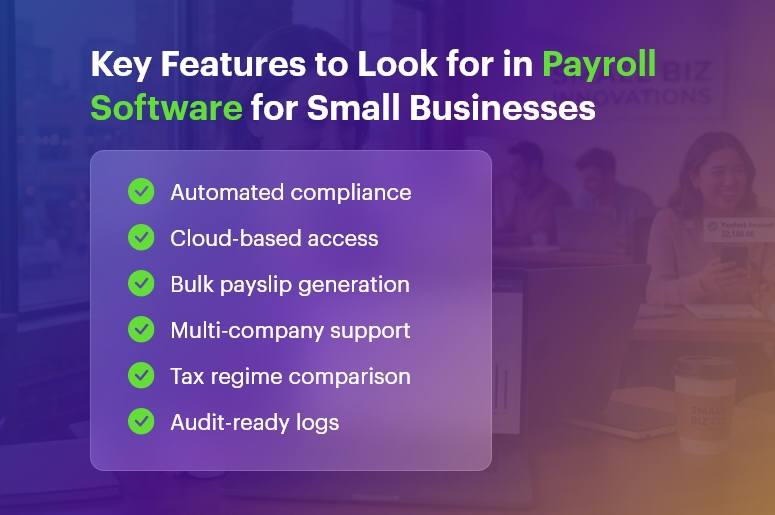
The best payroll software for small businesses typically includes features such as:

  • Salary calculation automation
  • Tax and statutory compliance management
  • Payslip generation
  • Employee data management
  • Attendance and leave integration
  • Reporting and analytics

Because payroll involves sensitive financial data, modern payroll systems also provide secure storage and encryption for employee records.

Why Small Businesses Need Payroll Automation

Small businesses often operate with limited HR staff. Consequently, manual payroll processing can create delays, errors, and compliance risks.

Using the best payroll software for small businesses helps organisations:

  • Reduce administrative workload
  • Improve payroll accuracy
  • Ensure timely salary payments
  • Maintain compliance with tax regulations

Additionally, automated payroll systems can reduce payroll errors and save significant time every month by eliminating manual calculations and paperwork.

Challenges Businesses Face Without a Dedicated Payroll System

Many small business owners still rely on spreadsheets or manual calculations to run payroll. However, this approach is both risky and inefficient. Without the right payroll software for small businesses, owners frequently face the following challenges:

  • Calculation errors in TDS, PF, and ESI that trigger government penalties
  • Missed statutory deadlines that attract interest under Section 234E
  • Hours of manual data entry that reduce productivity
  • Difficulty scaling payroll processes as the team grows
  •  Lack of a proper audit trail, which creates legal risk during assessments

Consequently, investing in payroll software for small businesses is not just a convenience — it is a strategic necessity. Now, let us examine the specific benefits in detail.

Key Features to Look for in Payroll Software for Small Businesses

Top Benefits of Payroll Software for Small Businesses

1. Significant Time Savings

The most immediate advantage of payroll software for small businesses is how dramatically it cuts processing time. Manual payroll can consume two to three working days each month. In contrast, INDPayroll lets you complete a full payroll run in just 15 minutes — freeing your team to focus on growth rather than data entry.

2. Automated Statutory Compliance

Compliance is the most critical reason businesses adopt payroll software for small businesses. Indian labour laws change frequently, and a single missed deadline can result in heavy penalties. Reliable platforms automatically calculate EPF, ESI, TDS, and Professional Tax, and generate ready-to-upload return files for ECR, challans, Form 24Q, and FVU — so you are always audit-ready and never fined.

3. Zero Calculation Errors

Human error is inevitable with spreadsheets. A single wrong formula can miscalculate salaries for your entire workforce. Automated systems use validated algorithms to deliver 100% accuracy every time. Furthermore, built-in reconciliation checks flag any discrepancies before you approve the payroll run — so your employees always receive the correct amount on time.

4. Cost Reduction and Better ROI

Many owners assume switching is an added expense. In reality, the opposite is true. Most paid payroll software for small businesses charges ₹500–₹1,000 per employee per month — that is over ₹50,000 per year for a 50-person team. INDPayroll, however, is completely free. Additionally, eliminating even one penalty from a compliance error saves far more than any software subscription.

5. Employee Self-Service Portal

A standout feature of modern payroll software for small businesses is the employee self-service portal. Employees can independently view payslips, check tax projections, download Form 16, and submit investment proofs — without raising HR queries. As a result, your team spends less time on routine requests and more time on strategic work.

6. Smart Analytics and Reporting

Beyond processing payroll, the best platforms deliver powerful reporting. Real-time dashboards give you visibility into CTC trends, department-wise costs, tax liabilities, and potential leakages. Consequently, you can make data-driven financial decisions well before the financial year ends — turning your payroll system into a genuine strategic tool.

Free Payroll, PF, ESI & TDS Software

The most trusted automation tool for modern Indian businesses.

Who Should Use Payroll Management Software?

Payroll software for small businesses is not limited to any particular industry or company size. In fact, it delivers value across a wide range of organisations:

  • Startups and SaaS companies: Automate ESOPs, TDS, and rapid headcount growth
  • Manufacturing firms: Manage complex shift rosters and ESI for factory workers
  • Construction companies: Track daily wages for on-site workers and contractors
  • CA firms and tax consultants: Manage payroll for multiple clients from one centralised dashboard
  • Educational institutions: Handle faculty pay, gratuity, and leave encashment
  • Retail chains: Process distributed outlet staff payroll efficiently

Regardless of your industry, if you pay salaries to employees, you need payroll software for a small business. Is it that straightforward?

Common Payroll Mistakes That Automated Payroll Systems Prevent

Understanding the mistakes that payroll software for small businesses prevents helps you appreciate its full value. Here are the most common payroll errors that businesses make — and how the right software eliminates them:

  • Misclassifying employees vs. contractors: Payroll software for small businesses clearly separates these categories for correct tax treatment
  • Missing PF/ESI deadlines: Automated reminders and ready-to-upload challans ensure timely filings
  • Incorrect TDS calculations: Algorithm-driven tax projections eliminate guesswork
  • Failing to update salary structures: Cloud-based payroll software for small businesses makes real-time updates simple
  • Inadequate record-keeping: Digital audit trails replace paper-based filing

How to Switch to Payroll Software: A Step-by-Step Guide

Transitioning to payroll software for a small business is simpler than most people expect. Follow these steps to get started quickly and confidently:

  • Step 1 — Choose the right payroll software for a small business: Evaluate your needs (number of employees, compliance requirements, budget) and select a solution that fits
  • Step 2 — Sign up and configure: Most cloud-based payroll software for small businesses takes fewer than 2 minutes to set up
  • Step 3 — Import employee data: Upload existing employee records, salary structures, and PF/ESI details
  • Step 4 — Configure compliance settings: Set up EPF, ESI, TDS, and PT parameters specific to your organisation
  • Step 5 — Run your first payroll: Import attendance, verify deductions, approve, and execute — done in minutes with payroll software for small business
  • Step 6 — Generate and distribute payslips: Bulk-email password-protected payslips to all employees
  • Step 7 — File statutory returns: Download ready-to-upload annexures for PF, ESI, and TDS portals

Why INDPayroll Is the Best Payroll Software for Small Businesses in India

INDPayroll stands out as the best payroll software for small businesses in India because it combines enterprise-grade features with zero cost. Here is why thousands of Indian SMEs and CA firms trust it:

  • 100% free forever: No credit card, no hidden fees
  • 2-minute setup: Start processing payroll the same day you sign up
  • India-specific compliance: Built for EPF, ESI, TDS, PT, and dual tax regimes
  • Unlimited employees: Scale from 5 to 5,000 staff at no extra cost
  • CA-friendly dashboard: Manage multiple clients from one secure login
  • 4.8-star rated: Trusted by startups, SMEs, and growing companies nationwide
India’s #1 Free Software

Free Payroll, PF,
ESI & TDS Software

Professional compliance management for Indian businesses. 100% Free Forever.

Conclusion

Choosing the right payroll software for a small business transforms one of your most tedious monthly tasks into a fast, accurate, and fully compliant process. From saving hours of manual work and eliminating calculation errors, to delivering powerful analytics and empowering employees with self-service tools, the benefits are clear and immediate.

Moreover, with INDPayroll offering completely free payroll software for small businesses, there is no financial barrier to getting started. Visit indpayroll.com today, sign up in 2 minutes, and experience why thousands of Indian businesses trust INDPayroll to handle their payroll every month.

Frequently Asked Questions

Q1. How much does payroll software for a small business cost?

Costs vary widely. While some providers charge ₹500–₹1,000 per employee per month, solutions like INDPayroll offer completely free payroll software for small businesses with no per-employee fees and no hidden charges.

Q2. Can payroll software for small businesses handle compliance automatically?

Yes. The best payroll software for small businesses automatically calculates EPF, ESI, TDS, and PT, and generates ready-to-upload return files for all relevant portals. Furthermore, it updates its algorithms whenever the government revises rules.

Q3. Is cloud-based payroll software for small businesses secure?

Reputable payroll software for small businesses uses bank-grade encryption and secure servers to protect your data. Additionally, role-based access controls ensure that only authorised personnel can view sensitive information.

Q4. How long does it take to set up payroll software for a small business?

Most cloud-based payroll software for small businesses takes under 5 minutes to set up. INDPayroll, for example, requires just 2 minutes — and you can run your first payroll cycle the same day.


Top 10 Features Every Indian Payroll Software Must Have

Managing payroll in India is complex. From ever-changing tax rules to labor regulations across multiple states, HR and finance teams spend countless hours ensuring payroll accuracy and compliance. That’s why choosing the right payroll software is crucial for Indian organizations—whether it’s a startup scaling fast or a large enterprise with distributed teams.

To help you make a confident decision, here are the Top 10 Features Every Indian Payroll Software Must Have to simplify payroll processing, ensure legal compliance, and improve employee experience.

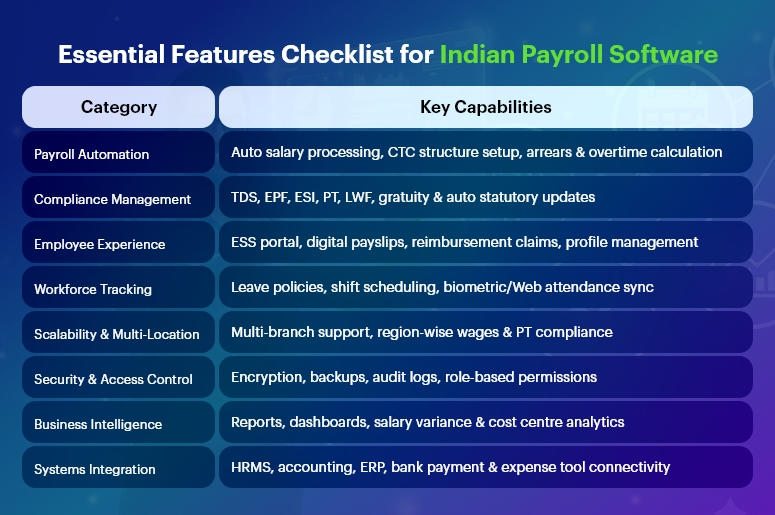
Essential Features Checklist for Indian Payroll Software

Automated Payroll Processing & Salary Calculations

Manual payroll calculations often lead to errors, late salary payments, and employee dissatisfaction. A modern payroll solution must offer:

  • Auto-calculation based on attendance data
  • Support for multiple pay cycles (monthly/weekly)
  • Automatic arrears, incentives, bonuses & overtime
  • Configurable salary structures (CTC breakup)

With automation, companies reduce repetitive work and ensure 100% accuracy every month.

India’s #1 Free Software

Free Payroll, PF,
ESI & TDS Software

Professional compliance management for Indian businesses. 100% Free Forever.

Compliance With Indian Statutory Laws

Payroll compliance in India is dynamic and varies across states. A reliable payroll software must ensure seamless compliance with:

  • Income Tax / TDS
  • EPF, ESI & Labour Welfare Fund (LWF)
  • Professional Tax (PT)
  • Gratuity & Bonus Act
  • Minimum Wages Act
  • Maternity Benefit Act
  • Shops & Establishment Act regulations

It must auto-calculate contributions, generate challans, and update rules automatically to avoid penalties.

TDS, Income Tax & Investment Declarations Management

Employees should easily declare their investments for tax-saving purposes. Good payroll software should provide:

  • Automatic tax projections on salary slips
  • Section 80C & 80D declaration support
  • Proof submission tracking
  • Form 16 auto-generation

This simplifies the financial year-end chaos.

Employee Self-Service (ESS) Portal

A self-service portal transforms employee experience by providing access to:

  • Digital payslips
  • Tax documents (Form 16, salary certificates)
  • Leave & attendance records
  • Personal information updates
  • Reimbursement claims

HR teams save significant time while employees stay empowered.

Leave & Attendance System Integration

Payroll and attendance must go hand-in-hand. A fully integrated system helps:

  • Sync biometric or web attendance in real-time
  • Auto-deduct leave without pay (LWP)
  • Manage multiple leave types and policies
  • Track shift schedules & overtime

This ensures accurate payouts every time.

Digital Reimbursements & Claims

Indian companies often offer tax-saving reimbursements like:

  • Travel allowances
  • Food coupons
  • Phone/internet bill reimbursements
  • Medical allowances

Payroll software should enable online claim submissions, approval workflows, and automatic payouts during payroll processing.

Multi-Location & Multi-State Support

Businesses expanding across states need payroll that supports:

  • Region-specific PT, local rules & wages
  • Multi-branch organization structure
  • Centralized admin dashboard
  • Multiple business units or legal entities

This ensures smooth processing for distributed workforces.

Secure Data Handling & Role-Based Access

Payroll data is highly sensitive. Security must be a top priority, including:

  • End-to-end encryption
  • Audit logs and detailed access permissions
  • Cloud-based data backups
  • ISO-compliant infrastructure

Role-based access ensures only authorized personnel can view salaries.

Comprehensive Payroll Reports & Analytics

Leadership needs insights for better decisions. The right software provides:

  • Payroll registers & compliance reports
  • Salary variance analysis
  • Cost centre-wise breakdowns
  • Reconciliation statements

Exportable reports (XLS, PDF) support audits and financial planning.

Integration With HR, Accounting & ERP Tools

Seamless integration eliminates duplicate data entry. Look for payroll that connects with:

  • HRMS, timesheet & attendance software
  • Bank payment systems for salary disbursement
  • Corporate expense management tools

This builds a connected digital workforce ecosystem.

India’s #1 Free Software

Free Payroll, PF, ESI & TDS Software

Final Thoughts

Indian payroll processing is unlike anywhere else in the world—and the right payroll software must solve challenges around regulatory compliance, multi-state management, and employee expectations.

Organizations should choose a solution that:

  • Is future-ready and scalable
  • Enables automation and compliance
  • Improves employee experience
  • Reduces manual workload for HR & finance

With the right digital payroll tool in place, companies can focus more on people and growth—and less on paperwork.

Frequently Asked Questions (FAQs)

1. What is the most important feature in Indian payroll software?

Automated statutory compliance and accurate salary calculations are the most crucial features to avoid legal issues.

2. Can payroll software handle multi-state compliance in India?

Yes, advanced solutions automatically apply state-specific rules like PT, minimum wages, and LWF.

3. Why do companies prefer cloud-based payroll?

Cloud payroll ensures security, accessibility, scalability, and real-time updates—especially for hybrid and remote teams.

4. Is payroll software useful for startups?

Absolutely! It minimizes HR workload, prevents calculation errors, and ensures compliance right from day one.

5. Can employees access payslips digitally?

Yes, through an ESS portal or mobile app, employees can download payslips anytime.

6. Does payroll software generate Form 16?

Yes, many solutions auto-generate and distribute Form 16 during tax season.

7. Is Tally integration available in Indian payroll software?

Most payroll systems offer accounting integration with Tally and ERP tools.

8. How does payroll software help in audits?

It provides standardized, exportable reports, reducing audit preparation time.

9. Can payroll software automate bank salary disbursements?

Yes, integration with bank systems enables hassle-free salary transfers.

10. What about data security in payroll software?

Modern platforms include encryption, access controls, and regular backups to secure sensitive payroll details.

Category: EPFO & ESI

No posts in this category.

Subcategory: EPFO

Subcategory: ESI

Category: Payroll Help

No posts in this category.

Subcategory: Employee Self-Service & Engagement

Subcategory: Introduction to Payroll

Subcategory: Payroll Analytics & Reporting

Subcategory: Payroll Automation & Technology

Subcategory: Payroll for Business Growth

Subcategory: Payroll Processing & Management

Subcategory: Taxation & Compliance

Category: User Manual

No posts in this category.

Subcategory: Company Setup

Subcategory: Employee Management

Subcategory: Getting Started

Subcategory: Glossary

Subcategory: Import & Export

Subcategory: Introduction

Subcategory: Payroll Configuration

Subcategory: Payslips & Disbursement

Subcategory: Reports & Analytics

Subcategory: Running Payroll

Subcategory: Statutory Compliance & Reports

Subcategory: Troubleshooting

Subcategory: User Management & Security