Every HR professional knows payroll is one of the most stressful, detail-heavy functions in the entire organization. At the same time, HR teams must balance compliance, accuracy, timeliness, and employee satisfaction with limited time and resources. Fortunately, automated payroll reduces HR stress by eliminating repetitive tasks, reducing errors, speeding up processes, and freeing HR professionals to focus on strategic work.
In this comprehensive, practical guide, you will learn how automation reduces HR stress, why it matters, how to implement it, and how to maximize its impact across your company.
What Is Automated Payroll?
It is a technology-driven process that calculates wages, taxes, deductions, and benefits automatically using software.
Instead of manually calculating hours, deductions, and tax rates, an automated payroll system pulls data from time tracking tools, HR databases, and compliance libraries to produce accurate payruns with minimal human intervention.
By design, automation reduces HR stress, increases accuracy, and accelerates payroll cycles.
Why Payroll Causes Stress in HR
Payroll creates stress because it demands precision under tight deadlines. HR teams must:
- Calculate pay accurately: This requires tracking hours, overtime, bonuses, leave, and commissions.
- Manage taxes and compliance: Tax rates change frequently, and noncompliance carries penalties.
- Handle benefits and deductions: Health insurance, retirement contributions, garnishments, and other deductions vary by employee.
- Report and document: Payroll reports feed into accounting, audits, and internal planning.
- Respond to employee questions: Employees expect clarity, speed, and transparency.
No wonder traditional payroll processes overwhelm HR teams. This is where automated payroll reduces HR stress dramatically.
Free Payroll, PF,
ESI & TDS Software
Professional compliance management for Indian businesses. 100% Free Forever.
Top Ways Automated Payroll Reduces HR Stress
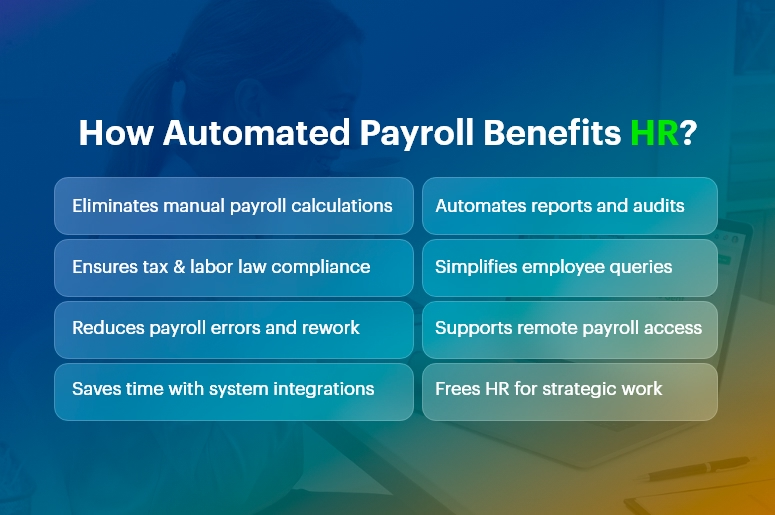
1. Eliminates Manual Calculations
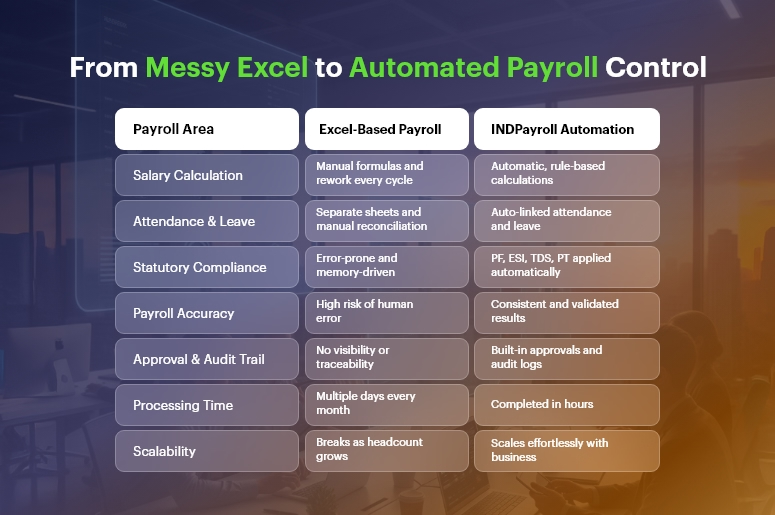
Manual payroll calculations take hours and invite errors. In contrast, automated systems compute wages automatically based on configured rules.
By removing manual math from the equation, automation reduces HR stress and increases accuracy.
2. Ensures Compliance With Laws and Regulations
Labor laws and tax regulations change frequently. Automated payroll software updates tax tables and compliance rules automatically, ensuring your payroll is always up to date.
This means HR spends less time tracking changes and worrying about compliance penalties.
3. Reduces Errors and Risk
Human error is inevitable under pressure. Missing a decimal, misapplying a tax rate, or omitting a benefit can create costly mistakes.
Because automation reduces HR stress by catching errors upfront and enforcing consistency, HR teams can trust the numbers and avoid costly corrections.
4. Saves Time With Integrated Systems
Integration matters. When your payroll software connects with time tracking, benefits administration, and HR databases, data flows automatically. This eliminates duplicate data entry and ensures consistency.
Consequently, automation reduces HR stress by cutting administrative overhead.
5. Improves Reporting and Insights
Automated payroll systems generate reports instantly. Whether you need departmental cost breakdowns, tax filings, or historical pay data, automated reporting gives HR the insights it needs without manual assembly.
Because it reduces HR stress around data preparation, HR can focus more on analysis and decision-making.
6. Enhances Employee Experience
Employees dislike errors and delays in pay. When payroll runs smoothly and accurately, employee satisfaction rises.
It reduces HR stress by minimizing customer service issues and enabling HR to handle questions quickly and confidently.
How Automated Payroll Reduces HR Stress in Daily Operations
To understand real-world impact, let’s examine day-to-day HR operations:
-
Streamlined Payroll Runs
With automation, data flows from time-tracking systems into payroll seamlessly. HR simply reviews and approves pay runs rather than generating them from scratch.
Thus, automation reduces HR stress by shortening payroll preparation time and cutting repetitive work.
-
Faster Adjustments
Need to update an employee’s tax status or benefit enrollment? Automated systems propagate changes across all payroll modules.
This eliminates manual intervention and ensures accuracy. Because automated payroll reduces HR stress during adjustments, HR can respond swiftly to employee life events.
-
Simplified Audits
Auditors demand documentation, trails, and accuracy. Automation systems maintain logs, reports, and documentation automatically.
This transparency helps HR complete audits with less effort. In short, automation reduces HR stress when compliance checks arrive.
-
Remote and On-Demand Access
Modern payroll tools allow HR and employees to access payroll information from anywhere. This reduces dependency on paper records and ensures that HR can answer questions in real time.
Consequently, automation reduces HR stress by supporting remote and distributed teams.
Free Payroll, PF, ESI & TDS Software
Key Features That Make Automated Payroll Effective
Understanding which features deliver stress relief helps you make informed choices.
-
Real-Time Calculations
Instant updates to payroll figures reduce last-minute surprises.
-
Tax Filing Automation
Automatic filing and payments save time and prevent penalties.
-
Integration With HR Systems
Connected systems ensure data accuracy and eliminate siloed information.
-
Self-Service Employee Portals
Employees can view payslips, tax forms, and benefits independently, reducing HR inquiries.
-
Alerts and Notifications
Reminders for deadlines and exceptions help HR stay proactive.
Each of these features contributes to how automation reduces HR stress, making payroll faster, smarter, and more reliable.
Choosing the Right Automated Payroll Solution
Selecting the right system matters. To ensure your payroll solution truly reduces HR stress, evaluate the following:
-
Scalability
Choose software that grows with your business and handles multiple pay schedules, classifications, and international requirements.
-
Integration Capabilities
Verify that the payroll tool integrates with your HRIS, time tracking, benefits platform, and accounting systems.
-
Compliance Support
Ensure the solution updates tax tables, legal changes, and reporting requirements automatically.
-
Support and Training
Reliable vendor support and user training help your HR team adopt the tool smoothly.
By focusing on these criteria, you increase the likelihood that automated payroll reduces HR stress—not just in theory but in practice.
Common Misconceptions About Payroll Automation
Many HR teams hesitate to adopt payroll automation due to misconceptions:
“Automation Means No Human Control”
False. Automated payroll reduces HR stress by handling calculations, but HR still reviews, approves, and oversees payroll.
“It’s Only for Large Organizations”
Not true. Small and medium businesses benefit even more because automation eliminates manual work that small teams cannot afford.
“It’s Too Expensive”
While upfront costs exist, automated payroll reduces HR stress and delivers ROI through time saved, error reduction, and improved compliance.
Clarifying these misconceptions helps HR teams embrace automation with confidence.
Real-World Impact: Case Scenarios
Consider these examples:
Case 1: Mid-Size Tech Firm
Before automation, HR spent three days per pay run reconciling time cards. After implementing payroll automation, the firm cut that to under one day and eliminated overtime miscalculations. In this case, automated payroll reduces HR stress by removing manual reconciliation.
Case 2: Retail Chain With Variable Hours
With hourly workers and seasonal fluctuations, payroll errors were common. Automated rules captured overtime, shift differentials, and compliance automatically. Here, automated payroll reduces HR stress by standardizing complex wage calculations.
These scenarios show how automated payroll reduces HR stress across different business models.
Best Practices for a Smooth Payroll Automation Transition
To get the most value:
- Map Your Current Process – Document existing workflows to understand where automation helps most.
- Train Your Team – Ensure all users understand how to operate and troubleshoot the system.
- Test Before Deployment – Run parallel payroll tests to validate accuracy.
- Set Clear Policies – Define roles, review cycles, and approval workflows.
- Monitor and Improve Continuously – Review reports and process performance regularly.
Following these steps ensures automated payroll reduces HR stress not just initially, but over the long term.
Frequently Asked Questions (FAQs)
Q: How soon will automated payroll reduce HR stress after implementation?
A: Many organizations see measurable reductions in administrative workload within the first payroll cycle because repetitive manual tasks disappear.
Q: Does automated payroll remove HR jobs?
A: No. It shifts HR teams from transactional work to strategic, value-added activities like employee engagement and policy development.
Q: Can automated payroll handle compliance across different regions?
A: Yes, modern solutions update tax tables and compliance rules for multiple regions, ensuring accurate and compliant payroll processing.
Conclusion
Automated payroll reduces HR stress by removing manual work, increasing accuracy, ensuring compliance, and delivering faster, more reliable payroll processes.
When implemented thoughtfully — and paired with training, integration, and continuous improvement — automation transforms payroll from a stressful chore into a strategic advantage.
Whether you lead a small business or a large enterprise, understanding how automated payroll reduces HR stress equips your organization to operate more efficiently, improve employee satisfaction, and focus HR efforts where they matter most.
Free Payroll, PF, ESI & TDS Software
The most trusted automation tool for modern Indian businesses.