Managing employee salaries, tax deductions, and statutory compliance can be complex for growing companies. Many small businesses initially handle payroll manually, but as teams expand, the process quickly becomes time-consuming and error-prone. Therefore, investing in the best payroll software for small businesses becomes essential.
Modern payroll solutions automate calculations, generate reports, ensure compliance, and streamline salary processing. As a result, companies can focus more on growth and less on administrative tasks. In this guide, we explore the top benefits of using the best payroll software for small businesses, along with key features, implementation tips, and why automation is critical for modern organisations.
What Is Payroll Software?
Payroll software is a digital system that automates the management of employee salaries, tax deductions, bonuses, benefits, and compliance filings. Instead of performing payroll calculations manually, businesses can process salaries in minutes using automated tools.
The best payroll software for small businesses typically includes features such as:
- Salary calculation automation
- Tax and statutory compliance management
- Payslip generation
- Employee data management
- Attendance and leave integration
- Reporting and analytics
Because payroll involves sensitive financial data, modern payroll systems also provide secure storage and encryption for employee records.
Free Payroll, PF, ESI & TDS Software
Why Small Businesses Need Payroll Automation
Small businesses often operate with limited HR staff. Consequently, manual payroll processing can create delays, errors, and compliance risks.
Using the best payroll software for small businesses helps organisations:
- Reduce administrative workload
- Improve payroll accuracy
- Ensure timely salary payments
- Maintain compliance with tax regulations
Additionally, automated payroll systems can reduce payroll errors and save significant time every month by eliminating manual calculations and paperwork.
Challenges Businesses Face Without a Dedicated Payroll System
Many small business owners still rely on spreadsheets or manual calculations to run payroll. However, this approach is both risky and inefficient. Without the right payroll software for small businesses, owners frequently face the following challenges:
- Calculation errors in TDS, PF, and ESI that trigger government penalties
- Missed statutory deadlines that attract interest under Section 234E
- Hours of manual data entry that reduce productivity
- Difficulty scaling payroll processes as the team grows
- Lack of a proper audit trail, which creates legal risk during assessments
Consequently, investing in payroll software for small businesses is not just a convenience — it is a strategic necessity. Now, let us examine the specific benefits in detail.
Top Benefits of Payroll Software for Small Businesses
1. Significant Time Savings
The most immediate advantage of payroll software for small businesses is how dramatically it cuts processing time. Manual payroll can consume two to three working days each month. In contrast, INDPayroll lets you complete a full payroll run in just 15 minutes — freeing your team to focus on growth rather than data entry.
2. Automated Statutory Compliance
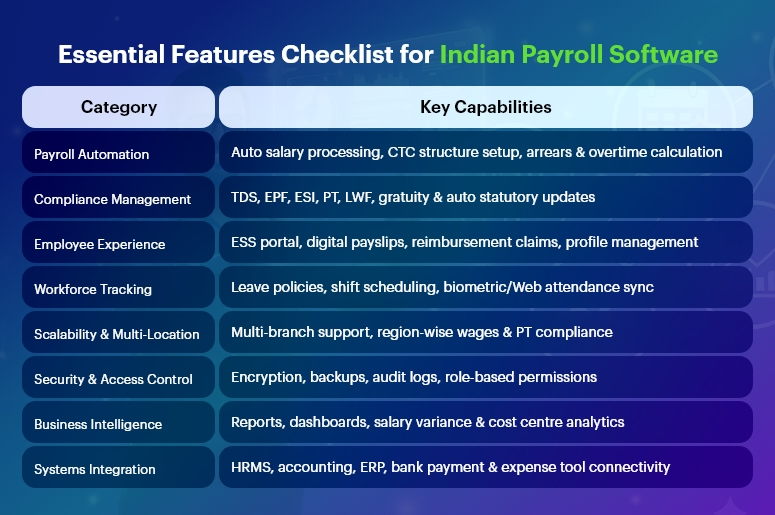
Compliance is the most critical reason businesses adopt payroll software for small businesses. Indian labour laws change frequently, and a single missed deadline can result in heavy penalties. Reliable platforms automatically calculate EPF, ESI, TDS, and Professional Tax, and generate ready-to-upload return files for ECR, challans, Form 24Q, and FVU — so you are always audit-ready and never fined.
3. Zero Calculation Errors
Human error is inevitable with spreadsheets. A single wrong formula can miscalculate salaries for your entire workforce. Automated systems use validated algorithms to deliver 100% accuracy every time. Furthermore, built-in reconciliation checks flag any discrepancies before you approve the payroll run — so your employees always receive the correct amount on time.
4. Cost Reduction and Better ROI
Many owners assume switching is an added expense. In reality, the opposite is true. Most paid payroll software for small businesses charges ₹500–₹1,000 per employee per month — that is over ₹50,000 per year for a 50-person team. INDPayroll, however, is completely free. Additionally, eliminating even one penalty from a compliance error saves far more than any software subscription.
5. Employee Self-Service Portal
A standout feature of modern payroll software for small businesses is the employee self-service portal. Employees can independently view payslips, check tax projections, download Form 16, and submit investment proofs — without raising HR queries. As a result, your team spends less time on routine requests and more time on strategic work.
6. Smart Analytics and Reporting
Beyond processing payroll, the best platforms deliver powerful reporting. Real-time dashboards give you visibility into CTC trends, department-wise costs, tax liabilities, and potential leakages. Consequently, you can make data-driven financial decisions well before the financial year ends — turning your payroll system into a genuine strategic tool.
Free Payroll, PF, ESI & TDS Software
The most trusted automation tool for modern Indian businesses.
Who Should Use Payroll Management Software?
Payroll software for small businesses is not limited to any particular industry or company size. In fact, it delivers value across a wide range of organisations:
- Startups and SaaS companies: Automate ESOPs, TDS, and rapid headcount growth
- Manufacturing firms: Manage complex shift rosters and ESI for factory workers
- Construction companies: Track daily wages for on-site workers and contractors
- CA firms and tax consultants: Manage payroll for multiple clients from one centralised dashboard
- Educational institutions: Handle faculty pay, gratuity, and leave encashment
- Retail chains: Process distributed outlet staff payroll efficiently
Regardless of your industry, if you pay salaries to employees, you need payroll software for a small business. Is it that straightforward?
Common Payroll Mistakes That Automated Payroll Systems Prevent
Understanding the mistakes that payroll software for small businesses prevents helps you appreciate its full value. Here are the most common payroll errors that businesses make — and how the right software eliminates them:
- Misclassifying employees vs. contractors: Payroll software for small businesses clearly separates these categories for correct tax treatment
- Missing PF/ESI deadlines: Automated reminders and ready-to-upload challans ensure timely filings
- Incorrect TDS calculations: Algorithm-driven tax projections eliminate guesswork
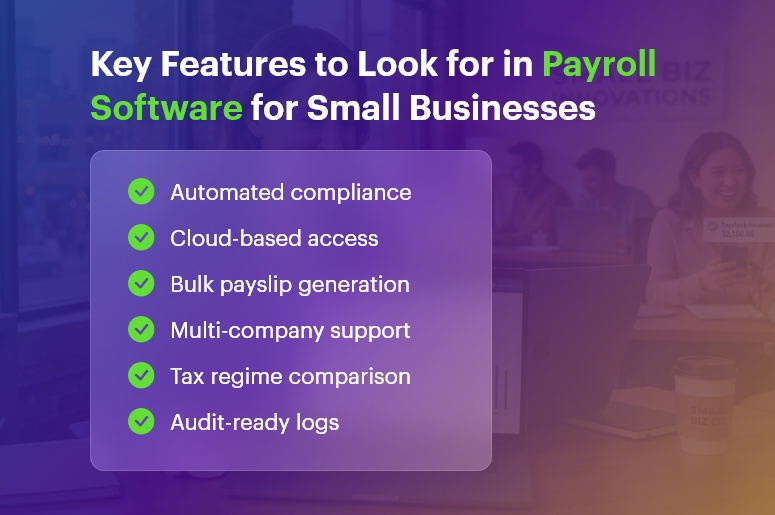
- Failing to update salary structures: Cloud-based payroll software for small businesses makes real-time updates simple
- Inadequate record-keeping: Digital audit trails replace paper-based filing
How to Switch to Payroll Software: A Step-by-Step Guide
Transitioning to payroll software for a small business is simpler than most people expect. Follow these steps to get started quickly and confidently:
- Step 1 — Choose the right payroll software for a small business: Evaluate your needs (number of employees, compliance requirements, budget) and select a solution that fits
- Step 2 — Sign up and configure: Most cloud-based payroll software for small businesses takes fewer than 2 minutes to set up
- Step 3 — Import employee data: Upload existing employee records, salary structures, and PF/ESI details
- Step 4 — Configure compliance settings: Set up EPF, ESI, TDS, and PT parameters specific to your organisation
- Step 5 — Run your first payroll: Import attendance, verify deductions, approve, and execute — done in minutes with payroll software for small business
- Step 6 — Generate and distribute payslips: Bulk-email password-protected payslips to all employees
- Step 7 — File statutory returns: Download ready-to-upload annexures for PF, ESI, and TDS portals
Why INDPayroll Is the Best Payroll Software for Small Businesses in India
INDPayroll stands out as the best payroll software for small businesses in India because it combines enterprise-grade features with zero cost. Here is why thousands of Indian SMEs and CA firms trust it:
- 100% free forever: No credit card, no hidden fees
- 2-minute setup: Start processing payroll the same day you sign up
- India-specific compliance: Built for EPF, ESI, TDS, PT, and dual tax regimes
- Unlimited employees: Scale from 5 to 5,000 staff at no extra cost
- CA-friendly dashboard: Manage multiple clients from one secure login
- 4.8-star rated: Trusted by startups, SMEs, and growing companies nationwide
Conclusion
Choosing the right payroll software for a small business transforms one of your most tedious monthly tasks into a fast, accurate, and fully compliant process. From saving hours of manual work and eliminating calculation errors, to delivering powerful analytics and empowering employees with self-service tools, the benefits are clear and immediate.
Moreover, with INDPayroll offering completely free payroll software for small businesses, there is no financial barrier to getting started. Visit indpayroll.com today, sign up in 2 minutes, and experience why thousands of Indian businesses trust INDPayroll to handle their payroll every month.
Free Payroll, PF,
ESI & TDS Software
Professional compliance management for Indian businesses. 100% Free Forever.
Frequently Asked Questions
Q1. How much does payroll software for a small business cost?
Costs vary widely. While some providers charge ₹500–₹1,000 per employee per month, solutions like INDPayroll offer completely free payroll software for small businesses with no per-employee fees and no hidden charges.
Q2. Can payroll software for small businesses handle compliance automatically?
Yes. The best payroll software for small businesses automatically calculates EPF, ESI, TDS, and PT, and generates ready-to-upload return files for all relevant portals. Furthermore, it updates its algorithms whenever the government revises rules.
Q3. Is cloud-based payroll software for small businesses secure?
Reputable payroll software for small businesses uses bank-grade encryption and secure servers to protect your data. Additionally, role-based access controls ensure that only authorised personnel can view sensitive information.
Q4. How long does it take to set up payroll software for a small business?
Most cloud-based payroll software for small businesses takes under 5 minutes to set up. INDPayroll, for example, requires just 2 minutes — and you can run your first payroll cycle the same day.