Salary Slip Format in India 2026 — Components, Sample & Free Download

A salary slip (also called a payslip or pay stub) is a document issued by an employer to an employee every month. It contains a detailed breakdown of the employee’s earnings, deductions, and net pay. Under the Payment of Wages Act, 1936, employers are legally required to provide salary slips to employees.

Salary slips serve as proof of income and are essential for loan applications, visa processing, tax filing, and employment verification.

Key Components of a Salary Slip

A standard salary slip in India contains three main sections: earnings, deductions, and summary.

India’s #1 Free Software

Free Payroll, PF, ESI & TDS Software

Earnings (Gross Pay Components)

Component Description Typical % of CTC
Basic Salary Core salary component, used to calculate PF, gratuity, and HRA 40-50%
House Rent Allowance (HRA) Allowance for rental accommodation, partially tax-exempt 20-25%
Dearness Allowance (DA) Compensates for inflation, common in government & PSU jobs Variable
Conveyance Allowance For daily commute expenses Fixed amount
Medical Allowance For healthcare expenses Fixed amount
Special Allowance Balancing component, fully taxable 15-30%
Leave Travel Allowance (LTA) For domestic travel, tax-exempt with conditions Variable
Performance Bonus Variable pay based on performance 5-20%

Deductions

Deduction Description Rate
Provident Fund (PF) Employee contribution to EPF 12% of Basic + DA
ESI (Employee State Insurance) Health insurance for employees earning ≤ Rs. 21,000/month 0.75% of gross
Professional Tax State-level tax on employment (varies by state) Rs. 150-200/month
TDS (Tax Deducted at Source) Income tax is deducted based on declared investments As per the slab
Loan Recovery EMI deductions for company-provided loans As applicable
Loss of Pay (LOP) Deduction for unauthorised absence Per day basis

Summary Section

  • Gross Earnings: Total of all earnings components
  • Total Deductions: Sum of PF + ESI + PT + TDS + other deductions
  • Net Pay (Take-Home): Gross Earnings − Total Deductions
  • Days Paid / Days in Month / LOP Days

Sample Salary Slip Format

Here is a sample salary slip for an employee with a CTC of Rs. 6,00,000 per annum:

Earnings Amount (₹) Deductions Amount (₹)
Basic Salary 25,000 Provident Fund 3,000
HRA 10,000 ESI 375
Conveyance 1,600 Professional Tax 200
Medical Allowance 1,250 TDS 2,500
Special Allowance 12,150
Gross Earnings 50,000 Total Deductions 6,075

Net Pay (Take-Home): ₹43,925

Salary Slip Format for Different Sectors

Private Sector Salary Slip

Private companies typically include Basic, HRA, Special Allowance, and variable pay. The format varies by organisation, but must include all statutory deductions (PF, ESI, PT, TDS).

Government Salary Slip

Government salary slips follow the 7th Pay Commission structure and include: Basic Pay (as per pay matrix), DA (revised twice yearly), HRA (based on city classification X/Y/Z), Transport Allowance, and NPS (National Pension Scheme) deduction instead of EPF.

Legal Requirements for Salary Slips in India

  • Payment of Wages Act, 1936: Employers must provide a wage slip showing all deductions
  • Code on Wages, 2019: Mandates salary slips to be issued in electronic or written form
  • Frequency: Must be provided every month on or before the pay date
  • Retention: Employers must maintain salary records for 3 years
  • Format: No prescribed format, but must include all earnings and deductions

How to Read Your Salary Slip

Understanding your salary slip helps you verify your pay and plan your taxes effectively:

  • Check Basic Salary: This determines your PF contribution, gratuity, and HRA exemption. Higher basic = higher PF, but also higher tax
  • Verify PF Deduction: Should be exactly 12% of Basic + DA. Match with your UAN passbook
  • Review TDS: Compare with your investment declarations. If you’ve submitted proof, TDS should reduce
  • Check LOP: Ensure leave deductions match your actual absence records
  • Match Net Pay: Verify the amount credited to your bank matches the net pay on the slip

Generate Salary Slips Automatically with INDPayroll

Creating salary slips manually in Excel every month is tedious and error-prone. INDPayroll automates the entire process:

  • Auto-calculate all components: Basic, HRA, PF, ESI, PT, TDS — all computed automatically
  • Professional PDF payslips: Branded salary slips with your company logo, generated in one click
  • Employee self-service: Employees download their own payslips from the portal anytime
  • Bulk generation: Generate payslips for all employees simultaneously
  • Compliance built-in: All statutory deductions calculated per the latest rates
  • Email distribution: Auto-email payslips to employees on pay day

Try INDPayroll Free: Generate professional salary slips for up to 5 employees at no cost.

Free Payroll, PF, ESI & TDS Software

The most trusted automation tool for modern Indian businesses.

Final Thoughts — Getting Your Salary Slip Right in 2026

A well-structured salary slip is not just a document — it is a reflection of your organisation’s payroll accuracy, legal compliance, and transparency with employees. In 2026, with the New Tax Regime as the default, updated ESI limits, and stricter labour law enforcement, getting the salary slip format right is more important than ever.

Here is a quick recap of everything covered in this guide:

  • A standard Indian salary slip has three sections: Earnings, Deductions, and Net Pay Summary
  • Basic Salary is the most important component — it determines PF, gratuity, HRA exemption, and tax liability
  • PF is 12% of Basic + DA (not gross salary)
  • ESI applies only to employees earning ₹21,000 or less per month
  • Professional Tax varies by state — up to ₹200/month
  • TDS depends on the tax regime chosen — New or Old
  • Salary slips must be issued every month as per the Code on Wages 2019
  • Employers must retain salary records for a minimum of 3 years

The biggest mistake most small businesses make is generating salary slips manually in Excel, which is error-prone, time-consuming, and hard to scale as the team grows. Missing a single calculation (wrong PF base, incorrect ESI applicability, or outdated PT slab) can lead to employee disputes and statutory compliance failures.

The smartest solution is to automate the entire process. INDPayroll automatically calculates Basic, HRA, PF, ESI, PT, and TDS
based on the latest statutory rates. It generates professional, branded PDF salary slips in one click and emails them directly to employees on pay day — for every employee, every month, without any manual effort. Start free today — generate salary slips for up to 5 employees at absolutely no cost, with no credit card required.

Frequently Asked Questions

Is a salary slip mandatory in India?

Yes. Under the Payment of Wages Act and the Code on Wages 2019, employers must provide salary slips to all employees. Failure to do so can result in penalties.

Can I use salary slips for loan applications?

Yes. Banks and NBFCs require the last 3-6 months’ salary slips as proof of income for home loans, personal loans, and credit cards. The salary slip must be on company letterhead or from an authenticated payroll system.

What is the difference between CTC and take-home salary?

CTC (Cost to Company) includes everything the company spends on you — salary, PF employer contribution, gratuity, insurance, etc. Take-home salary is what you actually receive after all deductions. Typically, take-home is 60-70% of CTC.

How many months of salary slips do I need for a visa?

Most embassies require 3-6 months of salary slips along with bank statements and Form 16 for visa applications. Some countries, like the US and UK, may ask for up to 12 months.

Can I get a salary slip from a previous employer?

Yes. You can request salary slips from your previous employer’s HR department. They are legally required to maintain salary records for at least 3 years.

Related Payroll Resources

A proper salary slip requires accurate calculation of all components. Learn about PF contribution calculation, ESI contribution rates, TDS on salary, and professional tax slabs by state. See our detailed payslip format guide for all mandatory components. Try our free payroll tools.
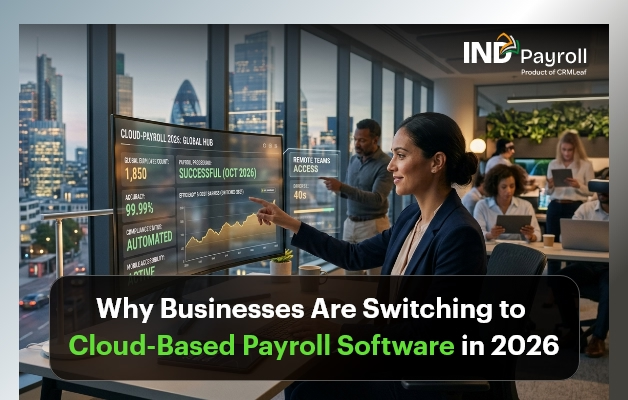
Why Businesses Are Switching to Cloud-Based Payroll Software in 2026

Payroll management has always been one of the most critical — and most time-consuming — functions in any business. From calculating salaries and deductions to ensuring statutory compliance with PF, ESI, and TDS, the monthly payroll cycle demands accuracy, speed, and up-to-date knowledge of ever-changing regulations.

For years, businesses in India relied on spreadsheets or installed desktop software to handle these tasks. These systems worked — until they didn’t. As teams grew, regulations changed, and remote work became the norm, the limitations of traditional payroll tools quickly became apparent.

That is why, in 2026, more businesses than ever are making the switch to cloud-based payroll software. It is not just a technology upgrade — it is a strategic shift in how companies manage their workforce, control costs, and stay compliant.

India’s #1 Free Software

Free Payroll, PF,
ESI & TDS Software

Professional compliance management for Indian businesses. 100% Free Forever.

What Is Cloud-Based Payroll Software?

Cloud-based payroll software is an online payroll system that processes and manages employee compensation through secure, internet-hosted servers. Unlike legacy systems that require installation on local computers or on-premises hardware, this platform is accessible from any device, anywhere, at any time.

The software provider maintains the platform, handles all updates, and ensures the system reflects the latest tax laws and compliance requirements — without your IT team lifting a finger. You simply log in, run payroll, and let the system do the heavy lifting.

For business owners and HR managers overseeing growing teams, this represents a fundamental change: from reactive, manual processing to proactive, automated payroll management. To understand the full scope of what this means, explore how INDPayroll’s payroll automation works.

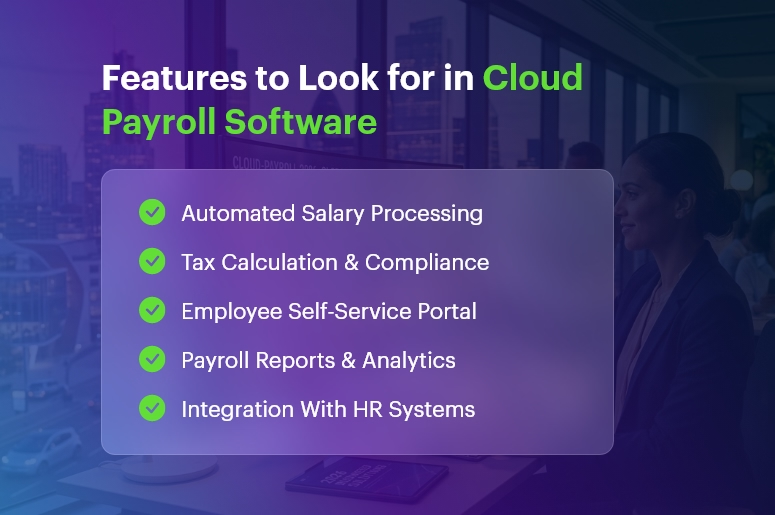
Features to Look for in Cloud Payroll Software

Key Reasons Businesses Are Switching to Cloud Payroll in 2026

The migration from legacy payroll tools to modern cloud platforms is accelerating. Here is what is driving it.

Payroll Automation Saves Time and Reduces Errors

Manual payroll is error-prone. A misplaced decimal or an outdated tax slab can lead to employee dissatisfaction and regulatory penalties. An automated payroll system handles salary calculations, statutory deductions, payslip generation, and bank transfer files — reducing the processing cycle from days to hours.

With built-in payroll automation, HR teams can focus on people strategy rather than number-crunching. Learn more about INDPayroll’s automated salary processing.

Remote Access and Flexible Operations

India’s workforce is increasingly distributed. Whether your team works from home, across multiple offices, or in different states, a cloud payroll platform gives HR and finance teams the ability to process payroll from anywhere — on any device, without VPNs or dedicated office hardware.

India’s #1 Free Software

Free Payroll, PF, ESI & TDS Software

Always Up-to-Date Compliance

Tax laws, PF contribution rates, ESI rules, and professional tax slabs change frequently. Modern platforms update automatically, ensuring payroll compliance in India remains current without manual intervention. This alone is a compelling reason for finance teams to make the move. See how INDPayroll handles compliance updates automatically.

Enterprise-Grade Data Security

Payroll data is among the most sensitive information a business holds. Leading providers offer end-to-end encryption, multi-factor authentication, role-based access co ntrols, and automatic backups — protection that far exceeds what most on-premise setups can deliver.

Lower Costs, No Infrastructure Overheads

Switching to a SaaS payroll model eliminates upfront licensing costs, server maintenance, and IT support expenses. Businesses pay a predictable monthly or annual subscription and gain access to enterprise-level features — making it particularly attractive for startups and growing companies.

Benefits of Cloud-Based Payroll Software for Small Businesses

Small businesses and startups often operate with lean teams where one person handles both HR and finance. A modern online payroll solution is purpose-built for this reality.

Consider a startup with 20 employees growing to 80 within 18 months. With a scalable platform, adding new hires, updating salary structures, and managing multi-state compliance happens within the same system — no migrations, no upgrades, no disruption.

Key benefits for small businesses include:

  • Fewer manual errors: Automated calculations eliminate common payroll mistakes before they become costly.
  • Faster payroll cycles: Process the entire monthly payroll in a fraction of the time.
  • Compliance without expertise: Built-in statutory compliance means you do not need a specialist in-house.
  • Employee self-service: Staff can view payslips, download Form 16, and update personal details independently — reducing HR queries.
  • Real-time visibility: Instant reports, cost summaries, and analytics available on demand.

Why Businesses in India Need a Dedicated Payroll Compliance Solution

India’s statutory compliance landscape is one of the most complex in the world. Businesses must accurately manage:

  • Provident Fund (PF): Monthly contributions, ECR filings, and UAN management for every employee.
  • Employee State Insurance (ESI): Eligibility checks, contribution calculations, and half-yearly returns.
  • Tax Deducted at Source (TDS): Monthly deductions, quarterly filings, and annual Form 24Q submissions.
  • Professional Tax (PT): State-specific slabs applied correctly across multi-location workforces.
  • Labour Welfare Fund (LWF): Periodic contributions varying by state and employee category.

Managing all of this manually — or through software that does not update automatically — creates serious compliance risk. A missed filing, incorrect deduction, or late payment can result in penalties, employee grievances, and regulatory scrutiny.

The right HR payroll software built specifically for the Indian market removes this risk entirely. The system stays updated with regulatory changes, computes deductions accurately, and generates the filing-ready reports your finance team needs. Explore INDPayroll’s compliance management features to see this in action.

How INDPayroll Helps Businesses Manage Payroll Efficiently

INDPayroll is a cloud-based payroll software built specifically for Indian businesses — designed to make payroll fast, accurate, and fully compliant without requiring a large HR team or in-house payroll expertise.

Here is what businesses using INDPayroll experience:

  • End-to-end payroll automation: From salary inputs to payslip generation and bank transfers, the entire cycle is automated. See the full feature list.
  • Built-in Indian compliance: PF, ESI, TDS, PT, and LWF calculations are handled automatically and updated when regulations change.
  • Employee self-service portal: Employees access payslips, submit investment proofs, and view tax summaries without contacting HR.
  • Detailed payroll reports: Salary registers, cost-to-company reports, and statutory filings generated instantly.
  • Scalable for growing teams: Whether your team is 10 or 500, the platform scales without additional setup or cost
  • Responsive support: A dedicated team that understands Indian payroll complexities. Contact us anytime for guidance.

INDPayroll is designed for business owners who want payroll off their plate, HR managers who need reliable compliance management, and finance teams who need accurate data without the manual work.

Free Payroll, PF, ESI & TDS Software

The most trusted automation tool for modern Indian businesses.

Conclusion:

The shift to cloud-based payroll software is no longer optional for businesses that want to operate efficiently and stay compliant in 2026. The combination of automation, real-time compliance updates, remote accessibility, and cost efficiency makes modern payroll platforms the clear choice for Indian businesses of all sizes.

Whether you are a startup processing your first payroll or a growing company managing a distributed workforce, the right solution can transform what has always been a stressful, error-prone process into a seamless system that runs reliably in the background.

Ready to simplify payroll and stay compliant without the manual effort? Explore INDPayroll‘s features, check out our pricing plans, or request a free demo today.

Frequently Asked Questions

Q1. What is cloud-based payroll software?

Cloud-based payroll software is an online payroll system that processes employee salaries, statutory deductions, and compliance requirements through internet-hosted servers. It is accessible from any device without requiring local installation or dedicated hardware.

Q2. Is a cloud payroll platform safe for sensitive employee data?

Yes. Reputable providers use end-to-end data encryption, multi-factor authentication, and role-based access controls. Automated backups ensure data is never lost due to hardware failure or human error.

Q3. How does online payroll software handle PF, ESI, and TDS compliance in India?

A payroll compliance platform built for India automatically calculates PF, ESI, TDS, professional tax, and LWF contributions using current statutory rates. The system updates when regulations change, ensuring your filings are always accurate.

Q4. Is this type of payroll tool suitable for small businesses and startups?

Absolutely. Modern payroll platforms are especially valuable for small businesses because they remove the need for in-house payroll expertise, reduce manual errors, and scale easily as the team grows — all at an affordable subscription cost.

Q5. What features should I look for in a payroll management system?

Look for automated salary processing, built-in PF/ESI/TDS compliance, an employee self-service portal, payroll reports and analytics, multi-state support, and seamless integration with attendance and leave management tools.

Employee Self‑Service in Payroll: A Win for Transparency and Productivity

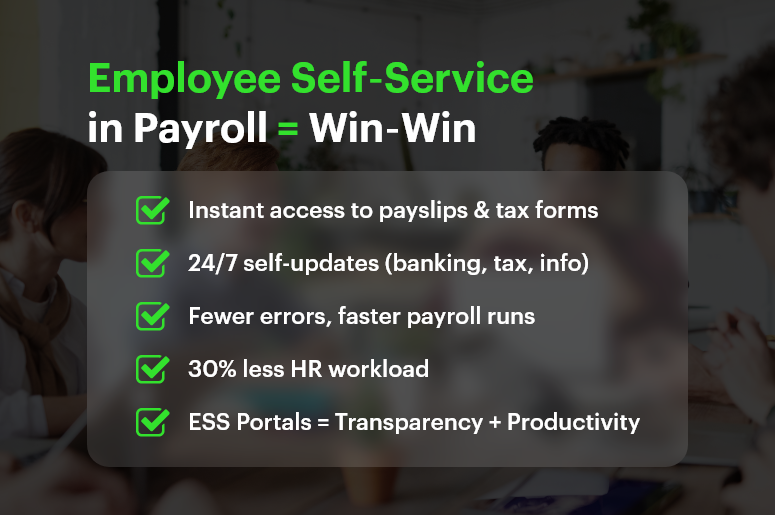
Every time someone emails HR for a pay stub or correction, you lose productivity, clarity, and trust. That’s why employee self‑service in payroll isn’t just a convenience — it’s a transformative approach to fostering transparency and efficiency.

Research confirms that self‑service portals reduce HR workload by up to 30%, speed responses, and boost employee empowerment

In this post, we’ll explain why employee self‑service in payroll matters, the benefits it delivers, and how CRMLeaf’s unified CRM + ERP platform makes it effortless to implement.

Employee Self‑Service in Payroll Win‑Win

Why Employee Self‑Service in Payroll Matters

When employees rely on HR for every pay slip or deduction question, HR teams become overloaded, and delays frustrate people. Empowering employees with a payroll self-service portal solves that—and unlocks broader organizational benefits.

1. Enhances Payroll Transparency

  • An ESS portal gives employees instant access to payslips, deductions, tax forms, and earnings history.
  • With on-demand visibility, trust rises because payroll becomes open and understandable

2. Boosts Productivity & Reduces HR Workload

  • Empowering employees to self-serve reduces routine HR queries by nearly one-third.
  • This frees HR teams for strategic initiatives instead of repetitive admin

3. Improves Payroll Accuracy

  • When employees enter their details — banking info, tax election, personal data — errors drop significantly.
  • Built-in validation helps correct discrepancies before payroll is finalized

Free Payroll, PF, ESI & TDS Software

The most trusted automation tool for modern Indian businesses.

Who Benefits Most? Industries That Gain from ESS in Payroll

Employee self‑service in payroll delivers ROI across sectors:

  • Retail & Hospitality: High-volume, hourly staff with frequent deductions rely on immediate pay transparency.
  • Manufacturing & Logistics: Rotating shift workers need real-time payroll visibility to confirm hours across sites.
  • Professional Services & Startups: Tight payroll schedules, project-based compensation, and fast-changing headcounts benefit from self-service accessibility.

In all cases, ESS leads to fewer errors, happier teams, and more focused HR departments.

Best Practices & Actionable Tips for ESS in Payroll

Effective deployment of employee self‑service in payroll requires a best-in-class strategy. Here’s how to plan implementation — especially when integrated with CRMLeaf’s CRM + ERP system.

1. Implement a Unified ESS Portal

  • Use a single platform that integrates payroll, HR, and finance.
  • That way, changes in one module (like leave or benefits) reflect across the system immediately.

2. Offer Mobile & 24/7 Access

  • Employees should be able to view pay details, request updates, and download forms anytime.
  • Mobile-compatible portals meet modern expectations perfectly.

3. Enable Self-Updates with Automatic Validation

  • Let staff update direct deposit details, withholding info, or emergency contacts themselves.
  • Use validation rules to prevent incorrect entries and conflicts before payroll processing.

4. Cut HR Tickets by Providing Transparent Information

  • When employees can self-access payslips and tax forms, HR inquiries reduce drastically.
  • This minimizes repetitive texting and email chains for routine questions.

5. Integrate ESS with Leave & Benefits Modules

  • Link ESS to leave balance, PTO requests, and benefits elections to reduce cross-team misalignment.
  • Every update feeds into payroll automatically without manual adjustments.

6. Provide Pre-Payroll Error Alerts

  • Use alerts to flag missing data, incomplete profiles, or mismatched information before final payroll runs.
  • This proactive approach improves data quality and lowers downstream corrections.

7. Empower Employees & Improve Engagement

  • Giving staff control over their payroll data drives accountability and morale.
  • Studies show that empowered employees report higher satisfaction and retention.

8. Use Secure, Role‑Based Access

  • Provide multi-factor authentication and restrict visibility so employees only see their data.
  • Role-based permissions keep HR and finance functions secure and audit-ready.

Customer Success /Case Study

For example, BrightWorks Co., a mid-sized manufacturing company with 300 employees, implemented employee self‑service in payroll using CRMLeaf’s CRM + ERP platform. They rolled out a mobile ESS portal allowing staff to view payslips, update banking and tax info, request PTO, and submit unclaimed hours.

  • HR queries dropped by 35% within two months
  • Payroll error rate fell by 60% due to pre-payroll validation
  • Employee satisfaction increased by 20%, thanks to transparency and autonomy

By empowering employees and streamlining admin, BrightWorks transformed payroll from a headache into a productivity driver.

India’s #1 Free Software

Free Payroll, PF, ESI & TDS Software

Key Takeaways & Closing

Here’s why employee self‑service in payroll is a win-win for businesses:

  • Transparency: Staff can access their payroll data instantly, reducing confusion and enhancing trust.
  • Productivity: HR teams spend less time on routine tickets, freeing them for strategic work.
  • Accuracy: Self-entry and validation reduce errors before payroll is processed.

With CRMLeaf’s integrated CRM + ERP platform, ESS becomes more than a feature — it becomes a backbone of data integrity, employee engagement, and operational efficiency. This synergy helps businesses scale faster, operate more transparently, and support employees better — without increasing HR effort.

Category: EPFO & ESI

No posts in this category.

Subcategory: EPFO

Subcategory: ESI

Category: Payroll Help

No posts in this category.

Subcategory: Employee Self-Service & Engagement

Subcategory: Introduction to Payroll

Subcategory: Payroll Analytics & Reporting

Subcategory: Payroll Automation & Technology

Subcategory: Payroll for Business Growth

Subcategory: Payroll Processing & Management

Subcategory: Taxation & Compliance

Category: User Manual

No posts in this category.

Subcategory: Company Setup

Subcategory: Employee Management

Subcategory: Getting Started

Subcategory: Glossary

Subcategory: Import & Export

Subcategory: Introduction

Subcategory: Payroll Configuration

Subcategory: Payslips & Disbursement

Subcategory: Reports & Analytics

Subcategory: Running Payroll

Subcategory: Statutory Compliance & Reports

Subcategory: Troubleshooting

Subcategory: User Management & Security