How to Reduce Payroll Processing Time by 80% in 2026

Are you still spending 6 to 8 hours every payroll cycle on manual calculations, data entry, and compliance checks? You are not alone. Thousands of Indian HR teams waste precious time every month on payroll processing tasks that modern software can handle in minutes.

In 2026, there is no reason to let slow payroll processing time hurt your team’s productivity. This guide will show you exactly how to cut your payroll processing time by up to 80% — with the right tools, smart automation, and zero compromise on compliance.

Why Does Payroll Processing Take So Long?

Before fixing the problem, you need to understand the root cause. Most HR teams in India spend excessive time on payroll because of outdated, manual processes. Here are the top three reasons your payroll processing time is eating up your workweek.

1. Manual Data Entry and Human Errors

When HR teams enter attendance, leave, and salary data manually, mistakes happen. A single typo in a salary figure can trigger a cascade of recalculations. This wastes hours every cycle. Studies show that manual payroll processing has an error rate of up to 30%, which means one in three payroll runs requires corrections. Automation eliminates this problem almost entirely.

Free Payroll, PF, ESI & TDS Software

The most trusted automation tool for modern Indian businesses.

2. Complex PF and ESI Calculations

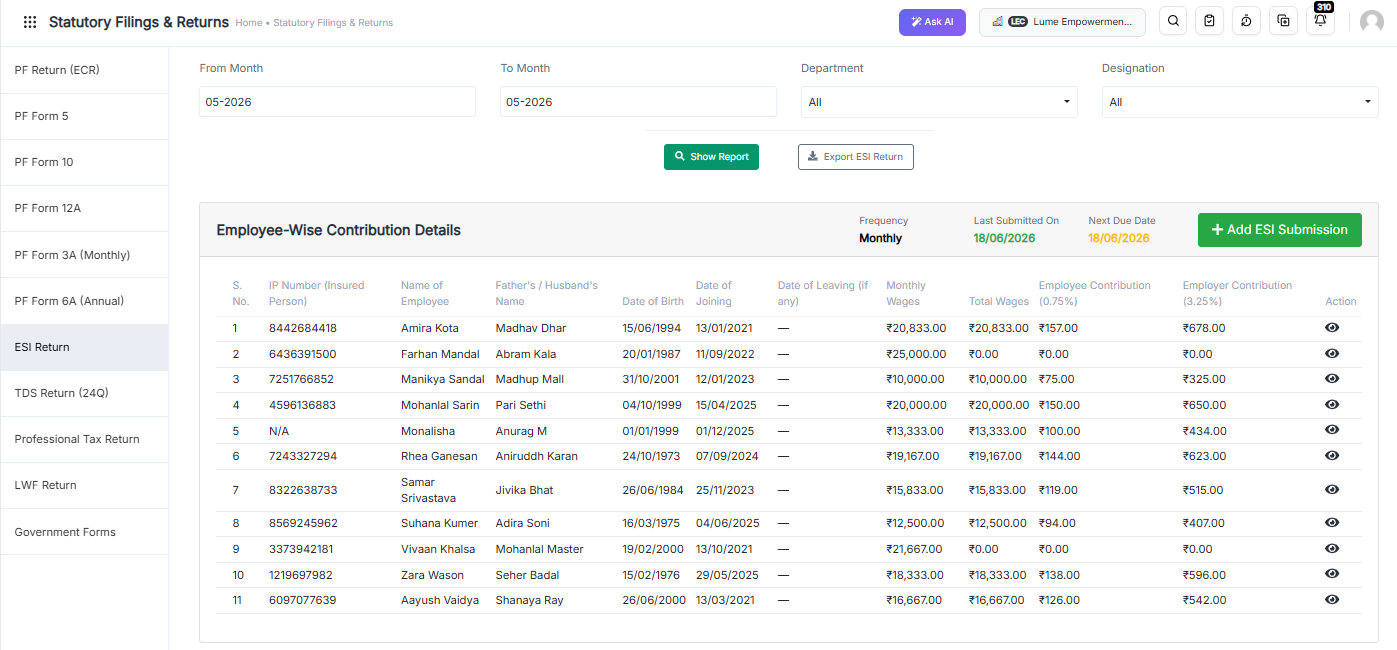
India’s PF and ESI rules are detailed and frequently updated. Calculating contributions accurately for each employee — especially for variable pay structures — takes significant time when done manually. A single compliance mistake can also lead to penalties and audits. You can simplify this with our PF & ESI Compliance module, which handles all calculations automatically.

3. Generating and Distributing Payslips Manually

Creating payslips for 50, 100, or 500 employees one by one is exhausting. Then distributing them through email adds more time. Our Payslip & Reports Generator automates the entire process — from generation to distribution — in a single click.

What Does “80% Faster Payroll Processing” Actually Mean?

Let us put this in real numbers. If your team currently spends 8 hours per payroll cycle, an 80% reduction means you finish in just 96 minutes. For a team of 200 employees, that translates to saving over 70 hours per month — time you can redirect toward strategic HR work, employee engagement, and business growth.

According to research by the American Payroll Association, companies that automate payroll reduce processing costs by up to 80% and cut error rates by 90%. In India, where compliance requirements are increasingly complex, automated payroll software is no longer a luxury — it is a necessity.

Furthermore, the technology company behind INDPayroll, has helped hundreds of businesses across India transition from manual to fully automated payroll — with measurable results within the first month.

7 Proven Ways to Reduce Payroll Processing Time by 80%

Here are the most effective strategies to dramatically cut your payroll processing time in 2026. Each of these steps is actionable, measurable, and tested by real HR teams across India.

Step 1: Switch to Automated Payroll Software

This is the single most impactful change you can make. Automated payroll software handles salary calculations, tax deductions, and compliance reporting without any manual input. INDPayroll processes payroll for hundreds of employees in minutes, not hours. It integrates attendance, leave, and HR data seamlessly — so you never have to copy data between spreadsheets again.

Step 2: Automate PF and ESI Compliance

Compliance is one of the biggest time sinks in Indian payroll. With automated PF & ESI compliance tools, you can auto-calculate contributions, generate challans, and file returns without manual effort. Stay current with latest EPF regulations and never miss a deadline again. You can also refer to our EPF compliance guide for step-by-step instructions.

Step 3: Use a Digital Payslip Generator

Stop creating payslips one by one. Our free payslip generator lets you create professional, compliant payslips for your entire workforce in seconds. You can customise the format, include all statutory deductions, and email payslips directly from the platform. This single change can save HR teams 2 to 3 hours every payroll cycle.

Step 4: Streamline Salary Processing

Manual salary processing involves verifying attendance, calculating gross pay, applying deductions, and processing net pay — all separately. Our salary processing module consolidates all these steps into one automated workflow. You simply review and approve — the system handles everything else. Additionally, use our free CTC calculator to accurately structure employee compensation packages.

Step 5: Use Free Payroll Calculators

Before finalising payroll, use our suite of free payroll tools to verify calculations instantly. Our PF calculator and ESI calculator give you accurate contribution figures in seconds. These tools eliminate the need for manual spreadsheet formulas and reduce verification time significantly.

Step 6: Stay Updated on Indian Labor Laws

Outdated knowledge of labor law leads to incorrect payroll and time-consuming corrections. Bookmark our labor law updates page and our registration and filing tutorials to stay compliant at all times. When laws change, your payroll software updates automatically — so you never have to adjust calculations manually.

Step 7: Integrate ESI Compliance Seamlessly

ESI calculations and filings can be complex, especially when employee salaries fluctuate. With INDPayroll’s automated ESI module, you get full compliance without extra effort. Read our detailed ESI compliance guide to understand how automation handles every edge case — from new joiners to mid-month resignations.

India’s #1 Free Software

Free Payroll, PF,
ESI & TDS Software

Professional compliance management for Indian businesses. 100% Free Forever.

Real-World Use Case: How an IT Firm Cut Payroll Time from 8 Hours to 90 Minutes

A Bengaluru-based IT services company with 220 employees was spending 8 hours every month on payroll. Their HR team manually calculated salaries in Excel, computed PF and ESI contributions separately, and emailed payslips one by one. Errors were common, and compliance reporting took an additional 3 hours.

After switching to INDPayroll, their results were remarkable:

  • Payroll processing time dropped from 8 hours to 90 minutes
  • Payslip generation time reduced from 2 hours to 3 minutes
  • PF and ESI compliance errors fell to zero
  • The HR team redirected 6+ hours monthly to strategic initiatives

This is the power of automated payroll software. It is not just about saving time — it is about transforming how your HR team operates.

Teams managing projects alongside payroll can also benefit from tools like Orangescrum for project tracking, and CRMLeaf for end-to-end HR and CRM management.

INDPayroll vs Manual Payroll: Side-by-Side Comparison

Feature Manual Payroll INDPayroll (Automated)
Processing Time per Cycle 6–10 hours Under 2 hours
Error Rate Up to 30% Less than 1%
PF & ESI Compliance Manual, error-prone Fully automated
Payslip Generation 1–2 hours Under 5 minutes
Labour Law Updates Manual tracking required Auto-updated in software
Reporting Manual spreadsheets One-click reports
Cost High (time + errors) Low (flat subscription)

Is INDPayroll the Right Choice? Compare Alternatives

If you are currently using another payroll or HR platform, it is worth doing a comparison before deciding. We have put together detailed alternative guides to help you make an informed decision:

Each guide provides a detailed feature comparison, pricing breakdown, and use-case recommendations — so you can choose the platform that best fits your company’s needs.

How to Get Started with INDPayroll in 3 Simple Steps

Reducing your payroll processing time by 80% is easier than you think. Here is how to get started today:

  • Sign Up Free: Create your free account at INDPayroll Signup. No credit card required. Setup takes less than 10 minutes.
  • Configure Your Payroll: Add your employees, set salary structures, and configure PF and ESI settings. The onboarding wizard guides you through every step.
  • Run Your First Payroll: Process payroll for your entire team in minutes. Generate payslips, download compliance reports, and send salary credits — all from one dashboard.

Explore all the features on the INDPayroll homepage or browse our blog for more tips on payroll management, compliance, and HR automation.

Conclusion

In 2026, long and error-prone payroll processing time is a problem you simply do not need to have. The right payroll automation software eliminates manual data entry, ensures full PF and ESI compliance, generates payslips instantly, and keeps you up to date with every labor law change — automatically.

INDPayroll is designed specifically for Indian businesses. It is powerful enough for enterprise-level payroll and simple enough for growing SMEs. Whether you process payroll for 10 employees or 10,000, you can cut your processing time by up to 80% from day one.

Stop wasting time. Start automating. Your HR team deserves better — and so does your business.

India’s #1 Free Software

Free Payroll, PF, ESI & TDS Software

Frequently Asked Questions

1. How can I reduce payroll processing time in my company?

The most effective way to reduce payroll processing time is to switch from manual processes to automated payroll software like INDPayroll. Automation handles salary calculations, PF & ESI compliance, payslip generation, and reporting — cutting processing time by up to 80%.

2. What is the average payroll processing time in India?

For companies using manual or semi-automated payroll, the average processing time is 6 to 10 hours per month. With fully automated payroll software, this drops to under 2 hours — regardless of team size.

3. Is automated payroll software safe for PF and ESI compliance?

Yes. Reputable payroll software like INDPayroll is built around Indian statutory compliance. It automatically calculates PF and ESI contributions based on the latest government rules, minimising risk and eliminating manual errors. Learn more in our EPF compliance guide.

4. Can small businesses benefit from payroll automation?

Absolutely. Even businesses with 5 to 10 employees benefit from payroll automation. It saves time, reduces errors, and ensures compliance — regardless of company size. INDPayroll offers affordable plans for startups and SMEs.

5. What is the best payroll software for Indian companies in 2026?

INDPayroll is one of the top choices for Indian businesses in 2026. It offers end-to-end salary processing, PF & ESI compliance, payslip generation, and free tools — all in one platform.

6. How does automated payslip generation save time?

Instead of creating payslips manually for each employee, automated tools like our payslip generator generate and distribute payslips for your entire workforce in seconds. This alone saves 2 to 3 hours per payroll cycle.

7. What happens when labor laws change?

When Indian labor laws change, INDPayroll updates its calculation engine automatically. You always run payroll using the latest rules — without manually tracking labor law updates yourself.

8. Can I use INDPayroll for ESI compliance?

Yes. INDPayroll includes a full PF & ESI compliance module. It auto-calculates ESI contributions, generates challans, and helps with return filing. You can also refer to our ESI compliance guide for detailed help.

9. How long does it take to set up INDPayroll?

Most businesses are up and running within 30 minutes. The onboarding wizard guides you through adding employees, setting salary structures, and configuring compliance settings — step by step.

10. Is there a free trial available?

Yes! You can sign up for free and start processing payroll immediately. No credit card is required to get started. Try it today and experience the difference automated payroll makes.

The Ultimate Free Payslip Generator For Every Business

Every business owner knows the pain of payroll day. Your employees are waiting. HR is scrambling. And you’re still manually calculating deductions, PF contributions, and ESI amounts — one salary slip at a time. If this sounds familiar, you need a free payslip generator that does the heavy lifting for you.

Payroll errors cost Indian businesses thousands of rupees every year — not just in penalties, but in lost employee trust. According to a 2024 SHRM report, 49% of employees will start job hunting after just two payroll mistakes. That’s a risk no business can afford.

In this guide, you’ll discover how a free payslip generator can transform your payroll process — saving time, eliminating errors, and keeping your business 100% compliant. Whether you’re a startup, SME, or growing enterprise, this tool works for you. Let’s dive in.

India’s #1 Free Software

Free Payroll, PF,
ESI & TDS Software

Professional compliance management for Indian businesses. 100% Free Forever.

What Is a Payslip Generator and Why Does Your Business Need One?

A payslip generator is an online tool that automatically creates professional, formatted salary slips for your employees. It calculates gross salary, deductions (PF, ESI, TDS, professional tax), and net pay — then outputs a downloadable payslip in seconds.

Every business in India with salaried employees is legally required to issue payslips. Under the Payment of Wages Act and various state labour laws, employers must provide documented proof of salary payment. Failing to do so can attract fines and legal disputes.

Key Benefits of Using a Free Payslip Generator

  • Saves time: Generate 100+ payslips in minutes instead of hours of manual work.
  • Eliminates errors: Automatic calculations remove the risk of human arithmetic mistakes.
  • Ensures compliance: Built-in PF, ESI, and TDS formulas keep you aligned with Indian labour law.
  • Professional formatting: Branded, clean salary slips boost employee confidence.
  • No software installation: Works entirely online — accessible from any device, anytime.

Still using Excel templates? That approach might have worked for 5 employees. But when you scale to 50 or 500, a dedicated free payslip generator becomes non-negotiable.

How INDPayroll’s Free Payslip Generator Works

INDPayroll’s free payslip generator is designed for simplicity and speed. You don’t need to be a payroll expert to use it. Here’s the step-by-step process:

Step 1: Enter Employee Details

Input the employee’s name, designation, employee ID, department, and PAN/UAN numbers. The tool automatically structures this information into a professional payslip format.

Step 2: Add Salary Components

Enter the salary breakdown — Basic Pay, HRA, Special Allowance, Conveyance, Medical Allowance, and any other components relevant to your pay structure. The salary processing module handles complex CTC structures automatically.

Step 3: Add Statutory Deductions

The generator auto-calculates Employee PF (12% of Basic), ESI (0.75% of gross), Professional Tax (state-wise), and TDS based on current tax slabs. You can also use our PF calculator and ESI calculator separately for verification.

Step 4: Preview and Download

Instantly preview the formatted payslip and download it as a PDF. You can email it directly to employees or upload it to your HRMS. The entire process takes under 2 minutes per employee.

Who Should Use a Free Payslip Generator?

The short answer: every business that pays salaries. But here’s a detailed breakdown of who benefits most from a free payslip generator:

1. Startups and Micro-Businesses (1–20 Employees)

You don’t have a dedicated HR team yet. You’re managing payroll yourself alongside a dozen other responsibilities. A free tool eliminates the need to hire a payroll specialist or buy expensive software. Generate accurate, compliant payslips in minutes — and focus on building your business instead.

2. Small and Medium Enterprises (20–200 Employees)

Your HR team handles multiple responsibilities. Payroll day shouldn’t consume entire workdays. With batch payslip generation, you can process salaries for your entire workforce in a single session. The built-in compliance features ensure every payslip meets Indian labour law requirements.

3. Chartered Accountants and Payroll Consultants

If you manage payroll for multiple clients, a payslip generator dramatically reduces your turnaround time. Generate customized payslips for each client’s unique pay structure — complete with their company branding.

4. Remote-First and Distributed Teams

Managing payroll across cities and states means dealing with different professional tax slabs and labour regulations. INDPayroll’s tool handles state-specific compliance automatically, making it ideal for companies with pan-India operations.

5. Manufacturing and Factory Units

High employee counts, shift allowances, overtime pay, and PF/ESI compliance are complex. A dedicated payslip generator manages all these variables — producing accurate salary slips even for large workforces.

Free Payslip Generator vs. Manual Excel: A Real Comparison

Many businesses still rely on Excel for payroll. Let’s compare both approaches honestly:

Feature Excel / Manual Free Payslip Generator
Time per payslip 15–30 minutes Under 2 minutes
PF/ESI Auto-calculation Manual formula setup ✅ Automatic
Error risk High (human errors) Very Low
Professional formatting Limited ✅ Branded PDF output
Compliance updates Manual (miss changes) ✅ Auto-updated
Cost Free (but time-costly) Free

The conclusion is clear. A free payslip generator wins on every metric that matters — speed, accuracy, compliance, and professionalism. The only reason to stick with Excel is inertia.

Key Features to Look for in a Free Payslip Generator

Not all payslip generators are created equal. When choosing the right tool, prioritize these essential features:

1. Complete Salary Breakdown

The tool must support all standard salary components — Basic, HRA, DA, TA, Medical Allowance, Bonus, Incentives, and Special Allowances. Use our CTC calculator to structure your salary breakup before generating payslips.

2. Statutory Compliance Built-In

Look for a generator that automatically calculates PF (Employees’ Provident Fund), ESI (Employee State Insurance), Professional Tax, and TDS. These amounts must align with the latest EPF regulations and registration and filing requirements.

3. Customizable Templates

Your payslip should reflect your company’s brand. Look for tools that allow you to add your company logo, name, address, and custom salary components. The payslip reports generator from INDPayroll supports full template customization.

4. PDF Download and Email Integration

The ability to download payslips as PDFs and email them directly to employees is essential. This eliminates manual distribution and creates an automatic audit trail.

5. Data Security

Salary data is sensitive. Ensure the tool uses SSL encryption and doesn’t store employee data without consent. INDPayroll follows enterprise-grade security protocols to protect your payroll information.

6. Multi-Month Payslip History

Employees frequently need payslips for loan applications, visa processing, and rental agreements. A tool that stores previous payslips and allows instant retrieval adds significant value for both HR and employees.

Understanding the Salary Slip Format: What Must Be Included?

A legally compliant salary slip in India must contain specific information. Here’s what every payslip generated by INDPayroll includes:

Employer Information

  • Company name and registered address
  • Company logo (optional but professional)
  • Month and year of salary payment

Employee Information

  • Employee name and employee ID
  • Designation and department
  • Date of joining and bank account details
  • PAN number and UAN (Universal Account Number for PF)

Earnings Breakdown

  • Basic Salary
  • HRA (House Rent Allowance)
  • DA (Dearness Allowance) — applicable for government and PSU employees
  • Transport / Conveyance Allowance
  • Medical Allowance
  • Special / Miscellaneous Allowance
  • Overtime Pay and Bonus (if applicable)

Deductions Breakdown

  • Employee PF Contribution (12% of Basic, capped at ₹1,800/month if Basic ≤ ₹15,000)
  • ESI Contribution (0.75% of gross, applicable if gross ≤ ₹21,000/month)
  • Professional Tax (state-specific)
  • TDS (Tax Deducted at Source, as per income tax slab)
  • Any other deductions (loan repayments, advance salary, etc.)

Net Pay

The final take-home salary after all deductions. INDPayroll’s payroll software calculates this automatically — with zero manual intervention required.

India’s #1 Free Software

Free Payroll, PF, ESI & TDS Software

PF and ESI Compliance: Why It Matters for Every Payslip

PF and ESI compliance is not optional. If your business employs 20 or more workers, EPF registration is mandatory under the Employees’ Provident Funds and Miscellaneous Provisions Act, 1952. ESI applies to factories and establishments with 10 or more employees where gross wages are ₹21,000 or below.

Every payslip must accurately reflect both employer and employee PF contributions — otherwise you risk penalties, interest charges, and damage to employee UAN accounts. Our PF & ESI compliance module ensures every calculation is correct and audit-ready.

PF Contribution Breakdown (2026)

  • Employee contribution: 12% of Basic + DA
  • Employer contribution: 12% of Basic + DA (split between EPF and EPS)
  • Employer’s EPF deposit: 3.67% goes to EPF, 8.33% to EPS (pension scheme)

For detailed EPF rules and recent amendments, visit our EPF compliance guide.

ESI Contribution Breakdown (2026)

  • Employee contribution: 0.75% of gross wages
  • Employer contribution: 3.25% of gross wages

For complete ESI rules and registration steps, visit our ESI compliance guide.

Free Payroll Tools That Work Alongside Your Payslip Generator

INDPayroll offers a complete suite of free payroll tools that complement the payslip generator. Together, they give your HR team everything needed for end-to-end payroll management:

  • PF Calculator: Instantly calculate employee and employer PF contributions for any salary amount.
  • ESI Calculator: Determine ESI contributions in seconds for gross salaries up to ₹21,000.
  • CTC Calculator: Break down any CTC package into its take-home components accurately.
  • Payslip Generator: Create professional, formatted salary slips for individual employees.

All these tools are 100% free — no account required for basic use. However, for bulk payslip generation, automated payroll runs, and compliance filings, INDPayroll’s full platform is the smart upgrade.

Is INDPayroll the Right Alternative to Your Current Payroll Tool?

If you’re currently using Keka, GreytHR, PagarBook, or FactoHR, you may be overpaying for features you don’t use — or missing India-specific compliance features you desperately need.

INDPayroll is built specifically for Indian businesses. It offers automatic PF/ESI compliance, state-wise professional tax calculations, and a truly free payslip generator as part of its core offering.

Explore our detailed comparison guides to see why businesses are switching:

Also, explore how Andolasoft powers INDPayroll’s robust, enterprise-grade payroll infrastructure — delivering reliability at every scale. Discover additional productivity integrations through CRMLeaf and Orangescrum for complete business management.

Real Business Use Cases: Free Payslip Generator in Action

Case Study 1: Tech Startup, Bengaluru (18 Employees)

A SaaS startup was spending 6–8 hours every month manually creating payslips in Excel. After switching to INDPayroll’s free payslip generator, they reduced payroll processing time to under 30 minutes. More importantly, they eliminated three payslip errors that had caused employee complaints in the previous quarter.

Case Study 2: Garment Manufacturing Unit, Tiruppur (450 Employees)

Managing payroll for 450 workers — with varying piece-rate wages, overtime, and ESI compliance — was a monthly nightmare. INDPayroll’s automated payslip generation handled the entire workforce in one batch, with automatic ESI deductions and statutory compliance reports ready for submission.

Case Study 3: CA Firm Managing 12 Client Payrolls

A Chartered Accountant in Mumbai managing payroll for 12 SME clients used to spend 40+ hours monthly on payslip generation. INDPayroll’s platform reduced this to under 10 hours — freeing up time to take on more clients and grow the practice.

Free Payroll, PF, ESI & TDS Software

The most trusted automation tool for modern Indian businesses.

Conclusion: Stop Struggling With Payslips — Start Automating Today

Generating payslips manually is a drain on your time, your HR team’s energy, and your business’s compliance standing. A free payslip generator isn’t just a convenience — it’s a competitive advantage.

With INDPayroll, you get more than just a payslip tool. You get a complete payroll ecosystem that handles salary processing, PF/ESI compliance, tax calculations, and professional reporting — all in one place. Thousands of Indian businesses have already made the switch. Now it’s your turn.

Explore more on our payroll blog for the latest updates on Indian labour law, payroll best practices, and compliance guides.

Frequently Asked Questions

1. What is a free payslip generator?

A free payslip generator is an online tool that automatically creates professional salary slips for employees. It calculates earnings, statutory deductions (PF, ESI, TDS), and net pay — then generates a downloadable PDF payslip in minutes.

2. Is INDPayroll’s payslip generator really free?

Yes. INDPayroll’s payslip generator is completely free to use for individual payslips. For bulk payslip generation and automated payroll runs, you can upgrade to the full platform.

3. How do I generate a payslip for my employee?

Simply enter the employee’s details, add salary components (Basic, HRA, allowances), add deductions (PF, ESI, PT, TDS), and click Generate. The tool creates a formatted PDF payslip instantly.

4. What deductions are automatically calculated?

INDPayroll automatically calculates Employee PF (12% of Basic), ESI (0.75% of gross), Professional Tax (based on state), and TDS (based on annual income and applicable tax slab).

5. Is a payslip legally mandatory in India?

Yes. Under the Payment of Wages Act and various state labour laws, employers must provide documented salary statements. Failing to issue payslips can attract penalties and legal disputes.

6. Can I customize the payslip template with my company logo?

Yes. INDPayroll’s payslip reports generator supports full template customization — add your company logo, name, address, and custom salary components.

7. How is PF calculated on a salary slip?

Employee PF is 12% of (Basic Salary + DA). If Basic + DA is ₹15,000 or less, PF applies to the actual amount. If it exceeds ₹15,000, contribution is capped at ₹1,800 per month (12% of ₹15,000) unless the employee opts for a higher contribution. Use our PF calculator for instant results.

8. What is the ESI deduction on a payslip?

ESI applies to employees earning gross wages of ₹21,000 or below per month. The employee contributes 0.75% of gross wages, and the employer contributes 3.25%. Check our ESI calculator for quick calculations.

9. Can I generate payslips for multiple employees at once?

Yes. INDPayroll‘s payroll platform supports bulk payslip generation. Upload employee data via Excel or enter it through the dashboard, and generate payslips for your entire workforce in a single click.

10. How is INDPayroll different from other payslip tools?

INDPayroll is built exclusively for Indian businesses. It offers automatic PF/ESI compliance, state-wise professional tax support, branded payslip templates, and integration with a complete payroll processing platform — making it far more capable than generic salary slip tools. Try it free today.

Payroll ROI: Unlock How Automation Increases Your Profits!

What if your payroll process is silently draining thousands of rupees every month — and you don’t even know it? Most business owners and HR managers focus on payroll as a compliance task, not a profit lever. But here’s the truth: the ROI of payroll automation is one of the most overlooked financial wins in modern businesses.

Manual payroll is slow, error-prone, and expensive. Between recalculations, compliance penalties, and hours of staff time — the hidden costs pile up fast. This guide will show you exactly how payroll software turns those costs into measurable profit gains — with real data, real use cases, and a clear roadmap to smarter payroll.

Ready to see what automated payroll can really do for your bottom line? Let’s break it down. Try it free and experience the ROI shift yourself.

Free Payroll, PF, ESI & TDS Software

The most trusted automation tool for modern Indian businesses.

What Is Payroll ROI and Why Does It Matter?

Payroll ROI (Return on Investment) measures the financial gains your business earns by optimizing your payroll process — compared to the time, money, and resources you spend running it. In simpler terms: how much are you saving (or losing) by the way you currently handle payroll?

For most SMEs in India, payroll is processed manually or with outdated tools. That means:

  • HR teams spending 10–15 hours per month on manual data entry
  • Frequent errors in salary slip generation and tax deductions
  • Compliance risks with EPF, ESI, and TDS miscalculations
  • High employee dissatisfaction from delayed or incorrect pay

When you introduce automated payroll software, each of these pain points is eliminated — and that elimination translates directly into rupees saved and profits recovered.

ROI Formula for Payroll:

Payroll ROI = (Total Cost Saved – Cost of Payroll Software) ÷ Cost of Payroll Software × 100

If your team was spending ₹50,000/month in combined staff hours and compliance penalties, and INDPayroll costs ₹3,000/month — your ROI is over 1,500%. That’s not a typo.

The Real Costs of Manual Payroll Processing

Before you can appreciate the ROI of automation, you need to understand what manual payroll actually costs. Most businesses see only the surface — the software license fee or accountant’s salary. The real iceberg runs much deeper.

1. Lost Staff Hours

According to industry benchmarks, HR teams in SMEs spend an average of 12–18 hours per month on payroll-related tasks — data collection, entry, verification, and corrections. At an average HR salary of ₹35,000/month, that’s roughly ₹10,000+ in pure labor cost just for payroll processing — every single month.

With automated salary processing, this drops to under 2 hours. That’s 80%+ time saved.

2. Compliance Penalties and Errors

India’s payroll compliance landscape is complex. EPF, ESI, TDS, PT — each has its own filing schedule, rate changes, and penalties. A single miscalculation can result in penalties from ₹5,000 to ₹25,000 or more. With manual systems, errors are inevitable.

INDPayroll’s PF & ESI compliance module auto-calculates contributions based on the latest EPF regulations, eliminating this risk entirely.

3. Payslip Generation Delays

Delayed payslips frustrate employees and create HR bottlenecks. With manual methods, generating 50+ payslips takes hours of formatting, checking, and emailing. Our free payslip generator automates this in minutes — with professional formatting and complete salary breakdowns.

4. Audit and Reconciliation Costs

Manual payroll creates inconsistent records that are hard to audit. Year-end reconciliations consume significant time and often require external accountants. Automated payroll keeps a clean, timestamped audit trail — saving ₹15,000–₹50,000 in annual audit prep costs for mid-sized teams.

How Payroll Automation Directly Increases Your Profits

Let’s get specific. Here are the five core ways payroll automation generates measurable ROI for Indian businesses:

1. Massive Reduction in Processing Time

With INDPayroll’s payroll software, what took a full day now takes under 30 minutes. HR teams get their time back — time they can reinvest in recruitment, employee engagement, and strategic HR work that actually drives business growth.

Real-World Example: A 100-person IT firm in Bengaluru was spending 3 full working days every month on payroll. After switching to INDPayroll, they cut that to 4 hours — freeing up nearly ₹60,000/month in combined HR productivity.

2. Zero Compliance Penalties

INDPayroll automatically stays updated with the latest Indian labor law updates, EPF ceiling changes, and ESI rate revisions. Use our PF calculator and ESI calculator to instantly verify contributions. This means no surprise penalties, no late filing fees, and no compliance anxiety.

3. Accurate Salary Breakup Every Time

Errors in salary computation cause downstream problems — incorrect TDS, wrong Form 16, disputed payslips. INDPayroll’s CTC calculator and salary breakup engine ensures every component — Basic, HRA, LTA, PF, ESI, PT — is calculated precisely, automatically, and consistently.

Explore our free payroll tools to see how accurate your current setup is.

4. Reduced Payroll Fraud Risk

Manual payroll creates opportunities for ghost employees, inflated claims, and unauthorized changes. Automated payroll software has built-in access controls, approval workflows, and audit logs — significantly reducing fraud risk. For a 200-person company, even a 0.1% payroll fraud rate could mean ₹1–2 lakhs lost annually.

5. Happier Employees = Higher Retention

This is the ROI that most spreadsheets miss. When employees receive accurate, on-time salary slips and transparent salary breakdowns — trust improves. Employee satisfaction surveys consistently show that payroll accuracy is among the top 3 factors in workplace satisfaction. High retention saves ₹50,000–₹2,00,000 per employee in recruitment and onboarding costs.

Start your free trial and see the difference accurate, on-time payroll makes for your team.

Payroll ROI Calculator: Estimate Your Savings

Not sure what your payroll ROI looks like? Here’s a simplified model based on common SME metrics:

Cost Area Manual Payroll (Monthly) With INDPayroll (Monthly) Monthly Savings
HR Staff Time ₹12,000 ₹2,000 ₹10,000
Compliance Penalties ₹8,000 (avg) ₹0 ₹8,000
Payslip Generation ₹3,000 ₹500 ₹2,500
Error Corrections ₹4,000 ₹200 ₹3,800
Audit/Reconciliation ₹5,000 ₹500 ₹4,500
Total ₹32,000 ₹3,200 ₹28,800/month

That’s over ₹3,45,600 in annual savings for a 50–100 person company — just by switching to automated payroll.

INDPayroll vs Manual Payroll: Feature-by-Feature Comparison

Speed and Accuracy

Manual payroll requires human data entry, verification, and re-entry — all prone to error. INDPayroll’s salary processing engine runs calculations in seconds with 100% accuracy. No rounding errors, no missed deductions, no formatting mistakes on payslips.

Compliance Automation

Manual payroll depends on the HR team staying current with every regulation change. INDPayroll integrates directly with the latest EPF compliance guidelines and ESI compliance guide, so your filings are always current — automatically.

Reporting and Analytics

Manual payroll generates reports only when someone builds them. INDPayroll’s payslip and reports generator provides instant, customizable reports for management, finance, and compliance — on demand, any time.

Scalability

Hiring 10 more employees with manual payroll means 10x more work. With INDPayroll, adding employees takes minutes — with no added complexity or cost per task.

India’s #1 Free Software

Free Payroll, PF,
ESI & TDS Software

Professional compliance management for Indian businesses. 100% Free Forever.

Who Benefits Most from Payroll Automation ROI?

Startups and SMEs (10–200 employees)

This segment gains the most from payroll automation ROI. Lean teams can’t afford HR headcount dedicated purely to payroll. INDPayroll replaces a part-time payroll executive with software that costs a fraction of the salary — and works 24/7 without errors.

IT Companies and Remote Teams

Distributed teams with employees across states face multi-state PT compliance, varying allowances, and remote attendance tracking. INDPayroll handles all of it centrally, making it ideal for tech firms managing hybrid or remote workforces.

Manufacturing and Retail Businesses

High headcounts, shift-based attendance, and complex wage structures make manual payroll a nightmare. Automation streamlines everything from wage calculation to PF/ESI filing — including registration and filing tutorials.

Agencies and Professional Services

Client-billing agencies and professional firms often have variable pay structures — bonuses, commissions, and project-based compensation. INDPayroll handles this flexibility while maintaining compliance and clean records.

Comparing INDPayroll with Other Payroll Solutions

Wondering how INDPayroll compares to competitors? We’ve done the homework:

INDPayroll consistently delivers stronger ROI through superior compliance automation, lower pricing tiers, and India-specific payroll intelligence that generic HR tools simply can’t match.

Step-by-Step: How to Start Maximizing Payroll ROI with INDPayroll

Step 1: Audit Your Current Payroll Costs

Use the ROI table above as a baseline. Log how many hours your HR team spends on payroll, how many compliance penalties you’ve paid in the last 12 months, and how frequently salary errors occur.

Step 2: Sign Up for INDPayroll

Visit INDPayroll and create your account. Setup takes under 15 minutes — including importing your employee data and configuring your salary structure.

Step 3: Configure Your Salary Structure

Use the CTC calculator to set up each employee’s salary breakup. INDPayroll supports custom pay components, variable pay, and India-specific statutory deductions.

Step 4: Run Your First Payroll

Process your first payroll in minutes using INDPayroll’s salary processing module. Review automatically generated payslips, compliance reports, and payment summaries — all in one dashboard.

Step 5: Monitor ROI Monthly

Use INDPayroll’s reporting suite to track time saved, errors reduced, and compliance maintained. Most businesses hit full ROI within the first 2–3 months of using INDPayroll.

Try INDPayroll free today — no credit card required.

Real Results: What INDPayroll Customers Are Saying

“We were spending almost 3 working days a month on payroll. INDPayroll cut that down to a few hours. The compliance automation alone saved us from two potential PF penalties last quarter.” — HR Manager, 120-person software firm, Pune

“The salary slip generation is flawless. Our employees love receiving professional payslips on time. It’s improved trust in our payroll process significantly.” — Operations Head, logistics startup, Hyderabad

“We switched from a generic tool and the difference in India-specific compliance handling is night and day. INDPayroll actually knows EPF, ESI, and PT — not just basic salary math.” — Founder, digital agency, Delhi NCR

Key Metrics to Measure Payroll Automation ROI

Once you’ve automated payroll, track these KPIs monthly to quantify your ROI:

  • Payroll Processing Time: Hours spent per payroll cycle (target: under 2 hours)
  • Error Rate: Number of payroll corrections per month (target: 0)
  • Compliance Penalty Rate: EPF/ESI/TDS penalties in the last 12 months (target: ₹0)
  • Employee Payslip Satisfaction: From your employee feedback surveys
  • HR Productivity Index: Hours freed for strategic HR work
  • Payroll Cost as % of Revenue: Benchmark this quarterly to track improvement

Read our INDPayroll blog for monthly benchmarks and payroll best practices tailored to Indian businesses.

India’s #1 Free Software

Free Payroll, PF, ESI & TDS Software

Conclusion: Your Payroll Is a Profit Center Waiting to Happen

Payroll automation isn’t a luxury — it’s a financial strategy. The ROI is clear, the implementation is fast, and the benefits compound over time. Every month you delay automating payroll is another month of avoidable costs, compliance risks, and wasted HR hours.

With INDPayroll, you get India’s most compliance-forward payroll software — built specifically for businesses that want to grow without being held back by manual HR processes. From PF & ESI compliance to instant payslip generation — everything you need is in one platform.

Stop treating payroll as a cost center. Start treating it as a ROI engine.

Frequently Asked Questions

1. What is payroll ROI and how is it calculated?

Payroll ROI measures the financial return you get from investing in payroll automation. It’s calculated as: (Total Cost Saved – Cost of Payroll Software) ÷ Cost of Payroll Software × 100. Most businesses using INDPayroll see ROI within 60–90 days.

2. How much can a business save by automating payroll in India?

Depending on company size, businesses typically save ₹20,000–₹60,000 per month by switching from manual to automated payroll — factoring in time, compliance penalties, and error correction costs.

3. Does payroll automation help with EPF and ESI compliance?

Yes. INDPayroll’s PF & ESI compliance module auto-calculates contributions, stays updated with regulation changes, and generates filing-ready reports — eliminating compliance risk.

4. Is INDPayroll suitable for small businesses?

Absolutely. INDPayroll is built for Indian SMEs with 10–500 employees. It’s affordable, easy to set up, and handles all India-specific payroll requirements out of the box.

5. How quickly can I set up INDPayroll?

Most businesses are fully set up within 1 business day. You can import employee data, configure salary structures, and run your first payroll in under 15 minutes using INDPayroll’s guided setup.

6. Can INDPayroll generate salary slips automatically?

Yes. INDPayroll’s payslip generator creates professional, compliant salary slips in seconds — for all employees, all at once, with full salary breakup details.

7. How does payroll automation improve employee retention?

Accurate, on-time salary payments and transparent payslips significantly improve employee trust and satisfaction. This directly reduces attrition — saving ₹50,000–₹2,00,000 per replaced employee in recruitment and training costs.

8. What’s the difference between INDPayroll and manual Excel payroll?

Excel payroll is error-prone, time-intensive, and not compliance-aware. INDPayroll automates calculations, stays updated with Indian labor laws, generates reports, and processes payslips automatically — saving hours every month.

9. Does INDPayroll handle multi-state payroll compliance?

Yes. INDPayroll supports Professional Tax (PT) rates across Indian states, making it ideal for businesses with employees in multiple states or remote/hybrid teams spread across India.

10. Where can I try INDPayroll for free?

You can start your free trial — no credit card required. Explore all features, process a test payroll, and see the ROI difference firsthand.

CTC Calculator: How to Calculate Employee Cost in India

Every HR manager in India has faced this question: “What does this employee actually cost us?” The answer is not just the take-home salary. It includes provident fund contributions, ESI, gratuity, bonuses, and more. Without a reliable CTC Calculator, calculating the true employee cost becomes confusing, error-prone, and time-consuming.

In fact, a survey by found that over 60% of Indian SMEs manually calculate CTC — leading to compliance risks and payroll errors. Whether you are an HR professional, a startup founder, or a finance manager, understanding how to calculate CTC accurately is critical in 2026.

In this guide, you will learn exactly what CTC means, how each component is calculated, how to use an online CTC Calculator, and how INDPayroll can automate the entire process for your business. Let’s dive in.

India’s #1 Free Software

Free Payroll, PF,
ESI & TDS Software

Professional compliance management for Indian businesses. 100% Free Forever.

What Is CTC? Understanding Cost to Company

CTC stands for Cost to Company. It is the total annual expenditure a company incurs for an employee. CTC is not the salary that lands in your bank account. Instead, it is the complete package — everything the employer spends on you.

For example, if your CTC is ₹6,00,000 per year, your in-hand salary will be significantly lower after deductions like Provident Fund (PF), Professional Tax, and Income Tax.

Why CTC Matters for Indian Businesses

Understanding CTC helps HR teams in several important ways:

  • It sets clear salary expectations during hiring negotiations.
  • It ensures accurate salary processing every month.
  • It supports compliance with Indian labor laws.
  • It helps finance teams budget workforce costs accurately.
  • It reduces payroll disputes between employers and employees.

Therefore, using a proper CTC Calculator is not optional — it is essential for every Indian HR team.

CTC Components: A Complete Breakdown

Before you use any CTC Calculator, you need to understand the building blocks of CTC. In India, CTC typically consists of three major parts: Fixed Pay, Variable Pay, and Employer Contributions.

1. Fixed Pay Components

Fixed pay is the guaranteed, monthly portion of an employee’s salary. It includes:

  • Basic Salary: Usually 40–50% of CTC. It forms the basis for PF and gratuity calculations.
  • House Rent Allowance (HRA): Typically 40–50% of Basic. Helps employees claim tax exemption.
  • Special Allowance: The remaining component after structuring all other allowances.
  • Conveyance Allowance: For travel expenses to and from work.
  • Medical Allowance: ₹15,000 per year, though many companies now include it in special allowance.
  • Leave Travel Allowance (LTA): Covers domestic travel costs and is tax-exempt under conditions.

2. Variable Pay Components

Variable pay depends on individual or company performance. It includes:

  • Performance Bonus: Paid quarterly or annually based on KPIs.
  • Annual Bonus / Ex-Gratia: One-time payment, often during festivals.
  • Sales Incentives: Common in sales roles, linked to revenue targets.

3. Employer Contributions (Statutory Components)

These are mandatory contributions the employer makes on behalf of the employee:

  • Employer PF Contribution: 12% of Basic Salary (up to ₹15,000 Basic) goes to Provident Fund.
  • Employer ESI Contribution: 3.25% of Gross Salary (for salaries up to ₹21,000/month), managed through ESI Calculator.
  • Gratuity: 4.81% of Basic Salary, payable after 5 years of service.
  • Group Health Insurance Premium: Some companies include this in CTC.
  • NPS Contribution: Optional employer contribution to National Pension System.

Together, all three components form the complete CTC. Use our free CTC Calculator to compute each component instantly.

CTC Calculation Formula Explained

The standard CTC formula used in India is:

CTC = Gross Salary + Employer PF Contribution + Employer ESI Contribution + Gratuity + Other Benefits

Step-by-Step CTC Calculation Example

Let’s take a real example. Suppose an employee has a monthly Basic Salary of ₹25,000.

Component Monthly (₹) Annual (₹)
Basic Salary 25,000 3,00,000
HRA (50% of Basic) 12,500 1,50,000
Special Allowance 8,000 96,000
Conveyance Allowance 1,600 19,200
Medical Allowance 1,250 15,000
Gross Salary 48,350 5,80,200
Employer PF (12% of Basic, capped at ₹1,800) 1,800 21,600
Employer ESI (3.25% — not applicable above ₹21,000) 0 0
Gratuity (4.81% of Basic) 1,202 14,424
Total CTC 51,352 6,16,224

As you can see, the CTC of ₹6,16,224 is considerably higher than the gross salary of ₹5,80,200. This difference represents the employer’s statutory cost. Our online CTC Calculator does this entire computation in seconds.

CTC vs Gross Salary vs Net Salary: Key Differences

Many employees and even some HR professionals confuse CTC, Gross Salary, and Net Salary. Here is a simple comparison:

Term Definition Example (₹/year)
CTC Total cost borne by employer including all benefits 6,16,224
Gross Salary Sum of all salary components before deductions 5,80,200
Net Salary (Take-Home) Amount credited to bank after all deductions ~4,80,000

To generate accurate salary payslips with a proper breakdown, use INDPayroll’s automated payslip tool — it handles everything from Gross to Net in one click.

How to Use the CTC Calculator Online

INDPayroll offers a free CTC Calculator that makes salary structuring effortless. Here is how to use it in three simple steps:

Step 1: Enter the Annual CTC

Start by entering the agreed annual CTC (e.g., ₹6,00,000). The calculator will auto-distribute the amount across components.

Step 2: Customize the Salary Structure

Adjust percentages for Basic, HRA, Special Allowance, and other components. The tool auto-calculates employer contributions like PF and gratuity.

Step 3: View the Detailed Salary Breakup

Instantly see the complete monthly and annual salary slip, including deductions and take-home pay. You can also download it as a PDF for employee records.

Furthermore, all calculations comply with the latest EPF regulations and Indian labor law updates.

PF and ESI Impact on CTC Calculation

Two statutory contributions significantly impact your CTC structure: Provident Fund (PF) and Employee State Insurance (ESI). Understanding both is crucial for accurate CTC calculation.

Provident Fund (PF) Calculation

  • Employee contribution: 12% of Basic Salary
  • Employer contribution: 12% of Basic Salary (split into EPF + EPS)
  • Applicable when Basic Salary ≤ ₹15,000/month (mandatory); voluntary above this
  • Use the PF Calculator to compute exact amounts

For detailed compliance rules, refer to the EPF compliance guide.

ESI (Employee State Insurance) Calculation

  • Employee contribution: 0.75% of Gross Salary
  • Employer contribution: 3.25% of Gross Salary
  • Applicable only when Gross Salary ≤ ₹21,000/month
  • Use the ESI Calculator to check applicability

Refer to the ESI compliance guide for registration and filing details.

Moreover, staying updated on PF & ESI compliance ensures your company avoids penalties. INDPayroll handles both automatically.

Gratuity Calculation: Often Missed in CTC

Gratuity is a statutory benefit paid to employees who complete 5+ years of service. Many HR teams forget to include it in CTC, leading to budget surprises.

Gratuity Formula

Gratuity = (Basic Salary / 26) × 15 × Number of Years of Service

For CTC structuring purposes, employers usually provision 4.81% of Basic Salary per year as gratuity.

Example:

  • Basic Salary: ₹25,000/month
  • Monthly Gratuity Provision: ₹25,000 × 4.81% = ₹1,202
  • Annual Gratuity Provision: ₹14,424

Our CTC Calculator includes gratuity provisioning automatically — so you never miss this important cost component.

India’s #1 Free Software

Free Payroll, PF, ESI & TDS Software

Real-World CTC Calculation Use Cases

Let’s look at how different industries use CTC calculators to manage employee costs effectively.

Use Case 1: IT Startup (50 Employees)

A Bengaluru-based IT startup used INDPayroll’s CTC Calculator to restructure salaries for 50 engineers. By optimizing HRA and Special Allowance, they reduced employee tax liability by 18% while keeping the company’s CTC budget unchanged. The payroll software automated monthly processing completely.

Use Case 2: Manufacturing Company (200 Workers)

A Pune manufacturing firm with 200 workers used the tool to calculate ESI liability accurately. Since most workers earned below ₹21,000/month, ESI applied. Using the ESI Calculator and filing tools, they ensured zero compliance violations.

Use Case 3: Remote-First Agency (HR Team of 3)

A Delhi digital agency with a lean HR team of 3 people managed payroll for 80 remote employees. By switching to INDPayroll, they cut payroll processing time from 3 days to 4 hours using automated CTC structuring and payslip generation.

Salary Breakup Best Practices for Indian Companies

Structuring CTC correctly is as important as calculating it. A well-structured salary breakup minimizes tax liability for employees while controlling costs for employers. Here are the best practices:

1. Keep Basic at 40–50% of CTC

A higher Basic increases PF and gratuity. A lower Basic reduces employee tax benefits. Aim for 40–50% for a balanced structure.

2. Maximize Tax-Exempt Allowances

Include HRA, LTA, food coupons (₹26,400/year), and telephone allowances to reduce the employee’s taxable income legally.

3. Separate Variable Pay

Keeping 10–20% of CTC as variable pay motivates performance and gives employers budget flexibility.

4. Include Statutory Components Accurately

Always account for employer PF, ESI, and gratuity in the CTC offer letter. Refer to free HR tools to automate these calculations.

5. Review CTC Structure Annually

Indian tax laws and labor regulations change frequently. Stay updated through labor law updates and revise structures during appraisal cycles.

Why INDPayroll Is the Best CTC Calculator for Indian Businesses

While spreadsheets work for small teams, growing businesses need a dedicated payroll software that handles CTC calculation, compliance, and payslip generation in one place.

INDPayroll offers:

  • Free CTC Calculator — Instant, accurate salary breakup in seconds
  • Auto PF & ESI Calculation — Fully compliant with EPF regulations
  • One-Click Payslip Generation — Professional payslip reports for every employee
  • Salary Processing Automation — Reduce payroll processing time by 80%
  • Compliance Dashboard — Track PF, ESI, and TDS deadlines in real-time
  • Cloud-Based & Secure — Access from anywhere, anytime

Trusted by over 5,000 Indian businesses, INDPayroll integrates seamlessly with tools like CRMLeaf and project management platforms like OrangeScrum for complete business automation.

Additionally, if you are evaluating alternatives, check out our comparison pages: Keka HR Alternatives, GreytHR Alternatives, PagarBook Alternatives, and FactoHR Alternatives.

Free Payroll, PF, ESI & TDS Software

The most trusted automation tool for modern Indian businesses.

Conclusion: Simplify CTC Calculations with INDPayroll

Calculating employee CTC in India involves much more than just the base salary. From Basic Pay and HRA to PF contributions, ESI, and gratuity — every component adds up to form the true cost of hiring. Getting it right is essential for compliance, budgeting, and employee trust.

Fortunately, you do not have to do it manually. INDPayroll’s free CTC Calculator handles all of this in seconds — giving you an accurate, compliant, and fully structured salary breakup every time.

Start automating your payroll today and eliminate the risk of calculation errors, compliance penalties, and payroll delays.

Frequently Asked Questions

1. What is CTC in salary?

CTC (Cost to Company) is the total annual amount a company spends on an employee. It includes Basic Salary, allowances, bonuses, and employer contributions like PF, ESI, and gratuity.

2. How do I calculate CTC from basic salary?

CTC = Gross Salary + Employer PF (12% of Basic, capped at ₹1,800/month) + Gratuity (4.81% of Basic) + ESI (3.25% of Gross, if applicable) + Other Benefits. Use our CTC Calculator for instant results.

3. What is the difference between CTC and take-home salary?

CTC is the total employer cost. Take-home salary (Net Salary) is what the employee receives after deducting Employee PF, Professional Tax, Income Tax TDS, and ESI contributions.

4. Is PF included in CTC?

Yes. Both the employer’s PF contribution (12% of Basic) and the employee’s PF contribution (12% of Basic) are typically included in CTC. The employer’s share adds to the total cost.

5. Is gratuity part of CTC?

Yes. Most Indian companies include a gratuity provision (4.81% of Basic) in CTC. However, gratuity is only paid out after 5 years of continuous service.

6. How to calculate HRA in CTC?

HRA is typically 40–50% of Basic Salary. For metro cities, it is 50% of Basic; for non-metro cities, it is 40%. HRA is exempt from tax under Section 10(13A) subject to conditions.

7. What is the formula for CTC calculation in India?

CTC = Basic + HRA + Special Allowance + LTA + Other Allowances + Employer PF + Employer ESI + Gratuity + Variable Pay + Other Benefits (Insurance, NPS, etc.).

8. Can I use a free CTC Calculator online?

Yes. INDPayroll offers a completely free CTC Calculator online that gives you an instant, accurate salary breakup with no signup required for basic use.

9. How does ESI affect CTC calculation?

ESI applies only to employees whose Gross Salary is ₹21,000/month or less. The employer contributes 3.25% of Gross Salary, which is included in CTC. Use the ESI Calculator to check eligibility.

10. What is the best payroll software for CTC calculation in India?

INDPayroll is one of the best payroll software solutions for Indian businesses. It automates CTC structuring, PF/ESI compliance, payslip generation, and salary processing — all in one platform.

Salary Components In India: HRA, DA, TA Made Easy 2026

Do you struggle to understand your salary slip every month? You’re not alone. Millions of Indian employees stare at confusing abbreviations like HRA, DA, TA, PF, and ESI — and have no idea what they actually mean. Understanding salary components in India is not just about curiosity — it directly affects your tax savings, take-home pay, and financial planning. In fact, the way your salary is structured can legally save you thousands of rupees every year.

In 2026, with updated EPF regulations, revised tax slabs, and stricter compliance norms, both employers and HR teams need a clear grip on Indian salary structure. Whether you’re a business owner running payroll or an employee decoding your payslip, this guide breaks it all down — simply, clearly, and completely.

By the end of this guide, you’ll understand every major salary component, how each is calculated, and how modern payroll software like INDPayroll automates this entire process without errors.

What Are Salary Components in India?

Salary components in India refer to the various individual elements that together make up an employee’s total compensation package. Instead of a single number, Indian salaries are structured into multiple heads — each with a specific purpose, tax treatment, and compliance requirement.

These components are typically grouped into:

  • Earnings (Basic Salary, HRA, DA, TA, Allowances)
  • Deductions (PF, ESI, Professional Tax, TDS)
  • Employer Contributions (Employer PF, Gratuity)

Understanding each component helps employers structure competitive, tax-efficient CTC packages — and helps employees maximize their in-hand salary. Use our free CTC Calculator to see how your package breaks down in seconds.

India’s #1 Free Software

Free Payroll, PF,
ESI & TDS Software

Professional compliance management for Indian businesses. 100% Free Forever.

The Complete List of Salary Components in India (2026)

1. Basic Salary

Basic salary is the foundation of your salary structure — typically 40%–50% of CTC. Moreover, it is fully taxable and forms the basis for calculating HRA, PF, and gratuity. However, a higher basic salary increases PF deductions but also boosts your retirement corpus.

Key Facts:

  • Usually 40–50% of gross salary
  • Fully taxable under Income Tax Act
  • Used to compute PF (12% of basic) and gratuity

2. House Rent Allowance (HRA)

HRA is one of the most important salary components in India for tax-saving purposes. Specifically, it helps employees cover rental expenses, and a portion is exempt from income tax under Section 10(13A) of the Income Tax Act.

HRA Tax Exemption Formula (Minimum of the three):

  • Actual HRA received
  • 50% of Basic Salary (metro cities) or 40% (non-metro)
  • Actual rent paid minus 10% of Basic Salary

Example: If your Basic is ₹40,000/month and you pay ₹15,000 rent in Delhi (metro), your exempt HRA = minimum of (₹20,000 actual HRA, ₹20,000 = 50% of basic, ₹11,000 = ₹15,000 − ₹4,000) = ₹11,000/month is tax-free.

INDPayroll’s payslip generator auto-calculates HRA exemptions for every employee, saving your HR team hours of manual work.

3. Dearness Allowance (DA)

DA is a cost-of-living adjustment allowance paid to government employees and pensioners in India. It’s revised twice a year — in January and July — based on the All India Consumer Price Index (AICPI).

Who Gets DA?

  • Central and State Government employees
  • Public Sector Undertaking (PSU) employees
  • Pensioners

DA Calculation Formula (Central Government 2026):

DA% = [(Average of AICPI for the last 12 months − 115.76) / 115.76] × 100

For private sector employees, however, DA is often merged into the basic salary or listed separately as a nominal amount. Moreover, it is fully taxable regardless of the sector.

4. Travel Allowance (TA) / Conveyance Allowance

Travel Allowance (TA) compensates employees for commuting between home and office. Under the Income Tax Act, a standard deduction of ₹50,000 per year (effective from FY 2018–19) replaced the earlier separate transport and medical allowance exemptions for salaried employees under the new tax regime.

However, under the old tax regime, a separate conveyance allowance exemption of ₹1,600/month (₹19,200/year) was allowed. Employees should compare both regimes to pick the better tax outcome.

Types of Travel Allowances:

  • Conveyance Allowance: Daily commute reimbursement
  • Leave Travel Allowance (LTA): For travel within India during leave
  • Tour Reimbursement: Business travel expenses

5. Special Allowance

Special Allowance is a residual component used by employers to balance the salary structure after accounting for all other components. It is fully taxable and has no specific tax exemption.

Many companies use it to offer flexibility in their compensation structure. Since it’s fully taxable, HR teams often try to minimize this component and maximize tax-saving allowances like HRA and LTA instead.

6. Leave Travel Allowance (LTA)

Moreover, LTA covers travel costs for the employee and family within India during leave. Under Section 10(5) of the Income Tax Act, LTA is exempt twice in a block of 4 calendar years (Current block: 2022–2025, next block: 2026–2029).

Conditions for LTA Exemption:

  • Travel must be within India only
  • Exemption covers air/train/bus fare only (not hotel or food)
  • Applicable twice per 4-year block

7. Medical Allowance / Reimbursement

Medical Allowance is a fixed monthly amount provided to employees for medical expenses. With the introduction of the standard deduction of ₹50,000 in Budget 2018, however, the separate ₹15,000 medical reimbursement exemption was abolished for the new tax regime. Nevertheless, employer-provided medical insurance premiums remain non-taxable as a perquisite.

8. Provident Fund (PF) — EPF

The Employee Provident Fund (EPF) is a mandatory retirement savings scheme governed by the EPFO. Specifically, both employee and employer contribute 12% of the employee’s basic salary + DA each month.

EPF Contribution Breakdown:

  • Employee: 12% of Basic + DA → Goes to EPF account
  • Employer: 12% of Basic + DA → Split: 3.67% to EPF + 8.33% to EPS (Employee Pension Scheme)

Note that employee PF contribution up to ₹1.5 lakh/year is deductible under Section 80C. Therefore, it is one of the best tax-saving instruments available to salaried employees. Additionally, stay current with the latest EPF regulations 2026. Use INDPayroll’s free PF Calculator to compute contributions instantly.

9. ESI (Employee State Insurance)

ESI is a comprehensive health and social security scheme applicable to employees earning ≤ ₹21,000/month (₹25,000 for employees with disabilities). Notably, it covers both medical and maternity benefits.

ESI Contribution Rates (2026):

  • Employee: 0.75% of gross salary
  • Employer: 3.25% of gross salary

ESI provides medical, maternity, disability, and dependent benefits. Read our full ESI Compliance Guide for detailed filing procedures. Use the ESI Calculator to compute amounts automatically.

10. Professional Tax (PT)

Professional Tax is a state-level tax levied on employment income. Notably, the maximum amount is ₹2,500/year as per the Constitution of India. Additionally, different states have different slabs and rates.

States Where PT Is Applicable: Maharashtra, Karnataka, West Bengal, Tamil Nadu, Andhra Pradesh, Telangana, Gujarat, and others.

PT is deductible under Section 16(iii) of the Income Tax Act, giving employees a small but genuine tax saving.

11. Gratuity

Gratuity is a lump sum payment made to employees who have completed at least 5 years of continuous service, upon resignation, retirement, or death. Specifically, it’s governed by the Payment of Gratuity Act, 1972.

Gratuity Calculation Formula:

Gratuity = (Last Basic Salary × 15 × Years of Service) / 26

Additionally, gratuity up to ₹20 lakh is tax-exempt for private sector employees under Section 10(10) of the Income Tax Act.

Automate PF, ESI, and gratuity calculations — Try INDPayroll Free Today

Sample Salary Structure / Breakup in India (2026)

Here’s a real-world example of a monthly salary slip for a ₹10 LPA employee:

Salary Component Monthly Amount (₹) Annual Amount (₹)
Basic Salary 41,667 5,00,004
HRA (40% of Basic) 16,667 2,00,004
Special Allowance 17,916 2,14,992
LTA 2,083 25,000
Gross Salary 78,333 9,40,000
Employee PF (12%) 5,000 60,000
Professional Tax 208 2,500
TDS (estimated) 3,500 42,000
Net In-Hand Salary 69,625 8,35,500

Use the free Payslip Generator to instantly create professional payslips with all components auto-calculated. Also explore our free payroll tools for PF, ESI, and CTC calculations.

CTC vs Gross Salary vs Net Salary — What’s the Difference?

One of the most common points of confusion in Indian salary structures is the difference between CTC, Gross, and Net salary. Here’s a clear breakdown:

CTC (Cost to Company) = Everything the company spends on you. This includes your gross salary PLUS employer’s PF contribution (12%), employer’s ESI (3.25%), gratuity provision, group insurance, etc.

Gross Salary = All your earnings BEFORE deductions. This equals Basic + HRA + DA + TA + all allowances.

Net Salary (Take-Home) = Gross Salary MINUS all deductions (Employee PF, ESI, PT, TDS).

A 10 LPA CTC doesn’t mean ₹83,333/month in hand — your actual take-home will be significantly lower after deductions. Therefore, always negotiate on CTC but ask for a detailed break-up. Our CTC Calculator makes this crystal clear. For more payroll insights, visit our payroll blog.

HRA Calculation: A Step-by-Step Example for 2026

Let’s say Ravi is a software engineer in Bengaluru with the following salary details:

  • Basic Salary: ₹50,000/month
  • HRA Received: ₹20,000/month
  • Actual Rent Paid: ₹18,000/month
  • City: Bengaluru (Metro)

First, calculate actual HRA received = ₹20,000

Next, compute 50% of Basic (metro) = ₹25,000

Finally, rent paid − 10% of Basic = ₹18,000 − ₹5,000 = ₹13,000

Exempt HRA = Minimum of (₹20,000, ₹25,000, ₹13,000) = ₹13,000/month

So Ravi saves ₹1,56,000/year in taxes from HRA alone — without any additional investment! As a result, INDPayroll’s salary processing module computes this automatically for every employee on your payroll.

Free Payroll, PF, ESI & TDS Software

The most trusted automation tool for modern Indian businesses.

DA Calculation for Government Employees in 2026

The Central Government revised DA to 53% of basic pay effective January 2024, and further revisions are expected mid-2025 and early 2026 based on AICPI trends. State government DA rates vary and are announced separately.

DA Calculation Example:

  • Basic Pay: ₹35,000
  • DA Rate: 53%
  • DA Amount: ₹35,000 × 53% = ₹18,550/month

Private sector companies rarely pay DA explicitly. Instead, most have absorbed it into the basic salary or special allowance. However, for manufacturing units and industries regulated by wage boards, DA is still a separate mandatory component. Stay updated via our labor law updates page.

Travel Allowance (TA) Rules in India — 2026 Update

Travel allowance in India operates across two frameworks depending on the tax regime chosen:

Under Old Tax Regime: Conveyance allowance up to ₹1,600/month (₹19,200/year) was tax-exempt. LTA exemption for 2 trips in every 4-year block also applies.

New Tax Regime (2026): In contrast, the flat ₹75,000 standard deduction (enhanced in Union Budget 2024–25) covers transport and medical allowances. No separate conveyance exemption exists.

Furthermore, for business trips, actual travel reimbursements on submission of bills are non-taxable perquisites. Proper record-keeping is crucial — INDPayroll’s expense and reimbursement module helps maintain audit-ready records aligned with compliance and filing requirements.

PF & ESI Compliance: What Employers Must Know in 2026

Employers with 20+ employees must mandatorily register for EPF. Similarly, establishments with 10+ employees in specified industries must register for ESI. Furthermore, non-compliance attracts penalties, interest, and even prosecution.

Key compliance deadlines:

  • EPF challan payment: By 15th of every month
  • ESI challan payment: By 15th of every month
  • EPF/ESI returns: Monthly (ECR for PF, online portal for ESI)
  • Annual returns: Due by April 30th each year

Fortunately, INDPayroll’s dedicated PF & ESI Compliance module automates challan generation, ECR filing, and remittance tracking so you never miss a deadline. Read our complete EPF Compliance Guide for step-by-step instructions.

Don’t risk PF/ESI penalties — Start your free INDPayroll trial

How INDPayroll Simplifies All Salary Components

Managing 10+ salary components manually across hundreds of employees is a compliance nightmare. Therefore, growing businesses across India trust INDPayroll to handle the complexity.

Here’s what INDPayroll does for you:

  • Auto-calculates HRA, DA, TA, PF, ESI, PT for every employee
  • Generates professional, compliant payslips in one click via the payslip generator
  • Tracks EPF, ESI filing deadlines and auto-generates challans
  • Supports multiple salary structures for different employee grades
  • Integrates with attendance and leave management for accurate salary processing
  • Stays updated with the latest EPF, ESI, and labor law changes automatically

Hundreds of HR managers have switched from spreadsheets to INDPayroll — saving an average of 12+ hours per payroll cycle. Companies managing distributed teams also use tools like OrangeScrum for project and workforce management alongside INDPayroll for payroll compliance.

Looking for alternatives to your current HR software? Compare INDPayroll with Keka alternatives, GreytHR alternatives, PagarBook alternatives, and FactoHR alternatives to make the best choice for your business.

For teams using CRM alongside payroll, CRMLeaf offers seamless integration for managing client and employee data in one place. The full payroll software infrastructure is built by Andolasoft, a trusted technology partner with over 15 years of enterprise software experience.

Common Mistakes in Managing Salary Components

Even experienced HR professionals make costly errors when handling salary components manually. Therefore, knowing these common pitfalls is essential for every payroll manager. Watch out for these:

  • Wrong HRA exemption calculation — using gross salary instead of basic for the 10% threshold
  • Not updating PF wage ceiling — missing the ₹15,000/month statutory PF wage limit implications
  • Including non-salary components in ESI gross — leading to excess deductions
  • Incorrect professional tax slabs — using outdated state-wise slabs
  • Mixing CTC components in gross salary — inflating deductions incorrectly

Fortunately, INDPayroll’s built-in validation engine flags these errors before payroll is processed — protecting you from penalties and employee disputes.

Salary Components and Income Tax Planning in 2026

Smart structuring of salary components in India is one of the most effective ways to legally reduce your income tax burden. Consequently, both employees and HR teams should understand how each component is taxed. Here’s a quick tax-saving cheat sheet:

Component Tax Treatment Max Exemption / Deduction
HRA Partially Exempt Actual exempt amount (Section 10(13A))
LTA Partially Exempt Actual travel fare (Section 10(5))
Employee PF Deductible Up to ₹1.5L/year (Section 80C)
Standard Deduction Deductible ₹75,000/year (New Regime 2024+)
Professional Tax Deductible Actual amount (Section 16(iii))
Gratuity Partially Exempt Up to ₹20L (Section 10(10))
Special Allowance Fully Taxable NIL
DA Fully Taxable NIL

Use INDPayroll‘s CTC Calculator to model different salary structures and find the tax-optimal configuration for your employees.

India’s #1 Free Software

Free Payroll, PF, ESI & TDS Software

Conclusion: Master Salary Components With INDPayroll

In conclusion, understanding salary components in India is not optional in 2026 — it’s essential. Whether you’re an employee trying to maximize your take-home pay or an HR manager responsible for accurate, compliant payroll, knowing how HRA, DA, TA, PF, and ESI work gives you a decisive advantage.

The good news? Furthermore, you don’t have to calculate any of this manually. INDPayroll handles every salary component automatically — from HRA exemption computation to PF challan generation — so your payroll is always accurate, compliant, and on time.

  • Auto-calculates all salary components
  • Generates compliant payslips instantly
  • Stays updated with Indian labor law changes
  • Saves 12+ hours every payroll cycle

Start Your Free INDPayroll Trial Today — Zero Setup Required

Frequently Asked Questions (FAQs)

1. What are the main salary components in India?

The main salary components in India include Basic Salary, HRA (House Rent Allowance), DA (Dearness Allowance), TA (Travel Allowance), LTA, Special Allowance, PF (Provident Fund), ESI, Professional Tax, and Gratuity. Each component has a specific purpose and different tax treatment.

2. How is HRA calculated in India in 2026?

HRA exemption is calculated as the minimum of: (a) actual HRA received, (b) 50% of Basic Salary for metro cities or 40% for non-metro, and (c) actual rent paid minus 10% of Basic Salary. Only this exempt portion is non-taxable. Use our payslip generator to auto-calculate it.

3. Is Dearness Allowance applicable in private companies?

DA is primarily applicable to Central/State Government employees and PSU workers. Private sector companies rarely pay DA separately — it is usually absorbed into the basic salary or listed as a nominal amount. However, some industries regulated by wage boards must pay DA separately.

4. What is the current PF contribution rate in 2026?

Both employee and employer contribute 12% of the employee’s basic salary + DA toward EPF. Specifically, of the employer’s 12%, 8.33% goes to EPS (Employee Pension Scheme) and 3.67% to EPF. The statutory wage ceiling for PF computation is ₹15,000/month. Learn more in our EPF compliance guide.

5. What is the difference between CTC and gross salary?

CTC (Cost to Company) is the total annual cost incurred by the employer, including gross salary plus employer’s PF, ESI, gratuity provision, and other benefits. Gross salary is only the employee’s earning components (Basic + HRA + Allowances) before deductions. CTC is always higher than gross salary.

6. What is ESI and who is eligible for it?

ESI (Employee State Insurance) is a social security scheme providing medical, maternity, and disability benefits. Employees earning ≤ ₹21,000/month (₹25,000 for disabled employees) in establishments with 10+ employees are covered. Additionally, employee contributes 0.75% and employer contributes 3.25% of gross salary. Use our ESI Calculator for instant calculations.

7. Is Travel Allowance taxable in India?

Under the new tax regime (2026), Travel Allowance is covered under the flat ₹75,000 standard deduction — no separate TA exemption applies. In contrast, under the old regime, conveyance allowance up to ₹1,600/month was tax-exempt. LTA exemption applies for 2 trips within India per 4-year block regardless of regime.

8. What is the minimum basic salary requirement in India?

There is no single national minimum basic salary — it varies by state, industry, and skill level based on the Minimum Wages Act. However, EPF guidelines require that the PF wage (basic + DA) should not be artificially suppressed below the statutory minimum wage applicable. Check your state’s minimum wage updates regularly.

9. How many times can LTA exemption be claimed?

LTA exemption can be claimed twice in a block of 4 calendar years. Furthermore, the current block is 2022–2025 and the next block starts 2026–2029. Exemption covers only domestic travel (within India) for the employee and family, and only for transportation costs (not hotel or food expenses).

10. How does INDPayroll handle salary components automatically?

INDPayroll automatically calculates all salary components including HRA exemptions, PF/ESI contributions, professional tax deductions, and TDS based on each employee’s profile and applicable state rules. It generates payslips, files returns, and keeps your payroll compliant with zero manual effort. Start free today and experience hassle-free payroll management.

ESI Registration Process: Complete Employer Guide 2026

If your business employs 10 or more workers and your monthly wage bill exceeds ₹21,000 per employee, ESI (Employee State Insurance) registration is not optional — it is mandatory. Yet many Indian employers still struggle with the ESI registration process, unsure where to start, what documents to gather, or what to expect after registration.

This complete employer guide to ESI registration in 2026 walks you through every step of the process so you can register confidently, stay compliant, and protect your employees. If you are also managing EPF compliance obligations, it is worth reviewing both requirements together for seamless statutory compliance.

What is ESI (Employee State Insurance)?

The Employee State Insurance scheme is a self-financing social security and health insurance scheme for Indian workers. It is governed by the ESI Act, 1948 and administered by the Employees’ State Insurance Corporation (ESIC) — an autonomous body under the Ministry of Labour and Employment.

ESI provides covered employees with a range of benefits, including:

  • Medical benefits for employees and their dependents
  • Sickness benefits (cash compensation during illness)
  • Maternity benefits
  • Disablement benefits
  • Dependent benefits (for family in case of work-related death)
  • Funeral expenses

In addition, to understand how ESI fits within the full statutory compliance picture, check our guide on labour law updates for Indian businesses.

India’s #1 Free Software

Free Payroll, PF, ESI & TDS Software

Who Needs to Register for ESI?

ESI registration is mandatory for:

  • Factories employing 10 or more workers
  • Establishments (shops, hotels, restaurants, road motor transport, cinema theatres, etc.) employing 10 or more workers in most states (20 or more in some states)
  • Any establishment covered under a State Government notification

Employee eligibility: All employees earning up to ₹21,000 per month (₹25,000 for persons with disability) are covered under ESI. Furthermore, managing payroll for a growing workforce is easier with IndPayroll’s payroll software, which automates statutory compliance workflows end-to-end.

ESI Contribution Rates in 2026

Contributor Rate
Employer 3.25% of gross wages
Employee 0.75% of gross wages

Note: Employees earning ₹176 per day or less are exempt from the employee contribution — only the employer contributes for them. Moreover, for accurate contribution calculations, use our free ESI Calculator tool to verify deductions before finalising your payroll.

Documents Required for ESI Registration Process

Before starting the ESI registration process, gather the following documents:

  • Certificate of Incorporation / Registration Certificate of the firm
  • Memorandum and Articles of Association (for companies)
  • Partnership Deed (for partnership firms)
  • GST Registration Certificate
  • PAN card of the establishment
  • Address proof of the establishment (electricity bill, rent agreement, etc.)
  • List of all employees with their details (name, salary, date of joining)
  • Bank account details of the establishment
  • Cancelled cheque
  • Digital Signature Certificate (DSC) or Aadhaar-based OTP of the authorised signatory

Step-by-Step ESI Registration Process in 2026

Step 1: Visit the ESIC Portal

First, go to the official ESIC Self-Service Portal at esic.gov.in. All ESI registrations in 2026 are done online through this portal. Importantly, paper-based applications are no longer accepted for new registrations.

Step 2: Employer Registration – Sign Up

Next, click on “Employer Login” and then “Sign Up” to create a new employer account. You will need to provide:

  • Your establishment’s name and address
  • Type of business/industry
  • PAN of the establishment
  • Contact information (email and mobile number)

An OTP will be sent to your registered mobile number for verification.

Step 3: Fill in the Employer Registration Form (Form 01)

After signing in, navigate to “New Employer Registration” and fill out Form 01 — Employer’s Registration Form. This form includes:

  • Nature of business
  • Date of commencement of employment
  • Details of the factory/establishment (location, area, number of floors, etc.)
  • Details of the proprietor, partners, or directors
  • Number of employees and wage details

Step 4: Upload Required Documents

Subsequently, upload all the documents listed above in the required formats (PDF, JPG as specified by the portal). Ensure all documents are clear and readable to avoid rejection.

Step 5: Submit and Receive the ESI Code Number

Once the form is submitted successfully, the system will generate a 17-digit ESI Code Number immediately. This code is unique to your establishment and is used for all future ESI-related filings. You will receive the registration confirmation on your registered email ID.

Step 6: Register Your Employees (Insured Persons)

After receiving the ESI code, you must register all eligible employees. Therefore, log into the ESIC portal and navigate to “Employee Registration”. Provide each employee’s details:

  • Aadhaar number
  • Date of birth
  • Date of joining
  • Wage details
  • Family members’ details (for dependent benefits)

Each employee will be assigned an Insurance Number (IP Number) — their unique identifier under ESI. However, employers who process payroll manually often miss employee registrations. As a result, learn why manual payroll fails growing businesses in India and how automation prevents such oversights.

Step 7: Generate and Distribute ESI Cards

Finally, employees can access their ESI cards through the Umang App or by logging into the ESIC portal. These cards are needed when availing medical benefits at ESI hospitals and dispensaries.

ESI Compliance After Registration

Registration is just the beginning. In fact, here is what you need to do on an ongoing basis to stay compliant.

Monthly Contributions

ESI contributions must be deposited by the 15th of the following month. For example, contributions for April 2026 are due by May 15, 2026. Specifically, contributions are calculated on all wages, including basic salary, dearness allowance, house rent allowance, overtime, and other allowances.

Moreover, understanding how salary components affect ESI deductions is essential. Therefore, refer to our detailed salary slip format guide for India 2026 to see which components form the ESI calculation base.

Half-Yearly Returns

In addition, employers must file ESI returns twice a year:

  • April to September – due by November 11
  • October to March – due by May 11

Monthly Reporting via ESIC Portal

All employee wage data must be submitted through the ESIC portal monthly. Consequently, keeping up with deadlines is far easier when you use dedicated PF and ESI compliance software that automates reminders and challan generation.

Common Mistakes to Avoid During ESI Registration

  • Delaying registration – Registration must happen within 15 days of reaching the threshold (10 employees). Penalties apply for delay.
  • Incorrect wage data – Always include all wage components in the ESI calculation base.
  • Not registering new employees – Every new eligible employee must be registered within 10 days of joining.
  • Wrong category selection – Choose the correct industry category during registration as it can affect compliance obligations.
  • Ignoring branch establishments – Each branch in a different location may need a separate ESI code.

These are among the common payroll mistakes HR managers should avoid to remain compliant and penalty-free.

Penalties for Non-Compliance

Failure to comply with the ESI Act can result in severe consequences. Specifically:

  • Late payment interest – 12% per annum on delayed contributions
  • Damages – Up to 25% of the contribution amount, depending on the period of delay
  • Prosecution – Imprisonment up to 3 years and/or fine up to ₹10,000 for wilful default

For a broader view of statutory obligations, therefore, read our Payroll Compliance 101 guide covering all the key laws every Indian business must follow.

How IndPayroll Simplifies ESI Compliance

Manually tracking ESI contributions, filing returns, and managing employee IP numbers is time-consuming and error-prone. However, IndPayroll automates the entire ESI compliance workflow:

  • Automatically calculates ESI contributions based on employee wages
  • Generates ESI challan reports ready for upload to the ESIC portal
  • Sends reminders before contribution due dates
  • Maintains a complete history of ESI filings for audit purposes
  • Supports bulk employee registration data exports in ESIC-compatible formats

Moreover, to see how IndPayroll compares with competitors, read the IndPayroll vs Zoho Payroll 2026 comparison. Additionally, discover why Indian SMEs are switching to free payroll software in 2026.

ESI and PF: Understanding the Difference

While ESI covers health and insurance benefits for employees earning up to ₹21,000/month, the Employees’ Provident Fund (EPF) is a retirement savings scheme. Furthermore, both are mandatory for covered establishments and must be managed together.

Therefore, use our free PF Calculator alongside the ESI calculator to plan your total statutory deductions. In addition, refer to the ESI compliance guide and the EPF compliance guide for in-depth guidance.

Free Payroll, PF, ESI & TDS Software

The most trusted automation tool for modern Indian businesses.

Conclusion

ESI registration is a critical compliance obligation for Indian employers. Moreover, getting it right from the start can save you from penalties, legal complications, and employee dissatisfaction. The 2026 ESI registration process is fully online and more streamlined than ever — but it still requires careful attention to detail.

Therefore, by following the steps outlined in this guide, gathering your documents in advance, and using a payroll tool like IndPayroll to automate ongoing compliance, you can ensure your business stays on the right side of ESI regulations all year round. Need help managing ESI and other statutory deductions? Try IndPayroll for free — India’s dedicated payroll and compliance platform for growing businesses.

Frequently Asked Questions

1. Who is required to register for ESI in India?

Any factory or establishment employing 10 or more workers (20 or more in some states) must register under the ESI Act, 1948. Furthermore, registration must be completed within 15 days of reaching the employee threshold. State governments may also extend ESI coverage through specific notifications.

2. What is the ESI contribution rate for employers and employees in 2026?

In 2026, employers contribute 3.25% of gross wages and employees contribute 0.75%. However, employees earning ₹176 per day or less are exempt from the employee contribution — the employer contributes on their behalf instead.

3. How do I complete the ESI registration process online in 2026?

First, visit the ESIC Self-Service Portal at esic.gov.in. Then, create an employer account, complete Form 01, upload required documents, and submit to receive your 17-digit ESI Code Number instantly. No paper-based applications are accepted in 2026.

4. What documents are needed for ESI registration?

You need the Certificate of Incorporation, PAN card, GST certificate, address proof, an employee list with salary details, bank account details, a cancelled cheque, and the DSC or Aadhaar OTP of the authorised signatory.

5. What is the ESI wage limit for employee coverage in 2026?

Employees earning up to ₹21,000 per month are covered under ESI. However, for persons with disabilities, the threshold is ₹25,000 per month. Employees earning above these limits are not covered under the ESI scheme.

6. What are the penalties for late or non-registration under ESI?

Non-compliance can attract damages of up to 25% of contribution amounts, interest at 12% per annum on delayed deposits, and in wilful default cases, imprisonment up to 3 years and/or a fine up to ₹10,000.

7. How often do employers need to file ESI returns?

Employers must file ESI returns twice a year: April to September (due by November 11) and October to March (due by May 11). Moreover, monthly wage data must also be submitted through the ESIC portal every month.

8. When must monthly ESI contributions be deposited?

ESI contributions for a given month must be deposited by the 15th of the following month. For instance, contributions for April 2026 are due by May 15, 2026. Late deposits attract interest at 12% per annum.

9. Does ESI apply to contract and gig workers?

ESI coverage depends on wage levels and employment nature. Contract workers engaged through a principal employer may be covered under ESI if their wages fall within the eligibility limit. Therefore, employers should verify applicability carefully under the ESI Act.

10. Can IndPayroll automate ESI compliance for my business?

Yes. IndPayroll automates ESI contribution calculations, generates ESIC-ready challan reports, and sends timely reminders for due dates. In addition, it maintains a complete filing history and supports bulk ESIC-compatible employee data exports, making the entire ESI registration process and ongoing compliance simple and error-free.

Category: EPFO & ESI

No posts in this category.

Subcategory: EPFO

Subcategory: ESI

Category: Payroll Help

No posts in this category.

Subcategory: Employee Self-Service & Engagement

Subcategory: Introduction to Payroll

Subcategory: Payroll Analytics & Reporting

Subcategory: Payroll Automation & Technology

Subcategory: Payroll for Business Growth

Subcategory: Payroll Processing & Management

Subcategory: Taxation & Compliance

Category: User Manual

No posts in this category.

Subcategory: Company Setup

Subcategory: Employee Management

Subcategory: Getting Started

Subcategory: Glossary

Subcategory: Import & Export

Subcategory: Introduction

Subcategory: Payroll Configuration

Subcategory: Payslips & Disbursement

Subcategory: Reports & Analytics

Subcategory: Running Payroll

Subcategory: Statutory Compliance & Reports

Subcategory: Troubleshooting

Subcategory: User Management & Security