Top 10 Features Every Indian Payroll Software Must Have

Managing payroll in India is complex. From ever-changing tax rules to labor regulations across multiple states, HR and finance teams spend countless hours ensuring payroll accuracy and compliance. That’s why choosing the right payroll software is crucial for Indian organizations—whether it’s a startup scaling fast or a large enterprise with distributed teams.

To help you make a confident decision, here are the Top 10 Features Every Indian Payroll Software Must Have to simplify payroll processing, ensure legal compliance, and improve employee experience.
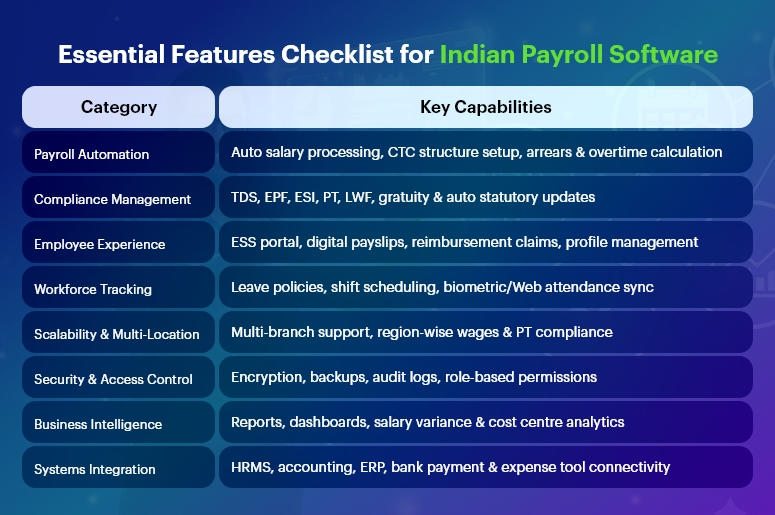
Essential Features Checklist for Indian Payroll Software

Automated Payroll Processing & Salary Calculations

Manual payroll calculations often lead to errors, late salary payments, and employee dissatisfaction. A modern payroll solution must offer:

  • Auto-calculation based on attendance data
  • Support for multiple pay cycles (monthly/weekly)
  • Automatic arrears, incentives, bonuses & overtime
  • Configurable salary structures (CTC breakup)

With automation, companies reduce repetitive work and ensure 100% accuracy every month.

India’s #1 Free Software

Free Payroll, PF,
ESI & TDS Software

Professional compliance management for Indian businesses. 100% Free Forever.

Compliance With Indian Statutory Laws

Payroll compliance in India is dynamic and varies across states. A reliable payroll software must ensure seamless compliance with:

  • Income Tax / TDS
  • EPF, ESI & Labour Welfare Fund (LWF)
  • Professional Tax (PT)
  • Gratuity & Bonus Act
  • Minimum Wages Act
  • Maternity Benefit Act
  • Shops & Establishment Act regulations

It must auto-calculate contributions, generate challans, and update rules automatically to avoid penalties.

TDS, Income Tax & Investment Declarations Management

Employees should easily declare their investments for tax-saving purposes. Good payroll software should provide:

  • Automatic tax projections on salary slips
  • Section 80C & 80D declaration support
  • Proof submission tracking
  • Form 16 auto-generation

This simplifies the financial year-end chaos.

Employee Self-Service (ESS) Portal

A self-service portal transforms employee experience by providing access to:

  • Digital payslips
  • Tax documents (Form 16, salary certificates)
  • Leave & attendance records
  • Personal information updates
  • Reimbursement claims

HR teams save significant time while employees stay empowered.

Leave & Attendance System Integration

Payroll and attendance must go hand-in-hand. A fully integrated system helps:

  • Sync biometric or web attendance in real-time
  • Auto-deduct leave without pay (LWP)
  • Manage multiple leave types and policies
  • Track shift schedules & overtime

This ensures accurate payouts every time.

Digital Reimbursements & Claims

Indian companies often offer tax-saving reimbursements like:

  • Travel allowances
  • Food coupons
  • Phone/internet bill reimbursements
  • Medical allowances

Payroll software should enable online claim submissions, approval workflows, and automatic payouts during payroll processing.

Multi-Location & Multi-State Support

Businesses expanding across states need payroll that supports:

  • Region-specific PT, local rules & wages
  • Multi-branch organization structure
  • Centralized admin dashboard
  • Multiple business units or legal entities

This ensures smooth processing for distributed workforces.

Secure Data Handling & Role-Based Access

Payroll data is highly sensitive. Security must be a top priority, including:

  • End-to-end encryption
  • Audit logs and detailed access permissions
  • Cloud-based data backups
  • ISO-compliant infrastructure

Role-based access ensures only authorized personnel can view salaries.

Comprehensive Payroll Reports & Analytics

Leadership needs insights for better decisions. The right software provides:

  • Payroll registers & compliance reports
  • Salary variance analysis
  • Cost centre-wise breakdowns
  • Reconciliation statements

Exportable reports (XLS, PDF) support audits and financial planning.

Integration With HR, Accounting & ERP Tools

Seamless integration eliminates duplicate data entry. Look for payroll that connects with:

  • HRMS, timesheet & attendance software
  • Bank payment systems for salary disbursement
  • Corporate expense management tools

This builds a connected digital workforce ecosystem.

India’s #1 Free Software

Free Payroll, PF, ESI & TDS Software

Final Thoughts

Indian payroll processing is unlike anywhere else in the world—and the right payroll software must solve challenges around regulatory compliance, multi-state management, and employee expectations.

Organizations should choose a solution that:

  • Is future-ready and scalable
  • Enables automation and compliance
  • Improves employee experience
  • Reduces manual workload for HR & finance

With the right digital payroll tool in place, companies can focus more on people and growth—and less on paperwork.

Frequently Asked Questions (FAQs)

1. What is the most important feature in Indian payroll software?

Automated statutory compliance and accurate salary calculations are the most crucial features to avoid legal issues.

2. Can payroll software handle multi-state compliance in India?

Yes, advanced solutions automatically apply state-specific rules like PT, minimum wages, and LWF.

3. Why do companies prefer cloud-based payroll?

Cloud payroll ensures security, accessibility, scalability, and real-time updates—especially for hybrid and remote teams.

4. Is payroll software useful for startups?

Absolutely! It minimizes HR workload, prevents calculation errors, and ensures compliance right from day one.

5. Can employees access payslips digitally?

Yes, through an ESS portal or mobile app, employees can download payslips anytime.

6. Does payroll software generate Form 16?

Yes, many solutions auto-generate and distribute Form 16 during tax season.

7. Is Tally integration available in Indian payroll software?

Most payroll systems offer accounting integration with Tally and ERP tools.

8. How does payroll software help in audits?

It provides standardized, exportable reports, reducing audit preparation time.

9. Can payroll software automate bank salary disbursements?

Yes, integration with bank systems enables hassle-free salary transfers.

10. What about data security in payroll software?

Modern platforms include encryption, access controls, and regular backups to secure sensitive payroll details.

Monthly Payroll vs. Weekly Payroll: Which One Is Right for Your Business?

When it comes to payroll, frequency matters more than you might think. The decision between monthly payroll vs. weekly payroll isn’t just a preference — it’s a strategic lever that affects cash flow, compliance, morale, and operational efficiency.

For many HR professionals, finance teams, and small business owners, the question is this: How often should you pay your employees? And more importantly, how does that decision impact your team and bottom line?

In this blog, we’ll break down the differences between monthly and weekly payroll, explore how it affects various business models, and help you choose the option that aligns with your goals — backed by practical insights and powered by the flexibility of CRMLeaf’s CRM + ERP platform.

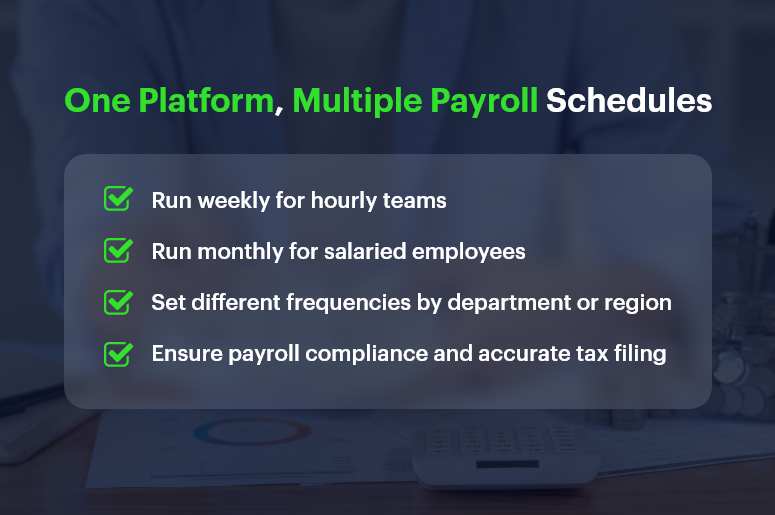
One Platform, Multiple Payroll Schedules

Why Payroll Frequency Is a Strategic Decision for Growing Businesses

Payroll isn’t just about cutting checks — it’s about financial planning, employee satisfaction, and regulatory compliance. As your business scales, choosing the right payroll schedule becomes even more critical.

1. Operational Simplicity vs. Workforce Expectations

  • Businesses often lean toward monthly payroll for its administrative simplicity and predictable cash flow cycles.
  • However, some industries require weekly payroll to meet labor expectations, especially for hourly or part-time staff.

2. Industry-Specific Norms

  • Construction, manufacturing, and retail industries often pay weekly or biweekly due to fluctuating shifts, hourly pay structures, and union rules.
  • SaaS companies, consultancies, and professional services prefer monthly payroll to reduce admin load and align payments with invoice cycles.

3. Employee Engagement and Retention

  • For many employees, pay frequency impacts satisfaction. Weekly payroll can improve morale and reduce financial stress — especially in hourly workforces.
  • On the other hand, salaried professionals often prefer predictable, consolidated monthly pay.

So, how do you decide between monthly payroll vs. weekly payroll? Let’s explore the pros and cons.

India’s #1 Free Software

Free Payroll, PF, ESI & TDS Software

Payroll Schedule Comparison: Monthly vs. Weekly Breakdown

Here’s a clear breakdown of the advantages and trade-offs for both schedules, so you can make a confident decision.

Monthly Payroll: Advantages

  • Reduced Administrative Overhead: You only process payroll 12 times a year, saving time, effort, and resource costs.
  • Simplified Tax Filing: Fewer filings mean fewer opportunities for compliance errors and smoother reconciliation processes.
  • Cash Flow Predictability: Monthly payouts help businesses better forecast cash flow, especially when managing vendor payments and invoices.
  • Better Integration with Financial Systems: Monthly payroll aligns well with CRM + ERP platforms that also operate on monthly billing and reporting cycles.

Monthly Payroll: Potential Drawbacks

  • Delayed Earnings for Employees: Waiting 30 days for pay may cause dissatisfaction among employees, especially in lower-income or hourly roles.
  • Harder to Adjust for Mid-Cycle Changes: Bonuses, terminations, and last-minute adjustments may be harder to handle without disrupting the cycle.
  • Less Flexibility: If labor hours vary significantly, reconciling hours and calculating pay can be more challenging over longer cycles.

Weekly Payroll: Advantages

  • Boosts Employee Satisfaction: Employees receive faster access to their earnings, which can reduce financial stress and improve engagement.
  • Ideal for Hourly Workforces: Weekly payroll is perfect for businesses with fluctuating schedules and overtime payments.
  • Faster Error Correction: Mistakes can be caught and corrected more quickly, limiting the window for unresolved issues.

Weekly Payroll: Potential Drawbacks

  • Higher Administrative Load: Processing payroll 52 times a year can burden HR and finance teams — unless you automate with tools like CRMLeaf.
  • Increased Processing Costs: More frequent payroll runs can increase costs related to compliance, direct deposits, and accounting.
  • Shorter Cash Flow Windows: Weekly disbursements require tighter cash management and forecasting to avoid liquidity issues.

Best Practices: How to Choose the Right Payroll Schedule

Choosing between monthly payroll and weekly payroll depends on several factors — employee type, industry, company size, and available payroll infrastructure.

1. Align Payroll with Workforce Structure

  • If your team is largely hourly, seasonal, or shift-based, weekly payroll often works best.
  • For predominantly salaried employees, monthly payroll minimizes complexity and matches performance review or bonus cycles.

2. Evaluate Internal Resources

  • If your HR and finance teams are small or overstretched, monthly payroll might reduce workload and risk.
  • However, automation with CRMLeaf levels the playing field. You can run payroll weekly without overwhelming your team thanks to built-in workflows and tax calculators.

3. Consider Cash Flow Patterns

  • Ask: Can we maintain healthy cash reserves for weekly disbursements?
  • If not, monthly payroll may give your finance team more breathing room for planning, investing, or handling emergencies.

4. Stay Compliant with Local Laws

  • Some jurisdictions mandate weekly or biweekly payments, especially for certain industries.
  • CRMLeaf helps you stay compliant by automating regional payroll compliance and alerting you to changes in tax rules or labor laws.

Real-World Case Study: Choosing the Right Schedule with CRMLeaf

For example, ShopMax, a mid-sized retail business with 300 hourly employees, switched from monthly to weekly payroll using CRMLeaf’s CRM + ERP platform.

After automating time tracking, tax deduction, and overtime calculations:

  • Payroll errors dropped by 45%
  • Employee satisfaction scores increased by 22%
  • Time spent on payroll processing decreased by 40%

By leveraging CRMLeaf’s payroll automation and analytics, ShopMax turned payroll from a pain point into a retention advantage.

India’s #1 Free Software

Free Payroll, PF,
ESI & TDS Software

Professional compliance management for Indian businesses. 100% Free Forever.

Key Takeaways: Finding Your Payroll Sweet Spot

Choosing between monthly payroll vs. weekly payroll isn’t one-size-fits-all. It’s a decision shaped by your team, your operations, and your goals.

  • Weekly payroll may suit hourly teams and high-turnover roles that require speed, transparency, and employee satisfaction.
  • Monthly payroll may suit salaried workforces, project-based companies, and cash-conscious operations.
  • The best strategy is to combine thoughtful planning with powerful automation.

With CRMLeaf’s CRM + ERP platform, you’re not stuck choosing one over the other — you get the flexibility to run different payroll schedules based on department, location, or role.

So whether you want efficiency, accuracy, or happier employees, CRMLeaf empowers your payroll process to align with business strategy.

Why Manual Payroll Processing Is Costing You More Than You Think?

On the surface, manual payroll processing might seem manageable — especially for small teams or early-stage companies. But behind the scenes, it’s a productivity drain, a compliance risk, and a hidden cost center.

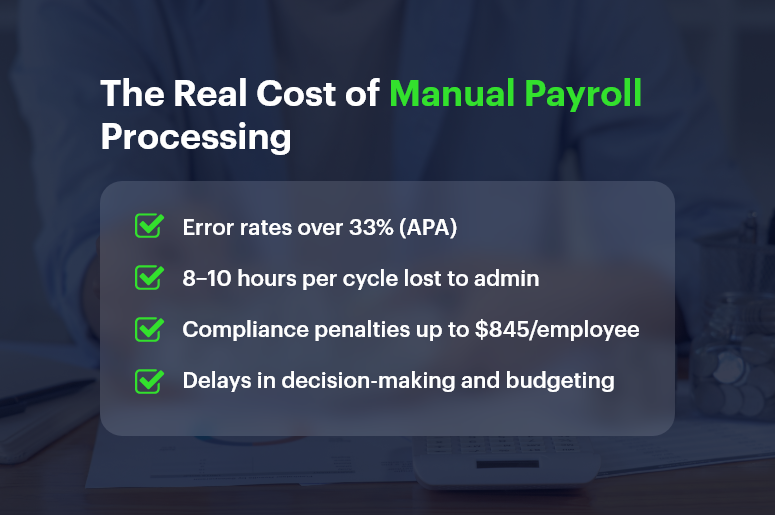
In fact, the American Payroll Association found that payroll errors affect over 33% of businesses, often costing hundreds to thousands annually per employee. And yet, many companies stick with spreadsheets and legacy systems simply because “that’s how it’s always been done.”

In this blog, we’ll explore why manual payroll processing is costing you more than you think, uncover the real-world risks, and show how platforms like CRMLeaf’s CRM + ERP help modernize payroll with automation, accuracy, and insight.

The Real Cost of Manual Payroll Processing

The Real Cost of Manual Payroll: Why This Matters to Growing Businesses

Manual processes aren’t just outdated — they’re dangerous in a fast-paced, compliance-heavy, and data-driven business world. And the impact isn’t limited to just HR.

1. Manual Means Mistakes — And Mistakes Cost Money

  • Data entry errors are common: Manually inputting hours, deductions, and tax codes opens the door to mistakes. One wrong cell and your employees get underpaid, or your business overpays taxes.
  • Fixing errors eats into productive time: HR and finance teams often spend hours fixing mistakes instead of focusing on strategic initiatives.

2. Hidden Compliance Risks Are Always Lurking

  • Tax laws change constantly: Staying updated manually across multiple jurisdictions increases the risk of fines and audits.
  • Late filings or misclassified employees can result in government penalties, legal trouble, and loss of trust.

Free Payroll, PF, ESI & TDS Software

The most trusted automation tool for modern Indian businesses.

3. Employee Experience Takes a Hit

  • Late payments or incorrect paychecks hurt morale: It’s hard to keep employees engaged if they’re constantly questioning their pay.
  • Manual processes reduce transparency: Employees may not know where to go for breakdowns, deductions, or past payslips.

4. Business Scalability Slows Down

  • Manual payroll doesn’t scale: The more employees you onboard, the harder it becomes to track benefits, bonuses, and time off accurately.
  • Disconnected systems stall decision-making: Without real-time integration between payroll, finance, and HR, you lose visibility.

From retail and manufacturing to tech startups and agencies, businesses in every industry face these bottlenecks — until they automate.

The True Costs of Manual Payroll Processing: Let’s Break It Down

You might think manual processing saves you software costs. But here’s what it’s costing:

1. Time Cost

  • Manual payroll can take 8–10 hours per cycle, depending on employee count, overtime tracking, tax calculations, and approvals.
  • Multiply that across 12–52 pay periods, and you’re talking about dozens of workdays lost annually to payroll administration.

2. Financial Risk

  • A simple mistake — like failing to withhold the correct tax — can cost businesses up to $845 per year per employee in penalties, according to the IRS.
  • Labor audits due to noncompliance often result in thousands in legal fees.

3. Opportunity Cost

  • Manual payroll drains time that could be spent on performance analysis, workforce planning, or improving employee engagement.
  • Delayed payroll insights mean you can’t react quickly to budget overruns or labor costs exceeding projections.

Best Practices: How to Eliminate the Hidden Costs of Manual Payroll

It’s time to stop treating payroll like a back-office burden and start managing it as a strategic function. Here’s how to make the shift:

1. Automate Data Collection with Integrated Time Tracking

  • Sync employee hours, leave records, overtime, and holidays with your payroll system using CRMLeaf’s unified CRM + ERP.
  • You’ll eliminate manual errors and gain real-time visibility across departments.

2. Implement Tax Rules & Compliance Workflows

  • Automate tax calculations and state-specific compliance checks within your payroll module.
  • CRMLeaf keeps tax rules up to date, so you’re always audit-ready without manual intervention.

3. Generate Reports Instantly

  • From payroll summaries to compliance reports, automation lets you run reports with one click instead of piecing together Excel sheets.
  • This makes it easier to justify expenses, analyze labor trends, and share insights with leadership.

4. Give Employees Self-Service Access

  • Empower employees with portals where they can access payslips, tax forms, and payment history — reducing HR queries by up to 40%.
  • CRMLeaf includes secure, role-based access so sensitive data stays protected.

5. Sync Payroll with Project Costs

  • When payroll data integrates with projects and budgets, you can track real-time labor costs per client or task.
  • This is crucial for consulting firms, marketing agencies, and any business with billable hours.

Customer Story: How One Business Slashed Payroll Costs with CRMLeaf

For example, TaskPro, a logistics company with 150+ employees, was managing payroll manually using spreadsheets and a legacy HR tool.

Once they switched to CRMLeaf’s payroll automation, the impact was immediate:

  • Payroll processing time dropped by 60%
  • Error rate reduced by 80%
  • Annual compliance fines went from $6,000 to zero

TaskPro also integrated payroll with its budgeting module — improving project profitability by understanding labor cost allocations in real-time.

India’s #1 Free Software

Free Payroll, PF, ESI & TDS Software

Key Takeaways: Automation Isn’t Optional Anymore

Here’s the reality — manual payroll processing is draining your time, increasing risk, and limiting your growth.

To recap:

  • Manual methods introduce more errors, which cost both money and employee trust.
  • You’re losing valuable time and missing out on insights that modern automation delivers instantly.
  • Payroll should be part of your business intelligence strategy, not just a monthly task.

With CRMLeaf’s CRM + ERP platform, payroll is integrated, automated, and optimized — so your teams can focus on strategy, not spreadsheets.

End-to-End Payroll Processing Checklist for Growing Businesses

Payroll isn’t just about paying your people. It’s about staying compliant, earning trust, and keeping your team motivated. But as your business grows, managing payroll manually becomes risky, time-consuming, and error-prone. In fact, more than 33% of small businesses face penalties due to payroll errors. In this guide, we’ll walk you through a practical end-to-end payroll processing checklist — built for modern, growing businesses. You’ll learn where most companies slip up, what to fix, and how to make the entire process seamless with CRMLeaf’s CRM + ERP platform.

The Business Case: Why End-to-End Payroll Processing Matters

Managing payroll goes far beyond cutting checks. When payroll is inaccurate or non-compliant, it creates ripple effects across your business. Think employee dissatisfaction, audits, legal trouble, and financial losses.

Let’s look at why a robust payroll system is essential for growth:

  • Retail & Hospitality: High employee turnover and hourly wages make real-time payroll updates critical. Delays lead to unhappy staff and retention issues.
  • Manufacturing & Logistics: Managing overtime, shift differentials, and contract workers demands precision — or you’ll face major payroll compliance risks.
  • Professional Services: Billing hours, bonuses, and project-based compensation require automation to prevent calculation errors.

No matter the industry, streamlined payroll automation improves productivity, builds employee trust, and reduces your operational burden.

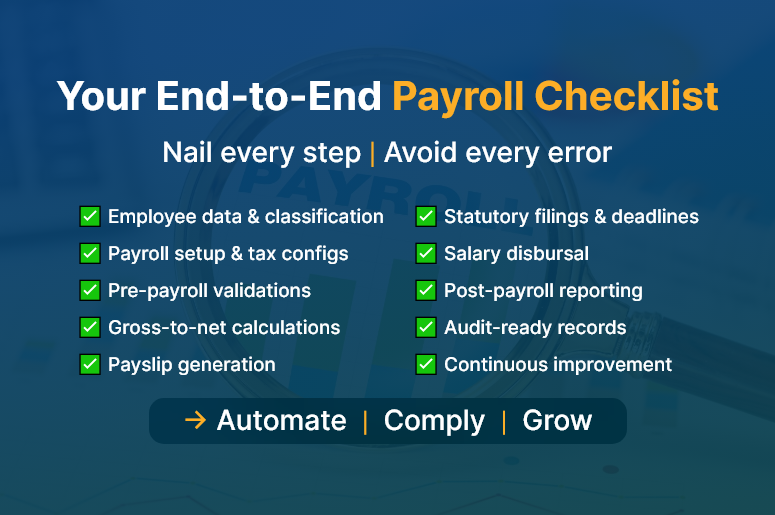
Your End-to-End Payroll Checklist

The Ultimate End-to-End Payroll Processing Checklist

Here’s your complete payroll checklist, broken down into actionable stages. Each one is critical for a smooth, accurate, and compliant payroll cycle.

1. Employee Data Collection & Classification

  • Capture full employee details: Collect tax ID, contact info, job role, bank details, and any benefits preferences at onboarding.
  • Classify employment type: Distinguish between full-time, part-time, contract, and freelance workers to ensure correct tax treatment.
  • Track working hours and shifts: Use digital timesheets or biometric systems to gather accurate work data.

2. Payroll Setup & Configuration

  • Set pay frequencies: Define weekly, bi-weekly, or monthly payroll cycles based on company structure.
  • Automate tax rates & deductions: Stay current with federal, state, and local tax laws to apply accurate deductions.
  • Integrate with attendance systems: Sync leave, holidays, and work hours from your HR tool into your payroll system.

3. Pre-Payroll Validation

  • Verify attendance data: Double-check logged work hours, approved leave, and overtime entries.
  • Audit changes in pay structure, including bonuses, commissions, and pay raises, and validate them before final processing.
  • Confirm deductions: Ensure that benefits, insurance, and loan deductions are accurate and approved.

4. Payroll Calculation & Review

  • Run gross-to-net calculations: Automatically compute gross salary, taxes, deductions, and net pay.
  • Cross-check with payroll software: Use automated payroll software to reduce human errors and eliminate spreadsheet fatigue.
  • Generate payslips: Produce detailed, downloadable payslips for employee transparency.
India’s #1 Free Software

Free Payroll, PF,
ESI & TDS Software

Professional compliance management for Indian businesses. 100% Free Forever.

5. Compliance & Statutory Filings

  • Generate tax forms: Automatically create W-2s, 1099s, PF/ESI documents, and other required tax filings.
  • Meet submission deadlines: Set reminders for tax payment and reporting deadlines to avoid penalties.
  • Stay audit-ready: Maintain digital records and audit trails to comply with labour laws.

6. Payment Processing

  • Schedule timely payments: Use integrated banking or payroll software to process salary payments without delay.
  • Disburse reimbursements: Include travel or expense claims in the current cycle to avoid payment lags.
  • Reconcile bank statements: Ensure every payment matches the payroll run and accounting books.

7. Post-Payroll Reporting & Feedback

  • Share detailed reports: Provide department-wise breakdowns and payroll summaries to finance and HR teams.
  • Analyze payroll KPIs: Track payroll accuracy, error rates, cycle time, and compliance status.
  • Collect feedback: Enable employee feedback to improve future payroll runs.

How CRM + ERP Transforms Payroll for Scaling Teams

Disconnected tools lead to fragmented processes. CRMLeaf’s CRM + ERP platform brings everything — from employee onboarding to payroll disbursal — into one unified workflow.

  • HR integration: Automatically sync new hire data from your HR module into payroll setup.
  • Real-time tracking: Use dashboards to monitor payroll progress, pending validations, and payment status.
  • Custom reports: Generate audit-ready reports, salary slips, and tax documents at the click of a button.
  • Scalability: Whether you have 20 or 200 employees, the system grows with you — minus the manual work.

Customer Success

For example, Finovate Solutions, a 50-person IT services company, used CRMLeaf’s payroll automation to reduce payroll errors by 95% and cut processing time from 3 days to 4 hours. Here’s how:

  • Integrated employee timesheets with payroll
  • Enabled automatic compliance checks and tax form generation
  • Streamlined payouts and payslip generation

This shift not only saved time but boosted employee satisfaction and reduced compliance risks.

Free Payroll, PF, ESI & TDS Software

The most trusted automation tool for modern Indian businesses.

Key Takeaways & Closing

A smooth end-to-end payroll processing workflow doesn’t just prevent errors — it strengthens trust, ensures compliance, and frees up your time for strategic growth.

  • Map your payroll process: Understand each phase and identify bottlenecks.
  • Automate wherever possible: Manual work invites mistakes. Use payroll automation tools.
  • Stay compliant: Regulations change frequently. Your system must adapt in real time.
  • Unify systems: Don’t rely on disconnected HR, time tracking, and payroll apps.

With the right tools and mindset, payroll can become a growth enabler — not a back-office burden.

Top Payroll Challenges Small Businesses Face — And How to Overcome Them

Managing payroll is not just about calculating salaries and hitting “send.” It’s a critical function that impacts compliance, employee trust, and business growth. Small businesses, especially, face intense pressure to get payroll right — without the luxury of large teams or expensive systems.

In this blog, we break down the top payroll challenges faced by small businesses and show you how to overcome them with modern tools, smart workflows, and streamlined systems like a CRM + ERP platform.

Why Payroll Management Deserves More Attention

If payroll feels like a back-office task, think again. For small and mid-sized businesses, payroll can make or break operations:

  • Cash flow hinges on payroll timing. If salaries are delayed or miscalculated, it can cause employee dissatisfaction and even attrition.
  • Payroll errors often trigger legal penalties. From late filings to incorrect tax calculations, non-compliance is costly.
  • Manual payroll is time-consuming and error-prone. Many small teams still rely on spreadsheets, which are simply not scalable.

Industries like retail, manufacturing, and IT services that operate with mixed or distributed workforces often find payroll particularly tricky due to varying shifts, bonuses, and legal compliance.

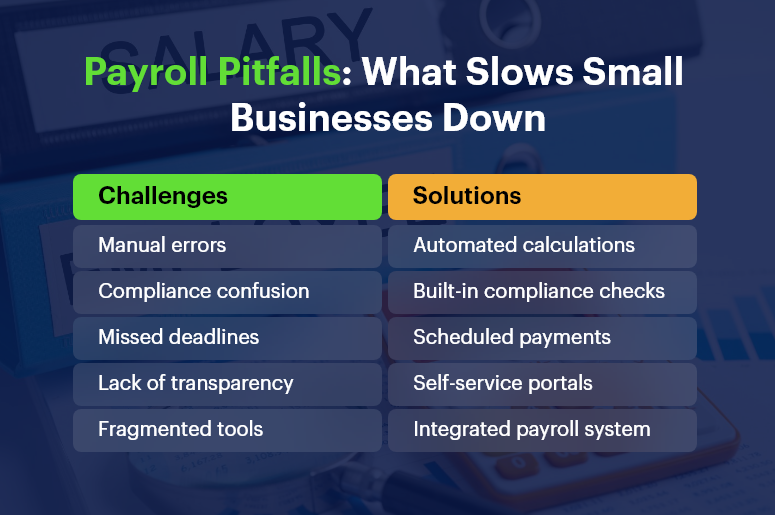
Payroll Pitfalls What Slows Small Businesses Down

The Top Payroll Challenges for Small Businesses

1. Payroll Compliance and Ever-Changing Tax Regulations

Staying compliant with local, state, and national laws is exhausting. Tax slabs change, new deductions are introduced, and local labor laws evolve regularly.

  • Failure to comply can lead to hefty fines. For example, misfiling PF or ESI returns can invite audits or penalties.
  • Keeping up with changes requires continuous monitoring. Small HR teams may not have bandwidth for this.

2. Employee Misclassification (Full-Time vs. Contractual)

Many small businesses operate with a mix of full-time, part-time, and freelance workers.

  • Incorrect classification leads to incorrect tax deductions and benefit allocations.
  • This misstep can attract government scrutiny and cause reputational damage.

Free Payroll, PF, ESI & TDS Software

The most trusted automation tool for modern Indian businesses.

3. Frequent Payroll Errors and Manual Calculations

Human errors during data entry, incorrect overtime calculations, or forgetting to update deductions can all snowball quickly.

  • Incorrect payslips break employee trust. It lowers morale and could lead to disputes.
  • Fixing payroll errors consumes time and resources, especially if discovered late.

4. Delayed Salary Disbursement

Salary delays often result from approvals stuck in email threads or cash flow uncertainty.

  • Late salaries hurt employee retention. Workers expect timely payments — especially in labor-heavy sectors.
  • It also disrupts payroll reporting and statutory submissions.

5. No Integration Between HR, Payroll, and Finance Systems

Disjointed systems mean multiple logins, repeated data entry, and no single view of employee or financial data.

  • Data silos lead to inefficiencies. You may calculate leave in one system, salary in another, and taxes manually.
  • Lack of integration affects reporting accuracy.

6. Handling Bonus, Incentive, and Variable Pay

Bonuses, commissions, and performance incentives add complexity to monthly processing.

  • Without a rule-based system, calculating variable pay is confusing and inconsistent.
  • Mistakes here affect employee motivation and tax liabilities.

7. Difficulties in Tax Filing and Year-End Reports

Many businesses struggle with last-minute data compilation during TDS filing or form generation.

  • Inaccurate tax filing risks penalties and employee dissatisfaction.
  • Manually generating Form 16 or 24Q is time-consuming.

How to Overcome These Payroll Challenges

Solving these issues starts with automation, integration, and insight. Here’s how:

Adopt a Unified Payroll Platform

Replace fragmented tools with a CRM + ERP system that integrates payroll, HR, and finance.

  • Eliminates redundant data entry across departments.
  • Ensures consistency in employee classification and tax deduction rules.

Set Payroll Rules and Templates

Use configurable salary structures and templates for roles, departments, and work types.

  • Standardization reduces calculation errors.
  • Templates ensure clarity across full-time, part-time, and freelance roles.

Automate Tax Compliance and Filing

Use payroll software that supports automatic deductions, PF/ESI calculation, and timely filings.

  • Get real-time compliance alerts.
  • Avoid end-of-quarter panic.

Enable Self-Service for Employees

Give employees access to payslips, tax details, and reimbursement updates.

  • Builds transparency and reduces admin burden.
  • Empowers employees to track earnings and deductions.

Set Clear Payroll Schedules and Workflows

Avoid delays with automated approval workflows and defined processing dates.

  • Improves coordination between HR, finance, and leadership.
  • Ensures salaries are hit on time.

Case Study

For example, a retail chain implemented an integrated payroll + HR solution to streamline monthly payouts. With automated PF/ESI calculations and integrated leave tracking, they:

  • Reduced payroll processing time by 60%
  • Avoided late filing penalties completely
  • Improved employee satisfaction and retention
India’s #1 Free Software

Free Payroll, PF, ESI & TDS Software

Key Takeaways

  • Payroll management is more than salary disbursement — it’s a business-critical operation.
  • Manual systems increase risks and drain time for small teams.
  • Compliance, classification, and tax filing are the top pain points in small business payroll.
  • Integrated systems reduce errors, delays, and missed compliance windows.

In summary, a smart, unified payroll system can transform how small businesses manage compliance, build employee trust, and save countless hours each month. As you grow, you need processes that scale without multiplying complexity.

Payroll Compliance 101: Key Laws Every Business Must Follow

Navigating payroll compliance is no longer just a back-office task — it’s a critical business responsibility that impacts employee trust, legal standing, and your bottom line. Whether you’re a startup or scaling enterprise, payroll compliance mistakes can cost you more than money — they can damage reputation, team morale, and operational efficiency.

In this guide, you’ll learn the must-know payroll laws, real-world scenarios, and how to stay compliant without draining time or resources. With help from platforms like CRMLeaf’s CRM + ERP, compliance becomes part of your workflow, not a fire drill.

Why Payroll Compliance Matters for Modern Businesses

Payroll compliance isn’t just about paying employees on time — it’s about doing it legally, accurately, and consistently. As your business grows, payroll gets more complex, and so do the risks.

Here’s why it matters:

  • Avoid Costly Penalties: Missing tax deadlines or misclassifying employees can lead to thousands in fines and interest. Staying compliant protects your finances and keeps audits away.
  • Maintain Employee Trust: Mistakes in paychecks — from incorrect deductions to late deposits — can erode employee satisfaction and increase churn.
  • Meet Industry-Specific Requirements: From construction to tech to retail, every industry has different labor laws. Staying up-to-date keeps you compliant and competitive.
  • Enable Better Growth Decisions: When your payroll data is accurate and compliant, you can plan for raises, new hires, and expansions with confidence.

Payroll Compliance Checklist

Common Payroll Compliance Challenges & How to Solve Them

1. Misclassifying Employees and Contractors

Improper classification affects taxes, benefits, and legal exposure. Classifying a contractor as a full-time employee (or vice versa) may trigger audits and legal consequences. Always verify roles with federal and state guidelines.

2. Inaccurate Tax Withholding and Reporting

Incorrect tax calculations can result in underpayment or overpayment. Businesses must stay current on IRS guidelines and local tax requirements. Automation through payroll compliance software reduces these risks.

3. Late or Missed Filings

Missing deadlines for payroll taxes, W-2s, or 1099s leads to penalties. Build a tax calendar, set automated reminders, or better yet — let your CRM + ERP do it for you.

Free Payroll, PF, ESI & TDS Software

The most trusted automation tool for modern Indian businesses.

4. Ignoring Wage and Hour Laws

From overtime rules to minimum wage updates, compliance means aligning your payment structure with ever-changing labor laws. Integrating legal updates into your payroll engine helps you stay alert.

5. Poor Recordkeeping

Federal law requires you to retain payroll records for several years. A centralized system ensures you don’t misplace vital documents during audits.

6. Failing to Provide Proper Pay Stubs

Employees have the right to transparent, itemized pay stubs. A payroll compliance checklist should include pay stub generation that complies with your jurisdiction.

7. Noncompliance with New Hire Reporting

Each state mandates reporting new hires within a specific time window. Ignoring this can result in steep fines. Automated systems ensure timely compliance.

8. Overlooking Multi-State Regulations

Operating in multiple states? You’ll face different wage laws, tax codes, and filing rules. A unified platform helps you customize compliance settings by location.

9. Failing to Keep Up with Tax Law Changes

Tax codes evolve constantly. Manual tracking invites errors. Instead, use a CRM + ERP system that integrates real-time tax law updates and reflects them in payroll.

10. Ignoring Employee Classification Updates

Employees move between roles or contract statuses. Keeping classifications updated ensures ongoing compliance. Make this part of your HR workflow.

Best Practices to Master Payroll Compliance

Automate Where Possible

Automated systems ensure accurate tax withholdings, filing deadlines, and paycheck calculations — freeing up HR for strategic work.

Create a Payroll Compliance Checklist

Outline your responsibilities, including reporting, documentation, audits, and tax deadlines. Review and update this list quarterly.

Audit Your Payroll Process Regularly

Set up periodic internal audits to identify errors early. Validate timesheets, benefits, classifications, and tax rates.

Stay Educated on Compliance Requirements

Subscribe to HR and legal newsletters. Join webinars. Platforms like the IRS and Department of Labor provide free, updated guidance.

Work with Integrated Platforms

A disconnected spreadsheet can’t notify you of rule changes. Use CRMLeaf’s CRM + ERP to ensure HR, payroll, and compliance are all on the same page.

Keep Digital Records

Store pay stubs, tax filings, and employee contracts in a secure digital hub. Back them up and restrict access using role-based permissions.

Align HR and Payroll Teams

Regular syncs between HR and payroll ensure employee data — from bank accounts to benefits — remains accurate and compliant.

Customer Success Story

For example, SwiftHire Solutions, a mid-sized recruitment firm, used CRMLeaf’s automated payroll compliance features to eliminate filing errors and avoid $10,000+ in penalties over two years.

By centralizing HR, payroll, and employee data into one platform, they slashed admin time by 40% and stayed audit-ready during an IRS check. Their HR team can now focus on talent and engagement instead of tax forms.

India’s #1 Free Software

Free Payroll, PF, ESI & TDS Software

Key Takeaways & Closing

Payroll compliance is critical to your legal, financial, and operational success. Mistakes are costly — both in money and morale.

Integrated tools like CRMLeaf’s CRM + ERP help automate, monitor, and update compliance processes, reducing errors and saving time.

Compliance isn’t a one-time job. You need a system that evolves with laws and your business.

What to do next:

  • Audit your current payroll workflow. Identify risks, gaps, or outdated processes.
  • Create a compliance checklist. Use it monthly.
  • Book a demo of CRMLeaf to see automation in action.

Category: EPFO & ESI

No posts in this category.

Subcategory: EPFO

Subcategory: ESI

Category: Payroll Help

No posts in this category.

Subcategory: Employee Self-Service & Engagement

Subcategory: Introduction to Payroll

Subcategory: Payroll Analytics & Reporting

Subcategory: Payroll Automation & Technology

Subcategory: Payroll for Business Growth

Subcategory: Payroll Processing & Management

Subcategory: Taxation & Compliance

Category: User Manual

No posts in this category.

Subcategory: Company Setup

Subcategory: Employee Management

Subcategory: Getting Started

Subcategory: Glossary

Subcategory: Import & Export

Subcategory: Introduction

Subcategory: Payroll Configuration

Subcategory: Payslips & Disbursement

Subcategory: Reports & Analytics

Subcategory: Running Payroll

Subcategory: Statutory Compliance & Reports

Subcategory: Troubleshooting

Subcategory: User Management & Security